00196799-02_InstallGuide_DE.pdf - 第45页
In st al la tio ns- u nd K o nf ig ura tio ns a nl eit ung S IPL AC E Exp lo rer 3 I nsta ll ati on d es SIP LACE E x plor er Au sg ab e 06 /2 01 1 D E 3.6 Ko nf ig ura tio n vo n MS S QL Se r ve r 45 3 Abb. 3 - 19 MS SQ…
3 Installation des SIPLACE Explorer Installations- und Konfigurationsanleitung SIPLACE Explorer
3.6 Konfiguration von MS SQL Server Ausgabe 06/2011 DE
44
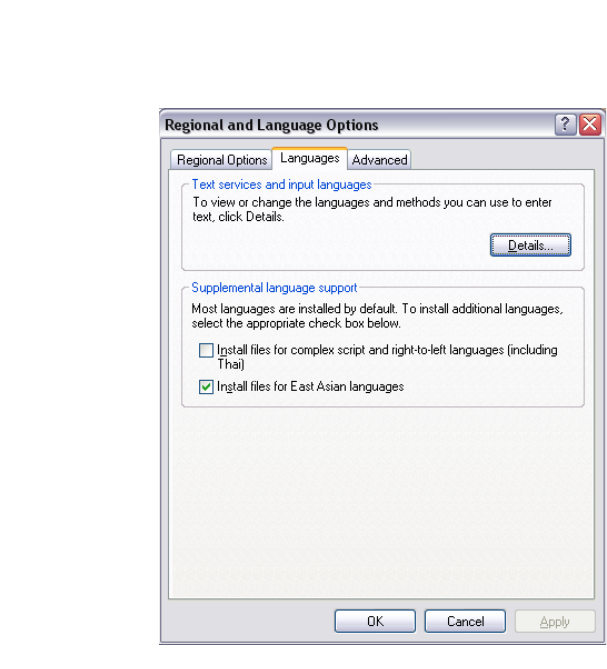
3.5.2 Windows Server 2003 SP2 und Windows Server 2003 R2
Öffnen Sie die Regional Settings über das Windows-Menu Start Settings Control Panel
Regional and language Option.
Wählen Sie den Languages Tab.
3
Abb. 3 - 18 Regional Settings in Windows Server 2003 SP2 und Windows Server 2003 R2
Aktivieren Sie die Install files for East Asian languages Checkbox.
Bestätigen Sie mit OK.
3.6 Konfiguration von MS SQL Server
Mit der Linien-Konfiguration können Sie die System-Datenbank konfigurieren. Siehe “Schritt 5 -
System-Datenbank konfigurieren” auf Seite 59. 3
Damit Sie die Wartung für die Systemdatenbank definieren können, müssen Sie den MS SQL
Server folgendermaßen konfigurieren: 3
Öffnen Sie MS SQL Server Management Studio.
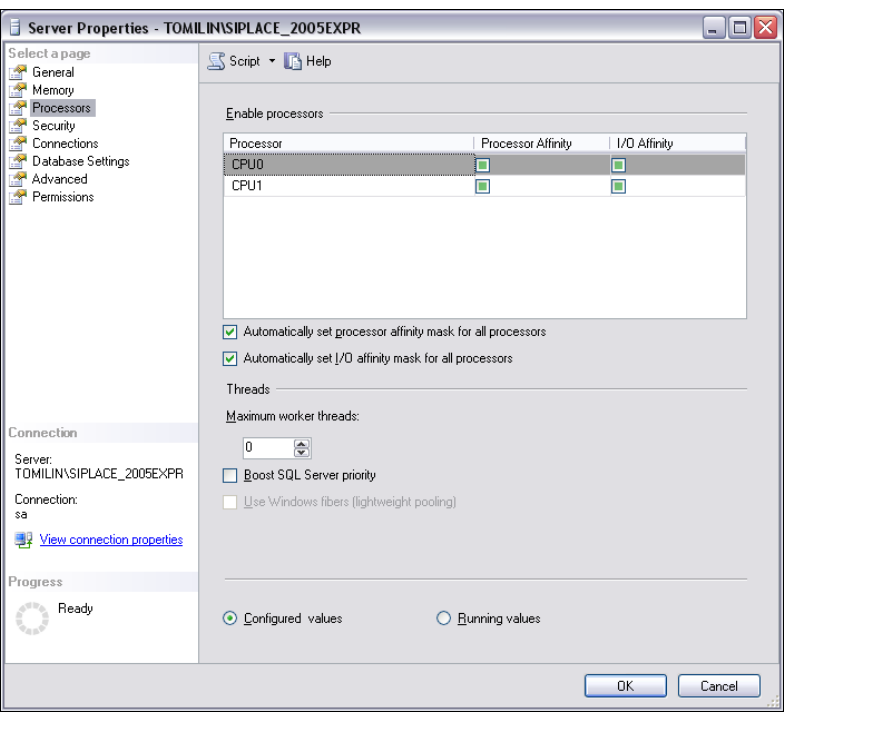
Öffnen Sie das Dialogfenster Server Properties. Wählen Sie die Server-Instanz, mit der
SIPLACE Explorer System-Datenbank aus. Wählen Sie aus dem Kontextmenü der rechten
Maustaste Properties. Das Dialogfenster Server Properties öffnet sich:
Installations- und Konfigurationsanleitung SIPLACE Explorer 3 Installation des SIPLACE Explorer
Ausgabe 06/2011 DE 3.6 Konfiguration von MS SQL Server
45
3
Abb. 3 - 19 MS SQL Server Properties
Wählen Sie Processors.
Aktivieren Sie folgende Checkboxen:
– Automatically set processor affinity mask for all processors
– Automatically set I/O affinity mask for all processors
Bestätigen Sie Ihre Eingaben mit OK.
Starten Sie den MS SQLServer erneut.
3 Installation des SIPLACE Explorer Installations- und Konfigurationsanleitung SIPLACE Explorer
3.7 Konfiguration von Tomcat Ausgabe 06/2011 DE
46
3.7 Konfiguration von Tomcat
3.7.1 Verwendung von Windows 2003 Server
Haben Sie als Betriebssystem Windows 2003 Server installiert, müssen Sie für die Verwendung
von SIPLACE Explorer V2.9 den Webserver (Tomcat) nachkonfigurieren. Diese Konfiguration
nehmen Sie im Internet Explorer vor. 3
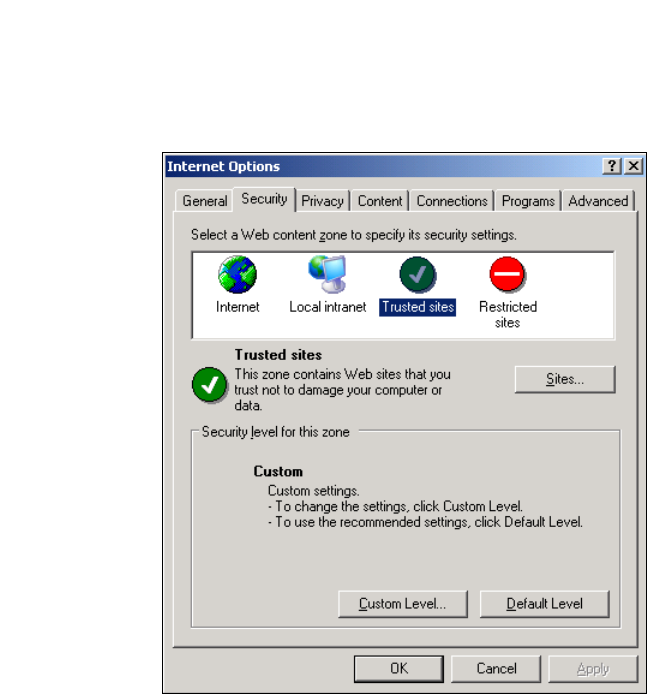
Wählen Sie das Menü Tools Options aus.
Das Dialogfenster Internet Options öffnet sich:
3
Abb. 3 - 20 Internet Options
Wählen Sie das Register Security aus.
Klicken Sie auf das Symbol für Trusted Sites und betätigen Sie die Schaltfläche Sites.