YSM40 Mainte_E.pdf - 第106页
3-38 3 Periodic maintenance items 4.1.2 Multi-camera T hecleaningprocedureforthemulti-cameralightingunitisgivenbelo w . 1 Detach the lighting co ver . Use a hexagon wrench (2.5) to remove the cover's 4 sec…
3-37
3
Periodic maintenance items
4. Six-month inspection
4.1 Cleaning the camera lighting unit
e
Thelightingunitmaybecomedirtyduetodustanddirt.Werecommendperiodiccleaningasexplainedbelow.
Toensuresafety,makesurethatthemachinepowerswitchisoffortheemergencybuttonispressedbefore
startingwork.
c
become unreliable.
c
of the lighting unit by the user will void the warranty.
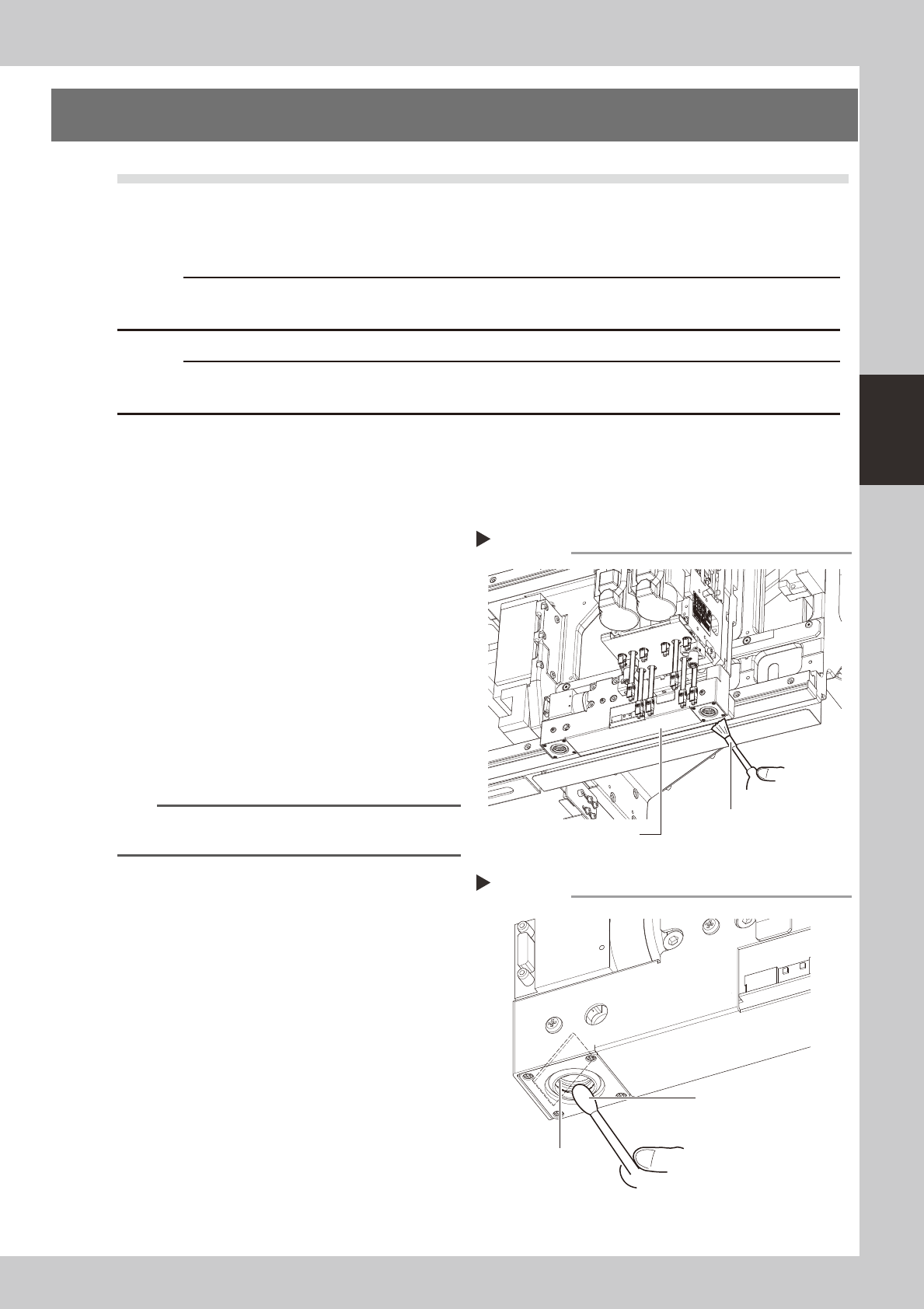
4.1.1 Fiducial camera
Thefiducialcameraismountedonthehead.Thecleaningprocedureforthecamera'slightingunitisgiven
below.
1
Move the head unit.
Move the head unit to a position which
permits the lighting unit to be easily
cleaned.
2
Clan the lighting unit.
Use an optical brush to remove the dust
from the lighting unit.
53340-N5-00
3
Clean the reflector plate.
Use a cotton swab slightly dampened with
lens cleaner to clean the reflector plate side
as shown in the figure at right.
53341-N5-00
TIP
The optical brush and lens cleaner are optional
purchase items.
Fiducial camera lighting unit
Using an optical brush to remove dust
Step 2
Optical brush
Cotton swab dampened
with lens cleaner
Cleaning the reflector plate
Step 3
Reflector plate
3-38
3
Periodic maintenance items
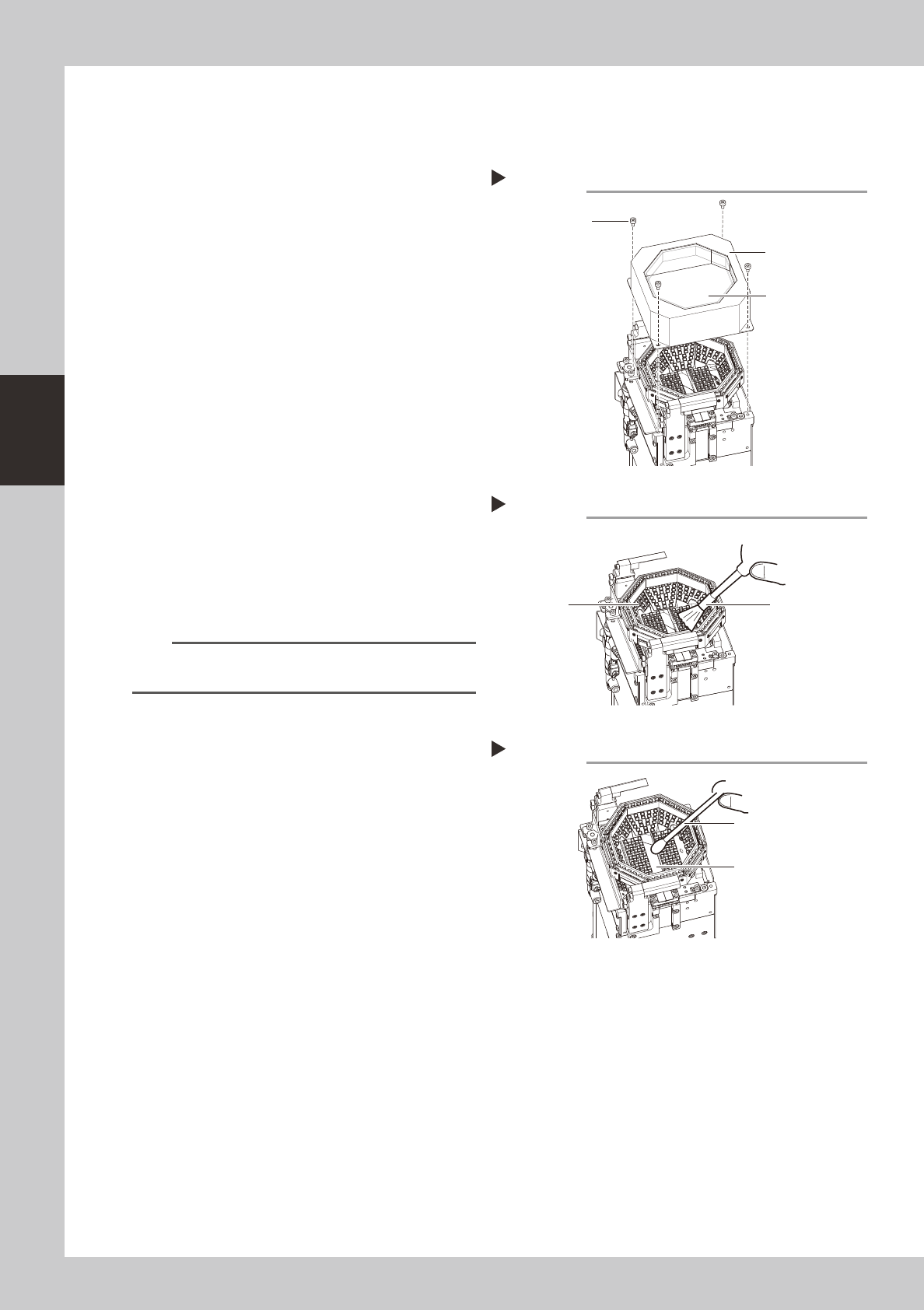
4.1.2 Multi-camera
Thecleaningprocedureforthemulti-cameralightingunitisgivenbelow.
1
Detach the lighting cover.
Use a hexagon wrench (2.5) to remove the
cover's 4 securing bolts, then detach the
lighting's protective cover.
53342-N5-00
2
Wipe the transparent glass with a
cloth.
Wipe the front and back sides of the lighting
cover's transparent glass with a cloth
damped by several drops of lens cleaner.
53343-N5-00
3
Clean the lighting.
Use an optical brush to remove the dust
from the lighting.
4
Clean the half-mirror.
Use a cotton swab dampened with a small
amount of lens cleaner to clean the half-
mirror.
53344-N5-00
5
Reattach the cover.
Place the lighting cover back in its original
position, then secure it with the 4 bolts.
TIP
The optical brush and lens cleaner are optional
purchase items.
Removing the lighting cover
Step 1
Lighting cover
Transparent glass
Securing bolt
Cleaning the lighting
Step 3
Lighting
Optical brush
Cleaning the half-mirror
Step 4
Half-mirror
Cotton swab dampened
with lens cleaner
3-39
3
Periodic maintenance items
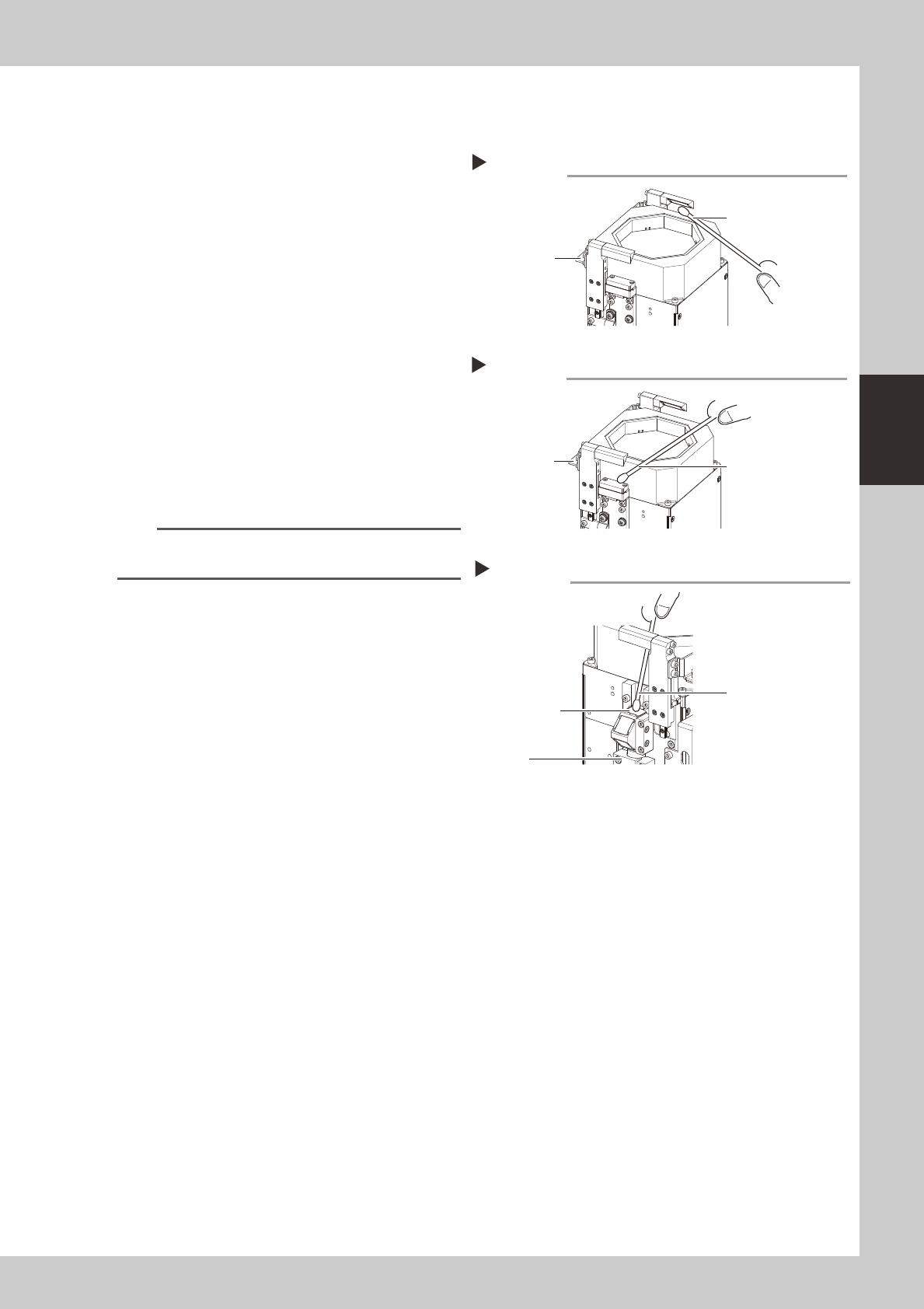
4.1.3 Side-view camera (multi-camera installed type)
Thecleaningprocedurefortheside-viewcamera'slightingunit(multi-camerainstalledtype)isgivenbelow.
1
Clean the mirrors at both sides.
1. Turn the machine air OFF.
2. Grasp the lighting UP/DOWN area and lift
it up, then clean the mirrors using a cloth
or cotton swab dampened with a small
amount of lens cleaner.
53345-N5-00
2
Clean the lighting side.
As shown in the figure at right, wipe the
lighting with a cotton swab dampened with
a small amount of lens cleaner.
53346-N5-00
3
Clean the camera side.
As shown in the figure at right, wipe the
cover with a cotton swab dampened with a
small amount of lens cleaner.
53347-N5-00
TIP
The optical brush and lens cleaner are optional
purchase items.
Cleaning the mirrors
Step 1
Grasp here and
lift upward
Cotton swab dampened
with lens cleaner
Cleaning the lighting
Step 2
Grasp here and
lift upward
Cotton swab dampened
with lens cleaner
Cleaning the camera side
Step 3
Clean this area
(top side)
Camera
Cotton swab dampened
with lens cleaner