YSM40 Mainte_E.pdf - 第116页
3-48 3 Periodic maintenance items 5.3.2 Cleaning and lubricating the scissors gear Asageneralguide,thescissorsgearshouldbecleanedandlubricatedoncepery ear .Usethefollowing proceduretocleanandlubrica…
3-47
3
Periodic maintenance items
5.3 FL head
5.3.1 Cleaning the spline shaft
Adheredforeignmatterandsoilinginsidethesplineshaft'sairpassagescancausepickupandplacement
errors.Topreventthis,thespineshaftinteriorshouldbecleanedonceperyear(generalguideline),although
thismayvarysomewhatdependingonthesuppliedairconditionandtheoperatingtime.
1
Remove the nozzle from the head.
Either remove the nozzles by hand, or place
all nozzles in the nozzle station.
2
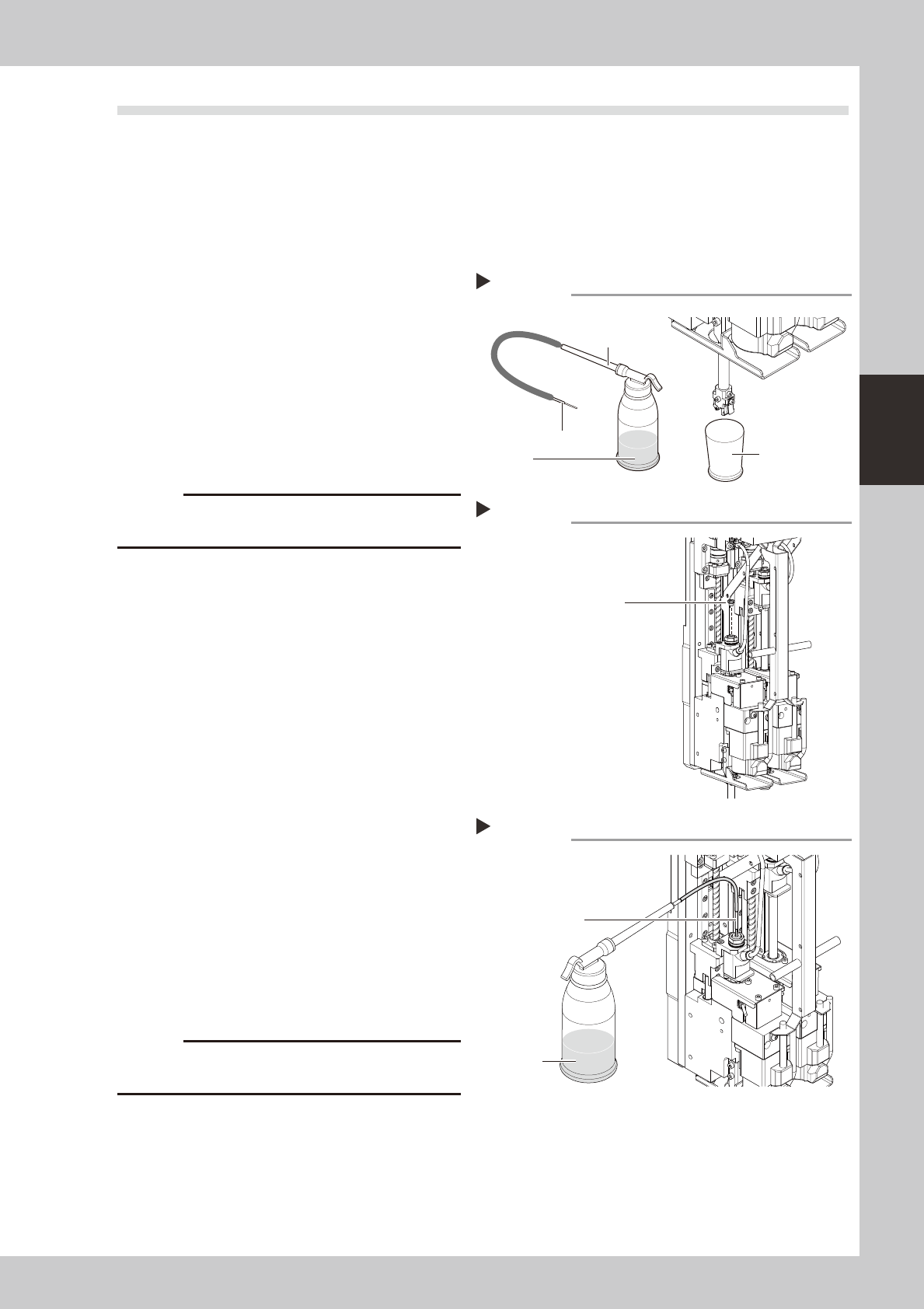
Prepare the cleaning kit (KHN-
M8860-00X).
1. Pour IPA (isopropyl alcohol) into the
container of the cleaning kit.
2. Spread a cloth directly below the
working position, or place a paper cup,
etc., there.
533A8-N5-00
c
3
Remove the maintenance bolt.
Use a slotted screwdriver to remove the
maintenance bolt shown in the figure at
right.
533A9-N5-00
4
Clean the inside of the spline shaft.
1. Insert the nozzle of the cleaning kit into
the cleaning hole of the spline shaft.
2. Pour alcohol (IPA) into the spline shaft air
path to clean away dust and grime.
533B1-N5-00
5
Blow air into the spline air path.
1. Connect an air blow tool (optional
purchase item) to the air joint.
2. Place a cloth against the end of the
spline shaft, then air-blow the spline shaft
interior with the air blow tool.
3. When the cloth placed against the spline
shaft end is no longer being soiled by the
exiting air, screw the maintenance bolt in
again.
c
to wear safety goggles.
6
Clean the spline shaft of the other
head.
Repeat steps 3 to 5 to clean the inside of
the spline shaft of the other head.
7
Reattach the nozzle.
Cleaning
Step 2
Pump
Nozzle
Rug or paper cup
IPA
Maintenance bolt
Step 3
Maintenance bolt
Cleaning the spline
Step 4
Nozzle
IPA
3-48
3
Periodic maintenance items
5.3.2 Cleaning and lubricating the scissors gear
Asageneralguide,thescissorsgearshouldbecleanedandlubricatedonceperyear.Usethefollowing
proceduretocleanandlubricatethescissorsgear.
1
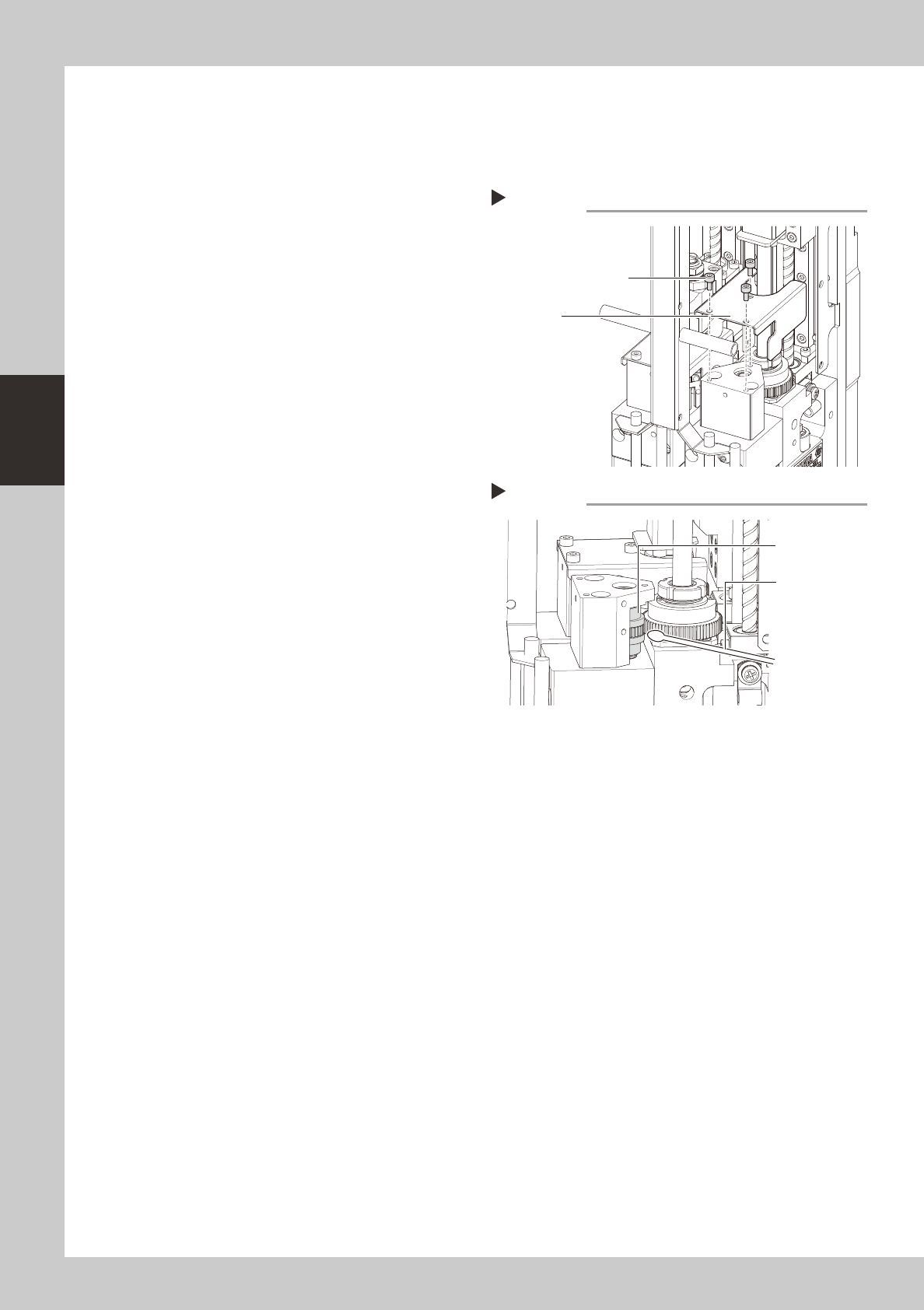
Remove the gear cover.
Use a hex wrench to remove the three bolts
that secure the gear cover.
53328-N5-00
2
Clean the rack gear.
While rotating the R-axis by hand, use a
cotton swab to wipe off the dust and dirt on
the rack gear (see the figure at right).
53329-N5-00
3
Apply grease.
While rotating the R-axis by hand, apply the
specified grease (NSL) to the rack gear.
4
Reattach the gear cover.
Place the gear cover back in its original
position, and tighten the three bolts with the
hex wrench.
Removing the gear cover
Step 1
Gear cover mounting bolt
Gear cover
Cleaning the scissors gear
Step 2
Scissors gear
Cotton swab
3-49
3
Periodic maintenance items
5.4 Conveyor
5.4.1 Inspecting the conveyor belt and cleaning the guides
1
Make the preparation for cleaning.
e
1. Remove all items that are affected by
magnetism, such as a watch and ID
card.
2. Press the emergency stop button.
3. Lower the feeder exchange carriage by
using the clamp switch and remove the
feeder exchange carriage.
4. Place a square cloth on the push-up
plate.
2
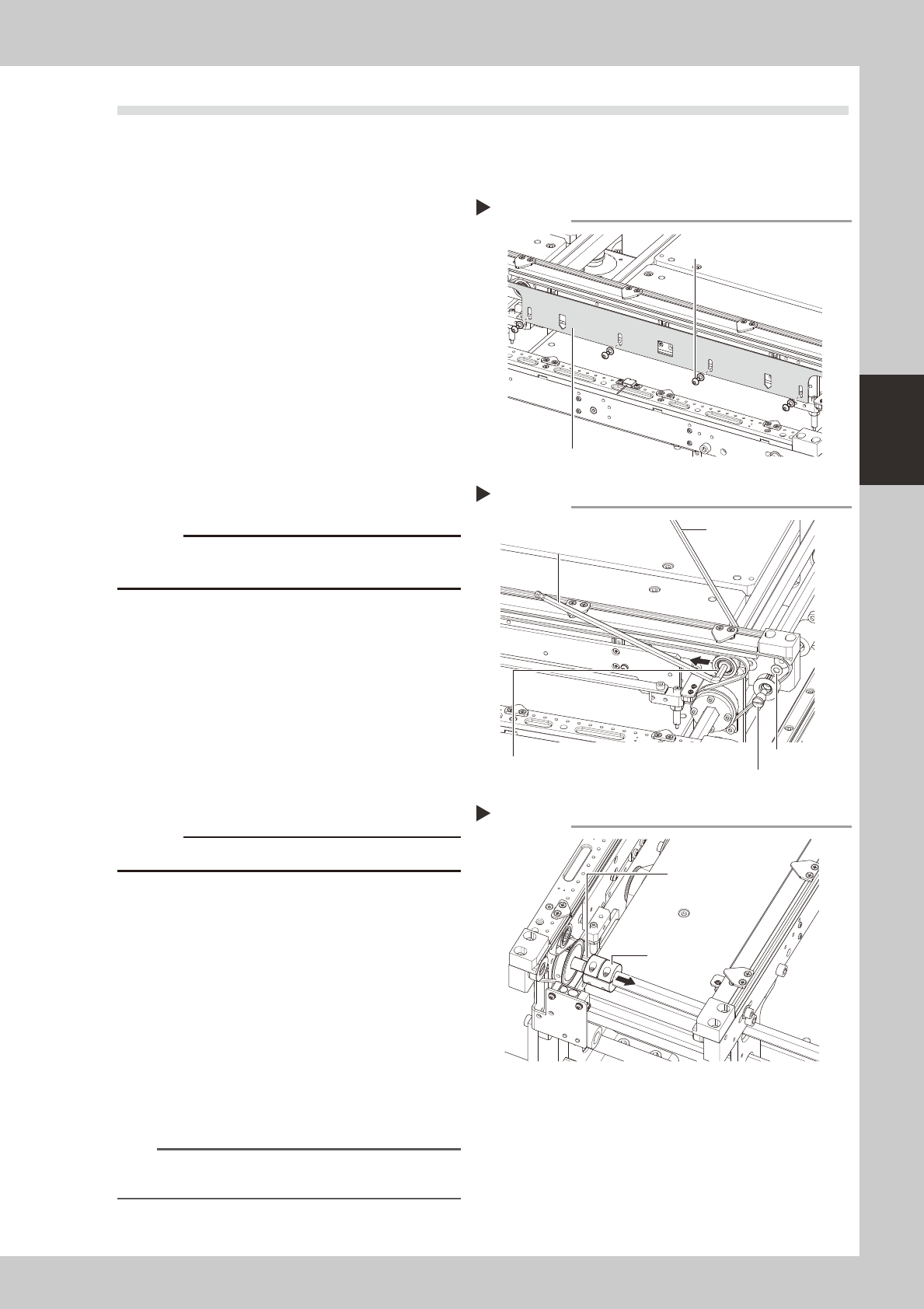
Remove the board clamp plates.
Use a hexagon wrench (2.5) to remove the 4
board clamp bolts, then remove the board
clamp plate.
53413-N5-00
c
3
Loosen the belt.
1. Use two hexagon wrenches to loosen the
tension pulley, then move it to the end of
the tension adjusting slot (in the
loosening direction).
Pulley side : 5mm
Securing side : 4mm
2. Use a flat-blade screwdriver to loosen
the pulley shaft, then remove the pulley.
53414-N5-00
c
Use care to avoid losing the washers.
4
Detach the belt drive pulley from
the shaft.
1. Use a hexagon wrench (2.5) to loosen
the coupling bolts.
2. Remove the coupling from the pulley to
create a gap through which the belt can
be extracted.
53412-N5-00
5
Remove the belt from the conveyor.
Verify that the removed belt is free of cracks
and excessive wear.
n
NOTE
If the belt is scratched or worn out, replace it with a
new one.
Removing the board clamp plate
Step 2
Board clamp plate
Board clamp plate securing bolts
Loosening the belt
Step 3
Hexagon
wrench (4)
Hexagon wrench (5)
Tension pulley
Washer
Pulley shaft
Loosening the coupling
Step 4
Extract the belt
through this gap.
Coupling