Micron Technical Reference V9 Volume 1.pdf - 第222页
PRINT CARRIAGE MODULE ADJUSTMENTS AND SETTINGS 8.6 Technical Reference Manual Chapter Issue 5, Aug 14 15. M easure the horizontal distance between the inside face of the front rail belt support plate and the print carria…

PRINT CARRIAGE MODULE
ADJUSTMENTS AND SETTINGS
Chapter Issue 5, Aug 14 Technical Reference Manual 8.5
ADJUSTMENTS AND SETTINGS
Home Sensor Adjustment
WARNING
BOARD CLAMPS. EXTREME CARE MUST BE EXERCISED WHEN WORKING IN
THE TOOLING AREA OF THE MACHINE TO AVOID INJURY. THE FOILS ON THE
FRONT AND REAR BOARD CLAMPS ARE VERY SHARP.
1. Select Unload Screen.
2. Open the front printhead cover
3. Remove the stencil from the machine.
4. Close the front printhead cover.
5. Press the System button.
6. Select Maintenance.
7. Select Diagnostics.
8. Use Next or Previous to highlight Print Carriage.
9. Select Select Module.
10. Ensure that Home Print Carriage is highlighted.
11. Select Run Diagnost.
12. Use Next or Previous to highlight Drive Carriage To Rear Position.
13. Select Run Diagnost.
14. Open the front printhead cover.
PRINT CARRIAGE MODULE
ADJUSTMENTS AND SETTINGS
8.6 Technical Reference Manual Chapter Issue 5, Aug 14
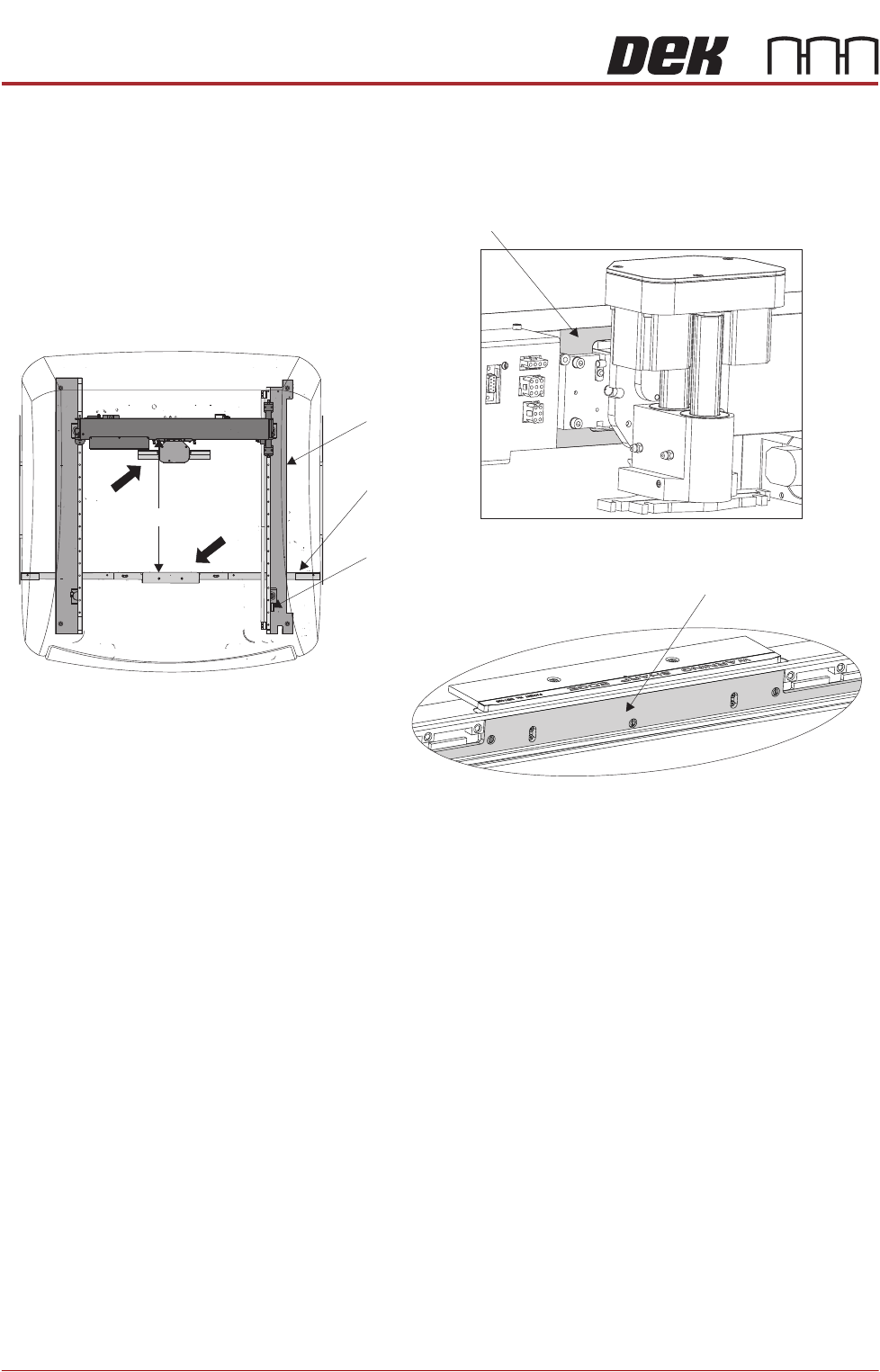
15. Measure the horizontal distance between the inside face of the front rail belt
support plate and the print carriage machined face, (squeegee/ProFlow
interface area), the correct setting being 612.0mm +/- 2.0mm.
16. If the adjustment is correct go to Step 22.
Front Rail
Machine Plan View
Print Carriage Machined Face
Home Sensor
Vane
Right Hand
Printhead
View on Arrow A
View on Arrow B
Belt Support Plate
612mm +/- 2.0mm612mm +/- 2.0mm
A
B
PRINT CARRIAGE MODULE
ADJUSTMENTS AND SETTINGS
Chapter Issue 5, Aug 14 Technical Reference Manual 8.7
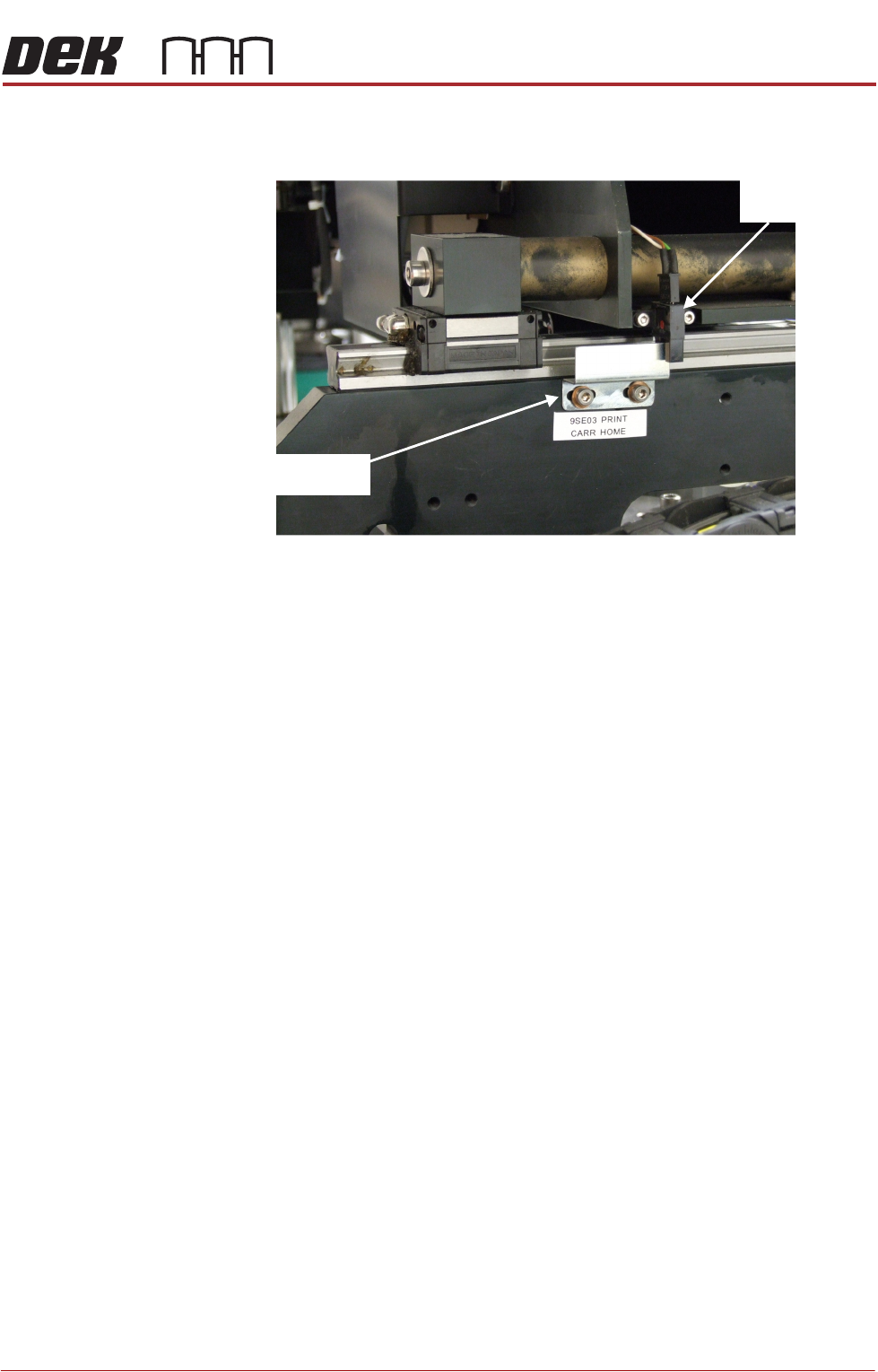
17. Gain access to the print carriage home sensor vane on the right hand
printhead.
18. Adjust the position of the home sensor vane.
19. Close the front printhead cover.
20. Press the System button.
21. Repeat Steps 10 to 16 until this measurement is achieved.
22. Refit the stencil.
23. Close the front printhead cover.
24. Press the System button.
25. Select Exit.
26. Select Exit.
27. Select Back.
Print Carriage
Home Sensor
Print Carriage
Home Sensor Vane
View On Right Hand Printhead