Micron Technical Reference V9 Volume 1.pdf - 第241页
SQUEEGEE MODULE REPLACEMENT PROCEDURES Chapter Issue 6, Jul 16 Technical Reference Manual 9.13 Fitting the Squeegees It is usual to fit two trailing edge squeegees and use the machine in the Print / Print mode. When fitt…
SQUEEGEE MODULE
REPLACEMENT PROCEDURES
9.12 Technical Reference Manual Chapter Issue 6, Jul 16
Alternative Drive
Belt Replacement
This replacement procedure applies to both front and rear belts. It is advised
that drive belts are replaced as a pair.
NOTE
1. If the underside of the stepper motors has a green ident label this procedure
does not apply;refer to figure 9-3.Follow the previous procedures for belt
replacements.
2. The pulley hole centres are fixed. There is no need for pulley belt tension
adjustment.
The squeegee drive belts can be replaced without having to remove the
printhead mechanism from the print carriage.
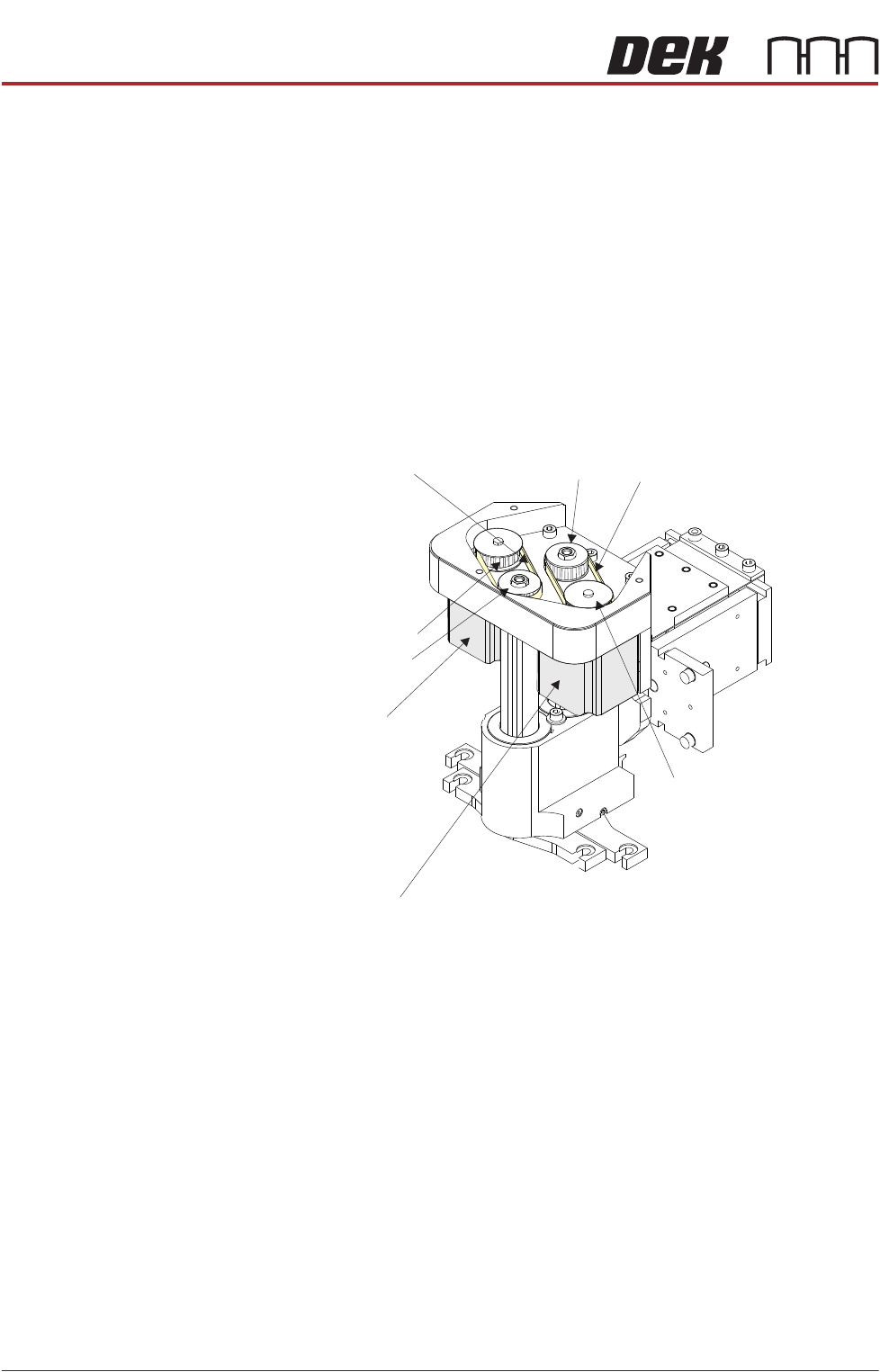
1. Pull the drive belt from its centre and slip it up over the idler pulley.
2. Slip the belt over the drive pulley and discard it.
3. Repeat Steps 1 and 2 for the other belt.
4. Hold the new belt in position. Align the teeth of the drive pulley with the teeth
of the belt and engage the belt on the pulley.
5. Whilst maintaining light tension on the belt in the drive pulley, to prevent it
from slipping off, rotate the idler pulley to align its teeth with the belts’ teeth.
6. Slip the belt down over the idler pulley; rotate the idler pulley if necessary to
aid fitment and alignment.
NOTE
Even with power removed the drive pulley does not rotate.
7. Repeat Steps 4-6 for the other belt.
8. On completion refit the drive belt cover plate and re-connect all leads to the
print carriage, left hand side.
9. Refit the squeegees.
R Stepper Motorear
Front Stepper Motor
Squeegee Motor Belt Replacement
Rear Drive BeltIdler Pulley
Idler Pulley
Drive Pulley
Drive Pulley
Front Drive Belt
SQUEEGEE MODULE
REPLACEMENT PROCEDURES
Chapter Issue 6, Jul 16 Technical Reference Manual 9.13
Fitting the
Squeegees
It is usual to fit two trailing edge squeegees and use the machine in the Print/
Print mode.
When fitting a single squeegee (trailing edge or diamond section) to the
machine, it must be fitted to the front squeegee mount only.
The following procedure describes a double trailing edge squeegee configura-
tion fit to the machine printhead mounting assembly.
1. Select Product Setup.
2. Select Change Squeegees.
3. The print carriage is driven to the front position.
4. Open the front printhead cover.
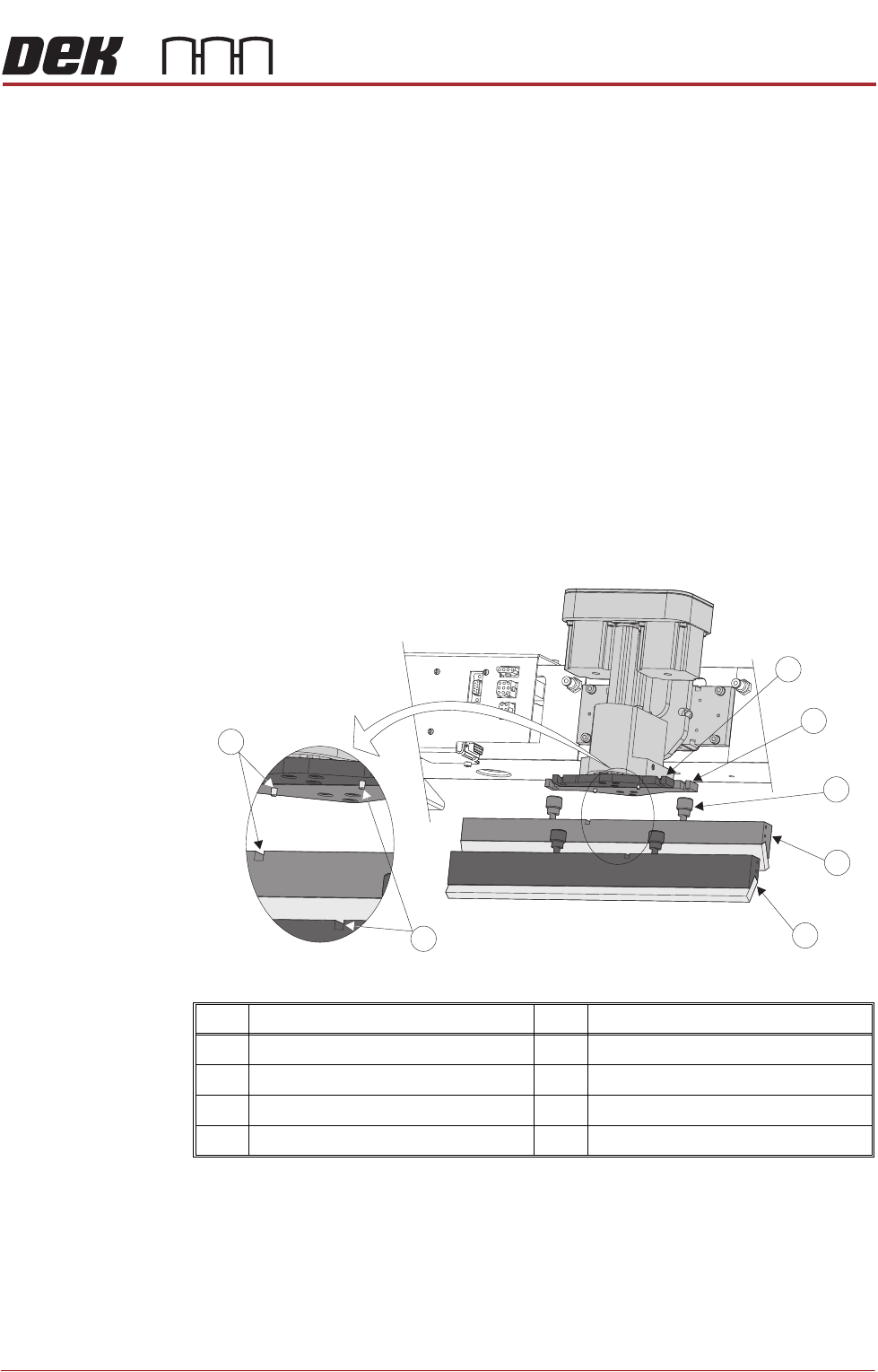
5. Fit the rear squeegee to the rear squeegee mount tightening the thumb-
screws finger tight.
NOTE
The locking thumbscrews on the rear squeegee are positioned wider apart
than those fitted to the front squeegee and the keyway slot is positioned on
the left hand side of the rear squeegee.
Item Description Item Description
1 Front Squeegee Mount 5 Front Squeegee
2 Rear Squeegee Mount 6 Front Squeegee Key and Keyway Slot
3 Locking Thumbscrew (in 4 positions) 7 Rear Squeegee Key and Keyway Slot
4 Rear Squeegee
1
2
3
4
5
6
7

SQUEEGEE MODULE
REPLACEMENT PROCEDURES
9.14 Technical Reference Manual Chapter Issue 6, Jul 16
6. Fit the front squeegee to the front squeegee mount ensuring the thumb-
screws are tightened finger tight.
NOTE
The locking thumbscrews on the front squeegee are positioned closer
together than those fitted to the rear squeegee and the keyway slot is
positioned on the right hand side of the front squeegee.
7. Close the front printhead cover.
8. Press the System button.
9. Select Continue.
10. Select Back.
11. Carry out Squeegee Reference Height calibration, Calibrations section of
this chapter refers.