SIPLACE S-23 HM.pdf - 第201页
User Manual SIPLAC E S-23 HM 6 Vision functions Software Version SR.406.xx 02/00 US Edition 6.4 Access to the ’Teach Fiducial’ and ’T est Component’ Options 201 6 Fig. 6.4 - 2 Teach fiducial option: menus Y ou can s elec…
6 Vision functions User Manual SIPLACE S-23 HM
6.4 Access to the ’Teach Fiducial’ and ’Test Component’ Options Software Version SR.406.xx 02/00 US Edition
200
Å In the menu bar of the Main view menu click on the Options pull-down menu.
Å Click on the Access level option. The user class option box will drop down.
Å Click on the Change password. The input box for the password will drop down.
Å Type in the password and then confirm.
Å Click on OK to accept the password or Cancel to reject it.
Å Move the mouse pointer over the Teach fiducial or Test component option. The status line
will display a brief explanatory text for the option in question. You can also use the F8 or F9
function keys to access the options. The View drop-down menu will list the allocations of the
function keys and the individual options.
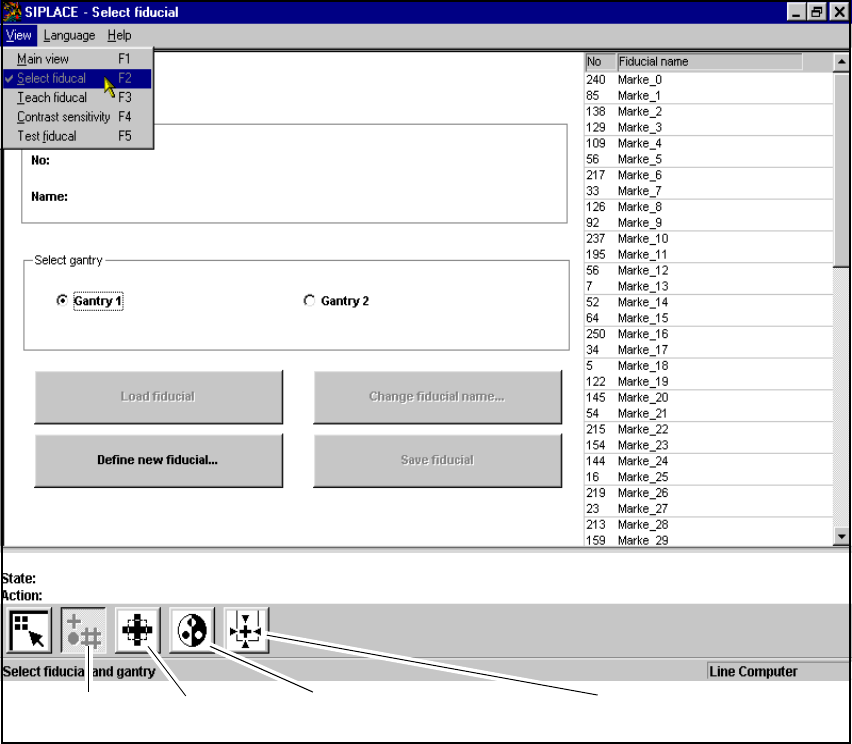
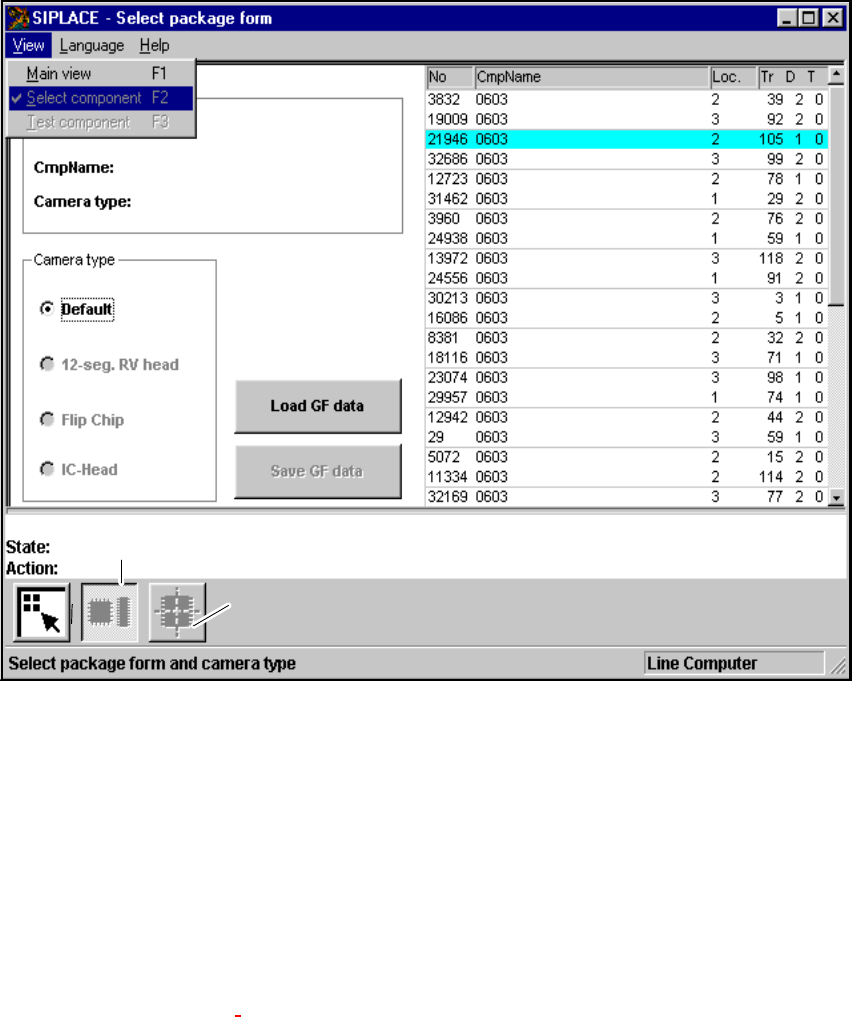
Å Click on either of the two icons (buttons). The screen will then display either the Select fiducial
menu or the Select package form menu depending on whether you have selected the Teach
fiducial option or the Test component option (see Figs. 6.4 - 2 and 6.4 - 3).
6
Again, depending on your choice, you can access further menus for the Teach fiducial option or
the Test component option. 6
User Manual SIPLACE S-23 HM 6 Vision functions
Software Version SR.406.xx 02/00 US Edition 6.4 Access to the ’Teach Fiducial’ and ’Test Component’ Options
201
6
Fig. 6.4 - 2 Teach fiducial option: menus
You can select the following menus from the Teach fiducial option either by clicking on the icons
in the symbols bar or by using function keys F2 to F5: 6
– Select fiducial
– Teach fiducial
– Contrast sensitivity, and
– Test fiducial.
You can return to the Main view menu either by clicking on the Main view icon or by pressing
function key F1. 6
Contrast sensitivity
icon
Test fiducial
icon
Select fiducial
icon
Test fiducial
icon
6 Vision functions User Manual SIPLACE S-23 HM
6.4 Access to the ’Teach Fiducial’ and ’Test Component’ Options Software Version SR.406.xx 02/00 US Edition
202
6
Fig. 6.4 - 3 Test component option: menus
You can select the following menus from the Test component option either by clicking on the
icons (buttons) or by pressing function keys F2 to F3: 6
– Select package form
– Test component
You can return to the Main view menu either by clicking on the Main view icon or by pressing
function key F1. 6
The options Teach fiducial and Test component are described in Section 6.5 from page 204 and
Section 6.6 from page 239.
6
To provide you with some orientation, at the start of each section you will find a flow chart and a
brief description for the Teach fiducial and Test component options. Each flow chart begins with
Main view menu and shows you the hierarchical structure of all of the menu options. 6
’Select package form’ icon
’Test component’ icon