SIPLACE S-23 HM.pdf - 第81页
User Manual SIPLAC E S-23 HM 2 Operational Safety Software Version SR.406.xx 02/00 US Edition 2.2 Safety equipment 81 Protect ive con tactor co mbina tions K1 and K2 monito r the following circu its: K1: E merg ency st o…
2 Operational Safety User Manual SIPLACE S-23 HM
2.2 Safety equipment Software Version SR.406.xx 02/00 US Edition
80
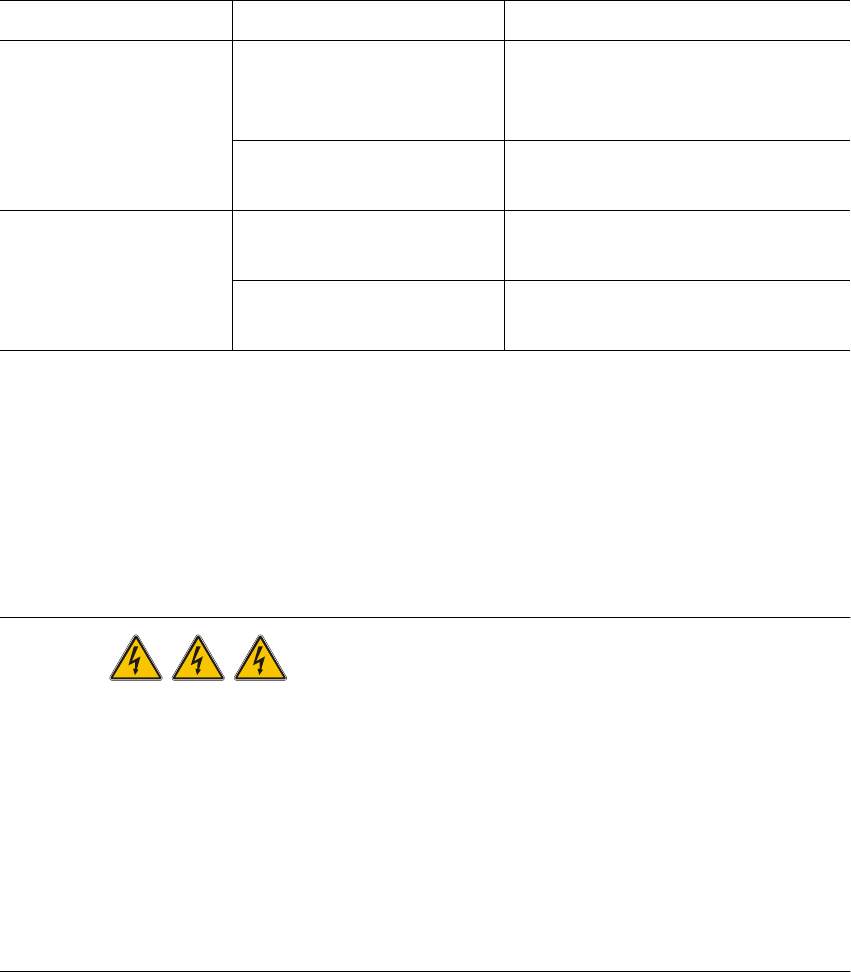
2.2.3.2 Status messages and the action required
The following displays may appear in placement mode. If they appear, carry out the action spec-
ified in the third column. 2
2.2.4 Safety circuits
The SIPLACE S-23 HM automatic placement system has two separate safety circuits which are
monitored by protective contactor combinations K1 and K2. Both protective contactor combina-
tions are incorporated into the power supply (see item 14 and 15 in Fig. 2.2 - 4). 2
DANGER
Automatic placement systems from the SIPLACE family are powered with 3x400VAC (3 x 208
VAC U.S.A. version) ± 5 %, 50/60Hz mains voltage.
This means that parts of the system carry potentially fatal voltages - even when switched off at the
main switch. Death, serious injury or considerable damage may result if these automatic place-
ment systems are handled incorrectly.
Always follow the applicable accident prevention and DIN regulations (particularly EN 60204,
part 1) and the applicable regulations in your own country.
The guard over the power supply must ONLY be opened by appropriately qualified and trained
personnel. 2
Status Display on screen Action required
EMERGENCY STOP
mushroom-head push-
button pressed
Emergency stop pressed ...
Machine stopped. Release
button
Release the pressed emergency
stop button (item 3 or 4 in Fig. 2.2 -
4)
Press start button Press the white start button (item 2
or 5 in Fig. 2.2 - 4)
Protective cover open Close the cover Close the protective cover (item 9,
10, 11 or 12 in Fig. 2.2 - 4)
Press start button Press the white start button (item 2
or 5 in Fig. 2.2 - 4)
Tab. 2.2 - 1 Screen display when the emergency stop mushroom-head push-button is pressed
or the protective cover is open
User Manual SIPLACE S-23 HM 2 Operational Safety
Software Version SR.406.xx 02/00 US Edition 2.2 Safety equipment
81
Protective contactor combinations K1 and K2 monitor the following circuits:
K1: Emergency stop circuit, safety circuits for the component tables or wafflepack changer,
protective cover switch and the enable software signal
K2: Emergency stop circuit, K1 protective contactor combination, software enable signal and
key switch
K1 or K2 is triggered if any of these functions fail. The mains voltage to the heavy current trans-
former that supplies the gantry axis motors will be interrupted. The voltage to the star-type motor
for the revolver head is reduced from 70V to 10V. The dp and dR axes of the placement heads
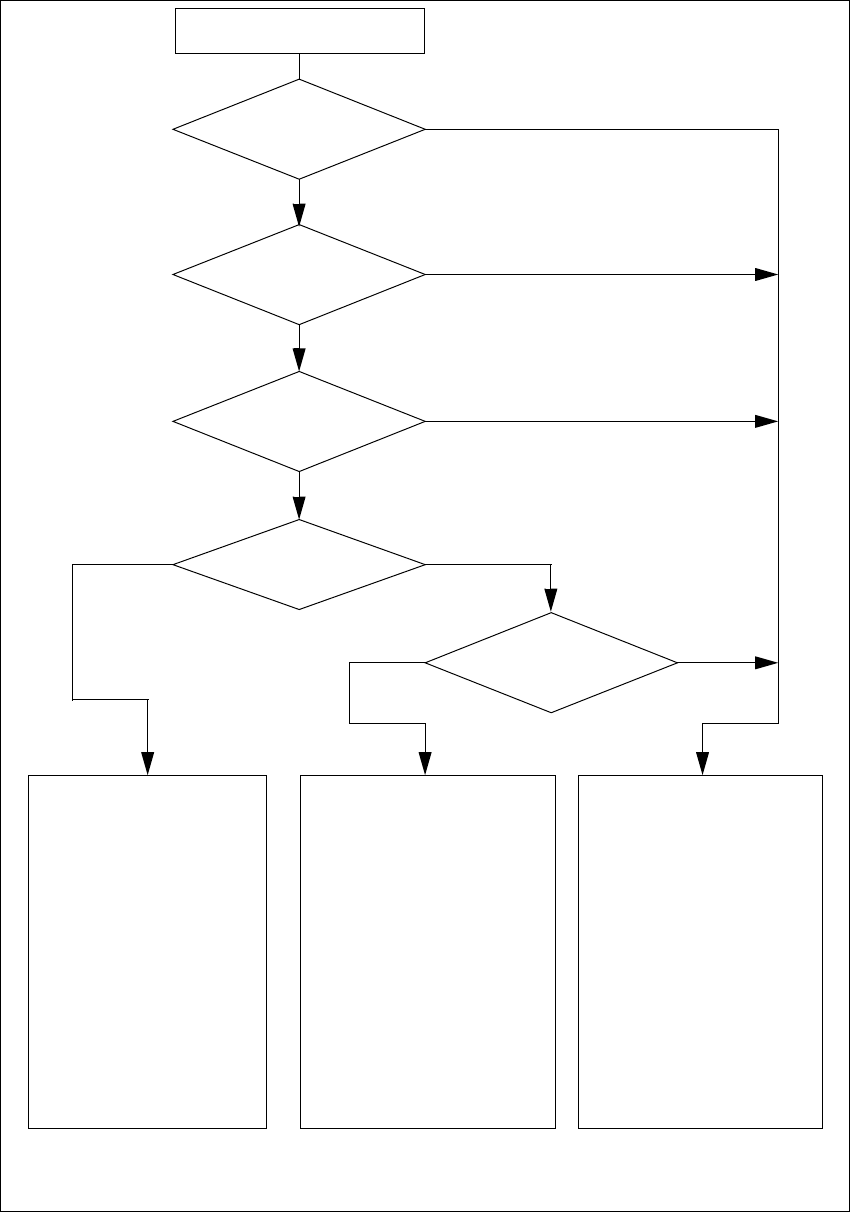
continue to be supplied with 30V. The next diagram illustrates the various statuses of K1 and K2
and their effects on the axes and the PCB conveyor components.
2 Operational Safety User Manual SIPLACE S-23 HM
2.2 Safety equipment Software Version SR.406.xx 02/00 US Edition
82
2
Fig. 2.2 - 5 SIPLACE S-23 HM safety circuits
Start button pressed
Emerg. stop
mushroom-head push-but-
ton pressed?
Protective cover open ?
Key switch
closed (positionI)?
No
Component table safety
circuit interrupted?
Yes
No
No
Yes
Yes
No
Active
K1 *) Yes
K2 *) Yes
Voltage
Y-axis 155 V
X-axis 155 V
Star axis 70 V
DP-axis 30 V
Z-axis 30 V
Active
PCB conveyor Yes
PCB clamping device Yes
Width adjustment Yes
PCB stopper Yes
Tape cutter Yes
Yes
Active
K1 *) No
K2 *) Yes
Voltage
Y-axisY-axis 0 V
X-axis 0 V
Star axis 10 V
DP-axis 30 V
Z-axis 30 V
Active
PCB conveyor Yes
PCB clamping device No
Width adjustment Yes
PCB stopper No
Tape cutter No
Active
K1 *) No
K2 *) No
Voltage
Y-axis 0 V
X-axis 0 V
Star axis 10 V
DP-axis 30 V
Z-axis 30 V
Active
PCB conveyor No
PCB clamping device No
Width adjustment No
PCB stopper No
Tape cutter No
*) K1, K2 protective contactor combination
Compressed air
min. 5.1 bar?
Yes
No