00193742-01.pdf - 第56页
3 Interfaccia utente grafica SIPLACE Manuale software SR.503.xx 3.3 Interfaccia utente - viste e menu Edizione 12/2001 IT 56 3.3.2.5 Menu "Lingua" T ramite il menu "L ingua“ si poss ono impostare le versio…
SIPLACE Manuale software SR.503.xx 3 Interfaccia utente grafica
Edizione 12/2001 IT 3.3 Interfaccia utente - viste e menu
55
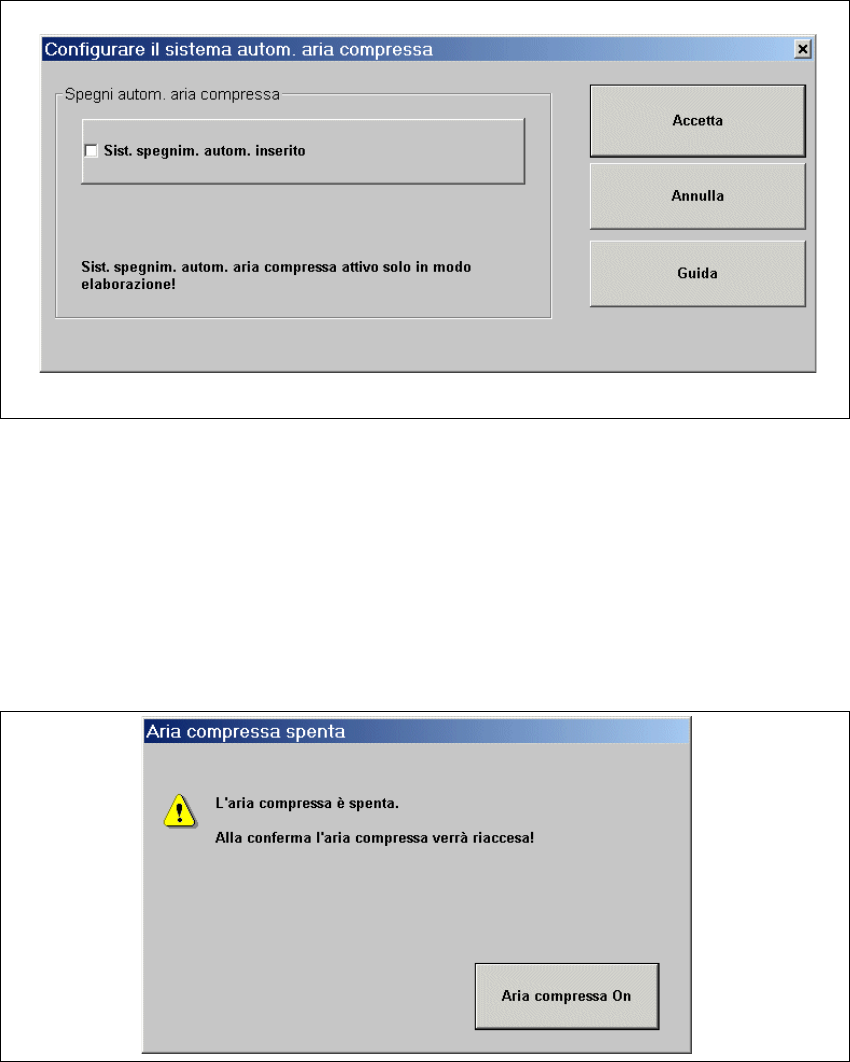
Æ Fate clic sulla voce di menu Configura spegnimento aria compressa....
Si aprirà la seguente finestra.
3
Fig. 3.3 - 17 Dialogo "Configura spegnimento aria compressa"
Æ Attivate/disattivate le caselle di controllo dello spegnimento automatico.
Æ Fate clic su Accetta per memorizzare le impostazioni.
3
Æ Fate clic sulla voce di menu Spegni aria compres.... (Questa funzione è possibile solo se la
macchina si trova sullo stato "arrestata l’elaborazione".)
Si aprirà la seguente finestra.
3
Fig. 3.3 - 18 Caselle di controllo "Spegnimento aria compressa"
Æ Attivate il pulsante Aria compressa on.
Æ L’aria compressa è nuovamente accesa.

3 Interfaccia utente grafica SIPLACE Manuale software SR.503.xx
3.3 Interfaccia utente - viste e menu Edizione 12/2001 IT
56
3.3.2.5 Menu "Lingua"
Tramite il menu "Lingua“ si possono impostare le versioni della lingua integrate nel software del
calcolatore stazione per l’interfaccia utente.
L’interfaccia utente può infatti venire commutata da qualsiasi vista su un’altra lingua.
Sono selezionabili le lingue "Tedesco" e "Inglese". 3
Æ Cliccate sulla voce di menu della lingua desiderata.
I testi dell’interfaccia utente verranno rappresentati nella lingua selezionata.
Æ Per un ampliamento lingua è a disposizione un CD di lingue per l’installazione di altre lingue
nazionali.
3.3.2.6 Menu "Guida"
Su questo menu sono comprese tutte le funzioni menu per richiamare il sistema Guida e le info-
mazioni generali sul calcolatore stazione o sul software. 3
Sommario Ctrl+F1 3
Così si richiama la Guida online. 3
Guida Alt+F1 3
Verrà visualizzata la Guida per il soggetto corrente. 3
Usa la Guida 3
Verrà visualizzato il maneggio pratico del sistema Guida. 3
Info ... 3
Da’ informazioni sulla versione software al momento installata (versione software CS), sul pac-
chetto di prestazioni, sul Cd-multilingue e sui dati generali del calcolatore stazione. 3
NOTA
Si può richiamare la Guida online su ogni vista dell’interfaccia utente con il simbolo (sotto a
destra).
Verrà visualizzata la Guida per il soggetto corrente.
La descrizione dettagliata delle funzioni del menu Guida è riportata al cap. 6. 3
Æ Fate clic sulla funzione richiesta del menu "Guida" o attivate in combinazione i tasti corrispon-
denti.
3
SIPLACE Manuale software SR.503.xx 3 Interfaccia utente grafica
Edizione 12/2001 IT 3.4 Diagramma del flusso sulla vista base
57
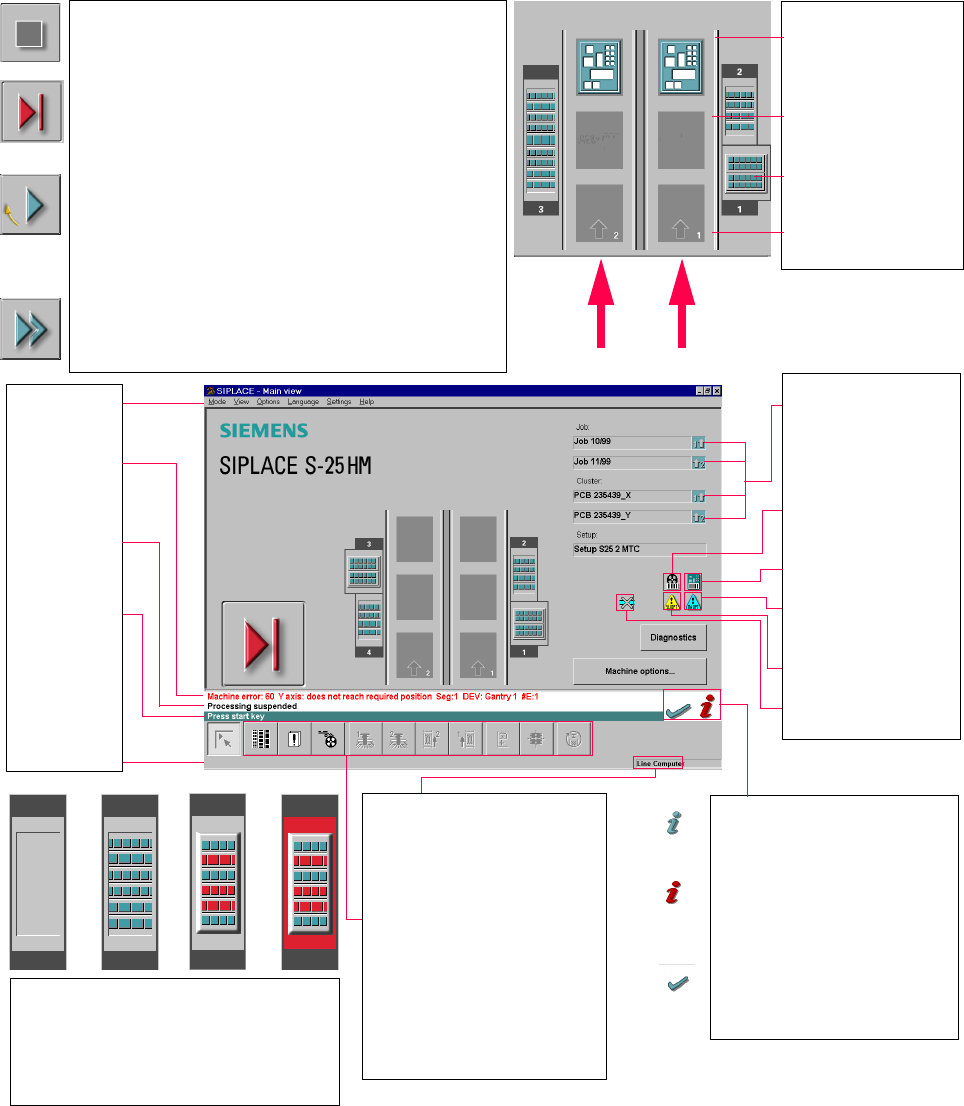
3.4 Diagramma del flusso sulla vista baser 3
3
3
Pull-down menus
3
Error information
bar
3
Status indication
and process status
3
Notification about a
specific action to
carry out
3
Information bar
3
Control modes:
Stand alone
GEM Host (not yet available)
Line Computer
SIPLACE Pro
3
Submenu icons with info box:
Setup
Error
Feeders
Gantry 1, 2
PCB conveyor 2, 1
Teach fiducial
Test component
SITEST
GEM
3
Output conveyor
The PCB is supplied.
Central conveyor
The central conveyor is empty
.
MTC on location 1
(S-25 HM only)
Input conveyor
The input conveyor is empty.
3
Context-sensitive help system
This also provides a short description of all
displayed operating elements.
3
Help system for errors
Starts a help system displaying possible
causes of the current error along with correc
-
tive actions.
3
Error deletion
After the error has been successfully cor-
rected, the currently active error is deleted.
Conveyor 2
Conveyor 1
3
Identifies the job or cluster of the
right conveyor lane, or of the
single conveyor, and of the left
conveyor lane (dual conveyors
only).
3
Barcode-supported componen
t
refilling
3
PCB barcode is activated.
3
Machine options have been
changed
3
Software options configured
3
Compressed air switch-off
mechanism configured
1234
1 No setup available on the corresponding location
2 Setup available
3 Setup available - at least one empty track error
4 Machine standstill due to track error
3
This display appears during the start-up process of the machine. Only when the
referenManuale software SR.503.xxce run has been completed successfully will
the display appear in the form of a button.
3
Status
The machine is running, or is in its 'ready' state.
Pressing the button:
The machine stops.
3
Status
The machine is placing components; 'stop' is activated. The assembly of the PCBs
located in processing conveyors 1 and 2 or in the central conveyor will be
terminated and the PCBs will be transported to the intermediate or output
conveyor. Subsequently, the machine will stop.
Pressing the button:
The machine continues to run without interruption.
3
Status
Machine is in the stopped state.
Pressing the button:
The machine resumes the placement operation.