00195374-0202_AI_LBO-D1D2_DE+EN.pdf - 第57页
Long bo ard option 2 Assembly instructions Long board op tion SIPLACE D1 / D2 06/2007 Edition 57 2.10 Conversion for LBO on the flexible dual conveyor in single conveyor mode T o be able to produce long board s > 460 …
2 Assembly instructions Long board option SIPLACE D1 / D2 Long board option
06/2007 Edition
56
2.9 Function check
: Start the SITEST program.
: Check by adjusting the conveyor width whether the actua
tors reliably actuate the switches on
the units.
If this is not the case, readjust the affected actuators or units.
2
Teaching the sonar sensor 2
: Place a PCB on the conveyor.
: Push the PCB towards the processing area so that it is beneath the sensor.
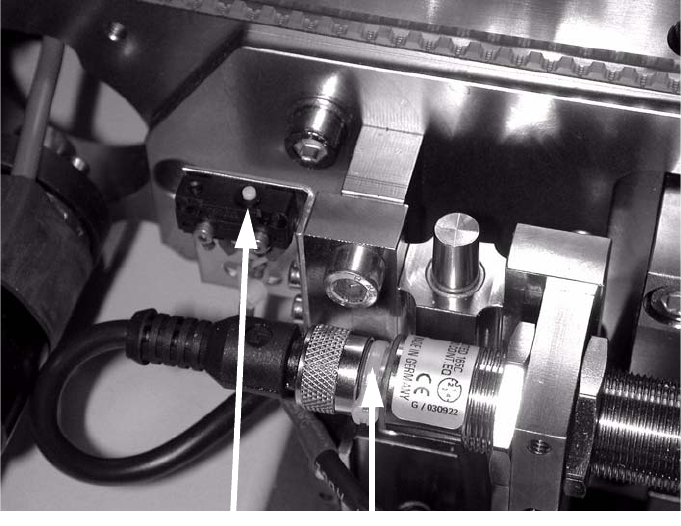
: Hold down the button until the LED flashes (see photograph below).
Wh
en teach
ing mode starts, the LED lights up constantly while the PCB
remains in position.
Button
LED
2
2
: Remove the PCB from the conveyor and place it sideways across the conveyor side walls
above the sensor.
The LED must not light up; the LED must only light up if th
ere is a PCB on the conveyor.
2
Long board option 2 Assembly instructions Long board option SIPLACE D1 / D2
06/2007 Edition
57
2.10 Conversion for LBO on the flexible dual conveyor
in single conveyor mode
To be able to produce long boards > 460 x 216 mm wide on the dual conveyor, the flexible dual
conveyor must be selected in SIPLACE Pro for the entire line. 2
: Shut down the station computer and switch off the place
ment machine at the main switch.
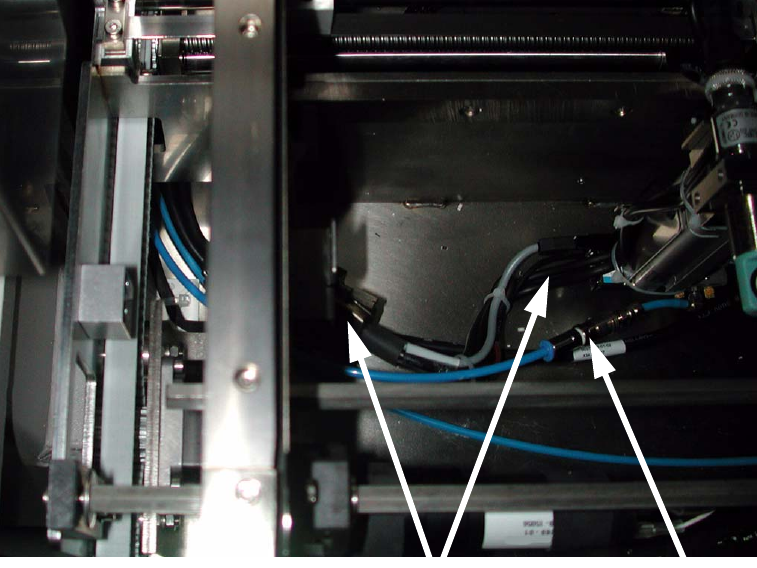
: Unplug the connecting cable and remove the hose with
the quick-release coupling on the stop-
per on the conveyor.
: Remove both the long board stopper and the actuator fo
r the width adjustment limit switch.
Coupling
Plug
2
2
: Optimize the set-up with this line (flexible dual conveyor, long board) and an initial set-up in
which the long board option is entered with an offset.
: Assign this job to the line.
2 Assembly instructions Long board option SIPLACE D1 / D2 Long board option
06/2007 Edition
58
: Switch the placement machine on at the main switch and carry out a reference run.
The second conveyor track is disabled by the software. The machine then automatically switches
th
e PCB conveyor to single conveyor. 2
If the stopper was not removed, the following error message appears:
15433 Funktion kann nicht bei eingebauter Option au
sgeführt werden (15433 function cannot be
executed if option is installed). 2
During the changeover, you will be prompted to connect the
two lifting tables. This is only neces-
sary if problems occur during clamping because the PCB is sag
ging. Read the Service Manual in
order to do this. 2
Error message relates to connection of the lifting tables and can be ignored. 2
2