Nordson-EFD-MC800-Operating-Manual.pdf - 第17页
MicroCoat MC800 Lubrication Systems 17 www.nordsonefd.com info@nordsonefd.com +1-401-431-7000 Sales and service of Nordson EFD dispensing systems are available worldwide. System Assembly Mount the Spray V alves Mount eac…
MicroCoat MC800 Lubrication Systems
16 www.nordsonefd.com info@nordsonefd.com +1-401-431-7000 Sales and service of Nordson EFD dispensing systems are available worldwide.
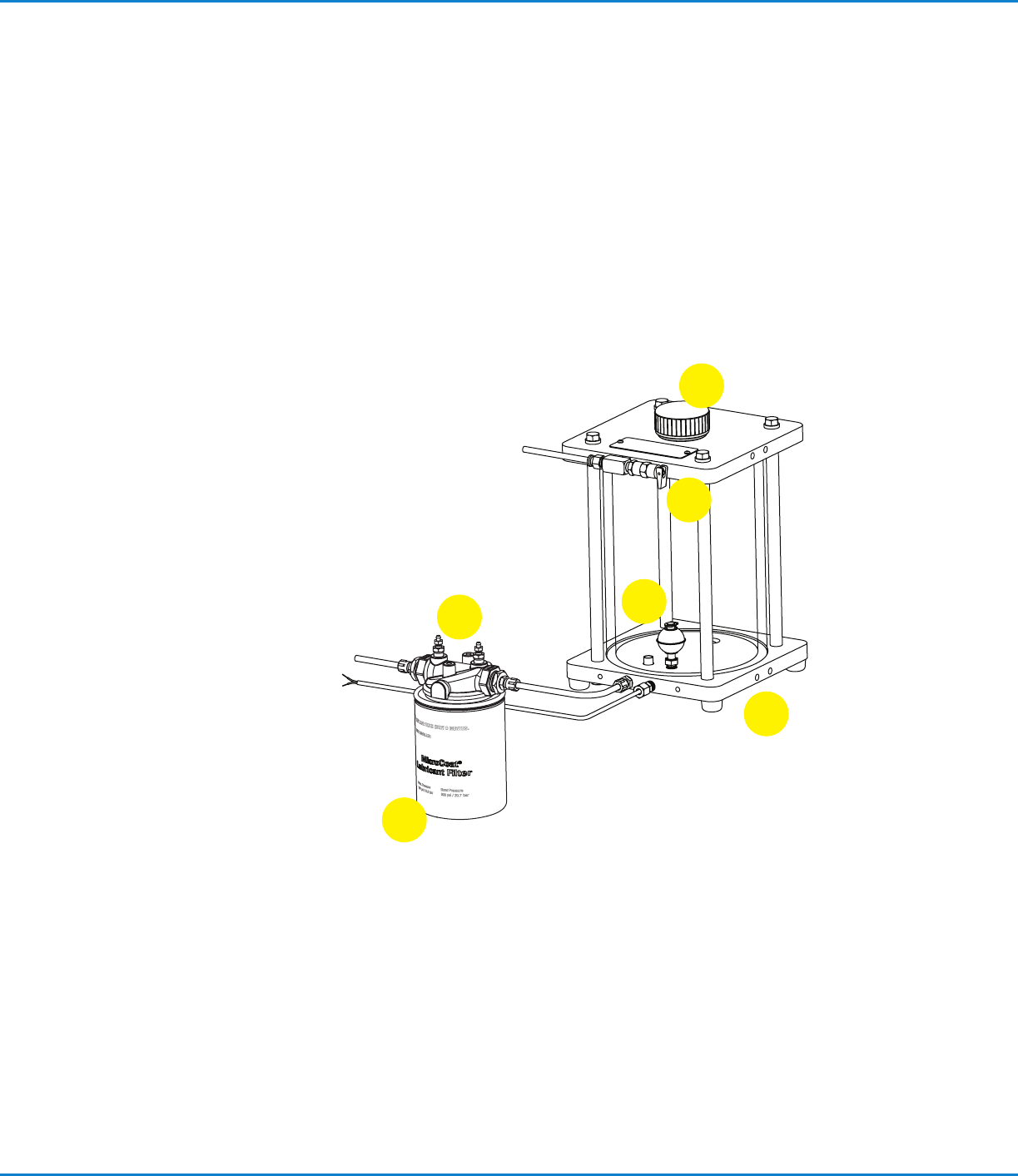
Tank Reservoir Features
1. Low Level Switch
Prevents the system from operating without lubricant when
connected to the press Emergency Stop Circuit. Switch opens
when tank level is near empty.
2. Air Pressure Relief Valve
Automatically exhausts air if tank reservoir pressure exceeds
2.76bar (40psi). Also used to manually exhaust air pressure
before refilling the tank.
3. Fill Port Cap
Ported threads relieve any residual reservoir air pressure when
cap is loosened.
4. Drain Plug (not shown)
5. Lubricant Inline Filter
6. Bleed Valve
Valve releases air after filter replacement.
1
3
6
5
4
2
MicroCoat MC800 Lubrication Systems
17www.nordsonefd.com info@nordsonefd.com +1-401-431-7000 Sales and service of Nordson EFD dispensing systems are available worldwide.
System Assembly
Mount the Spray Valves
Mount each valve with the mounting clamp (P/N 7021742)
provided, or use the 6 mm mounting hole in the valve body to
attach the valve to an alternative mounting bracket.
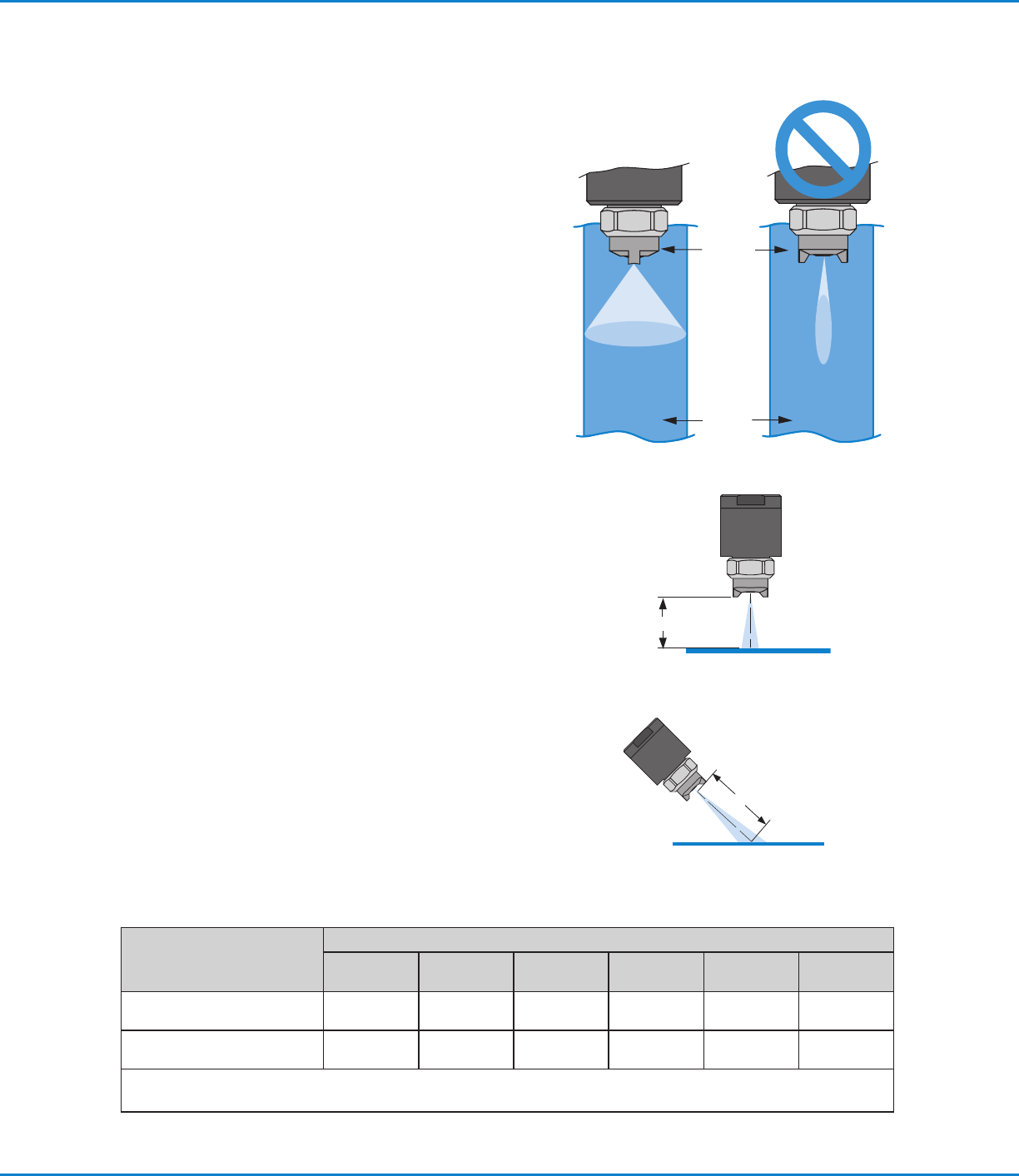
To ensure proper lubrication coverage, mount the MC785M
valve so the tabs on the air cap are in line with the stock as
illustrated.
IMPORTANT: If you loosen the air cap retainer nut to
reposition the tabs, be sure to re-tighten the nut with a wrench
before operating the valve.
The width of spray coverage is determined by the distance
between the valve nozzle and the stock, as shown in the chart
below.
Spray Area Coverage
Spray Valves
Nozzle Distance to Stock
2.54 mm
(0.1")
50.8 mm
(2.00")
76.2 mm
(3.00")
101.6 mm
(4.00")
127.0 mm
(5.00")
152.4 mm
(6.00")
MC785M
25.4 mm
(1.00")
38.1 mm
(1.50")
50.8 mm
(2.00")
63.5 mm
(2.50")
69.9 mm
(2.75")
82.6 mm
(3.25")
MC785M-WF
38.1 mm
(1.50")
63.5 mm
(2.50")
88.9 mm
(3.50")
114.3 mm
(4.50")
139.7 mm
(5.50")
165.1 mm
(6.50")
The MC785M-WF is recommended for spray widths from 2.0" to 6.0".
NOTE: Spray width coverage may vary depending on the viscosity and surface tension of the fluid.
Air cap
Metal
stock
Valve mounted
perpendicular
Nozzle distance
Valve mounted
at 45˚ angle
Nozzle distance
MicroCoat MC800 Lubrication Systems
18 www.nordsonefd.com info@nordsonefd.com +1-401-431-7000 Sales and service of Nordson EFD dispensing systems are available worldwide.
Installation / Removal of Flow
Control / Block-off Plug from
Manifold
Turn the system pressure off and confirm that tank
pressure is at zero before performing maintenance
on the system.
CAUTION
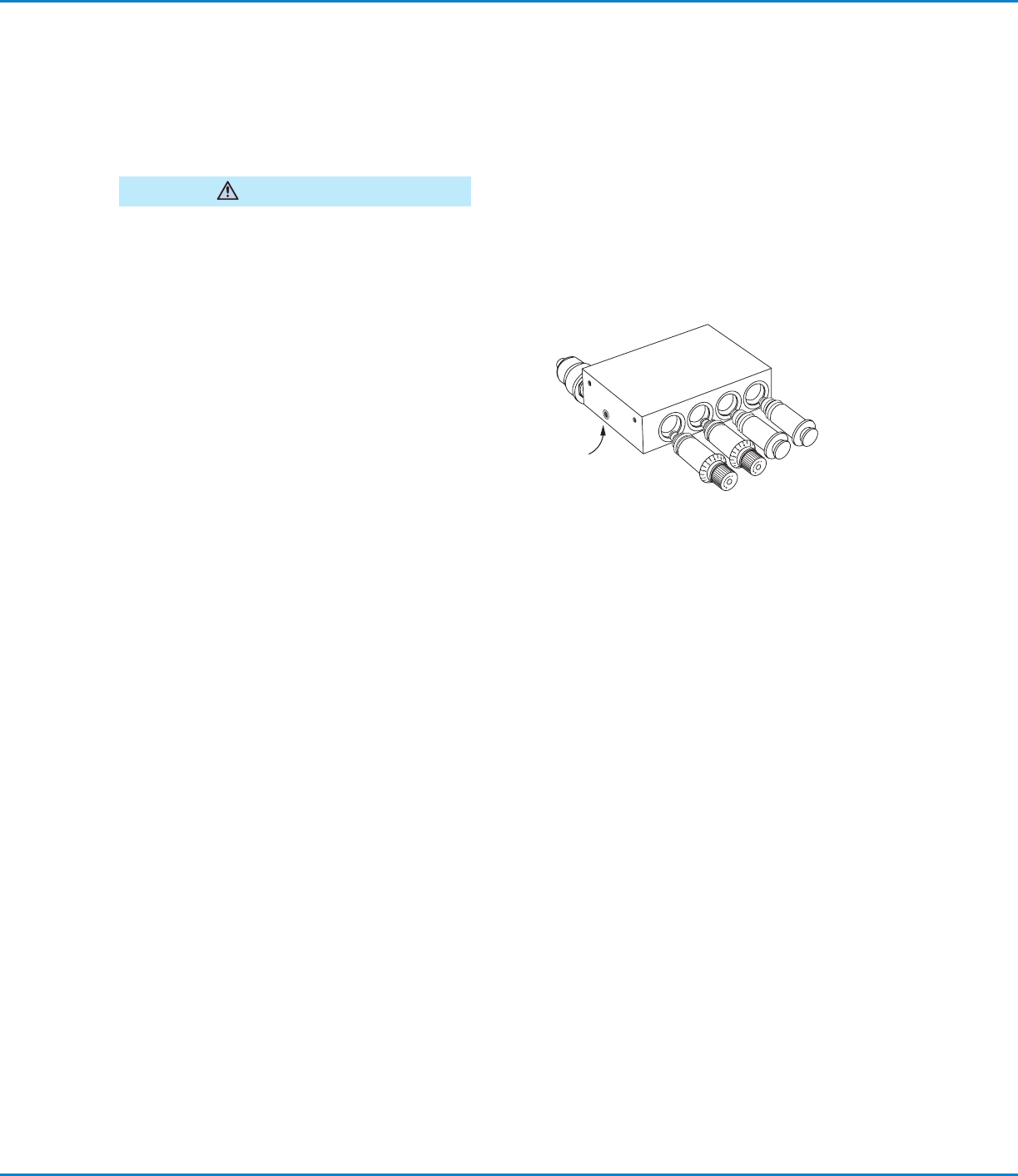
To remove a block-off plug or flow control, loosen the
set screw on the bottom of the fluid manifold block and
pull the block-off or flow control out of the manifold.
NOTE: To loosen / release the block-off and / or the
flow control from the manifold, it may help to rotate
them clockwise while you pull. This will help free the
0-ring seal. The flow control needs to be fully closed
before the body will turn within the manifold.
System Assembly (continued)
To install a new flow control, lubricate the 0-rings on
the flow control with your stamping oil and push the
flow control into the manifold while turning clockwise
until the flow control slides into place. Continue turning
until the zero on the knob is lined up with the zero
reference on the flow control manifold. Tighten the
manifold setscrew firmly.
Set screw
on bottom of manifold
Set Up the Controller
1. Place the controller and tank reservoir away from traffic areas and position the tank to allow for convenient
refilling.
2. Set the controller System Pressure to the Off position and the mode switch to the Auto/Run position.
3. Refer to the diagram on page 19 and connect a five-micron filter / regulator to the plant air supply. Using the
black and white 8 mm hoses supplied with the controller, connect to the color-coded Constant Air Input (black,
8 mm) and Control Air Input from Solenoid (white, 8 mm) fittings at the back of the controller.
Connect the Press Air Solenoid
IMPORTANT: When the press is stamping, the solenoid must be open continuously to allow constant spray from the
MicroCoat system. This can be accomplished by wiring the solenoid into the press clutch / run circuit.
To provide proper air distribution and control, a press air solenoid must be installed in-line with the white hose going
to the Control Air Input from Solenoid Fitting.
1. Select the appropriate 3-way solenoid. Flow must meet or exceed 0.06 m
3
/min (2.0 cfm) at 4.14bar (60psi).
2. Cut the control air hose at a convenient location and install the solenoid as shown.
3. Connect the solenoid wires to the press control circuit.