Horizon Generic Tooling.pdf - 第16页
MACHI NE PROG RAMMI NG STAGE 5B - VACUUM TOOLING 1.32 User Manual slide the adju ster to the rear of th e machine to lock in place. 44. Ens uring for the correct or ientati on of the stencil, load the stencil a gainst th…
MACHINE PROGRAMMING
STAGE 5B - VACUUM TOOLING
User Manual 1.31
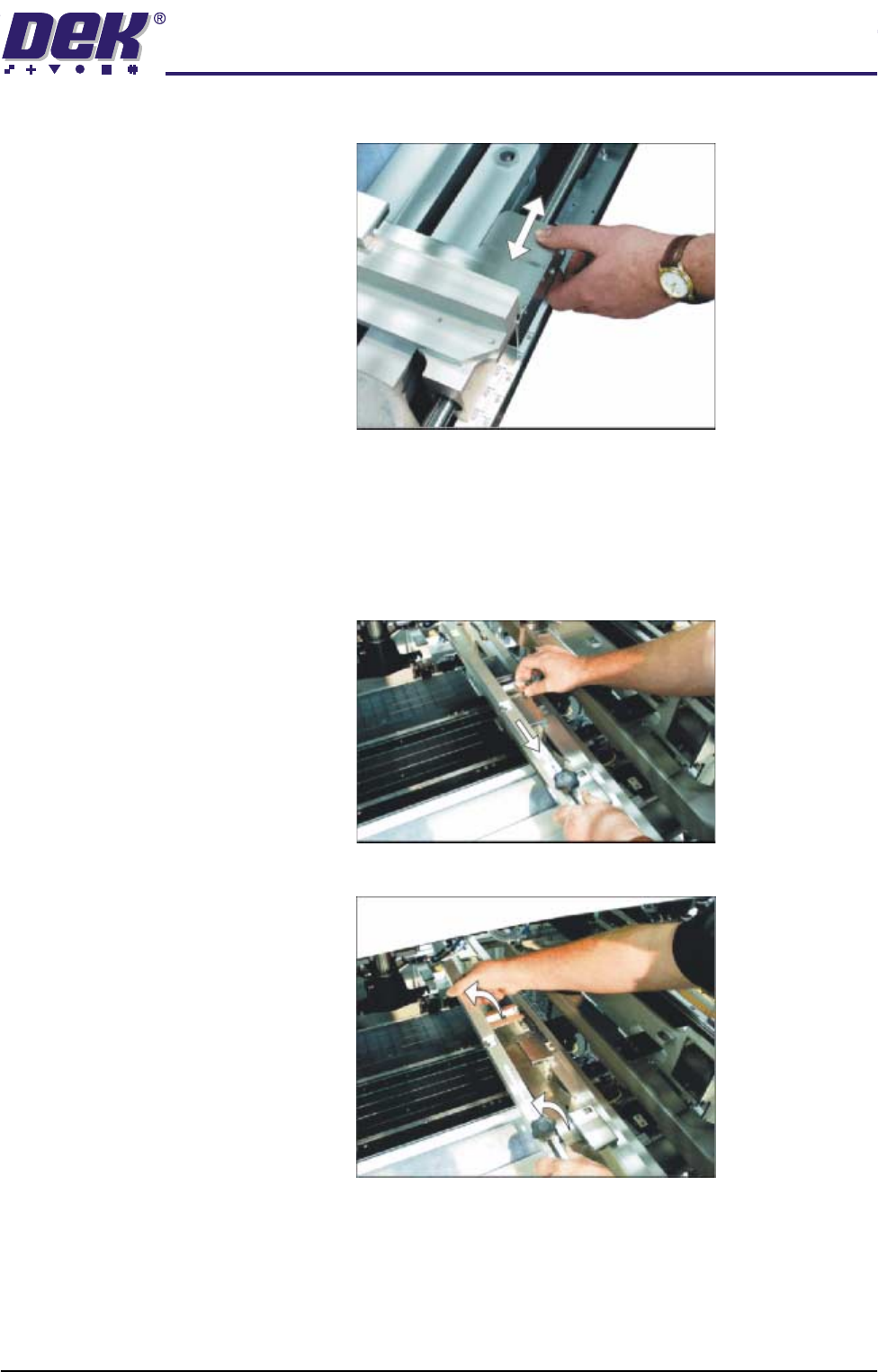
graduated scale.
c. Release the push button valve.
d. Repeat the procedure for the right hand chase rail.
43. If the stencil size is less than 29″ x 29″ the screen depth adjuster position is
to be adjusted as follows (ASM only):
a. Slide the screen depth adjuster towards the front of the machine.
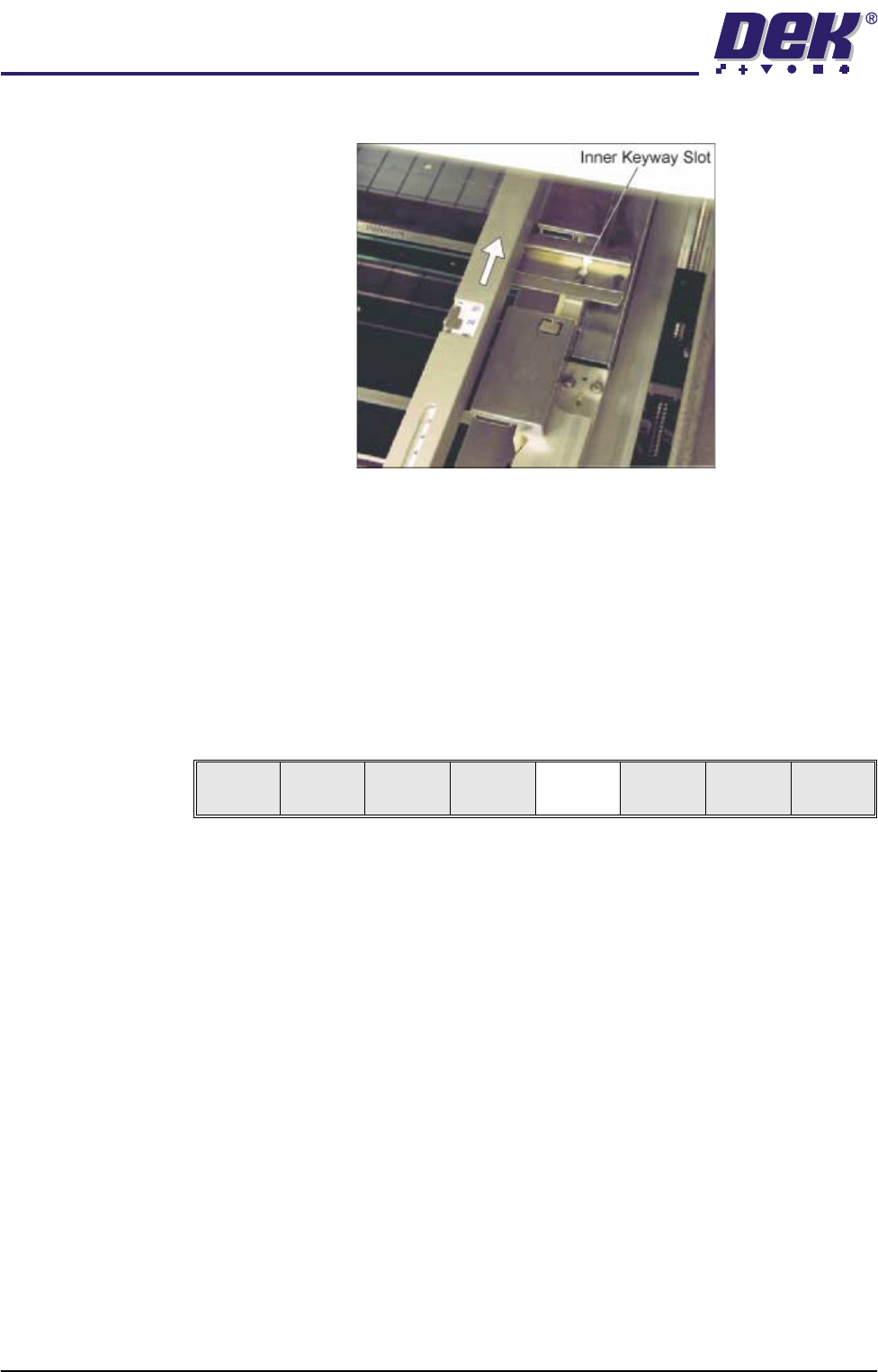
b. Lift the adjuster clear of the two locating screws.
c. Using the inner pair of keyway slots locate the adjuster on the chase and
MACHINE PROGRAMMING
STAGE 5B - VACUUM TOOLING
1.32 User Manual
slide the adjuster to the rear of the machine to lock in place.
44. Ensuring for the correct orientation of the stencil, load the stencil against the
left hand chase rail.
45. Either:
a. Close the front printhead cover.
or
b. Raise the drop down panel and lower the printhead shutter.
46. Press the System button.
47. Select Change Screen (F2).
48. Go to Stage 6.
Mode
Load
Data
Edit
Data
Setup
Squeegee
Change
Screen
Change
Tool ing
Change
Language
Exit
MACHINE PROGRAMMING
STAGE 5C - DEDICATED TOOLING
User Manual 1.33
STAGE 5C - DEDICATED TOOLING
WARNING
BOARD CLAMPS. EXTREME CARE MUST BE EXERCISED WHEN WORKING IN
THE TOOLING AREA OF THE MACHINE TO AVOID INJURY. THE FOILS ON THE
FRONT AND REAR BOARD CLAMPS ARE VERY SHARP.
CAUTION
BOARD CLAMPS.
Care must be taken to ensure that the board clamps are
not damaged when removing or replacing tooling.
NOTE
Ensure that Generic Tooling is set to Enabled in Set Prefs.
1. If there is a screen loaded continue with Step 2. If there is no screen loaded
go to Step 7.
2. Select Change Screen (F5). The message ‘Open Front Cover and
Remove Screen’ is displayed.
3. Either:
a. Open the front printhead cover.
or
b. Raise the printhead shutter and lower the drop down panel.
4. Remove the stencil from the printer.
5. Either:
a. Close the front printhead cover.
or
b. Raise the drop down panel and lower the printhead shutter.
6. Press the System button.
7. Select Change Tooling (F6). The print carriage and the under screen
cleaner are moved to the rear.
The Change Tooling Parameters window is displayed:
NOTE
If the remote board stop is fitted the Board Stop X and Board Stop Y
parameters are replaced by Remote Board Stop X.
Mode
Load
Data
Edit
Data
Setup
Squeegee
Change
Screen
Change
Tool ing
Change
Language
Exit
Mode
Load
Data
Edit
Data
Setup
Squeegee
Change
Screen
Change
Tooling
Change
Language
Exit
Change Tooling Parameters
BOARD WIDTH
BOARD STOP X
BOARD STOP Y
UNDER CLEARANCE
216.0
125.0
142.6
19.0
mm
mm
mm
mm