User-Manual-NeoDen-IN12-Reflow-oven.pdf - 第15页
14 melting point of alloy and the desired m aximum temperature of reflow. Before you start, you m ust have a basic understanding of the ideal temperature wave. Theoretically, the ideal wave consists of four parts or sect…
13
components.
An optimized reflow temperature wave is one of the most important factors to
obtain high quality solder joints in printed circuit board (PCB) assembly using
surface mount components. The temperature wave is a function of the temperature
applied on the circuit assembly to time. During the reflow process, it represents the
temperature at a specific point on the PCB to form a wave at any given time.
Several parameters affect the shape of the wave, the most important of which is the
belt speed and the temperature setting of each zone. The belt speed determines the
duration of exposure of the board to the set temperature of each zone. Increasing
the duration allows more time for the circuit assembly to approach the temperature
setting of the zone. The total duration of each zone determines the total processing
time.
The temperature setting of each zone affects the temperature rising speed of PCB,
and high temperature produces a large temperature difference between PCB and
zone temperature. The set temperature of the increase zone allows the board to
reach the given temperature faster. Therefore, it is necessary to make a figure to
determine the PCB temperature wave. Next is the outline of this step to generate
and optimize the graphics.
The following equipment and Auxiliary tools are required before starting the wave
procedure
High precision temperature profiler ( with IN12), thermocouple (with IN12), tools
for attaching thermocouple to PCB (mainly high temperature tape) and solder paste
parameter table.
There are several ways to attach thermocouple to PCB. The better way is to use
high temperature solder such as silver / tin alloy, and the solder joint should be as
small as possible.
Another acceptable method is fast, easy, and accurate enough for most applications.
A small amount of thermal compound (also known as thermal paste or grease,
which is often used on computer CPU or graphics card CPU) spots cover the
thermocouple, and then stick it with high-temperature tape (such as Kapton).
Another way to attach thermocouple is to use high-temperature adhesives, such as
cyanoacrylate adhesives. This method is usually not as reliable as other methods.
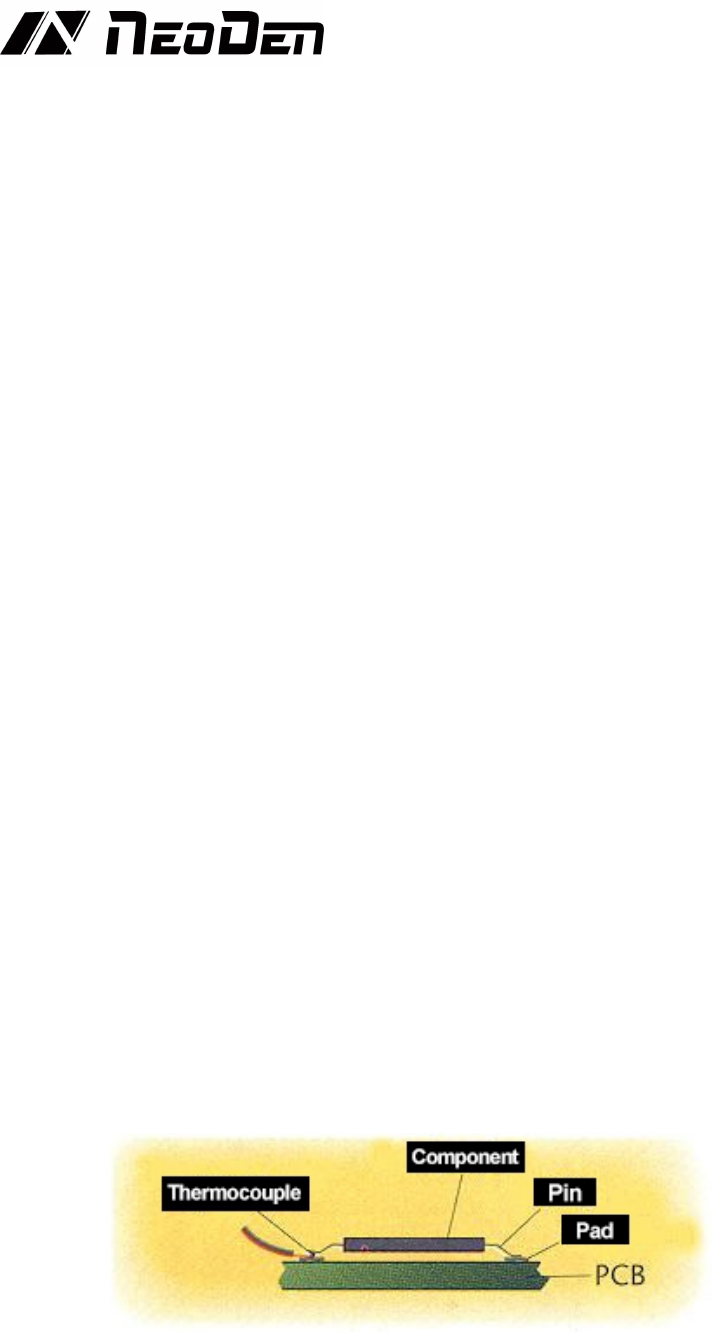
The attachment position should also be selected. It is usually better to attach the
thermocouple tip between the PCB pad and the corresponding component pin or
metal end.
(Figure 1. Attach thermocouple tip between PCB pad and corresponding
component pin or metal end)
The table of solder paste characteristic parameters is also necessary, and the
information contained in it is very important to the temperature wave, such as the
desired duration of temperature wave, the active temperature of solder paste, the
14
melting point of alloy and the desired maximum temperature of reflow.
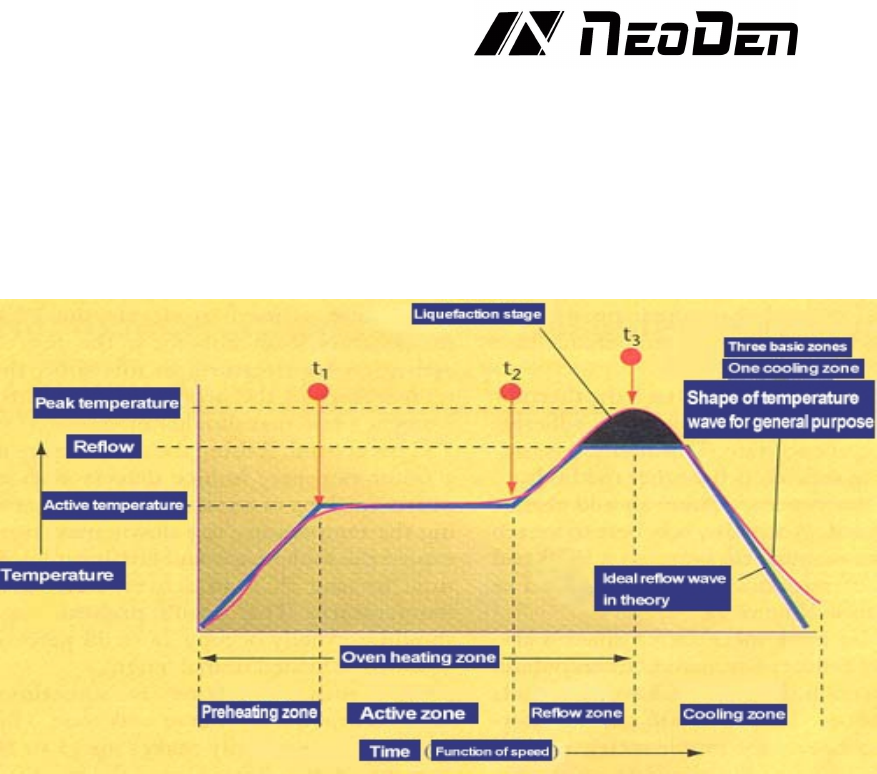
Before you start, you must have a basic understanding of the ideal temperature
wave. Theoretically, the ideal wave consists of four parts or sections, the first three
regions are heated and the last one is cooled. The more the temperature zone of the
oven, the more accurate and close the profile of the temperature wave can be
achieved. Most pastes can be successfully reflowed with four basic temperature
zones.
(Fig. 2. Theoretically, the ideal reflow wave consists of four zones, the first three
zones are heated and the last zone is cooled.)
It is also used to warm up the ambient temperature of the PCB from the active zone.
In this region, the temperature of the product rises continuously at a rate of no
more than 2-5
℃
per second
If the temperature rises too fast, it will cause some defects, such as tiny cracks in
ceramic capacitors. If the temperature rises too slowly, the solder paste will feel
too much temperature, and there is not enough time for PCB to reach the active
temperature. The preheating zone of the oven generally accounts for 25 ~ 33% of
the total length of the heating channel.
The active area, sometimes called dry or wet area, generally accounts for 33 ~ 50%
of the heating channel, and has two functions. The first is to sense the temperature
of PCB at a relatively stable temperature, allowing components of different quality
to be homogeneous in temperature, so as to reduce their considerable temperature
difference. The second function is to allow the flux to be activated and volatile
substances to volatilize from the solder paste. The general active temperature range
is 120 ~ 150℃. if the temperature of the active zone is set too high, the flux does
not have enough time to activate, and the slope of the temperature wave is an
upward increasing slope. Although some solder paste manufacturers allow some
temperature increase during activation, the ideal wave requires a fairly stable
temperature so that the PCB temperature is equal at the beginning and end of the
active zone. Some ovens on the market can not maintain a flat active temperature
wave. Choosing a oven that can maintain a flat active temperature wave will
improve the weld performance, and users will have a larger processing window.
The reflow zone is sometimes called the peak or final heating zone. The function
of this area is to increase the PCB assembly temperature from the active
temperature to the recommended peak temperature. The activation temperature is

15
always lower than the melting point of the alloy, and the peak temperature is
always at the melting point. The typical peak temperature range is 205 ~ 230℃. if
the temperature is set too high in this area, the temperature rise slope will exceed 2
~ 5℃ per second, or the reflow peak temperature will be higher than recommended.
This situation may cause excessive crimping, delamination or burning of PCB, and
damage the integrity of components.
Today, the most commonly used alloy is Sn63 / Pb37, and this proportion of tin
and lead makes the alloy eutectic. Eutectic alloy is an alloy that melts at a specific
temperature. Non eutectic alloy has a melting range, not a melting point,
sometimes called plastic loading. All the examples described here refer to eutectic
tin / lead, which has a melting point of 183℃, because it is widely used.
The ideal cooling zone wave should be a mirror image of the reflow zone wave.
The closer to this mirror relationship, the closer the solid structure of solder joint is,
the higher the quality of solder joint is and the better the integrity of solder joint
is.
The first parameter to be considered for the temperature wave is the speed setting
of the conveyor belt, which will determine the time spent in the heating channel of
the PCB. Typical solder paste factory parameters require a heating wave of 3-4
minutes. Dividing the total heating channel length by the total heating temperature
sensing time is the accurate belt speed. For example, when the solder paste requires
four minutes of heating time, using six feet of heating channel length, the
calculation is: 6 feet
/
4 minutes = 1.5 feet per minute = 18 inches per minute.
Next, it is necessary to determine the temperature setting of each zone. It is
important to understand that the actual interval temperature is not necessarily the
display temperature of the zone. The display temperature only represents the
temperature of the thermocouple in the area. If the thermocouple is closer to the
heating source, the displayed temperature will be relatively higher than the interval
temperature. The closer the thermocouple is to the direct channel of PCB, the
displayed temperature will be more able to reflect the interval temperature. It is
advisable to consult the oven manufacturer to understand clearly the relationship
between the displayed temperature and the actual interval temperature. In this
paper, the interval temperature rather than the display temperature will be
considered. Table 1 lists the interval temperature settings for typical PCB assembly
reflow.
Table 1. Typical PCB return zone temperature setting
I n t e r v a l
Interval tempera ture settin g
Actual plate temperature at the end of interval
Preheating
210℃
140℃
Activity
177℃
150℃
Reflow
250℃
210℃
The interval temperature is set to the actual plate temperature at the end of the
interval
After the speed and temperature are determined, they must be input to the oven
controller. Once all parameters are input, start the machine, and after the oven is
stable (i.e., all the actual displayed temperatures are close to the set parameters),
the wave can be started. The next PCB is placed in the conveyor belt, which
triggers the thermometer to start recording data.
For convenient using,some thermometer includes a trigger function to
automatically start the thermometer at a relatively low temperature, which is
typically slightly higher than the human body temperature of 37°C (98.6°F). For