User-Manual-NeoDen-IN12-Reflow-oven.pdf - 第18页
17 Figure 4:Set too high/low temperature of active z one Figure 5:Soldering too much/li ttle
16
example, the automatic trigger of 38°C (100°F) allows the thermometer to start
working as soon as the PCB is put on the conveyor chain and into the furnace, so
that the thermocouple will not be triggered by mistake when it is handled by the
human.
Once the initial temperature profile is generated, it can be compared with the
profile recommended by the solder paste manufacturer or the profile shown in
Figure 2.
First, it must be verified that the total time from the ambient temperature to the
peak temperature of the reflux is compatible with the desired stay time of the
heating curve. If it is too long, increase the conveyor speed proportionally; if it is
too short, decrease the conveyor speed proportionally.
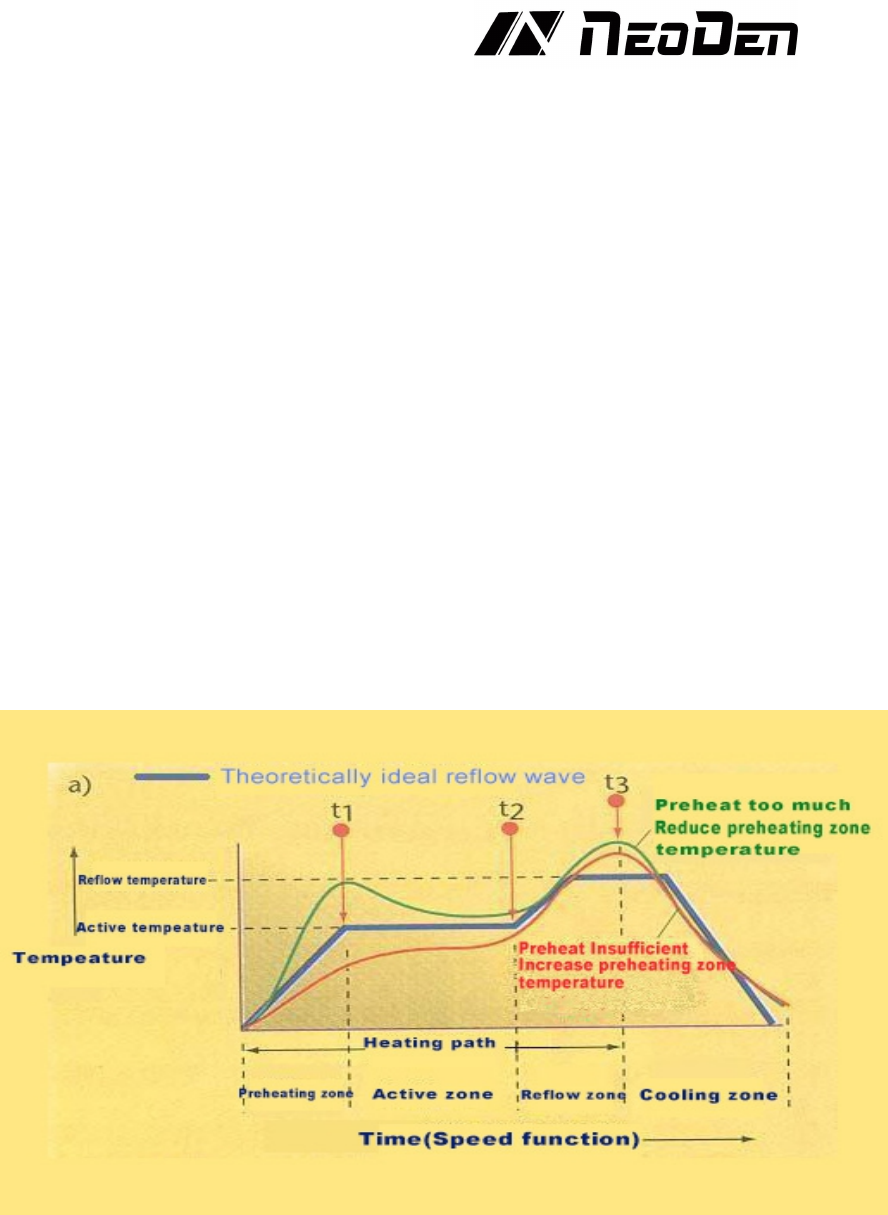
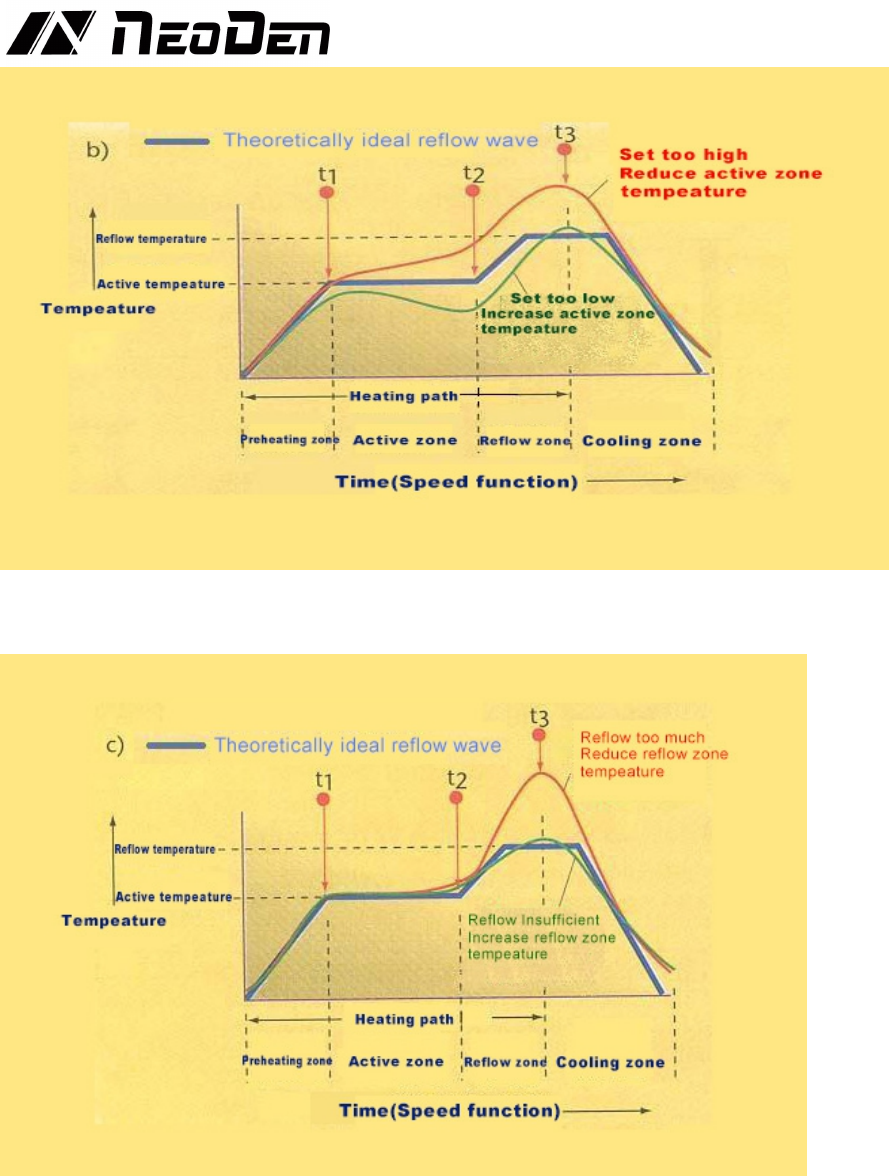
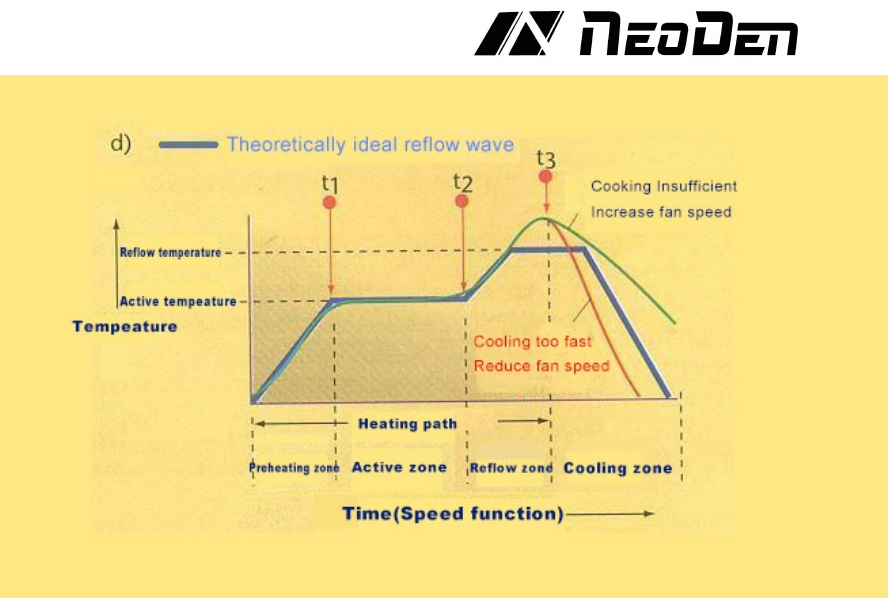
In the next step, the shape of the temperature profile must be compared with the
desired one (Figure 2). If the shape is not compatible, then compare it with the
following figures (Figures 3-6). Choose the most compatible temperature profile
compared to the actual shape of the profile. Should consider the deviation from left
to right (process sequence). For example, if there is a difference between the
preheating and soldering zones, first adjust the difference in the preheating zone
correctly. Generally, it is best to adjust one parameter at a time and test in run
before making further adjustments.Because a change in a given zone will also
affect the results of subsequent zones. We also recommend that novices had better
make small adjustments. Once you gain experience on a particular oven, you will
have a better "feel" to make more big adjustments.
Figure 3:Preheat too much/little soldering profile
17
Figure 4:Set too high/low temperature of active zone
Figure 5:Soldering too much/little
18
Figure 6:Cooling too much/little
When the final temperature profile is as close as possible to the desired profile, tke
record or store of the parameters for later use. Although this process is slow and
laborious at first, it can eventually gain proficiency experience, resulting in high-
efficiency production of high-quality PCBs.
6. Temperature profile setting method
♦Set the temperature of each zone and the speed of the conveyor chain from the initial
value. For cold oven, preheat for ~30 minutes.
♦After the preheating is completed, let the PCB go through the heating soldering
system. If soldering does not occur, the conveyor chain speed can be appropriately
reduced. Or on the premise of not changing the transmission chain speed,increase the
set temperature appropriately, and pay attention to not exceeding the bearing capacity
of the PCB and components when adjusting the set temperature.
♦Let the PCB go through the new conveyor chain under new speed or the adjusted set
temperature,if no soldering occurs,then do the adjustment of the previous step,
otherwise proceed to the next step to fine-tune the temperature profile.
♦The temperature profile can be adjusted appropriately according to the complexity of
the PCB.Can reduce the speed of the conveyor chain and increase the soldering time;
on the contrary, add the speed of the conveyor chain will reduce the soldering time.
♦Generally, when the PCB with components mounted on passes through the soldering
system but is not completely slodered, it can be properly adjusted and then put into the
soldering system for soldering again. Generally, it won’t effect on the PCB and
components.
♦The temperature setting is generally from low to high. If the soldering temperature
range exceeds the set temperature much, should increase the speed of the conveyor
chain or reduce the set temperature.
♦Different PCB boards have different heat transfer rates and heat absorption, then the
heating time and temperature required by soldering are also different. For double-layer
boards and multilayer boards and PCBs with more areas and pads, the setting
temperature is relatively higher , And for single-sided boards or paper plastic boards or