3MAINTENANCE__O.pdf - 第179页
3.9 Setting of Maintenance Warning Mode ④ DAYS Number of Days counted from “ START DAY ” Days are added regardless of the operating time and condition of the machine . Note : When “ DAYS ” reaches “ END DAY ” , the backg…
3.9
Setting
of
Maintenance
Warning
Mode
3.9
Setting
of
Maintenance
Warning
Mode
(
1
)
OIL
-
CHECKUP
When
the
[
MAINTENANCE
WARNING
MODE
]
key
is
pressed
at
the
“
SPECIAL
SEL
•
”
display
,
the
following
display
appears
on
the
screen
.
p
p
2
6
[
2
/
19
/
1991
/
THU
)
fARNING
_
E
>
VARMING
/
ENO
DAY
/
START
DAY
CYCLE
DAYS
TOTAL
,
COMP
^
DISABLE
:
.
12345678
12
/
05
/
1991
5
12
/
05
/
1991
WEEKLY
"
PISABii
MONTHLY
11
/
05
/
1991
12345678
25
12
/
05
/
1991
123456
?
8
3
-
MONTHLY
09
/
05
/
1991
DISABLE
,
85
12
/
05
/
1991
DISABLE
6
-
MONTHLY
12345878
06
/
Q
5
/
1991
175
12
/
05
/
1
S
91
12
/
05
/
1991
12
/
03
/
1991
ENABLE
2
12345678
1 2
360
365
12
/
05
/
199
Q
DISABLE
12345578
12
/
05
/
1991
CY
(
DAY
'
Ml
画
1
^
1
SCREENS
UPDATE
TODAY
HISTORY
MONTH
v
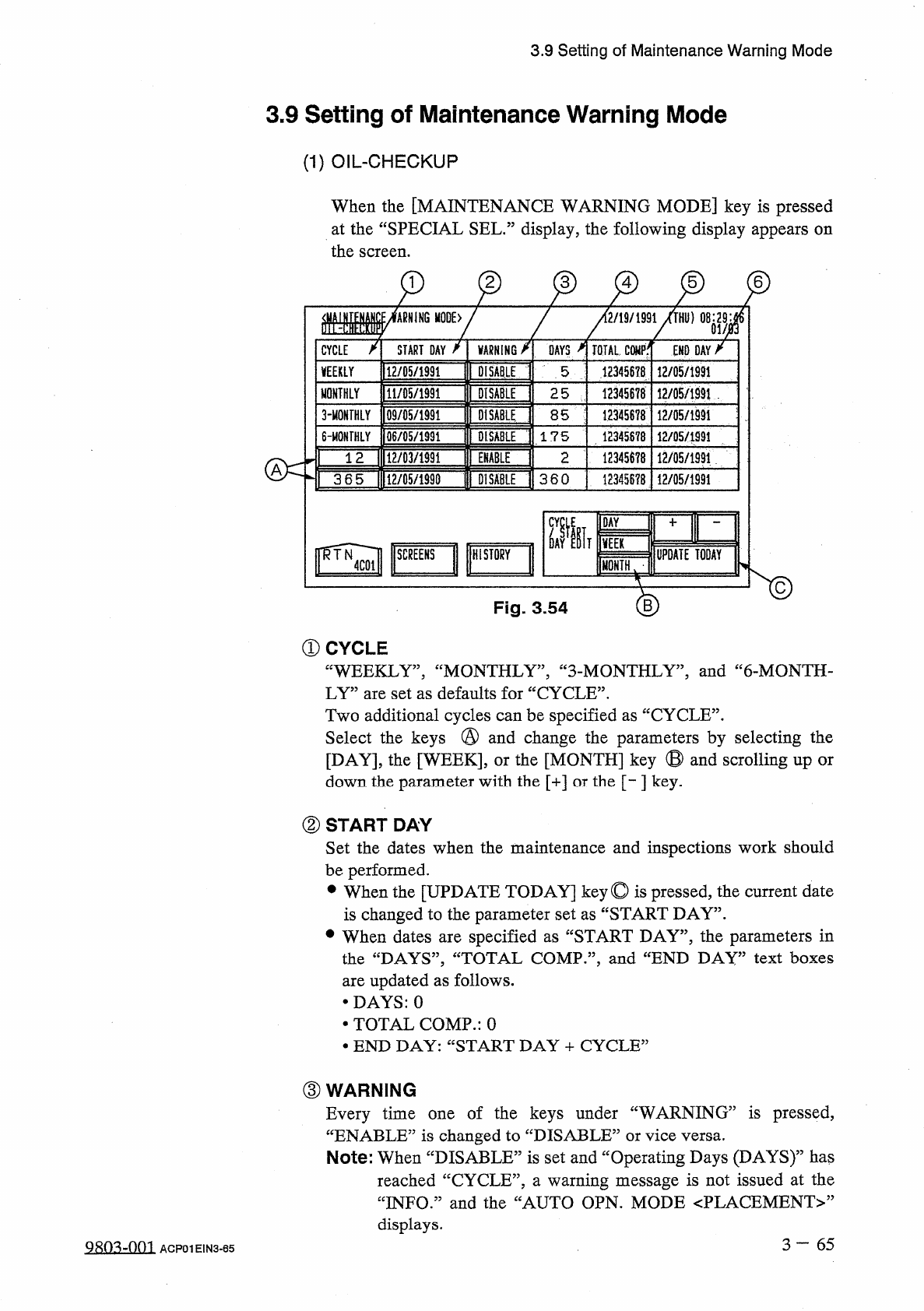
Fig
.
3.54
①
CYCLE
“
WEEKLY
”
,
“
MONTHLY
”
,
“
3
-
MONTHLY
,,
,
and
“
6
-
MONTH
-
LY
”
are
set
as
defaults
for
“
CYCLE
”
.
Two
additional
cycles
can
be
specified
as
“
CYCLE
”
.
Select
the
keys
@
and
change
the
parameters
by
selecting
the
[
DAY
]
,
the
[
WEEK
]
,
or
the
[
MONTH
]
key
⑬
and
scrolling
up
down
the
parameter
with
the
[
+
]
or
the
[
-
]
key
.
or
②
START
DAY
Set
the
dates
when
the
maintenance
and
inspections
work
should
be
performed
.
•
When
the
[
UPDATE
TODAY
]
key
©
is
pressed
,
the
current
date
is
changed
to
the
parameter
set
as
“
START
DAY
”
.
•
When
dates
are
specified
as
“
START
DAY
”
,
the
parameters
in
the
“
DAYS
”
,
“
TOTAL
COMP
”
,
and
“
END
DAY
”
text
boxes
are
updated
as
follows
.
•
DAYS
:
0
•
TOTAL
COMP
.
:
0
•
END
DAY
:
“
START
DAY
+
CYCLE
”
③
WARNING
Every
time
one
of
the
keys
under
“
WARNING
”
is
pressed
,
“
ENABLE
”
is
changed
to
“
DISABLE
:
Note
:
When
“
DISABLE
”
is
set
and
“
Operating
Days
(
DAYS
)
55
has
reached
“
CYCLE
”
,
a
warning
message
is
not
issued
at
the
“
INFO
.
”
and
the
“
AUTO
OPN
.
MODE
<
PLACEMENT
>
,
,
displays
.
or
vice
versa
.
3
—
65
Q
8
Q
3
-
001
ACP
01
EIN
3
-
65
3.9
Setting
of
Maintenance
Warning
Mode
④
DAYS
Number
of
Days
counted
from
“
START
DAY
”
Days
are
added
regardless
of
the
operating
time
and
condition
of
the
machine
.
Note
:
When
“
DAYS
”
reaches
“
END
DAY
”
,
the
background
color
turns
red
.
⑤
TOTAL
COMP
.
Number
of
Components
picked
up
during
automatic
operation
,
starting
from
“
START
DAY
”
The
parameters
can
be
used
to
check
the
operating
condition
of
the
machine
,
starting
from
“
START
DAY
”
.
⑥
END
DAY
Date
counted
from
“
START
DAY
”
The
displayed
date
shows
“
START
DAY
+
CYCLE
”
and
a
warning
message
is
issued
on
the
date
when
“
ENABLE
”
is
set
in
the
data
box
of
the
label
“
WARNING
”
.
3
一
66
gRo
^
-
om
ACP
01
EIN
3
-
66
3.9
Setting
of
Maintenance
Warning
Mode
(
2
)
UPKEEP
-
CHECKUP
When
the
[
SCREENS
]
key
is
pressed
at
the
“
MAINTENANCE
WARNING
MODE
(
OIL
-
CHECKUP
)
”
display
,
the
following
display
appears
on
the
screen
.
2
,
LN
12
/
19
/
1991
(
THU
)
08
:
^
9
M
^
GROUP
START
DAY
VARN
16
DAYS
TOTAL
COMP
.
END
DAY
112
/
00
/
1991
DISABLE
NOZZLE
.
5
12345678
12
/
05
/
1991
112
/
00
/
1991
12
/
05
/
1491
FILTER
#
1
DISABLE
5
12345678
FILTER
t
2
DISABLE
5
12345678
12
/
05
/
1991
TERM
DAYS
m
»
1000
NOZZLE
5
B
1
QQ
00
疆
COMP
.
2
FILTER
51
1
QB
tooooo
12345678
FILTER
#
2
15
B
SIT
w
眶
HISTORY
UPDATE
TODAY
[
MONTH
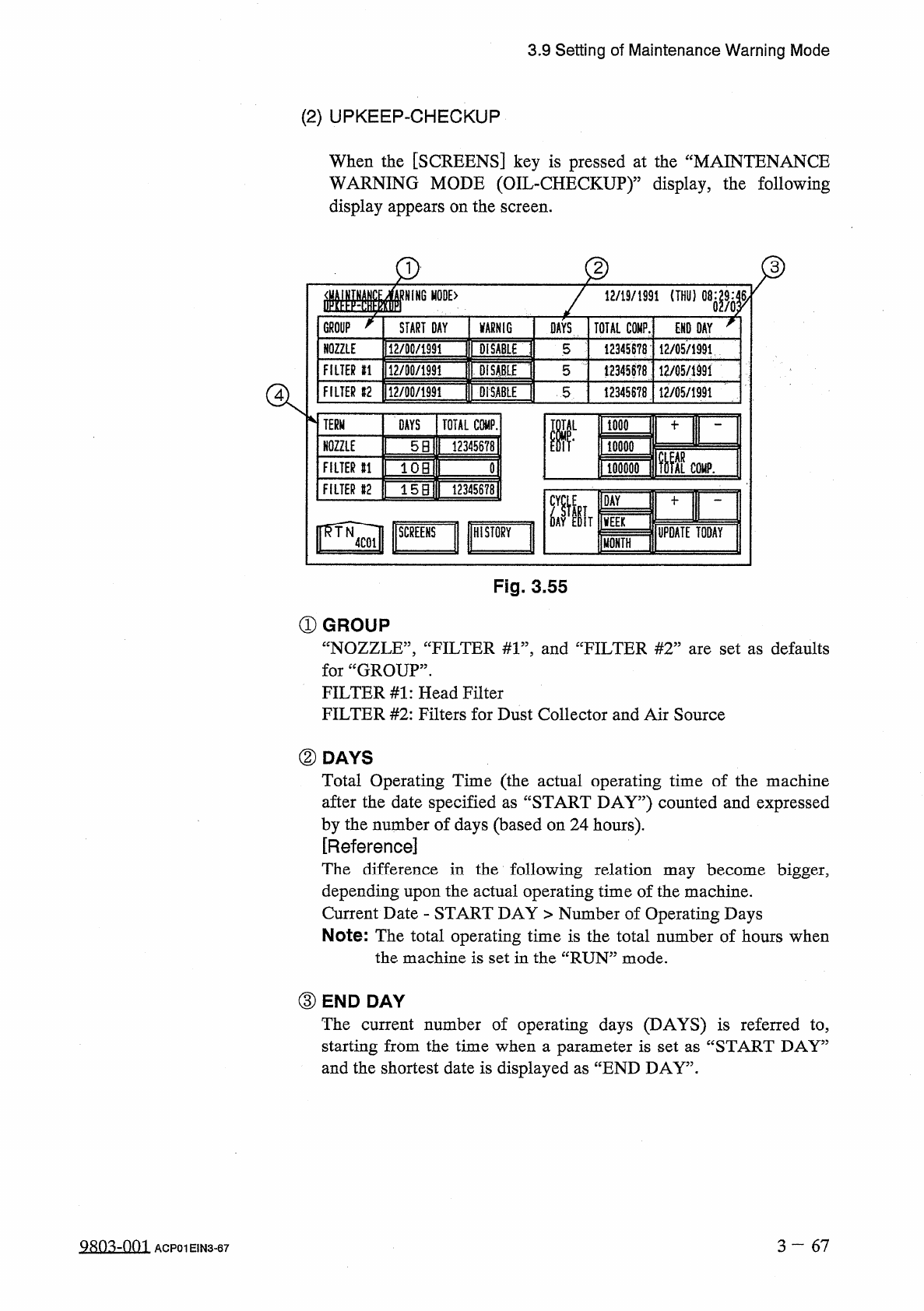
Fig
.
3.55
①
GROUP
“
NOZZLE
”
,
“
FILTER
#
1
”
,
and
“
FILTER
#
2
”
are
set
as
defaults
for
“
GROUP
”
.
FILTER
#
1
:
Head
Filter
FILTER
#
2
:
Filters
for
Dust
Collector
and
Air
Source
②
DAYS
Total
Operating
Time
(
the
actual
operating
time
of
the
machine
after
the
date
specified
as
“
START
DAY
”
)
counted
and
expressed
by
the
number
of
days
(
based
on
24
hours
)
.
[
Reference
]
The
difference
in
the
following
relation
may
become
bigger
,
depending
upon
the
actual
operating
time
of
the
machine
.
Current
Date
-
START
DAY
>
Number
of
Operating
Days
Note
:
The
total
operating
time
is
the
total
number
of
hours
when
the
machine
is
set
in
the
“
RUN
”
mode
.
③
END
DAY
The
current
number
of
operating
days
(
DAYS
)
is
referred
to
,
starting
from
the
time
when
a
parameter
is
set
as
“
START
DAY
”
and
the
shortest
date
is
displayed
as
“
END
DAY
”
.
3
一
67
QRO
^
Om
ACP
01
EIN
3
-
67