3MAINTENANCE__O.pdf - 第86页
2.2 Selection of P . C . B . Flow Direction ( L / R ) ( 2 ) Parameter Settings ① Change of Parameter for TRANSFER ” Open the following display and change the parameter in the “ P . C . B . TRANSFER ” data box . ( Hierarc…
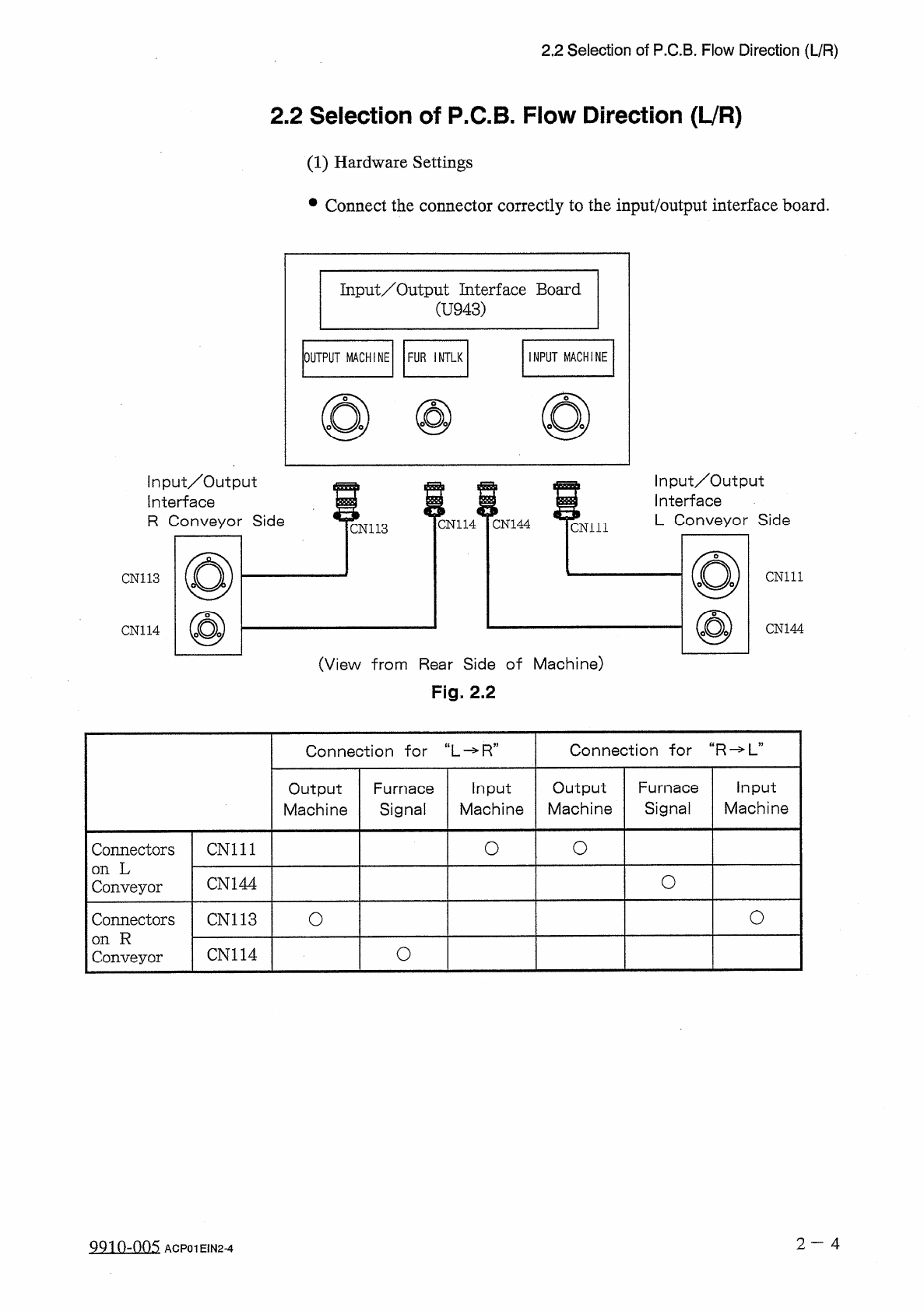
2.2
Selection
of
P
.
C
.
B
.
Flow
Direction
(
L
/
R
)
2.2
Selection
of
P
.
C
.
B
.
Flow
Direction
(
LVR
)
(
1
)
Hardware
Settings
•
Connect
the
connector
correctly
to
the
input
/
output
interface
board
.
Input
/
Output
Interface
Board
(
U
943
)
INPUT
MACHINE
OUTPUT
MACHINE
FUR
INTLK
input
/
Output
Interface
R
Conveyor
Side
Input
/
Output
Interface
L
Conveyor
Side
m
CN
114
CN
144
cm
ii
CN
113
CN
111
CN
113
CN
144
CN
114
(
View
from
Rear
Side
of
Machine
)
Fig
.
2.2
Connection
for
“
R
-
>
L
”
Connection
干
or
“
L
-
»
R
”
Output
Machine
Furnace
Signal
Input
Machine
Output
Machine
Furnace
Signal
Input
Machine
O
O
Connectors
on
L
Conveyor
CN
111
O
CN
144
O
o
Connectors
on
R
Conveyor
CN
113
O
CN
114
2
一
4
QQ
10
-
005
ACP
01
E
1
N
2
-
4
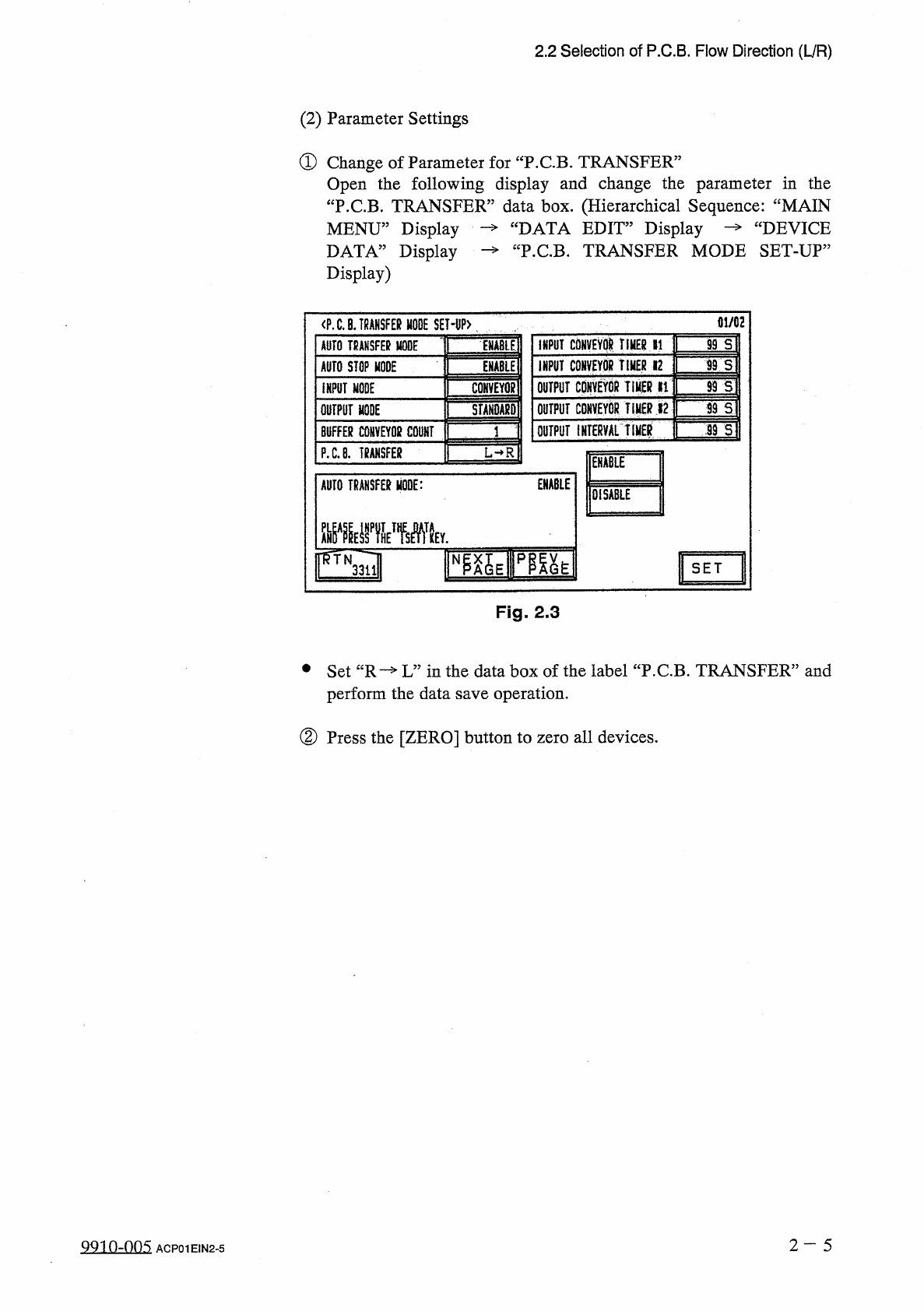
2.2
Selection
of
P
.
C
.
B
.
Flow
Direction
(
L
/
R
)
(
2
)
Parameter
Settings
①
Change
of
Parameter
for
TRANSFER
”
Open
the
following
display
and
change
the
parameter
in
the
“
P
.
C
.
B
.
TRANSFER
”
data
box
.
(
Hierarchical
Sequence
:
“
MAIN
MENU
”
Display
DATA
”
Display
Display
)
“
DATA
EDIT
”
Display
“
P
.
C
.
B
.
TRANSFER
MODE
SET
-
UP
:
DEVICE
—
>
01
/
02
<
P
.
C
.
a
.
TRANSFER
MODE
SET
-
I
)
P
>
INPUT
CONVEYOR
TIMER
»
1
99
S
AUTO
TRANSFER
MODE
jjjABlE
INPUT
CONVEYOR
TIMER
12
ITS
AUTO
STOP
MODE
ENABLE
1
93
S
OUTPUT
CONVEYOR
TIMER
li
CONVEYQg
INPUT
MODE
OUTPUT
CONVEYOR
Tip
*
2
99
S
:
STANDARD
OUTPUT
MODE
OUTPUT
IHTERYAL
tIHER
:
S
9
S
BUFFER
C
0
HVEY
0
K
COUNT
P
.
C
.
B
.
TRANSFER
L
—
R
ENABLE
ENABLE
AUTO
TRANSFER
MODE
:
DISABLE
SET
Fig
.
2.3
•
Set
“
R
—
L
”
in
the
data
box
of
the
label
“
P
.
C
.
B
.
TRANSFER
”
and
perform
the
data
save
operation
.
②
Press
the
[
ZERO
]
button
to
zero
all
devices
.
2
-
5
QQ
10
-
005
ACP
01
EIN
2
-
5
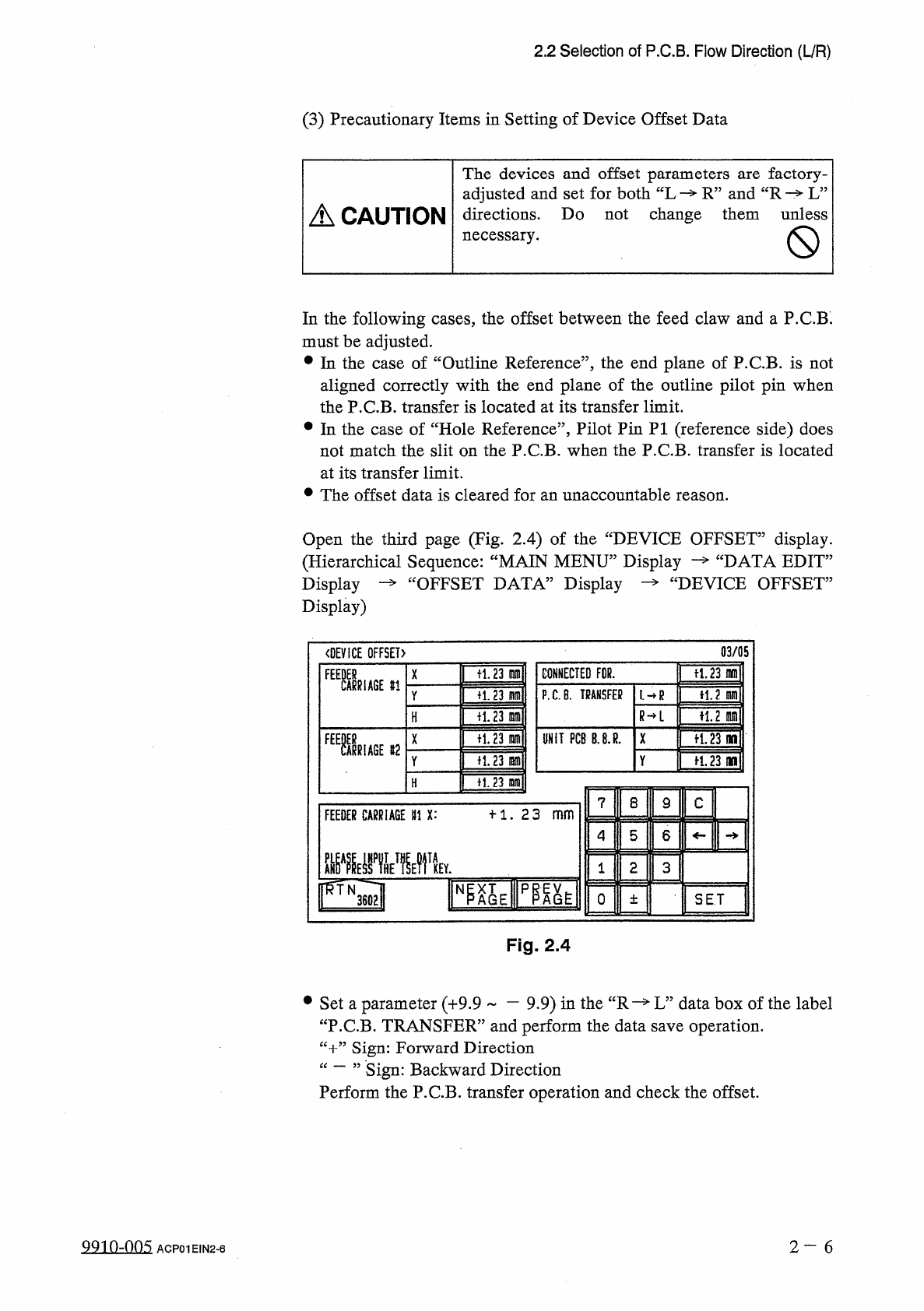
2.2
Selection
of
P
.
C
.
B
.
Flow
Direction
(
L
/
R
)
(
3
)
Precautionary
Items
in
Setting
of
Device
Offset
Data
The
devices
and
offset
parameters
adjusted
and
set
for
both
“
L
R
”
and
“
R
L
”
directions
.
Do
not
change
them
unless
necessary
.
factory
-
are
A
CAUTION
In
the
following
cases
,
the
offset
between
the
feed
claw
and
a
P
.
C
.
B
.
must
be
adjusted
.
•
In
the
case
of
“
Outline
Reference
”
,
the
end
plane
of
P
.
C
.
B
.
is
not
aligned
correctly
with
the
end
plane
of
the
outline
pilot
pin
when
the
P
.
C
.
B
.
transfer
is
located
at
its
transfer
limit
.
•
In
the
case
of
“
Hole
Reference
”
,
Pilot
Pin
PI
(
reference
side
)
does
not
match
the
slit
on
the
P
.
C
.
B
.
when
the
P
.
C
.
B
.
transfer
is
located
at
its
transfer
limit
.
•
The
offset
data
is
cleared
for
an
unaccountable
reason
.
Open
the
third
page
(
Fig
.
2.4
)
of
the
“
DEVICE
OFFSET
”
display
.
“
DATA
EDIT
”
£
DEVICE
OFFSET
”
(
Hierarchical
Sequence
:
“
MAIN
MENU
”
Display
Display
—
“
OFFSET
DATA
”
Display
Display
)
03
/
05
〈
DEVICE
OFFSET
)
ft
.
23
m
CONNECTED
FDR
.
tl
.
23
m
F
1
舰
X
#
1
P
.
C
.
B
.
TRANSFER
H
.
2
m
fi
.
23
m
L
—
R
Y
R
—
L
n
,
2
m
十
1.23
lam
H
fl
.
23
in
UNIT
PCB
B
.
8
.
R
.
X
争
1.23
no
n
.
23
m
争
1.23
(
W
Y
H
.
23
m
H
7
8
9
C
十
1
.
23
_
FEEDER
CARRIAGE
111
X
:
5
6
4
2
3
1
IFQl
N
0
SET
±
Fig
.
2.4
#
Set
a
parameter
(
+
9.9
一
9.9
)
in
the
“
R
—
L
”
data
box
of
the
label
“
P
.
C
.
B
.
TRANSFER
”
and
perform
the
data
save
operation
.
“
十
”
Sign
:
Forward
Direction
“
一
”
Sign
:
Perform
the
P
.
C
.
B
.
transfer
operation
and
check
the
offset
.
Backward
Direction
99
in
-
nn
5
2
—
6
ACP
01
EIN
2
-
6