3MAINTENANCE__O.pdf - 第192页
4.3 Management of Password 12 / 05 / 1991 ( THU ) 08 : 29 : 45 af ■ 腦 f c w _ . DAV 1 ^ ENDA ! AGRAM 0 A ] A * C 0 MP * l , BRARV 0 ATA * A U T Q M 8 ^ M A N U ^ D E DATA E D I T S P E C ^ L . LAYACOLOC - - MA § ㈣ p F A …
4.3
Management
of
Password
〈
PASSWORD
ENTRY
)
PLEASE
ENTER
THE
OPERATER
#
1
PASSWORD
.
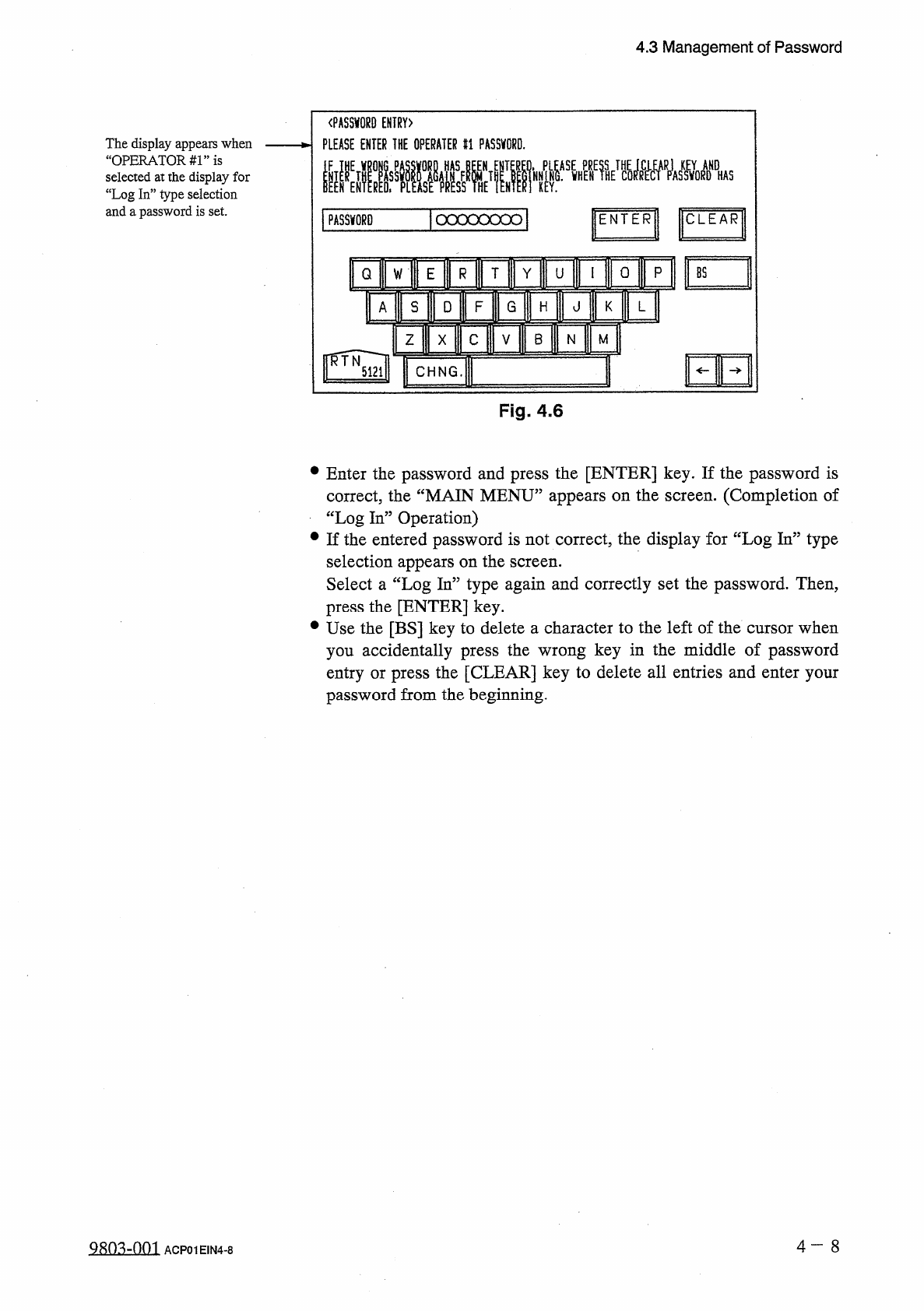
The
display
appears
when
“
OPERATORS
”
is
selected
at
the
display
for
“
Log
In
”
type
selection
and
a
password
is
set
.
ICLEAR
1
PASSWORD
|
ocxxoood
|
ENTER
0
p
T
Y
Q
U
W
mi
s
D
F
G
A
H
HE
B
Z
M
N
X
I
CHNG
.
Fig
.
4.6
•
Enter
the
password
and
press
the
[
ENTER
]
key
.
If
the
password
is
correct
,
the
“
MAIN
MENU
”
appears
on
the
screen
.
(
Completion
of
“
Log
In
”
Operation
)
•
If
the
entered
password
is
not
correct
,
the
display
for
“
Log
In
”
type
selection
appears
on
the
screen
.
Select
a
“
Log
In
”
type
again
and
correctly
set
the
password
.
Then
,
press
the
[
ENTER
]
key
.
•
Use
the
[
BS
]
key
to
delete
a
character
to
the
left
of
the
cursor
when
you
accidentally
press
the
wrong
key
in
the
middle
of
password
entry
or
press
the
[
CLEAR
]
key
to
delete
all
entries
and
enter
your
password
from
the
beginning
.
4
一
8
ACP
01
EIN
4
-
8
4.3
Management
of
Password
12
/
05
/
1991
(
THU
)
08
:
29
:
45
af
■
腦
f c w
_
.
DAV
1
^
ENDA
!
AGRAM
0
A
]
A
*
C
0
MP
*
l
,
BRARV
0
ATA
*
AUTQM
8
^
M A N U
^
D E
DATA
E D I T
SPEC
^
L
.
LAYACOLOC
-
-
MA
§
㈣
p
F
A
jjlOGOijfI
ER
-
0
R
^
MULTI
PLEASE
MAKE
A
StlECTION
.
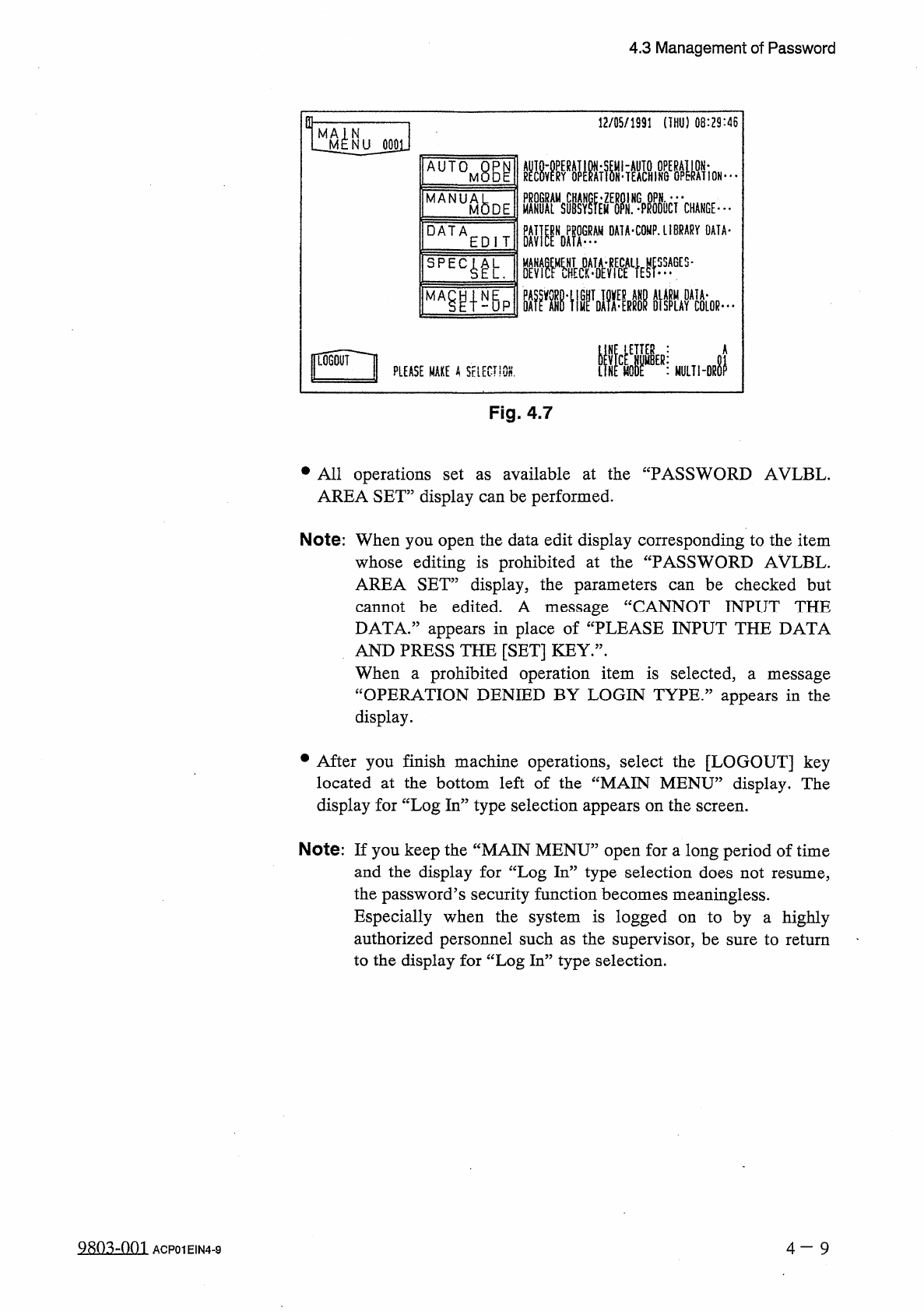
Fig
.
4.7
•
All
operations
set
AREA
SET
”
display
can
be
performed
.
available
at
the
“
PASSWORD
AVLBL
.
as
Note
:
When
you
open
the
data
edit
display
corresponding
to
the
item
whose
editing
is
prohibited
at
the
“
PASSWORD
AVLBL
.
AREA
SET
”
display
,
the
parameters
can
be
checked
but
cannot
be
edited
.
A
message
DATA
.
”
appears
in
place
of
“
PLEASE
INPUT
THE
DATA
AND
PRESS
THE
[
SET
]
KEY
.
”
.
When
a
prohibited
operation
item
is
selected
,
“
OPERATION
DENIED
BY
LOGIN
TYPE
.
1
CANNOT
INPUT
THE
a
message
appears
in
the
display
.
•
After
you
finish
machine
operations
,
select
the
[
LOGOUT
]
key
located
at
the
bottom
left
of
the
“
MAIN
MENU
”
display
.
The
display
for
“
Log
In
”
type
selection
appears
on
the
screen
.
Note
:
If
you
keep
the
“
MAIN
MENU
”
open
for
a
long
period
of
time
and
the
display
for
“
Log
In
”
type
selection
does
not
resume
,
the
password
’
s
security
function
becomes
meaningless
.
Especially
when
the
system
is
logged
on
to
by
a
highly
authorized
personnel
such
as
the
supervisor
,
be
sure
to
return
to
the
display
for
“
Log
In
”
type
selection
.
9
sn
^
-
nm
4
-
9
ACP
01
EIN
4
-
9
4.4
Setting
of
Light
Tower
and
Alarm
Data
4.4
Setting
of
Light
Tower
and
Alarm
Data
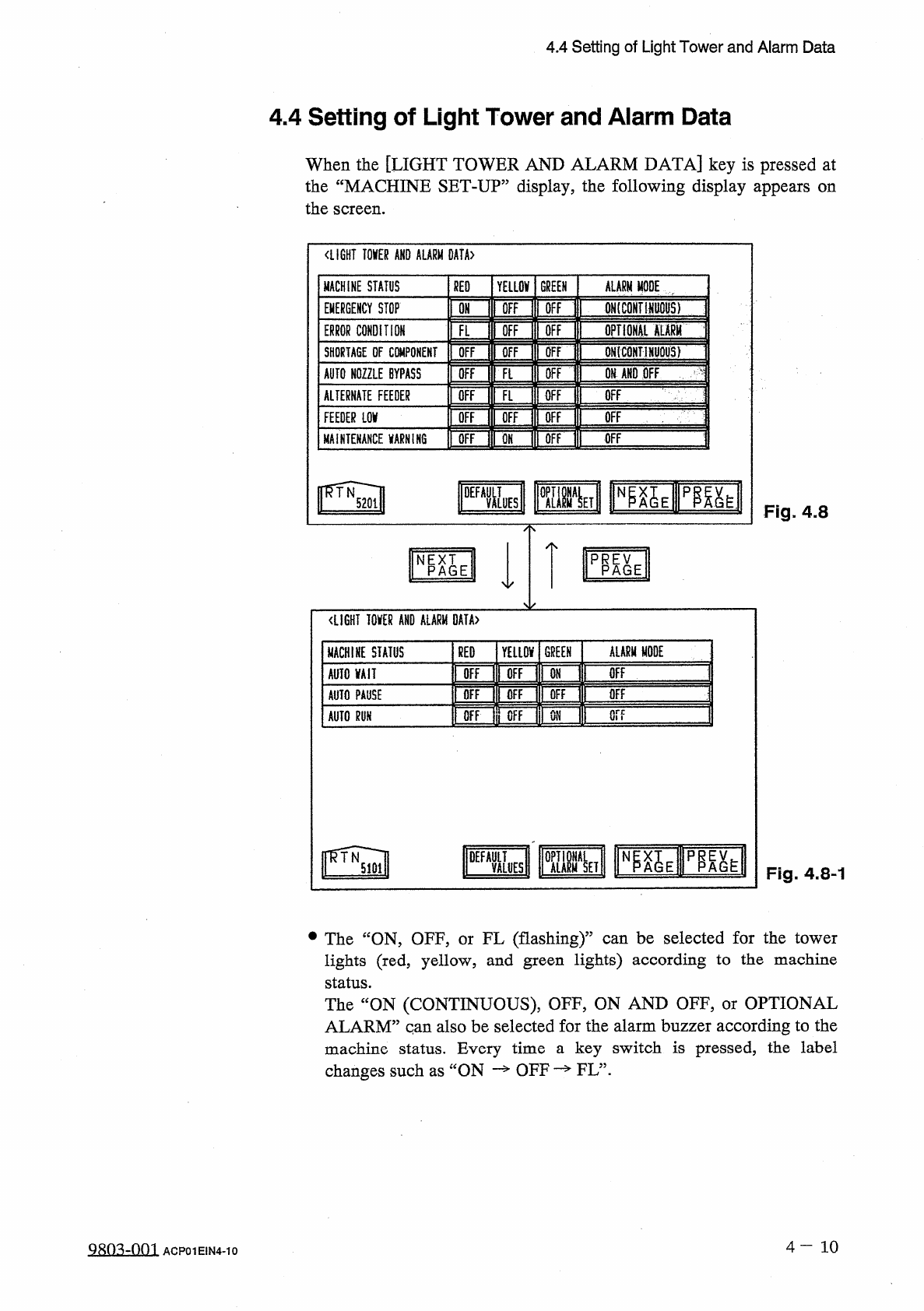
When
the
[
LIGHT
TOWER
AND
ALARM
DATA
]
key
is
pressed
at
the
“
MACHINE
SET
-
UP
”
display
,
the
following
display
appears
on
the
screen
.
〈
LIGHT
TOKR
AND
ALARM
0
AtA
>
MACHINE
STATUS
RED
YELLOV
GREEN
ALARM
MODE
[
IFF
ONtCONTHWOHS
)
OFF
EMERGENCY
STOP
ON
ffi
opTioHAi
mm
ERROR
CONDITION
OFF
FL
QN
(
CONTlNljQUS
)
OFF
SHORTAGE
DF
CWiPONEMT
OFF
Ofi
AND
OFF
AUTO
NOZZLE
BYPASS
OFF
OFF
Ft
OFF
ALTERNATE
FEEDER
OFF
FL
OFF
m
Of
OFF
OFF
OFF
FEEDER
LOV
OFF
OFF
MAINTENANCE
VARNIK
6
OFF
pgy
Fig
.
4.8
PRP
^
E
NPAGE
<
LIGHT
I
0
KR
AND
ALARM
DATA
〉
ALARM
MODE
GREEN
MACHINE
STATUS
RED
YELLOV
OFF
OFF
OFF
AUTO
VAII
ON
OFF
OFF
OFF
OFF
AUTO
PAUSE
or
?
OFF
OFF
ON
AUTO
m
DEFA
&
S
p
^
h
Fig
.
4.8
-
1
•
The
“
ON
,
OFF
,
or
FL
(
flashing
)
”
can
be
selected
for
the
tower
lights
(
red
,
yellow
,
and
green
lights
)
according
to
the
machine
status
.
The
“
ON
(
CONTINUOUS
)
,
OFF
,
ON
AND
OFF
,
or
OPTIONAL
ALARM
”
qan
also
be
selected
for
the
alarm
buzzer
according
to
the
machine
status
.
Every
time
a
key
switch
is
pressed
,
the
label
changes
such
as
ON
—
OFF
—
FL
”
.
4
-
10
9803
-
QQ
1
ACP
01
EIN
4
-
10