KE2020-Instruction-Manual-ver1.30.pdf - 第365页
5 − 23 (B) Corn er recognition Recognition conditions: ① Components whose whole shape is a regular squar e or rectang le ② Components whose corner angle R is 0. 5 mm or less ③ Component s whose linear portion leng th f o…
5 − 22
3) Limitation on components depending on the recognition method
(A) Side recognition
Recognition conditions:
① Components whose whole shape is a rectangle or regular square
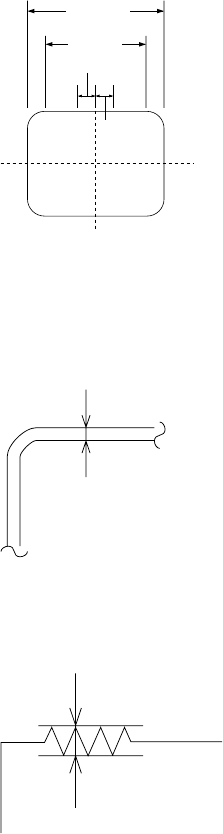
② Components whose linear portion (line segment) of a side is 1/2 or more of
the component outline size but whose linear portion (line segment) should
be 3 mm or more
③ Components whose side middle section is straight: 1.5 cm on both sides of
the center.
1.5 mm
1.5 mm
Line
segment
Component
outline size
④ Components whose component angle is within 90° ± 0.5°.
⑤ Components whose sides are 0.3 mm or more when their insides are
imaged darkly at imaging
0.3mm or more
⑥ Components whose side roughness forming a linear portion is 0.1 mm or
less
0.1mm or less
⑦ Components whose component shape is not convex.
When the above conditions are satisfied, side recognition is enabled.
Fig. 5.2.3.11-1 Explanatory Drawing of
Recognition Conditions 1), 2) and 3)
Fig. 5.2.3.11-2 Explanatory Drawing of
Recognition Condition 5)
Fig. 5.2.3.11-3 Explanatory Drawing of
Recognition Condition 6)
5 − 23
(B) Corner recognition
Recognition conditions:
① Components whose whole shape is a regular square or rectangle
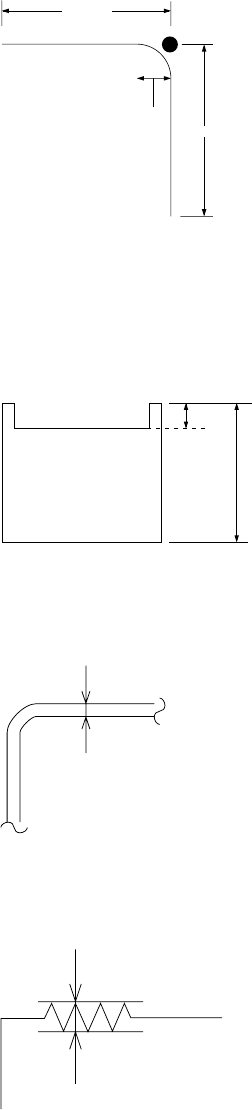
② Components whose corner angle R is 0.5 mm or less
③ Components whose linear portion length forming each side is 2 mm or more
2.00 mm
2.00 mm
0.5 mm
④ Components whose 4 corner points are at vertexes of a regular square or
rectangle
⑤ Components whose outline is not convex
⑥ Components with concave portions whose L1 is 10% or less of L2
L2
L1
⑦ Components whose sides are 0.3 mm or more when their insides are
imaged darkly at imaging
0.3mm or more
⑧ Components whose side roughness forming a linear portion is 0.1 mm or
less
0.1mm or less
♦ When the above recognition conditions are satisfied, corner recognition is
enabled.
Fig. 5.2.3.11-7 Explanatory Drawing of
Recognition Condition 8)
Fig. 5.2.3.11-6 Explanatory Drawing of
Recognition Condition 7)
Fig. 5-2.3.11-5 Explanatory Drawing of
Recognition Condition 6)
Fig. 5.2.3.11-4 Explanatory Drawing of
Recognition Conditions 2) and 3)
5 − 24
(C) Center recognition
Recognition conditions
① Components whose ratio of width to length is 1:2 or more
② Components whose side portion is 0.3 mm or more (The inside of a side
may be hollow at imaging.)
When the above conditions are satisfied, center recognition is enabled.
Note: Concavity and convexity may exit on the component outline. However, they
have an effect on the center position and inclination.
In this case, adjust the placement data, etc.
4) Recognition component examples
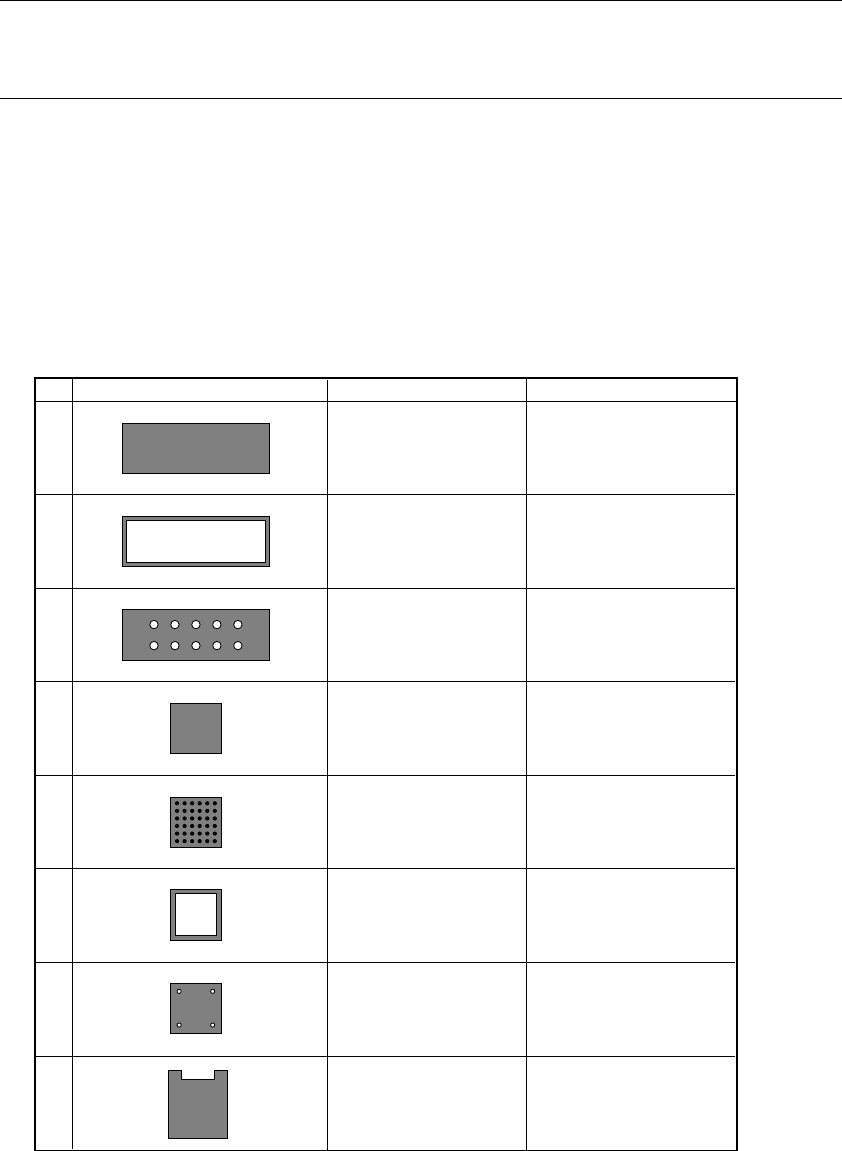
The components to be supported by the component outline recognition function
are those whose shapes are close to a rectangle or regular square. The edges
forming an outline should be 0.3 mm or more.
* In the component drawing shown in the following table, the black/white is
reversed unlike the reality.
Table 5.2.3.11-1 Recognition Components Table
1
2
3
4
5
6
7
8
Rectangular component
The inside of the
component is hollow.
Outline edge should be
0.3 mm or more.
The inside of the
component is undefined.
Square component
CBGA
The inside of the
component is hollow.
The inside of the
component is hollow.
The side shape is concave.
Center recognition (Note)
Side recognition
Corner recognition
Center recognition (Note)
Side recognition
Corner recognition
Center recognition (Note)
Side recognition
Corner recognition
Side recognition
Corner recognition
Side recognition
Corner recognition
Side recognition
Corner recognition
Side recognition
Corner recognition
Corner recognition
No. Recognition component shape Recognition method Remarks