00198328-01_AI_Basic Pack Vakuum Tooling_TX_DE_EN.pdf - 第60页
3 Installation 3.3 Final Work 60 Montageanleitung / Assembly Instructions SIPLACE TX-Serie Basic Pack Vacuum Tooling 07/2017 3.3.1.1 Factory Settings Parameter VSi-V VSi-P10 VSi-VP8 Switching point 1 Switching point mode…
3 Installation
3.3 Final Work
Montageanleitung / Assembly Instructions SIPLACE TX-Serie Basic Pack Vacuum Tooling 07/2017 59
3.3.1 Settings in the Vacuum Switch
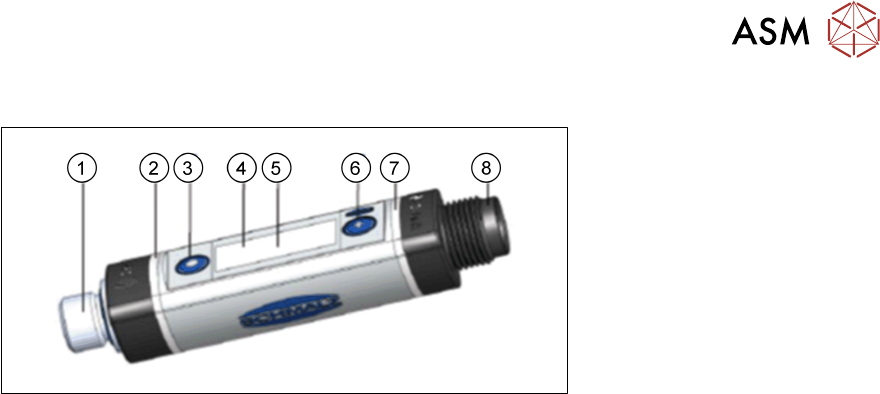
Fig.4: Vacuum switch
1. Fluid connection
2. Switching point 1 display, ORANGE or operating voltage display, GREEN
3. MODE button
4. Display
5. Position of the NFC antenna behind the display
6. SET button
7. Switching point 2 display, ORANGE
8. Electrical connection M12-4 or M8-4
Basic operation:
●
Press the SET button for the basic menu.
●
To scroll forward, press the SET button.
●
To select a menu item, press the MODE button.
You can quit or cancel the menus as follows:
●
Press both SET and MODE buttons.
●
Do not press any button for 1 minute.

3 Installation
3.3 Final Work
60 Montageanleitung / Assembly Instructions SIPLACE TX-Serie Basic Pack Vacuum Tooling 07/2017
3.3.1.1 Factory Settings
Parameter VSi-V VSi-P10 VSi-VP8
Switching point 1
Switching point mode and logic Two-point mode, normally closed (H.
no)
Switching point SP1 750 mbar 5500 mbar -750 mbar
Reset point rP1 600 mbar 5000 mbar -600 mbar
Window hysteresis Hy1 / leakage limit per sec L-1 20 mbar 100 mbar 20 mbar
Switch-on delay dS1, switch-off delay dr1 0ms 0ms 0ms
Switching point 2
Switching point mode and logic Two-point mode, normally closed (H.
no)
Switching point SP2 550 mbar 5000 mbar 5500 mbar
Reset point rP2 500 mbar 4500 mbar 5000 mbar
Window hysteresis Hy2 / leakage limit per sec L-2 20 mbar 100 mbar 20 mbar
Switch-on delay dS2, switch-off delay dr2 0ms 0ms 0ms
Transistor function PNP PNP PNP
Display unit mbar mbar mbar
Eco mode Off Off Off
Display alignment Standard Standard Standard
IO link device locks, extended device locks 0 0 0
Menu PIN code, NFC PIN code 000 000 000
3 Installation
3.3 Final Work
Montageanleitung / Assembly Instructions SIPLACE TX-Serie Basic Pack Vacuum Tooling 07/2017 61
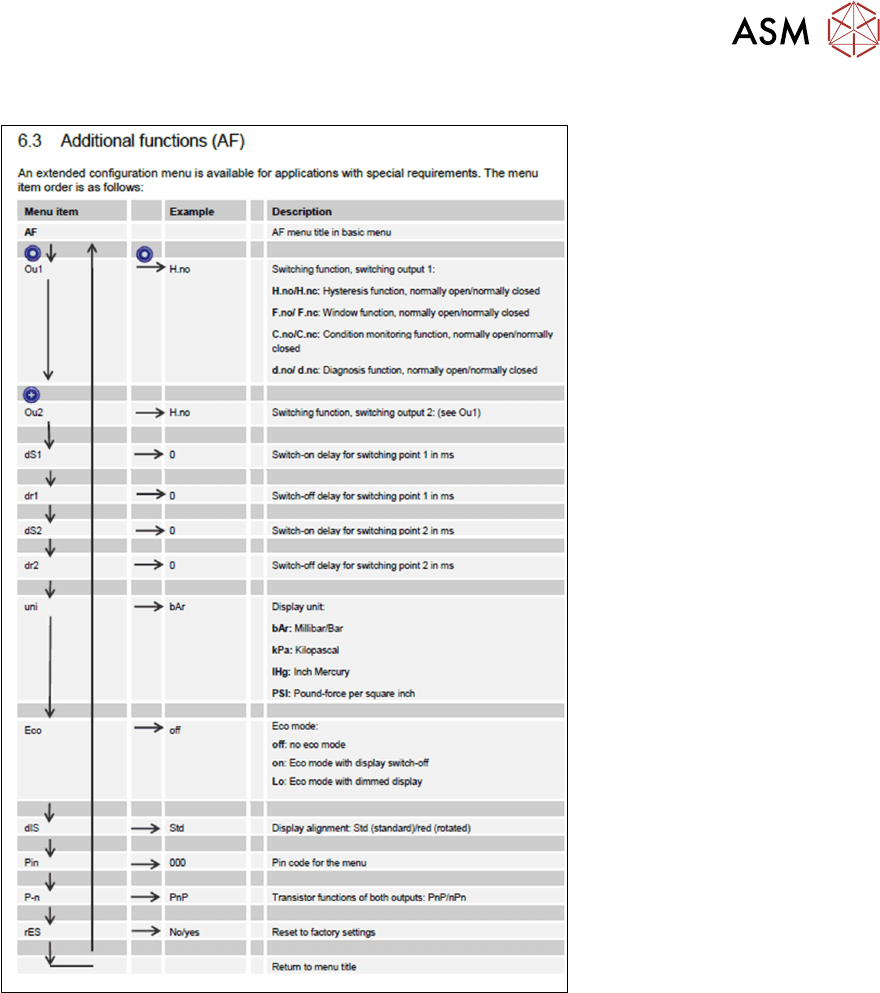
3.3.1.2 Setting Switching Point 2 as Normally Open
Fig.5: Setting switching point 2 as normally open
Proceed as follows to set switching point 2 as normally open:
► Press the SET button.
► Press the SET button until you see the AF (Additional Functions) menu item.
► Press the MODE button. Ou1 appears on the display.
► Press the SET button until Ou2 appears.
► Press the MODE button. H.no appears on the display.
► Press the SET button until H.nc is on the display.
► Quit the menu.