i3070_Software_Installation.pdf.pdf - 第12页
12 i3070 Software Installation 5 Complete the license installation. Refer to Installing S oftware Licenses . 6 T o run the i3070 softwar e when Windows Firewall is enabled (optional): T o allow the i3070 software t o run…
i3070 Software Installation 11
Completing the software installation
Task Steps
The installation wizard procedure is now completed. Continue with the following tasks.
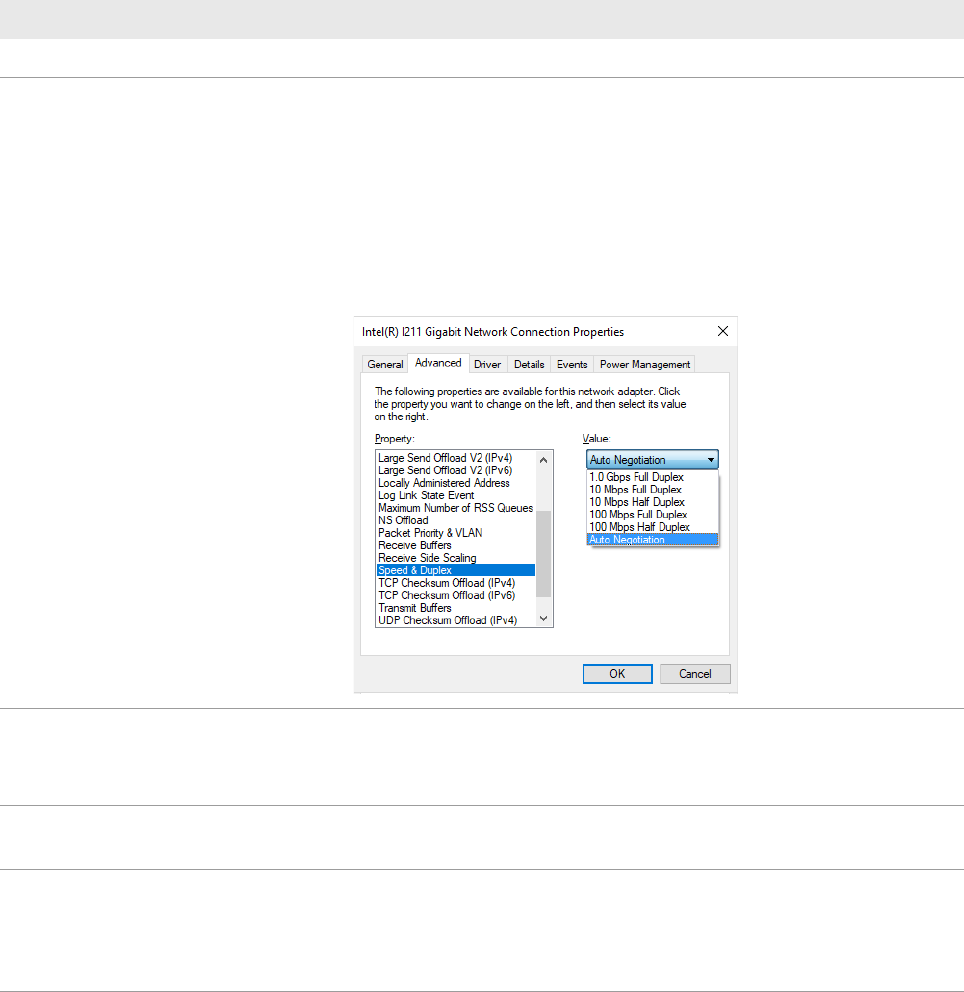
1 If installing on a testhead controller,
set the recommended Speed &
Duplex on Testhead LAN to prevent
lost heartbeat failure:
a Right-click on the Testhead LAN icon in the Taskbar and select Status.
b In the Testhead LAN Status dialog box, click Properties.
c In the Testhead LAN Properties dialog box, click Configure.
d In the network adapter’s Properties dialog box, click the Advanced tab.
e Select Speed & Duplex and change its value according to the Module
Control Card in use.
ControlXTPB – Auto Negotiation
ControlXTPA – 100 Mb, half duplex
2 Set power options to never turn off
the hard disks and monitor:
a Open Control Panel and click Power Options.
b Click Change plan settings for the power plan in use.
c Set all options to Never and click Save changes.
3 Check for software patches: Go to www.keysight.com/find/i3070patches to check for any software patches
and install them.
4 Copy needed files: a Open a KornShell window.
b Execute
setupEnv.ksh. (This will copy four files to the $HOME folder.
This step creates the user account and home env.)
c Close the KornShell window.
12 i3070 Software Installation
5 Complete the license installation. Refer to Installing Software Licenses.
6 To run the i3070 software when
Windows Firewall is enabled
(optional):
To allow the i3070 software to run when Windows Firewall is enabled, go to the
C:\I3070_ICT\util folder, right-click CreateFirewallRule.bat and select Run as
administrator.
The script creates inbound rules for the required ports and TCP/IP addresses.
• Default ports enabled: 1337, 3071, 9090, 5672, 31883, 40100, 40102,
50100, 50102, 7030.
• Default IP addresses enabled: 10.3.112.1 to 10.3.112.255, 0.0.0.0,
192.168.1.1, 255.255.255.255.
Completing the software installation (continued)
Task Steps
i3070 Software Installation 13
Installing Software Licenses
Installing Node-Locked Licences
Setting Up Client Machines to Use Floating Licenses
Viewing Licenses
Installing Node-Locked Licences
1 Launch PathWave License Manager (Start > Keysight PathWave License
Manager > Keysight PathWave License Manager).
2 Click + Add a License File.
3 Click Browse to locate and select the license(s) that you redeemed.
4 Click Add Now.
5 Click Done to close the Add a License File window.
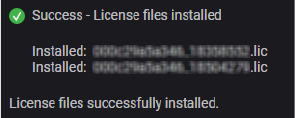
You should see the following status:
6 Open Task Manager (right-click on the taskbar and click Task Manager).
7 On the Services tab, right-click i3070 License Communication Service and
select Restart.
You can now run the i3070 In-Circuit Test Software.
View licenses and their status from the License Status module (see Viewing
Licenses).