i3070_Software_Installation.pdf.pdf - 第13页
i3070 Software Installation 13 Installing Software Licenses Installing Node-Locked Licences Setting Up Client Machines t o Use Floating Licenses Viewing Licenses Installing Node-Locked Licenc es 1 Launch PathWav e Licens…
12 i3070 Software Installation
5 Complete the license installation. Refer to Installing Software Licenses.
6 To run the i3070 software when
Windows Firewall is enabled
(optional):
To allow the i3070 software to run when Windows Firewall is enabled, go to the
C:\I3070_ICT\util folder, right-click CreateFirewallRule.bat and select Run as
administrator.
The script creates inbound rules for the required ports and TCP/IP addresses.
• Default ports enabled: 1337, 3071, 9090, 5672, 31883, 40100, 40102,
50100, 50102, 7030.
• Default IP addresses enabled: 10.3.112.1 to 10.3.112.255, 0.0.0.0,
192.168.1.1, 255.255.255.255.
Completing the software installation (continued)
Task Steps
i3070 Software Installation 13
Installing Software Licenses
Installing Node-Locked Licences
Setting Up Client Machines to Use Floating Licenses
Viewing Licenses
Installing Node-Locked Licences
1 Launch PathWave License Manager (Start > Keysight PathWave License
Manager > Keysight PathWave License Manager).
2 Click + Add a License File.
3 Click Browse to locate and select the license(s) that you redeemed.
4 Click Add Now.
5 Click Done to close the Add a License File window.
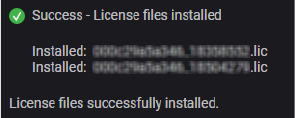
You should see the following status:
6 Open Task Manager (right-click on the taskbar and click Task Manager).
7 On the Services tab, right-click i3070 License Communication Service and
select Restart.
You can now run the i3070 In-Circuit Test Software.
View licenses and their status from the License Status module (see Viewing
Licenses).
14 i3070 Software Installation
Setting Up Client Machines to Use Floating Licenses
Follow these steps to enable client machines to make use of floating licenses, which
are shared from one or more remote license servers. You will need the hostname(s)
of the license server(s).
1 Launch PathWave License Manager (Start > Keysight PathWave License
Manager > Keysight PathWave License Manager).
2 Click Specify a Remote License Server.
3 Enter the hostname of the license server, for example,
27009@server1
If your system relies on a triple redundant server setup, enter the hostnames of
the three license servers, separated by commas. The three servers should be
listed in the same order as specified in the license files. For example:
27009@server1,27009@server2,27009@server
4 Click Verify Connection and Save.
5 Click Done when the process is completed.
6 In a Command Prompt window, go to
C:\I3070_ICT\util and run
LicenseSearchPathReg.bat as an administrator.
Enter
All if prompted to overwrite.
7 Open Task Manager (right-click on the taskbar and click Task Manager).
8 On the Services tab, right-click i3070 License Communication Service and
select Restart.
You can now run the i3070 In-Circuit Test Software.
View licenses and their status from the License Status module (see Viewing
Licenses).