00193790-01.pdf - 第114页
2 English Installat ion and Getting Started with CACCIA 2.10 Overview of the J umper Settings for Individual Subsyst ems Issue 07/2004 48 2.10.2.6 CAN Processor Board 8Bit 80C515C on the Head Adapter C&P Fig. 2 - 38 …
Installation and Getting Started with CACCIA 2 English
Issue 07/2004 2.10 Overview of the Jumper Settings for Individual Subsystems
47
Description LED‘s:
–LZOS Light barrier Z-axis upper stop
–LZUS Light barrier Z-axis down position
– LSM Stepper motor board not connected
–LSZD Light barrier Swivel in and turning dp-station
–LSVZ Light barrier Vacuum / air kiss Z-axis
– LSVA Light barrier Vacuum / air kiss reject position
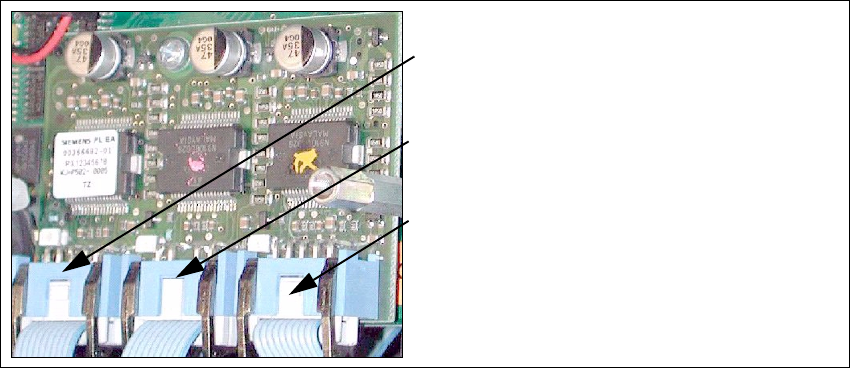
2.10.2.5 Stepping motor board
The stepping motor board for the valve drivers and the swivel function on the DP station are
mounted onto the head adapter below the CAN processor board 80C515C. Is the board missing
the LSM LED at the head adapter is ON. In this case the CAN Bus Processor board can not fixed.
Fig. 2 - 37 Stepping motor board
2
3
1
Stepping motor reject position
(for S/F. HS and HF machine)
Steppingmotorpickup,placement and
reject position HF/HF3
Stepping motor DP-axis
2 English Installation and Getting StartedwithCACCIA
2.10 Overview of the Jumper Settings for Individual Subsystems Issue 07/2004
48
2.10.2.6 CAN Processor Board 8Bit 80C515C on the Head Adapter C&P
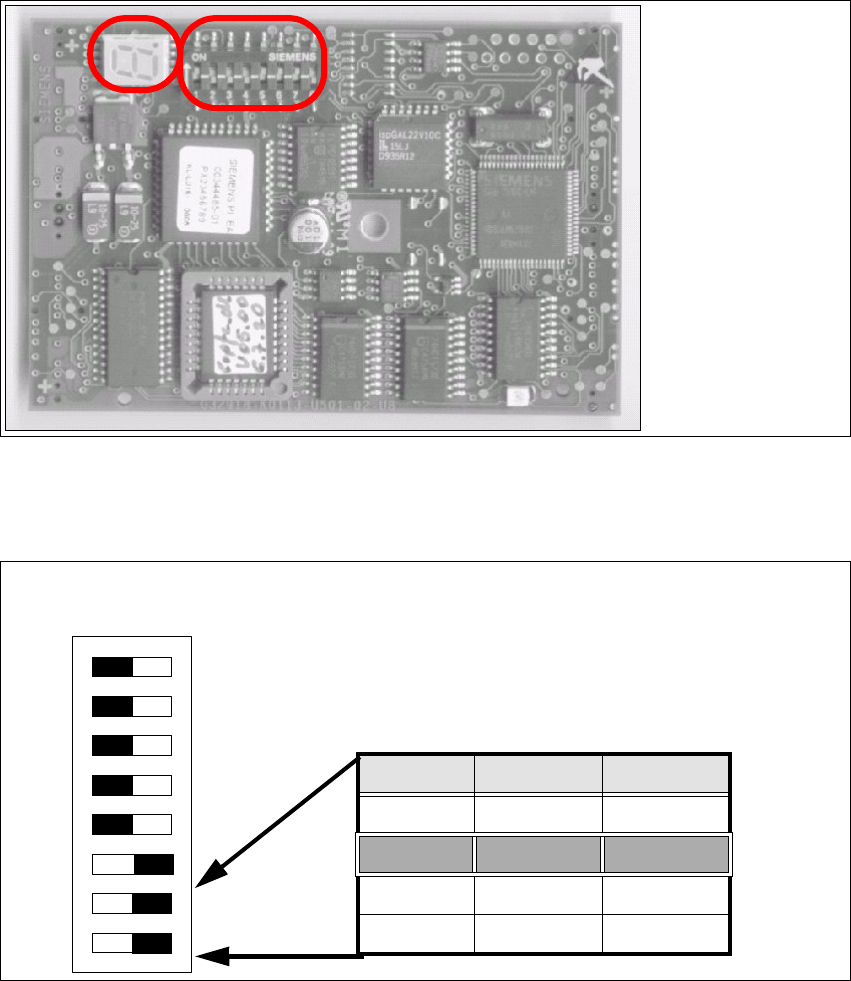
Fig. 2 - 38 CAN Processor board
Fig. 2 - 39 Table: DIP Switches
Description
DIP Switches and
7 Segment display
see below.
DIP Switch
ON
78123456
Gantries Switch 7 Switch 8
Gantry 1 ON ON
Gantry 2 ON OFF
Gantry 3 OFF ON
Gantry 4 OFF OFF

Installation and Getting Started with CACCIA 2 English
Issue 07/2004 2.10 Overview of the Jumper Settings for Individual Subsystems
49
Switch Position on the Head Board
2
Fig. 2 - 40 Table: DIP Switches
The wiring of the switch depends on the placement machine involved:
Jumper 1: ON → CAN matching resistor on the placement head is set
(S-20, F4, F5), S-23, S-25 HM,F5HM.
OFF → CAN_matching resistor is not wired on the head (HS/HF default)
Jumper 2: ON → Setting during the download
OFF → Default status
Jumper 3: ON → Test mode
OFF → Default status
Jumper 4: ON → Test mode (setting of CAN ID)
OFF → Default status
Jumper 5: ON → Default status
OFF → Switch off CAN Objects component-, LP vision and IC head on the
modular Head FW (only for SIPLACE HF)
Jumper 6: ON → Default status
Jumper7,8:CAN_ID:
Standard OFF OFF OFF OFF ON ON CAN_Addresse
Switch
position
1
CAN_R120
2
EPROM_WE
3
Test _Mode
4
CAN_ERR_
SWITCH
5
Jumper 5
6
Jumper 6
7
CAN_ID1
8
CAN_ID0
ON X
see
above
see above
OFF X X X X X
see
above
see above