00198505-01_SM_SIPLACE_SmartFeeder_EN.pdf - 第20页
3 X-Feeder Test Station 3.1 X Feeder Test Station Error Messages 20 Service Manual SIPLACE SmartFeeder 4 - 104 mm X 11/2017 3.1 X Feeder Test Station Error Messages If an error number is shown on the X-Feeder Testbox, pr…
3 X-Feeder Test Station
Service Manual SIPLACE SmartFeeder 4 - 104 mm X 11/2017 19
3 X-Feeder Test Station
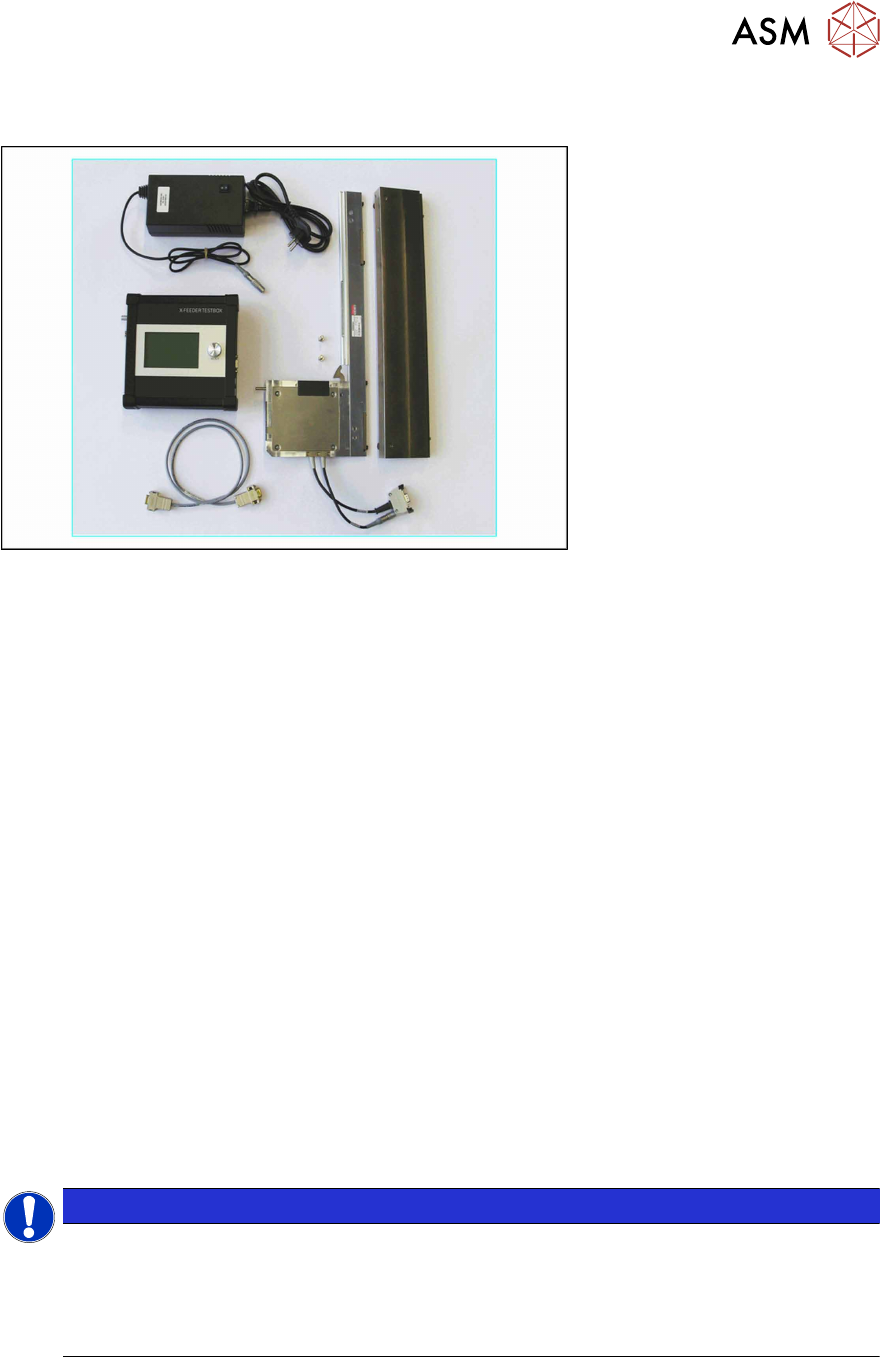
The X Feeder Test Station [03076685-xx],consists of an X Feeder Testbox and a Single Slot EDIF
(SSE) with base plate, on which the relevant X feeder modules are placed for checking. The SSE is
connected to the X Feeder Testbox via a CAN cable and is supplied with power via a power pack.
The X Feeder Testbox can be used to test the following feeder modules:
●
X Feeder 4-88mm
●
SmartFeeder 2x8mmX
●
SmartFeeder 4-16mmX
The X Feeder Testbox has the following functions:
●
Checking the feeder module (test)
The X Feeder Testbox checks the following in one run:
– Whether the feeder has stored an error.
If this is the case, the test will be terminated and the corresponding error number will be
shown on the display. Reset the error and then restart the test.
The documentation supplied includes detailed instructions about how to reset the relevant
error.
– The functionality of the foil rocker
– The functionality of the tape drive
– The functionality of the foil disposal drive
●
Reference run (X feeder modules only)
●
Resetting the service counter (SmartFeeders only)
●
Updating firmware of the feeder module
●
Downloading the feeder module log file
NOTICE
Background illumination
To protect the background illumination and the display of the X Feeder Care Testbox, the
display and the lighting are switched off if the device is not used for more than 15 minutes.
To switch the display and lighting back on, turn or press the knob on the X Feeder Testbox.
The currently active function of this knob will not be executed in this case.
For a detailed description of how to operate the X Feeder Test Station, refer to the Job Guide "X
Feeder Test Station " (German [00196352-xx], English [00196353-xx], other languages on re-
quest).
3 X-Feeder Test Station
3.1 X Feeder Test Station Error Messages
20 Service Manual SIPLACE SmartFeeder 4 - 104 mm X 11/2017
3.1 X Feeder Test Station Error Messages
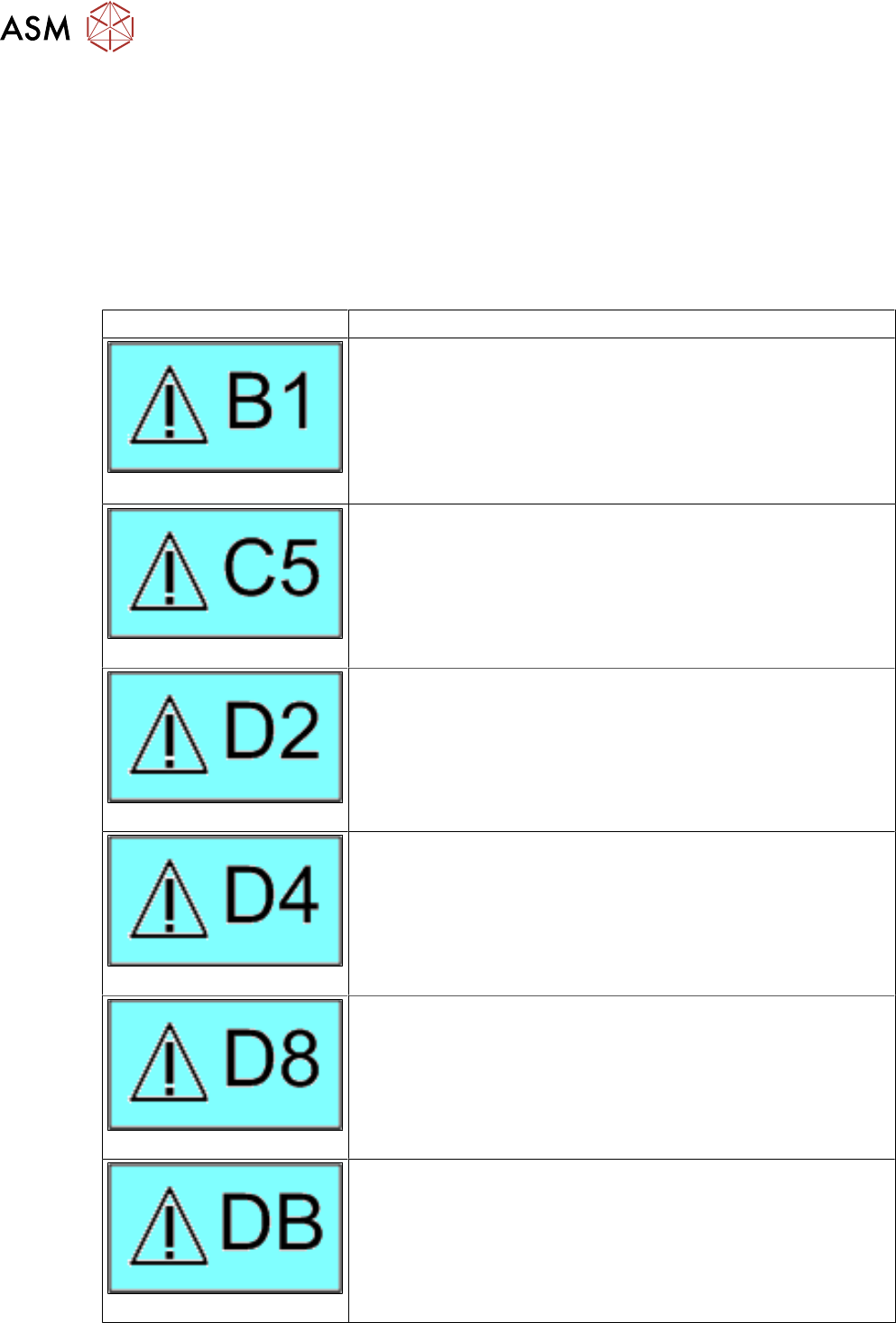
If an error number is shown on the X-Feeder Testbox, proceed as follows:
► First clean the feeder module and remove all foreign bodies (e.g. foil residues or compon-
ents).
► Then perform the task described for that error number in the Job Guide.
► Repeat the test.
If the error message is shown again, repair work is required. The following table shows which re-
pair tasks need to be performed for each error number.
Error Repair
Handle
If the error remains even when the handle is pushed in, replace the
entire control panel.
Performing a reference run
Perform a reference run.
If the error remains, send the feeder module to the manufacturer
for repair.
Transportation error
If the error remains, send the feeder module to the manufacturer
for repair.
Foil torn
Perform tear down.
Handle
If the error remains even when the handle is pushed in, replace the
entire control panel.
Reference error
Perform a reference run.
If the error remains, send the feeder module to the manufacturer
for repair.
3 X-Feeder Test Station
3.1 X Feeder Test Station Error Messages
Service Manual SIPLACE SmartFeeder 4 - 104 mm X 11/2017 21
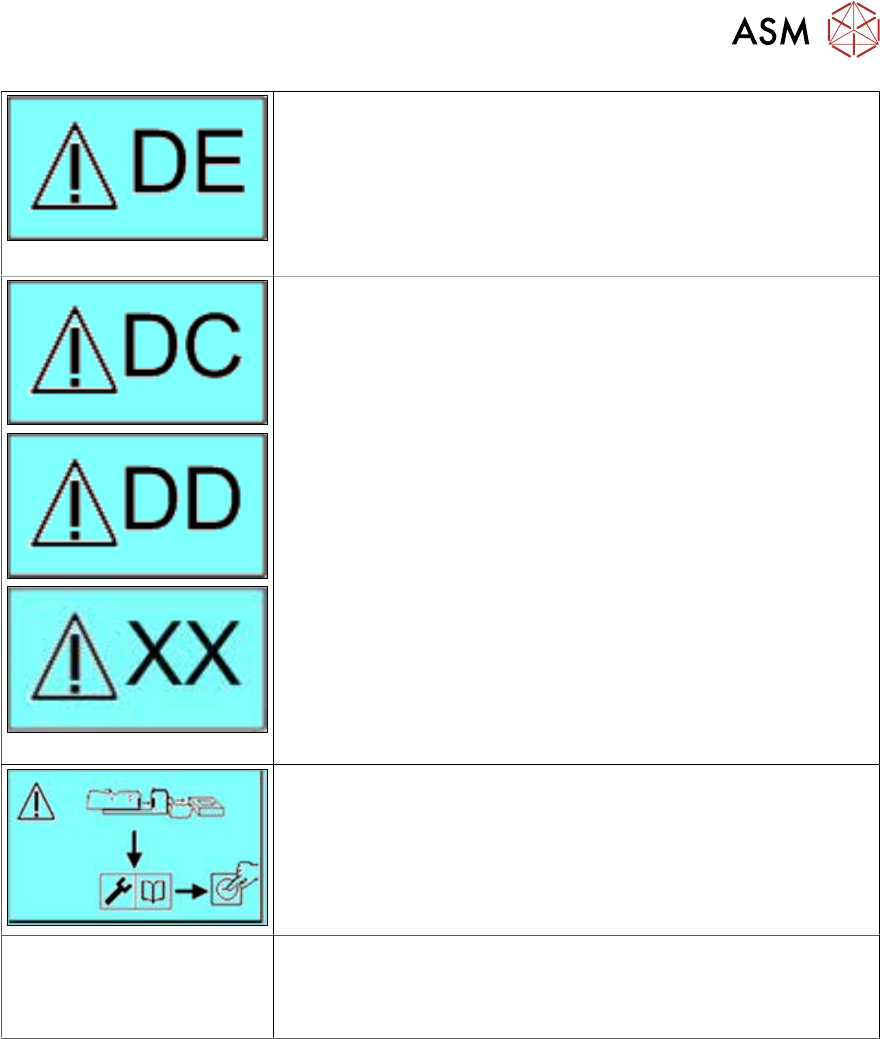
EEPROM error
Perform a reference run.
If the error is still shown, send the feeder module to the manufac-
turer for repairs.
Repeat the test.
If the error still exists, you will not be able to repair the feeder mod-
ule by yourself.
Please send the feeder module to the manufacturer for repair.
Make sure that the X feeder test station is correctly connected and
then restart the test.
If this message is shown repeatedly, communication with the
feeder module is not possible.
Please send the feeder module to the manufacturer for repair.
The status LED for the
feeder module flashes red.
Both status LEDs flash for
2x8 mm X feeders.
Update the feeder module firmware (application) with the X feeder
test station.
If you are unable to fix the error, send the feeder module to the
manufacturer for repair.