00198505-01_SM_SIPLACE_SmartFeeder_EN.pdf - 第206页
9 Repairs to SmartFeeder 12 mm X / 16 mm X 9.7 Drives and gears 206 Service Manual SIPLACE SmartFeeder 4 - 104 mm X 11/2017 ► Carefully place the feeder module down on its left side. ► Remove the circlip (1) on gear sta…
9 Repairs to SmartFeeder 12 mm X / 16 mm X
9.7 Drives and gears
Service Manual SIPLACE SmartFeeder 4 - 104 mm X 11/2017 205
9.7.3 Tape Drive (Hybrid Stepping Motor)
Required spare part
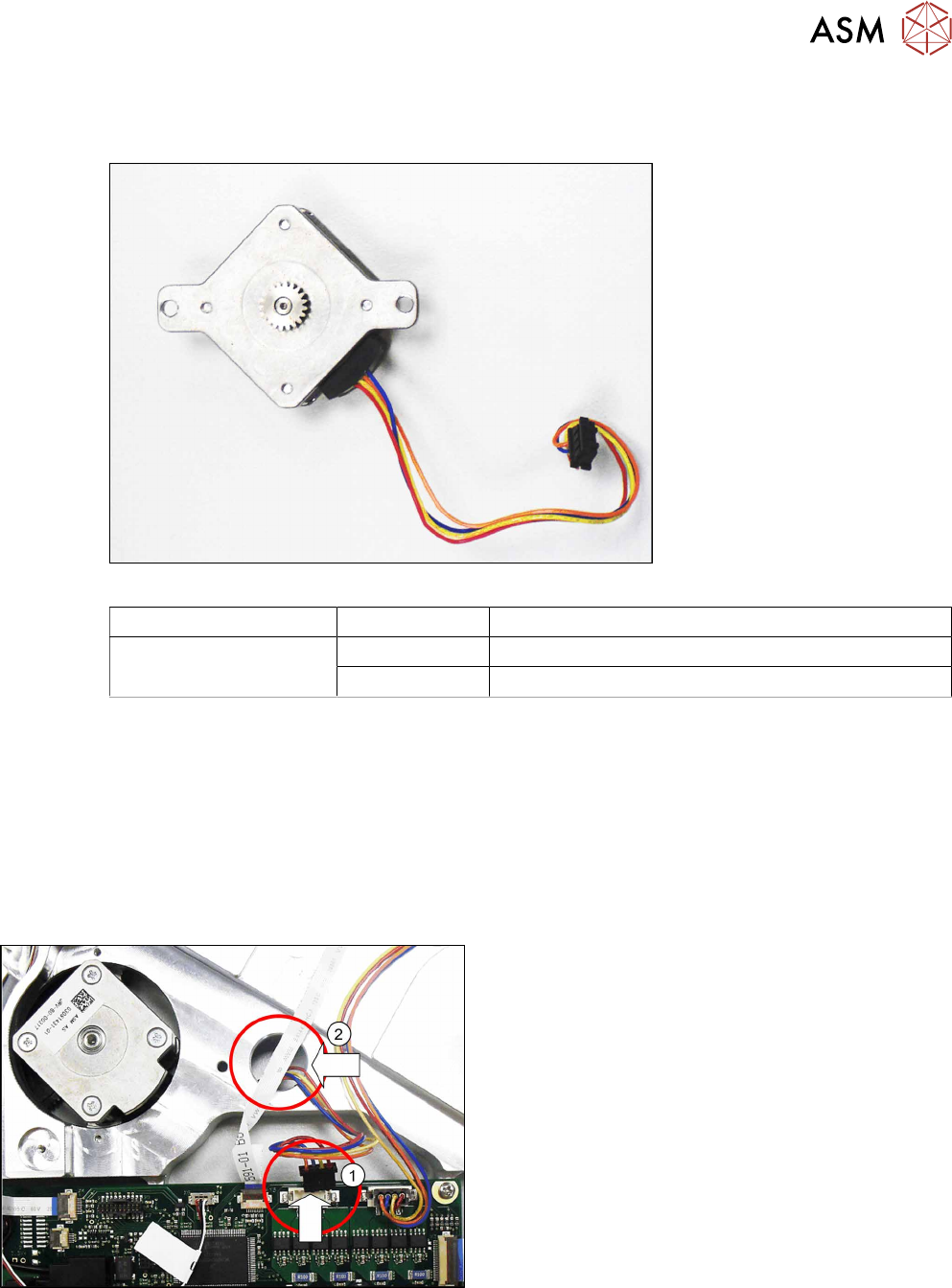
Fig.71: Tape drive hybrid stepping motor assembly
Feeder module Item no. Designation
SmartFeeder 12mm X
SmartFeeder 16mm X
03081431- xx Hybrid stepping motor assembly /X12-16 V2
03010210-xx ISO 7045 - M2.5 x 8-A2-50-H
Required tools
●
Phillips screwdriver 0.9Nm
●
TORX screwdriver 0.6Nm, size T8
●
Gauge for tape drive motor /X12-16 V2, item no. 03085120-xx
●
Circlip pliers for outer rings 3-10 mm
●
Tweezers
9.7.3.1 Removing the Tape Drive
► Remove the right side cover (see 9.3.3 "Remov-
ing the Right Side Cover" [}184])
► Remove the left side cover (see 9.3.1 "Removing
the Left Side Cover" [}184]).
► Carefully place the feeder module on its right
side.
► Unplug the connector for the tape drive cable
from the connection on the control board.(1)
► Guide the tape drive cable through the marked
opening(2) to the other side of the feeder mod-
ule.
9 Repairs to SmartFeeder 12 mm X / 16 mm X
9.7 Drives and gears
206 Service Manual SIPLACE SmartFeeder 4 - 104 mm X 11/2017
► Carefully place the feeder module down on its left
side.
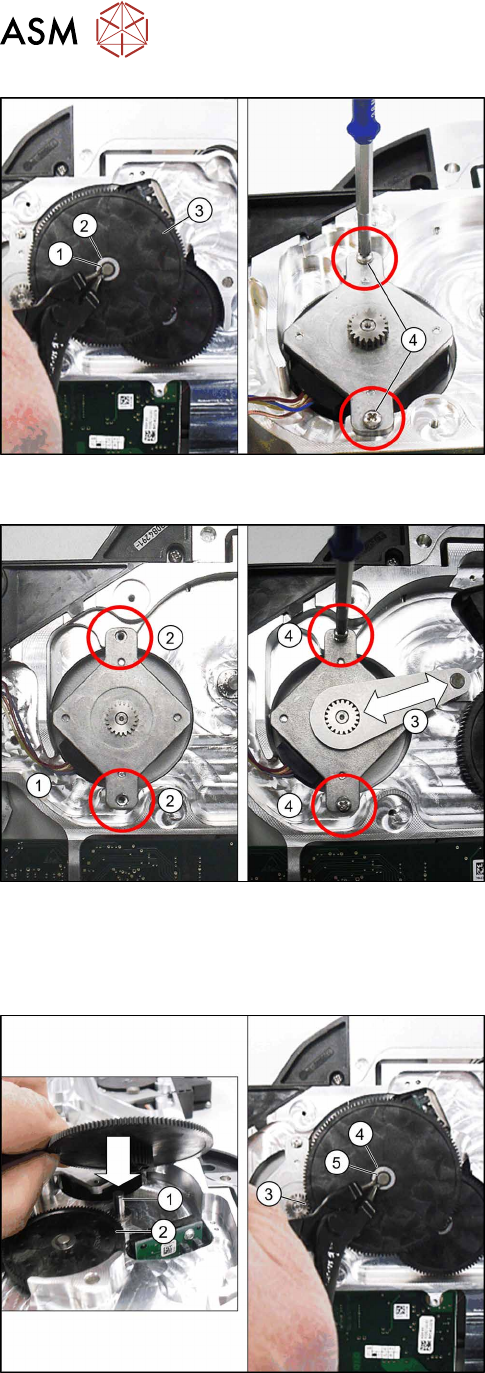
► Remove the circlip(1) on gear stage1.
► Remove the washer (2) on gear stage1
► Remove gear stage 1.(3)
► Remove the two screws which fasten the tape
drive.(4)
► Remove the tape drive.
9.7.3.2 Fitting the Tape Drive
► Carefully place the feeder module down on its left
side.
► Insert the tape drive into the recess.
Make sure that the tape drive cable is on the left
side.
► Run the cable in the cable duct.(1)
► Position the tape drive so that you can see the
holes in the feeder module base unit through the
holes in the drive frame.(2)
► Fit the gauge as shown, with the level side point-
ing upwards, onto the pinion of the tape drive and
onto the axle of gear stage1.(3)
► Position the tape drive so that the pinion and
gauge can not catch in one another.
► Fix the tape drive with the two Phillips screws
ISO 7045 M2.5x8. Use a Phillips screwdriver with
0.9Nm for this.
► Remove the gauge.
► Fit gear stage1 with the smaller toothed wheel
down onto the axle.(1)
Make sure that the smaller toothed wheel en-
gages below with gear stage2(2).
The large toothed wheel for the gear stage will
engage above with the tape drive pinion. (3)
► Fit the washer into place.(4)
► Secure gear stage 1 with a new circlip. (5)
9 Repairs to SmartFeeder 12 mm X / 16 mm X
9.7 Drives and gears
Service Manual SIPLACE SmartFeeder 4 - 104 mm X 11/2017 207
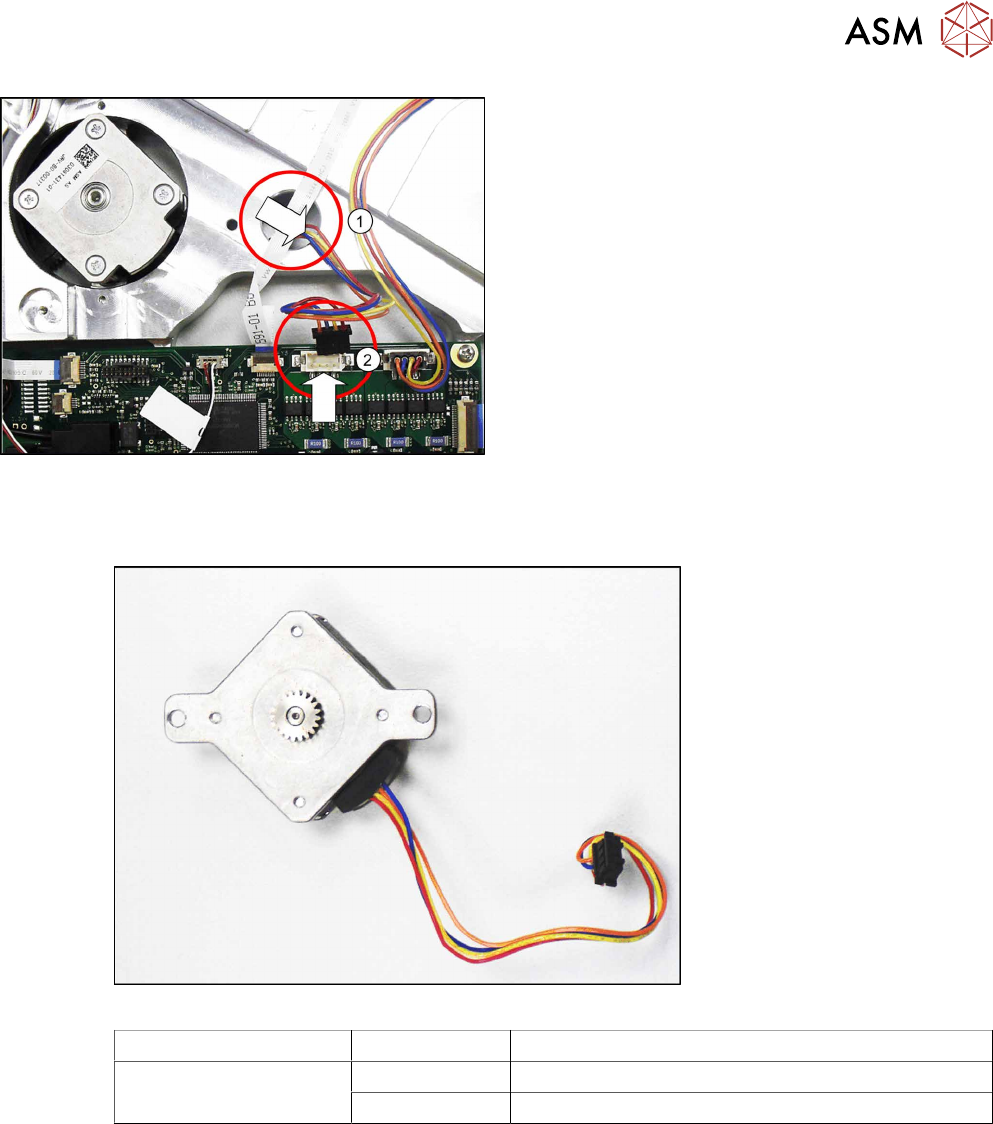
► Guide the tape drive cable through the marked
openingto the other side of the feeder module.
(1)
Make sure that the cable is on the right side of
the feeder module in the cable duct.
► Carefully place the feeder module on its right
side.
► Press the connector of the tape drive cable into
the marked connection on the control board.(2)
► Fasten the left and the right side covers (see
9.3.2 "Fitting the Left Side Cover" [}184], 9.3.4
"Fitting the Right Side Cover" [}185]).
9.7.4 Foil drive (hybrid stepping motor)
Required spare part
Fig.72: Foil disposal drive for hybrid stepping motor assembly
Feeder module Item no. Designation
SmartFeeder 12mm X
SmartFeeder 16mm X
03081431Sxx Hybrid stepping motor assembly /X12-16 V2
03010210-xx ISO 7045 - M2.5 x 8-A2-50-H
Required tools
●
Phillips screwdriver 0.6Nm
●
Phillips screwdriver 0.9Nm
●
TORX screwdriver 0.6Nm, size T8
●
Gauge for foil disposal motor /X12-16 V2 [03085119-xx]
●
Circlip pliers for outer rings 3-10 mm
●
Tweezers