00198763-02_VD_SIPLACE_Pro_17.1_R20-1_EN_DE.pdf - 第25页
SIPLACE Pro 17.1 (R 20-1) / Versi on Description 05/2020 Edition 25 5 Features of SIPLACE Pro 17.0 5.1 Board Editor / Grid Board Editor – Enhanc ements For the Board Edit or and Grid Board Editor, several en hancements h…
SIPLACE Pro 17.1 (R20-1) / Version Description 05/2020 Edition
24
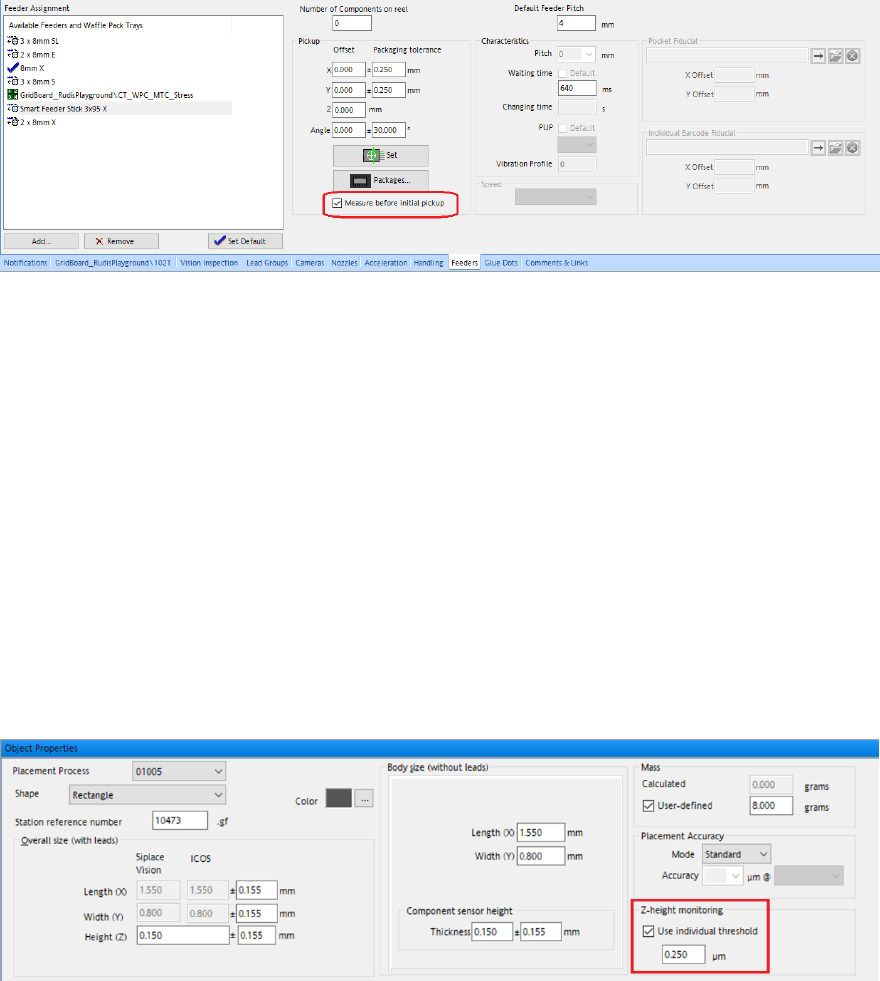
Figure 4-9: Measure before initial pick checkbox in Feeder tab of component editor
4.8 Inspecting Components After Placement at Too High Speed –
Enhancements
If the PCB description is incorrect or if there are bends in the PCB, the nominal z-position
(placement position) of the PCB top edge might deviate distinctly from its actual z-position. The
component might therefore be placed at too high speed, and consequently, get damaged. If the
deviation between nominal and actual z-positions exceeds a certain threshold value, the z-heights
are corrected automatically, the respective placement position is set to inspect, and an error
message is displayed on the station GUI, where you can check if the component has been
damaged.
It is now possible to configure the threshold value that triggers the z-height correction and error
message in SIPLACE Pro. An individual threshold value for each component shape can be
selected. You can configure the threshold value with the Z-height monitoring option in the Object
Properties of the respective component shape.
Figure 4-10: Threshold value for z-height monitoring
If no individual threshold value is configured, the default threshold value (1 mm) is used for all
components.
4.9 Avoiding Nozzle Collisions on CPP Placement Heads
In order to avoid nozzle collisions with high components, the automatic precedence rule finder for
CPP placement heads in the SIPLACE Pro Optimizer has been enhanced. The SIPLACE Pro
Optimizer now performs height checks for components with a height of 4 – 22 mm.
Precedence rules are generated for the CPP placement head during optimization. If this function is
not used, SIPLACE Pro attempts to place components without precedence rules. Components
which are suitable for placement in Pick&Place mode by the CPP placement head are distributed
to other Pick&Place heads.
SIPLACE Pro 17.1 (R20-1) / Version Description 05/2020 Edition
25
5 Features of SIPLACE Pro 17.0
5.1 Board Editor / Grid Board Editor – Enhancements
For the Board Editor and Grid Board Editor, several enhancements have been made. The
enhancements are listed below.
Using Custom Delay Time for Vacuum Tooling
It is possible to configure the delay time between PCB entering the machine and vacuum sensor
detecting the PCB, overwriting the default value set for the machine.
This feature can be activated using the Use custom waiting time for 'Vacuum OK' checkbox in
the Process Requirements tab in the Object Properties of the Board Editor or in the Vacuum
tooling tab of the Grid Board Editor.
New Field for Resulting Z-Height in Board Editor and Grid Board Editor
In the Board Editor and the Grid Board Editor, the Resulting Z-Height field has been added. When
entering the board height and panel height, the resulting z-height is calculated and displayed in this
field in the Board Editor and the Grid Board Editor respectively.
In the Board Editor, the Resulting Z-Height field is in the Panel Properties tab. In the Grid Board
Editor, it is in the panel list.
Changing Origin of the Coordinate System for Grid Panel and Package in Grid Board Editor
In the Grid Board Editor, the origin for the coordinate system of the grid panel and package type is
no longer fixed to a center position but can also be set to a position in the bottom left. It is possible
to switch between both origin positions.
The origin can be changed via the Origin of Coordinate System list in the Grid Panel Type tab
and Packages tab of the Grid Board Editor.
Programming Wafer Edge and Notch Alignment
It is possible to configure the wafer edge and notch alignment. For this, the Wafer Carrier fiducial
type has been introduced. If this new fiducial type is selected, the wafer diameter and notch angle
can be entered manually.
Additionally, the context menu of the fiducial in the graphics has been extended by the entry
Center Fiducial. With this new option, the fiducial can be centered on its structure.
Restrictions
– If the Wafer Carrier fiducial type is selected, only the evaluation modes Standard X, Y and
X, Y, Angle are available.
Restricting Clearance of Pickup Threshold Errors
In the Reject Thresholds group of the Component Editor, a checkbox has been added that allows
only users with activity level “Advanced Production” to clear occurring pickup threshold errors.

SIPLACE Pro 17.1 (R20-1) / Version Description 05/2020 Edition
26
5.2 New License “Single Component Traceability from Wafer –
Machine Connection”
If the single component traceability from wafer functionality (SCT) has been activated via the
Traceability system checkbox in the SIPLACE Pro Station Editor, the new license “Single
Component Traceability from Wafer – Machine Connection” is required.
Restrictions
– If SMT traceability is used at the same time, two licenses are required: the “SIPLACE ASM
Traceability – Machine Connection” license and the new “Single Component Traceability from
Wafer – Machine Connection” license.
5.3 Smart Pin Support for TX V2 – Enhancements
The Smart Pin Support for the TX V2 has been enhanced by the functions described below.
Using Partly Accessible Nozzle Magazines
If the TX V2 is configured with Smart Pin Support, the outermost nozzle magazines cannot be
reached by the PCB camera to read the fiducials. Instead of blocking the whole nozzle magazine
by default, it is now possible to use all those nozzles that are within reach of the PCB camera.
NOTICE
Even though SIPLACE Pro version 16.1 (station software version 712) does support
Smart Pin Support for the TX V2, with this older version nozzle magazines out of reach
are fully blocked.
Restrictions
– This functionality is only available for the magazines 4xxx(20) / 6xxx(20), item no.
[03218226-xx] for the C&P20 P2 head and 20xx(20), item no. [03226630-xx] for the CPP
head. It is not available for the magazines 28xx(9) and 20xx(12).
– This functionality is not available for TwinHead magazines.
Combination of Smart Pin Support with TwinHead on TX V2
The combination of Smart Pin Support with a TwinHead on the TX V2 is supported.
5.4 New Fiducial Type “Edge”
In the Fiducial Type Editor of SIPLACE Pro Desk, the fiducial type “Edge” has been introduced.
With this new fiducial type, it is possible to define the length of an X-coordinate, which is useful for
LED alignments.
5.5 ASM Production Planner in SIPLACE Pro Optimizer Toolkit
SIPLACE Pro supports Production Planner. Detailed information can be found in the ASM
Production Planner User Guide, item no. [00900196-xx].