00196785-01-IM-Traceability 3.2_en.pdf - 第38页
Installation Trace Host and Trace Service Trace Host Steps to perform after installation 38 Installation Manual SIPLACE Traceability 3.2 5.4.2 Step s to perfor m after inst allation 5.4.3 T roubleshooting 5.4.3.1 Port Co…
Installation Trace Host and Trace Service
Installation Trace Host
Installation Manual SIPLACE Traceability 3.2
37
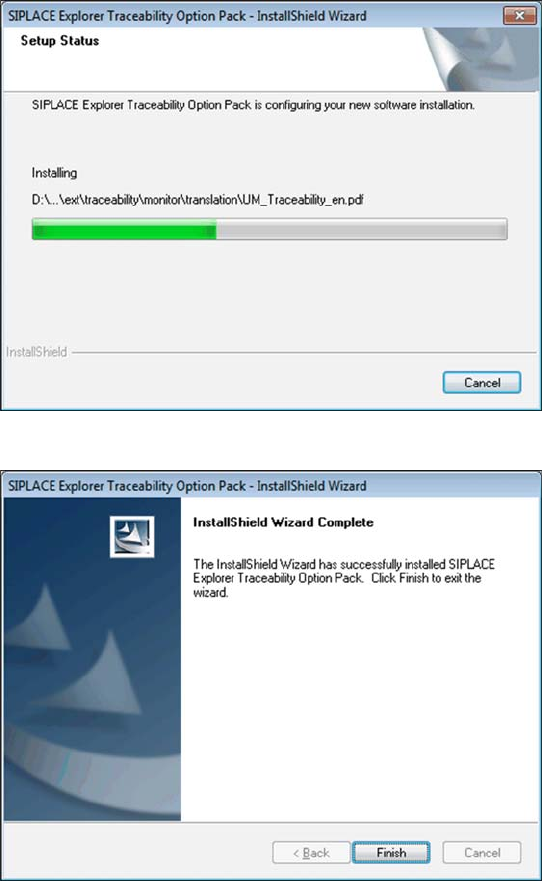
Once the installation procedure has finished, the
following dialog box will open:
X Click on Finish. The SIPLACE Explorer
Traceability option is now available on the
SIPLACE Explorer factory website.

Installation Trace Host and Trace Service
Trace Host Steps to perform after installation
38 Installation Manual SIPLACE Traceability 3.2
5.4.2 Steps to perform after installation
5.4.3 Troubleshooting
5.4.3.1 Port Configuration after Changing Tomcat Port Number
The Tomcat port number needs to be changed (as described below) in the following cases:
If the port is changed for website generation, in the Trace Host Manager, General tab.
If the standard port number 8080 is already in use and you do not want to use it again for this job
(website access).
X To change the port number, find the following lines in the file
<Tomcat-location>\conf\server.xml
X and change 8080 to your choice of port number as shown below:
<!-- Define a non-SSL Coyote HTTP/1.1 connector on the port specified during installation-->
<Connector port="8080" maxThreads="150" minSpareThreads="25" maxSpareThreads="75"
enableLookups="false" redirectPort="8443" acceptCount="100" debug="0"
connectionTimeout="20000" disableUploadTimeout="true" />
X Change the specified port number 8080 (
Connector port="8080"
) to the required port number
(
Connector port="YourPort"
). For further information about port number, please contact your
system administrator.
X To make Tomcat your default web server, set the port number to 8080.
5.4.3.2 Collation conflicts when restoring database backup
When restoring the database backup, the SQL Server must have the same collation as the database
backup. Otherwise run time errors and collation conflicts will occur when performing data query in Trace
Host Monitor.
X In case of collation conflicts we recommend you to recreate the SQL Server.
NOTE:
By default, Tomcat is installed on port 8080. This means that your users will access your website
as follows: http://yourServerName:8080/yourWebsite.
NOTE:
The port number specified in this xml file needs to be added to the URL address each time you
generate a website: http://yourServerName:yourPort/yourWebsite.

Installation Trace Host and Trace Service
Upgrade of Trace Host Trace Host
Installation Manual SIPLACE Traceability 3.2
39
5.4.3.3 Generating a Web site is denied
If you start Trace Host Manager to generate the Trace Host Web site you may get an “access denied
error”.
This is only true for Windows Vista. You need administrator rights to generate the Web site. In Windows
Vista you don’t have administrator rights in Trace Host even if you are member of a user group with
administrator rights.
Workaround 1
X Change the rights of the Trace Host installation folder (e.g.
C:\Program Files\SIPLACE\SIPLACE
Trace Host
) manually to “Full control”.
Workaround 2
Start Trace Host Manager with administrator rights:
X Navigate the mouse pointer to the Trace Host Manager Icon
X Press “Shift” and the right mouse button
X Select “Run as”
X Windows Vista will ask for the required rights. Select “Administrator”
5.4.4 Upgrade of Trace Host
X Install the current version of Trace Host.
X Start the Upgrade Wizard to convert the Trace Host database to the new format.
X Start Trace Host Manager and check the configuration. For detailed information about the database
configuration, please see the section "SIPLACE Trace Host Manager" of User Manual SIPLACE
Traceability 3.2, item no. 00196587-xx (English) or 00196586-xx (German).
ATTENTION:
This chapter only describes the upgrade procedure of the Trace Host. Before you start to
upgrade Trace Host please read chapter 6 carefully to understand the upgrade procedure of the
overall system.
ATTENTION:
Before you upgrade the Trace Host please uninstall the old Traceability-Software (Trace Host
database is not affected by uninstall).