2500_Users_Manual-.pdf - 第231页
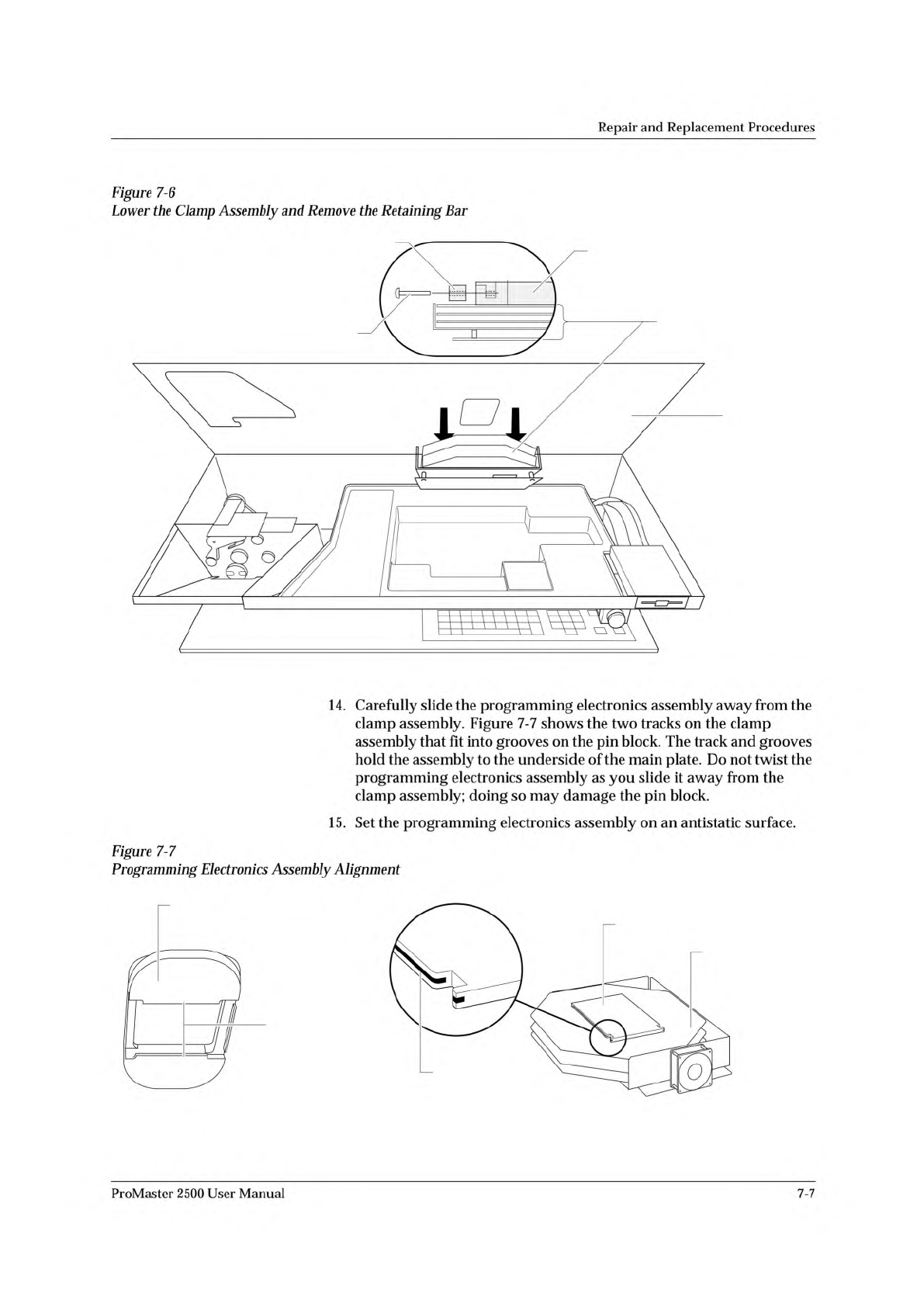
2070-2 MAIN PLATE (Underside) PROGRAMMING ELECTRONICS ASSEMBLY PROGRAMMING MODULE CLAMP ASSEMBLY HEX HEAD SCREW RETAINING BAR A J S SHIFT B K T DEL C L U D M V E N W F O X SHIFT G P Y H Q Z I R ENT ER 1 4 7 2 5 8 3 6 9 0…
2313-1
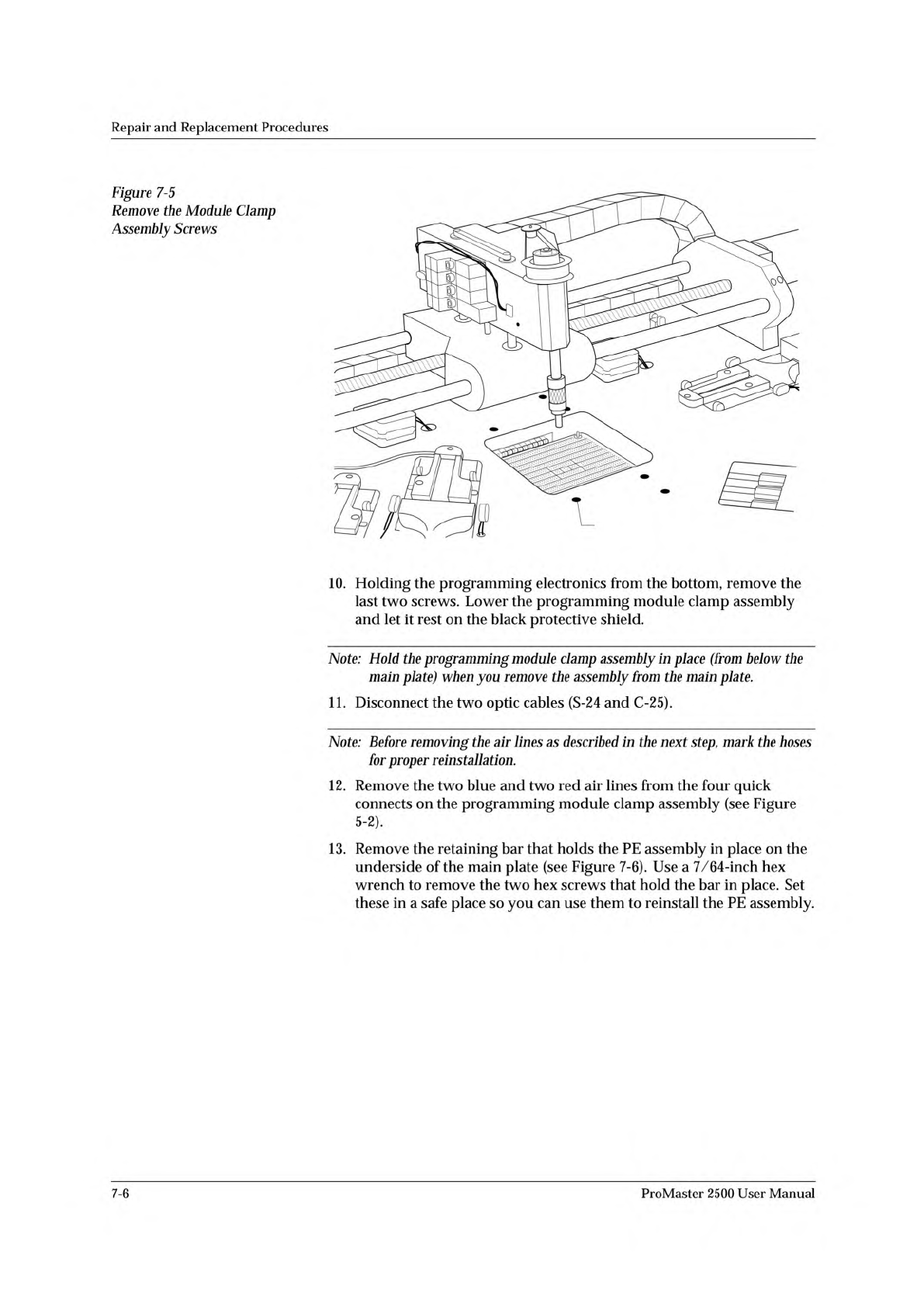
SCREW LOCATION (1 of 6)
Repair
and
Replacement
Procedures
Figure
7-5
Remove
the
Module
Clamp
Assembly
Screws
10.
Holding
the
programming
electronics
from
the
bottom,
remove
the
last
two
screws.
Lower
the
programming
module
clamp
assembly
and
let
it
rest
on
the
black
protective
shield.
Note:
Hold
the
programming
module
clamp
assembly
in
place
(from
below
the
main
plate)
when
you
remove
the
assembly
from
the
main
plate.
11.
Disconnect
the
two
optic
cables
(S-24
and
C-25).
Note:
Before
removing
the
air
lines
as
described
in
the
next
step,
mark
the
hoses
for
proper
reinstallation.
12.
Remove
the
two
blue
and
two
red
air
lines
from
the
four
quick
connects
on
the
programming
module
clamp
assembly
(see
Figure
5-2).
、
13.
Remove
the
retaining
bar
that
holds
the
PE
assembly
in
place
on
the
underside
of
the
main
plate
(see
Figure
7-6).
Use
a
7/64-inch
hex
wrench
to
remove
the
two
hex
screws
that
hold
the
bar
in
place.
Set
these
in
a
safe
place
so
you
can
use
them
to
reinstall
the
PE
assembly.
7-6
ProMaster
2500
User
Manual
2070-2
MAIN PLATE
(Underside)
PROGRAMMING
ELECTRONICS
ASSEMBLY
PROGRAMMING MODULE
CLAMP ASSEMBLY
HEX HEAD SCREW
RETAINING BAR
A
J
S
SHIFT
B
K
T
DEL
C
L
U
D
M
V
E
N
W
F
O
X
SHIFT
G
P
Y
H
Q
Z
I
R
ENTER
1
4
7
2
5
8
3
6
9
0
LOW
CASE
RESET
STOP
CAL
START
2066-2
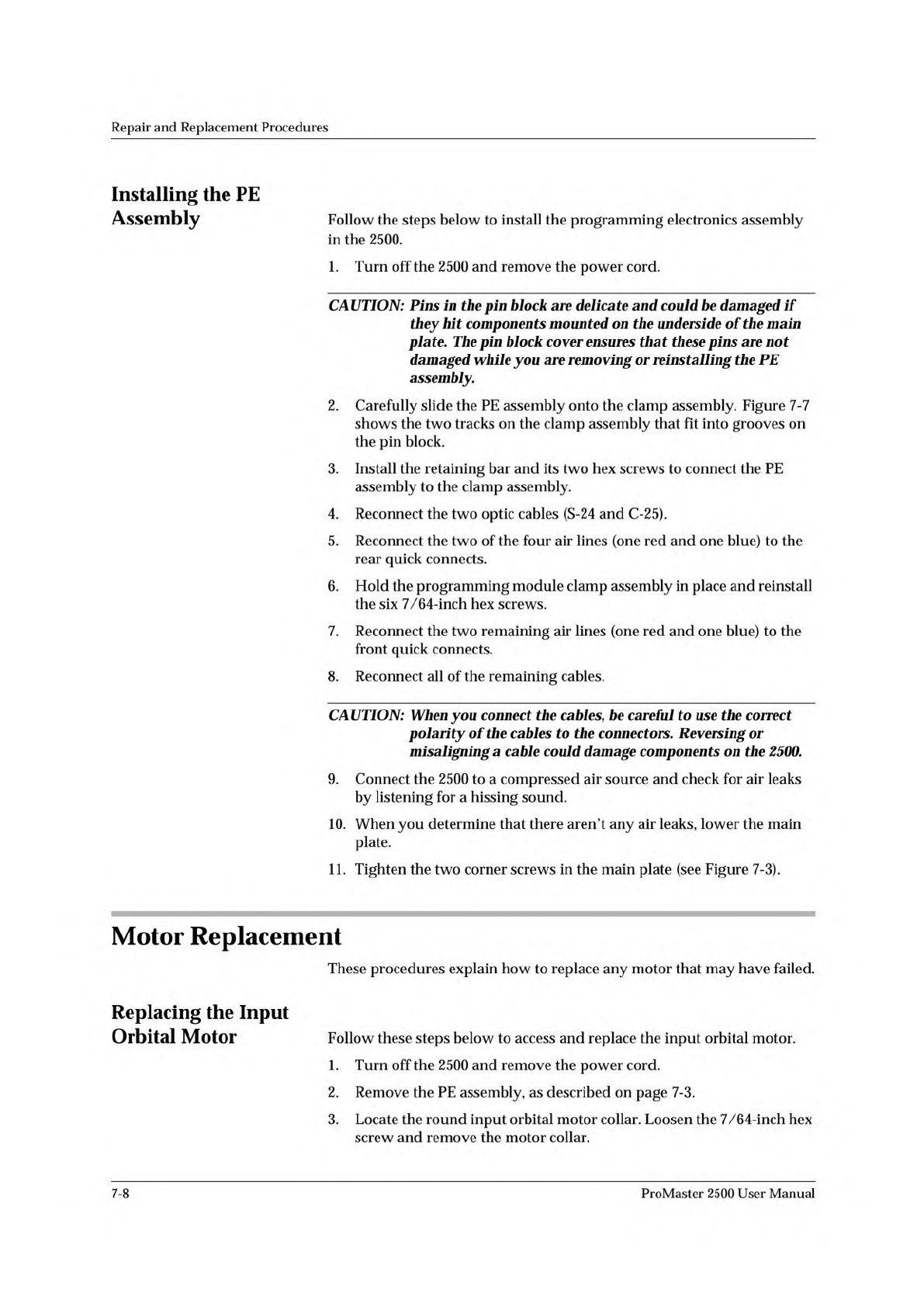
GROOVE
TRACKS
PIN BLOCK
PROGRAMMING
ELECTRONICS
ASSEMBLY
BOTTOM SIDE OF PROGRAMMING
MODULE CLAMP ASSEMBLY
Repair
and
Replacement
Procedures
14.
Carefully
slide
the
programming
electronics
assembly
away
from
the
clamp
assembly.
Figure
7-7
shows
the
two
tracks
on
the
clamp
assembly
that
fit
into
grooves
on
the
pin
block.
The
track
and
grooves
hold
the
assembly
to
the
underside
of
the
main
plate.
Do
not
twist
the
programming
electronics
assembly
as
you
slide
it
away
from
the
clamp
assembly;
doing
so
may
damage
the
pin
block.
15.
Set
the
programming
electronics
assembly
on
an
antistatic
surface.
Figure
7-7
Programming
Electronics
Assembly
Alignment
Figure
7-6
Lower
the
Clamp
Assembly
and
Remove
the
Retaining
Bar
ProMaster
2500
User
Manual
7-7
Repair
and
Replacement
Procedures
Installing
the
PE
Assembly
Follow
the
steps
below
to
install
the
programming
electronics
assembly
in
the
2500.
1.
Turn
off
the
2500
and
remove
the
power
cord.
CAUTION:
Pins
in
the
pin
block
are
delicate
and
could
be
damaged
if
they
hit
components
mounted
on
the
underside
of
the
main
plate.
The
pin
block
cover
ensures
that
these
pins
are
not
damaged
while
you
are
removing
or
reinstalling
the
PE
assembly.
2.
Carefully
slide
the
PE
assembly
onto
the
clamp
assembly.
Figure
7-7
shows
the
two
tracks
on
the
clamp
assembly
that
fit
into
grooves
on
the
pin
block.
3.
Install
the
retaining
bar
and
its
two
hex
screws
to
connect
the
PE
assembly
to
the
clamp
assembly.
4.
Reconnect
the
two
optic
cables
(S-24
and
C-25).
5.
Reconnect
the
two
of
the
four
air
lines
(one
red
and
one
blue)
to
the
rear
quick
connects.
6.
Hold
the
programming
module
clamp
assembly
in
place
and
reinstall
the
six
7/64-inch
hex
screws.
7.
Reconnect
the
two
remaining
air
lines
(one
red
and
one
blue)
to
the
front
quick
connects.
8.
Reconnect
all
of
the
remaining
cables.
CAUTION:
When
you
connect
the
cables,
be
careful
to
use
the
correct
polarity
of
the
cables
to
the
connectors.
Reversing
or
misaligning
a
cable
could
damage
components
on
the
2500.
9.
Connect
the
2500
to
a
compressed
air
source
and
check
for
air
leaks
by
listening
for
a
hissing
sound.
10.
When
you
determine
that
there
aren't
any
air
leaks,
lower
the
main
plate.
11.
Tighten
the
two
corner
screws
in
the
main
plate
(see
Figure
7-3).
Motor
Replacement
These
procedures
explain
how
to
replace
any
motor
that
may
have
failed.
Replacing
the
Input
Orbital
Motor
Follow
these
steps
below
to
access
and
replace
the
input
orbital
motor.
1.
Turn
off
the
2500
and
remove
the
power
cord.
2.
Remove
the
PE
assembly,
as
described
on
page
7-3.
3.
Locate
the
round
input
orbital
motor
collar.
Loosen
the
7/64-inch
hex
screw
and
remove
the
motor
collar.
7-8
ProMaster
2500
User
Manual