2500_Users_Manual-.pdf - 第83页
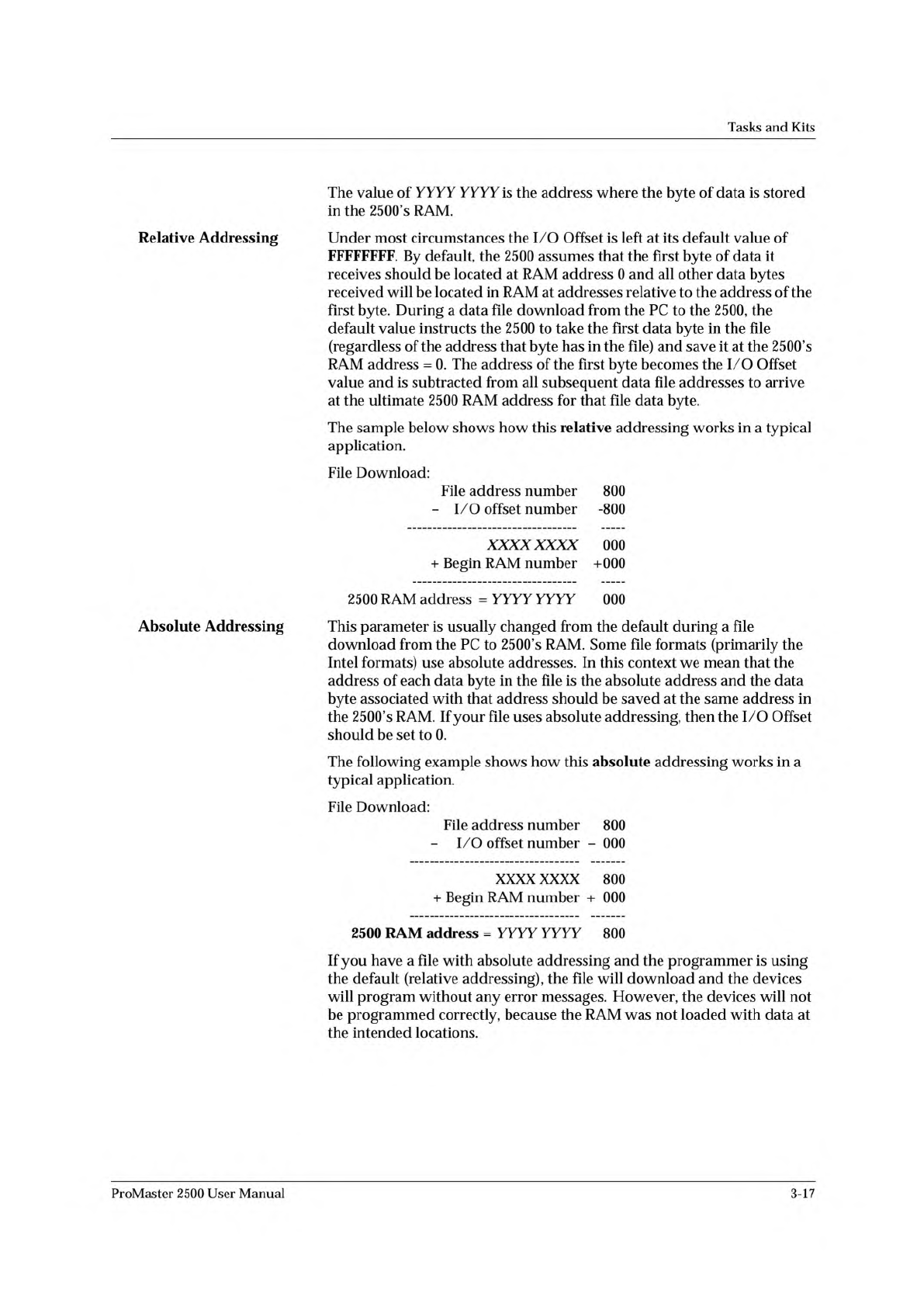
Tasks and Kits The value of YYYY YYYY is the address where the byte of data is stored in the 2500's RAM. Relative Addressing Under most circumstances the I/O Offset is left at its default value of FFFFFFFF. By defau…
Tasks
and
Kits
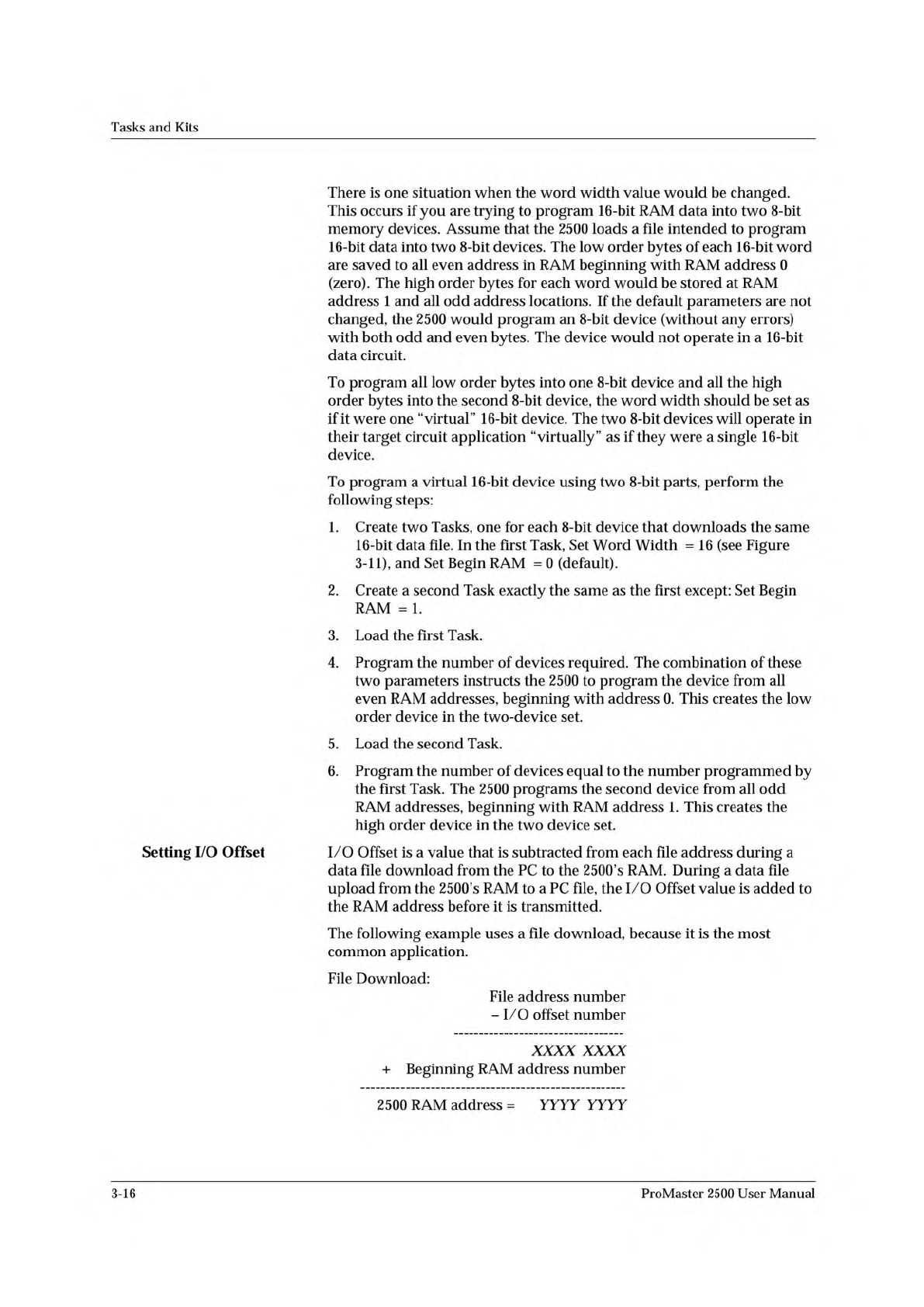
There
is
one
situation
when
the
word
width
value
would
be
changed.
This
occurs
if
you
are
trying
to
program
16-bit
RAM
data
into
two
8-bit
memory
devices.
Assume
that
the
2500
loads
a
file
intended
to
program
16-bit
data
into
two
8-bit
devices.
The
low
order
bytes
of
each
16-bit
word
are
saved
to
all
even
address
in
RAM
beginning
with
RAM
address
0
(zero).
The
high
order
bytes
for
each
word
would
be
stored
at
RAM
address
1
and
all
odd
address
locations.
If
the
default
parameters
are
not
changed,
the
2500
would
program
an
8-bit
device
(without
any
errors)
with
both
odd
and
even
bytes.
The
device
would
not
operate
in
a
16-bit
data
circuit.
To
program
all
low
order
bytes
into
one
8-bit
device
and
all
the
high
order
bytes
into
the
second
8-bit
device,
the
word
width
should
be
set
as
if
it
were
one
“virtual”
16-bit
device.
The
two
8-bit
devices
will
operate
in
their
target
circuit
application
“virtually”
as
if
they
were
a
single
16-bit
device.
To
program
a
virtual
16-bit
device
using
two
8-bit
parts,
perform
the
following
steps:
1.
Create
two
Tasks,
one
for
each
8-bit
device
that
downloads
the
same
16-bit
data
file.
In
the
first
Task,
Set
Word
Width
=
16
(see
Figure
3-11),
and
Set
Begin
RAM
=
0
(default).
2.
Create
a
second
Task
exactly
the
same
as
the
first
except:
Set
Begin
RAM
=
1.
3.
Load
the
first
Task.
4.
Program
the
number
of
devices
required.
The
combination
of
these
two
parameters
instructs
the
2500
to
program
the
device
from
all
even
RAM
addresses,
beginning
with
address
0.
This
creates
the
low
order
device
in
the
two-device
set.
5.
Load
the
second
Task.
6.
Program
the
number
of
devices
equal
to
the
number
programmed
by
the
first
Task.
The
2500
programs
the
second
device
from
all
odd
RAM
addresses,
beginning
with
RAM
address
1.
This
creates
the
high
order
device
in
the
two
device
set.
Setting
I/O
Offset
I/O
Offset
is
a
value
that
is
subtracted
from
each
file
address
during
a
data
file
download
from
the
PC
to
the
2500's
RAM.
During
a
data
file
upload
from
the
2500's
RAM
to
a
PC
file,
the
I/O
Offset
value
is
added
to
the
RAM
address
before
it
is
transmitted.
The
following
example
uses
a
file
download,
because
it
is
the
most
common
application.
File
Download:
File
address
number
-
I/O
offset
number
xxxx xxxx
+
Beginning
RAM
address
number
2500
RAM
address
=
YYYY
YYYY
3-16
ProMaster
2500
User
Manual
Tasks
and
Kits
The
value
of
YYYY YYYY
is
the
address
where
the
byte
of
data
is
stored
in
the
2500's
RAM.
Relative
Addressing
Under
most
circumstances
the
I/O
Offset
is
left
at
its
default
value
of
FFFFFFFF.
By
default,
the
2500
assumes
that
the
first
byte
of
data
it
receives
should
be
located
at
RAM
address
0
and
all
other
data
bytes
received
will
be
located
in
RAM
at
addresses
relative
to
the
address
of
the
first
byte.
During
a
data
file
download
from
the
PC
to
the
2500,
the
default
value
instructs
the
2500
to
take
the
first
data
byte
in
the
file
(regardless
of
the
address
that
byte
has
in
the
file)
and
save
it
at
the
2500's
RAM
address
=
0.
The
address
of
the
first
byte
becomes
the
I/O
Offset
value
and
is
subtracted
from
all
subsequent
data
file
addresses
to
arrive
at
the
ultimate
2500
RAM
address
for
that
file
data
byte.
The
sample
below
shows
how
this
relative
addressing
works
in
a
typical
application.
File
Download:
File
address
number
800
-
I/O
offset
number
-800
XXXXXXXX
000
+
Begin
RAM
number
+000
2500
RAM
address
=
YYYY
YYYY
000
Absolute
Addressing
This
parameter
is
usually
changed
from
the
default
during
a
file
download
from
the
PC
to
2500's
RAM.
Some
file
formats
(primarily
the
Intel
formats)
use
absolute
addresses.
In
this
context
we
mean
that
the
address
of
each
data
byte
in
the
file
is
the
absolute
address
and
the
data
byte
associated
with
that
address
should
be
saved
at
the
same
address
in
the
2500's
RAM.
If
your
file
uses
absolute
addressing,
then
the
I/O
Offset
should
be
set
to
0.
The
following
example
shows
how
this
absolute
addressing
works
in
a
typical
application.
File
Download:
File
address
number
800
-
I/O
offset
number
-
000
XXXX
XXXX
800
+
Begin
RAM
number
+
000
2500
RAM
address
=
YYYY YYYY
800
If
you
have
a
file
with
absolute
addressing
and
the
programmer
is
using
the
default
(relative
addressing),
the
file
will
download
and
the
devices
will
program
without
any
error
messages.
However,
the
devices
will
not
be
programmed
correctly,
because
the
RAM
was
not
loaded
with
data
at
the
intended
locations.
ProMaster
2500
User
Manual
3-17
< More >
↵
Handling/
Labeling Parameters...
↵
Package
↵
Pin 1 Orientation
Tasks
and
Kits
•
Label
—
Select
this
parameter
to
label
the
devices.
Devices
do
not
have
to
be
programmed
(or
verified)
and
labeled
in
the
same
process.
They
can
be
programmed
and
placed
in
tubes
to
be
labeled
by
the
2500
later.
The
2500
default
configuration
will
not
label
devices
that
have
failed
the
programming
operation.
(The
2500
can
be
configured
to
label
both
passed
and
failed
devices.
Refer
to
the
Binning
command
in
local
mode
in
Appendix
F.)
Devices
that
have
failed
can
be
labeled
only
by
passing
them
through
the
2500
a
second
time.
Selecting
Handling/
Labeling
Parameters
Numerous
parameters
are
available
by
selecting
the
pushbutton.
Press
and
the
More
Task
Parameters
selection
box
appears
(see
Figure
3-1,
screen
4).
Most
of
these
should
remain
at
their
default
settings.
The
parameters
that
must
be
defined
for
all
Tasks
are
the
selections.
Move
the
screen
cursor
over
Handling/Labeling
Parameters...
and
press
to
select
this
parameter
set.
The
following
handler
and
labeler
parameters
are
defined
in
this
dialog
box.
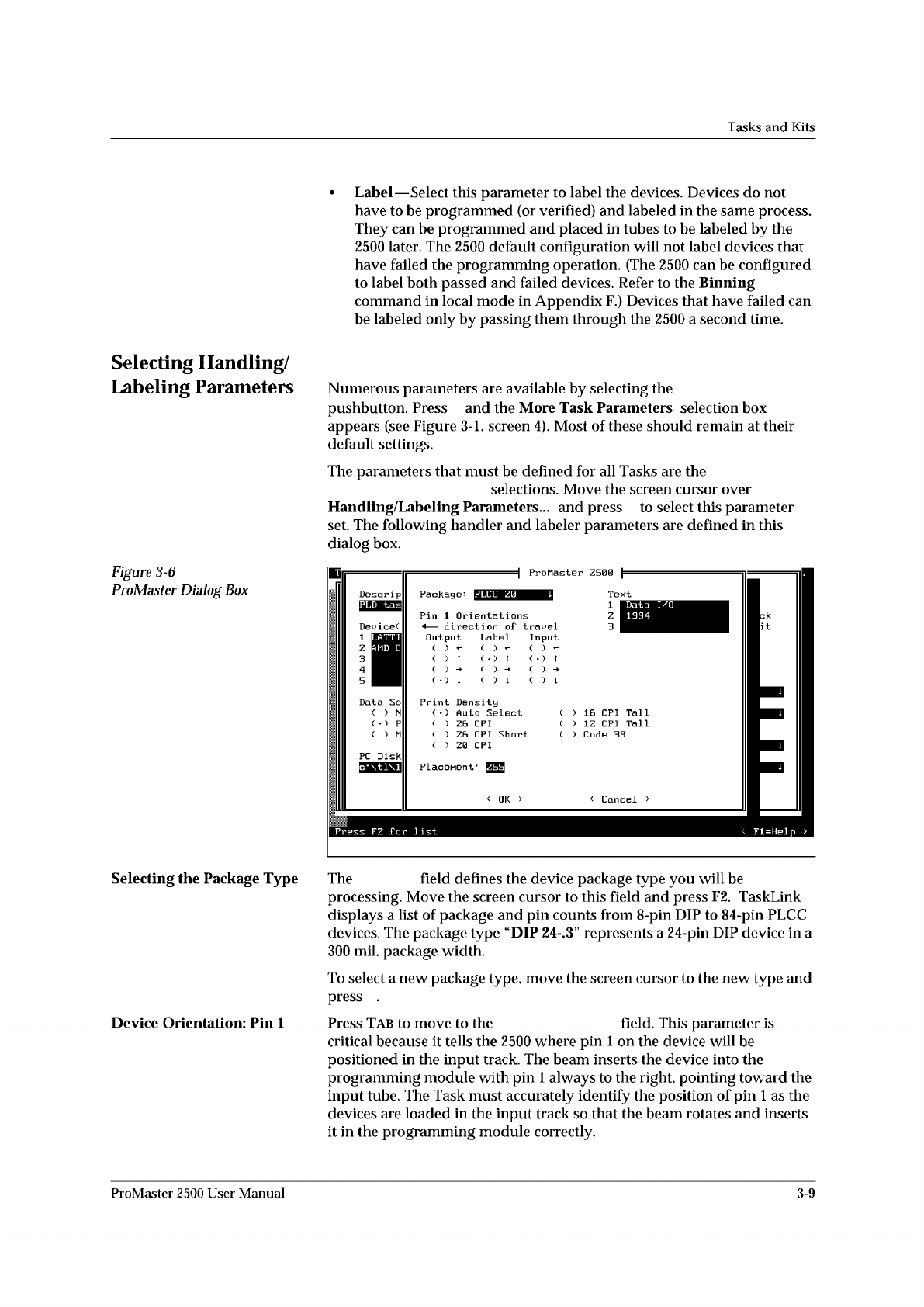
Figure
3-6
ProMaster
Dialog
Box
ProMaster
Z500
Package:
Text
Dev
ice(
<
OK
> <
Cancel
>
IPLCC
Z0
Press
FZ
For
list
Fl=Help
>
LATTI
AMD
C
Tall
Tall
1
Z
3
1
Z
3
4
5
16
CPI
'
1Z
CPI
'
Code
39
Data
I/O
1994
Descrip
PC
Disk
Input
( )
( )
t
Data
So
( )
N
( )
P
( )
M
Pin
1
Orientations
<
—
direction
of
travel
Print
Density
(
)
Auto
Select
( )
Z6
CPI
(
)
Z6
CPI
Short
(
)
Z0
CPI
Output
Label
( )
~
(
)
?
(
•
)
?
Selecting
the
Package
Type
The
field
defines
the
device
package
type
you
will
be
processing.
Move
the
screen
cursor
to
this
field
and
press
F2.
TaskLink
displays
a
list
of
package
and
pin
counts
from
8-pin
DIP
to
84-pin
PLCC
devices.
The
package
type
“DIP
24-.3"
represents
a
24-pin
DIP
device
in
a
300
mil.
package
width.
To
select
a
new
package
type,
move
the
screen
cursor
to
the
new
type
and
press
.
Device
Orientation:
Pin
1
Press
Tab
to
move
to
the
field.
This
parameter
is
critical
because
it
tells
the
2500
where
pin
1
on
the
device
will
be
positioned
in
the
input
track.
The
beam
inserts
the
device
into
the
programming
module
with
pin
1
always
to
the
right,
pointing
toward
the
input
tube.
The
Task
must
accurately
identify
the
position
of
pin
1
as
the
devices
are
loaded
in
the
input
track
so
that
the
beam
rotates
and
inserts
it
in
the
programming
module
correctly.
ProMaster
2500
User
Manual
3-9