2500_Users_Manual-.pdf - 第77页
↵ Tasks and Kits What Is a Task? A Task is a job setup containing all the information necessary to process a set of devices. A Task records all the parameters of the job setup including the device type, the data file to …
3
Tasks
and
Kits
For
Administrators
This
chapter,
which
is
directed
to
system
administrators,
describes
how
to
set
up
Tasks
and
Kits
in
TaskLink
after
installation
and
setup
are
complete,
as
described
in
Chapter
2.
System
operators
should
skip
this
chapter
and
read
the
daily
operating
procedures
described
in
Chapter
4.
A
Task,
which
is
used
by
system
operators
to
program,
test,
and
label
devices,
is
the
cornerstone
of
the
2500
system's
daily
operation.
This
chapter
describes
how
to
create
a
Task
and
how
to
modify
the
system
default
parameters
to
meet
your
specific
operating
requirements.
The
information
in
this
chapter
is
organized
as
follows:
What
Is
a
Task?
3-2
Creating
a
Task
for
a
Logic
Device
3-4
Creating
a
Task
for
a
Memory
Device
3-14
Other
TaskLink
Parameters
3-18
Introduction
to
Kits
3-33
ProMaster
2500
User
Manual
3-1
↵
Tasks
and
Kits
What
Is
a
Task?
A
Task
is
a
job
setup
containing
all
the
information
necessary
to
process
a
set
of
devices.
A
Task
records
all
the
parameters
of
the
job
setup
including
the
device
type,
the
data
file
to
be
used,
and
the
label
text
to
print
and
place
on
the
programmed
device.
The
Task
is
created
once
and
saved
on
disk
so
that
it
is
available
whenever
that
programming/labeling
job
needs
to
be
run.
Overview:
Creating
a
Task
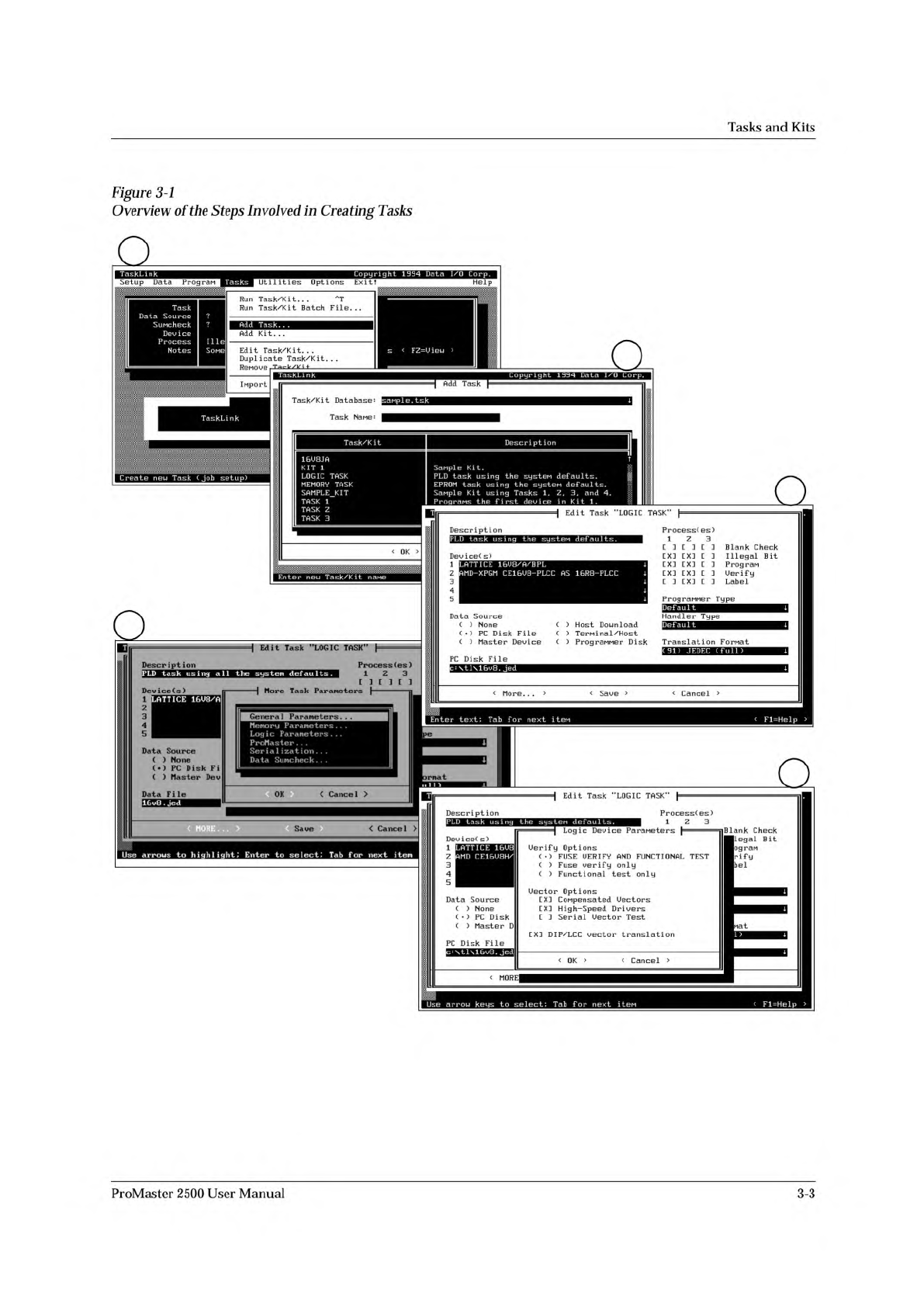
Figure
3-1
shows
the
major
steps
involved
in
creating
a
Task
for
a
programmable
logic
device
(PLD).
Once
the
Task
has
been
created,
the
system
operator
simply
selects
it
from
a
screen
similar
to
screen
2
(see
Figure
3-1)
and
the
entire
system
configuration
and
data
file
download
is
completed
with
a
single
keystroke.
The
steps
below
outline
the
task
creation
process
(see
Figure
3-1).
For
purposes
of
this
example,
ignore
all
references
to
Kits.
These
are
special
applications
for
Tasks
that
will
be
discussed
later
in
this
chapter.
1.
From
the
Main
TaskLink
screen,
select
Tasks
(see
screen
1).
2.
Select
Add
Task
(see
screen
1).
3.
Enter
the
new
Task
name
on
the
Task
Name
line
on
screen
2.
Press
to
move
to
screen
3.
4.
Select
at
least
one
Device
(s),
a
Data
Source,
and
at
least
one
Process(es)
(see
screen
3).
If
your
Data
Source
is
a
PC
disk
file,
you
must
select
a
data
file
Translation
Format
and
give
the
name
and
path
for
the
Data
File.
5.
There
are
some
additional
logic
programming
parameters,
which
you
may
choose
to
change
from
their
default
settings.
Choose
<
More...
>
to
access
these
parameters.
See
“General
Parameters”
on
page
3-20.
6.
Screen
4
allows
you
to
select
Logic
Parameters
from
a
list
of
parameter
menu
options.
7.
Screen
5
lets
you
select
device
verify
and
file
download
parameters.
When
you
have
finished,
select
<
OK
>
to
save
your
choices
and
close
the
dialog
box.
8.
Select
<
Save
>
to
record
all
the
parameters
on
your
PC
disk.
3-2
ProMaster
2500
User
Manual
1
2
3
4
5
Tasks
and
Kits
TASK
TASK
TASK
Ilie
Sone
MEMORY
TASK
SAMPLE
KIT
LOGIC
TASK
KIT
1
16U8JA
Description
1
Deuice(s)
More
Task
Parameters
Data
File
<
Cance
1
>
Edit
Task
"LOGIC
TASK"
Descript
i
on
I
Logic
Device
ParaMeters
}
DeuiceC
s)
mat
CXI
DIP/LCC
uector
translation
PC
Disk
File
<
Cancel
>
<
OK
>
LATTICE
16U8/A
Enter
text;
Tab
f
or
next
item
<
Fl=Help
>
PLD
task
using
the
systen
defaults.
ATTICE
16U8
MD
CE16U8H/
i
m
Z
2
3
I
4
I
5
I
Data
Source
( )
None
(•)
PC
Disk
Fi
( )
Master
Deu
Uector
Options
[X]
CoMpensated
Uectors
C
X]
High-Speed
Drivers
[
口
Serial
Uector
Test
UuriFy
Options
(♦)
FUSE
UERIFY
AND
FUNCTIONAL
TEST
( )
Fuse
verify
only
( )
Functional
test
only
c:
\tl\16u8.
Jed
Data
Source
(
)
None
(
•
)
PC
Disk
( )
Master
D
Blank
Check
I
legal
Bit
09rdM
riFy
bel
LD
task
using
all
the
system
defaults
.
ProcessC
es)
1
Z
3
Setup
Data
PrograM
Help
Run
Task/Kit.
.
.
Run
Task/Kit
Batch
File.
..
Add
Kit.
・・
ReMoue
Ta
—
Ir/P
i
+
Import
Add
Task.
..
Edit
Task/Kit.
..
Duplicate
Task/Kit...
人
T
s
<
F2=Uieu
>
修__
.
簇凝
彩制
滋急
韩紫
渊鎏
:落泰
Utilities
Options
Exit!
TaskLink
Task
Data
Source
SuMcheck
Deu
ice
Process
Notes
TaskLink
Copyright
1994
Data
1/0
Corp.
Tasks
Sanple
Kit.
PLD
task
using
the
systen
def
aults.
EPROM
task
using
the
systeM
defaults.
SaMple
Kit
using
Tasks
1,
Z,
3,
and
4.
PrograMs
the
first
deu
ice
in
Kit
1.
T
|
Edit
Task
"LOGIC
Edit
Task
"LOGIC
TASK”
J
TaskLink
Add
Task
Task/Kit
Database:
sanple.
tsk
T
“
k
NrlMP:
TASK"
}
Task/Kit
Description
Create
new
Task
(Job
setup)
Description
PLD
task
using
the
systeM
defaults.
Deuice(
s)
1
Z
3
4
5
LATTICE
16U8/A/BPL
J
AMD-XPGM
CE16U8-PLCC
AS
16R8-PLCC
]
J
J
J
Data
Source
( )
None
( )
PC
Disk
File
(
)
Host
Download
(
)
Teminal/Host
ProcessC
es)
1
Z
3
L
1
L
1
L
J
EXH
CX:
[
J
EX!
CX]
E
]
CXI CXI
[]
E
]
TX]
L
]
Blank
Check
Illegal
Bit
Program
Uerify
Label
PrograMMer
Type
Default
J
Handler
Type
Def
aul
t
J
( )
Master
Deu
ice
PC
Disk
File
(
)
PrograMMer
Disk
Transl
at
i
on
Format
(91)
JEDEC
(full)
J
\tl\16u8.
jed
J
<
More.
..
> <
Saue
> <
Cancel
>
<
MORE
Use
arrow
keys
to
select;
Tab
For
next
iten
<
Fl=Help
Figure
3-1
Overview
of
the
Steps
Involved
in
Creating
Tasks
<
Cancel
>
<
MORE
・・ ・
>
Use
arrows
to
highlight;
Enter
to
select;
Tab
for
next
item
Saue
3
1
z
12
3
4
5
ProMaster
2500
User
Manual
3-3