TM4642.TM4406.PickupMACS.pdf - 第6页
SMT Software Engineering Group IM Ope ration s Y A MAHA MOTOR CO ., L TD. MDOC-SOFT50 177 6/ 23 < Content s of Fe eder MACS set ting items > Feeder MACS Select whether use Feeder MACS or n ot. ON – Us e, OFF – No…
SMT Software Engineering Group
IM Operations YAMAHA MOTOR CO., LTD.
MDOC-SOFT50177
5/23
3. Setting
Settings to use this function are as follows.
3.1. Machine Setting
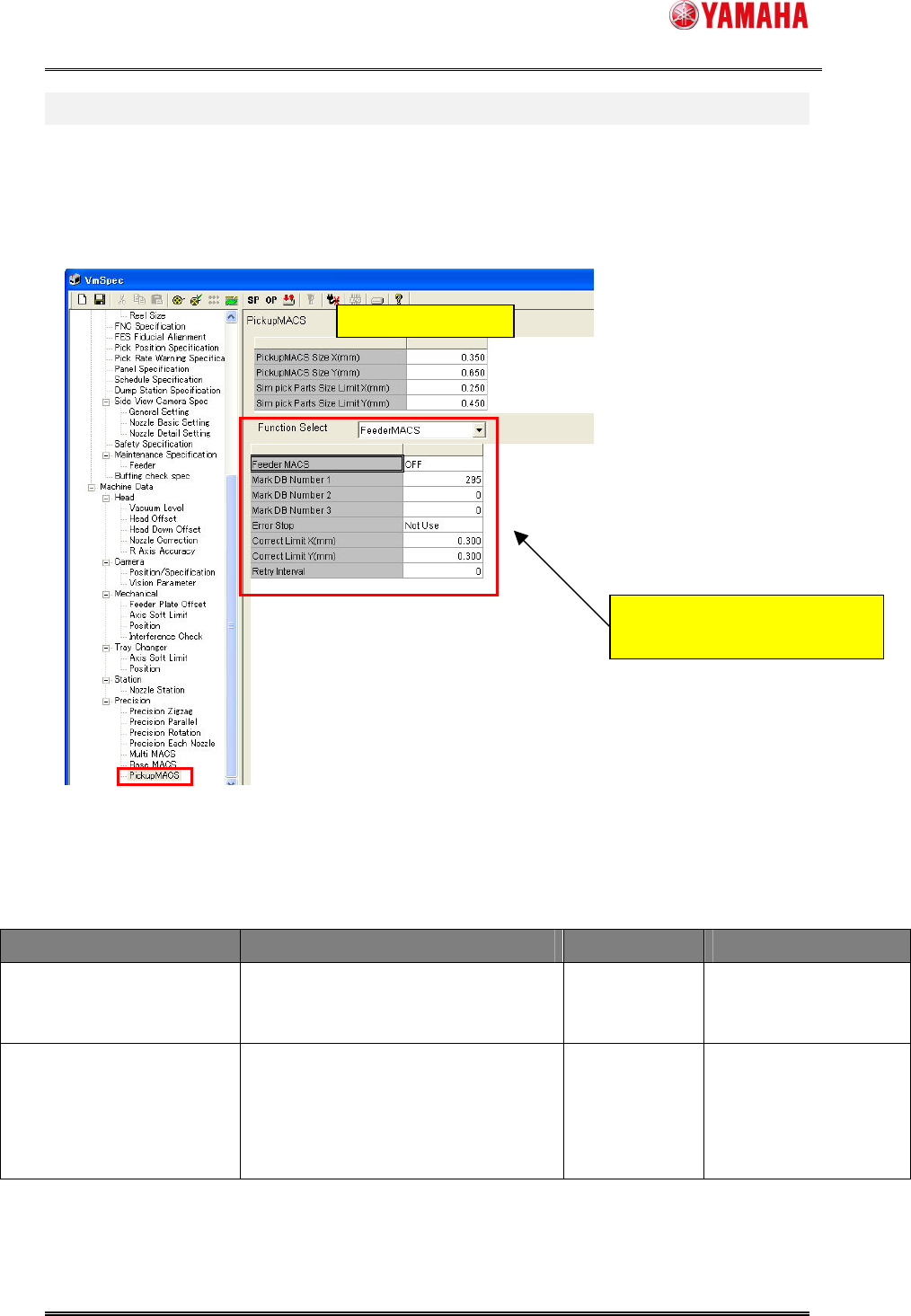
In [Machine] - [Setting] - [Machine Data] - [Precision] - [Pickup MACS], set each item.
Fig.3.1 “Pickup MACS” Settings
< Contents of Pickup MACS common setting items >
Items Explanation Input range Initial value
Pickup MACS Size X(mm)
Pickup MACS Size Y(mm)
Input the target parts size. This
function executes parts size smaller
than input value in this item.
000.000–
999.999(mm)
X 0.350(mm)
Y 0.650(mm)
Sim Pick Parts Size Limit
X(mm)
Sim Pick Parts Size Limit Y
(mm)
Input the parts size which lower limit
executing simultaneous pickup. The
parts of the size of less than an input
value do not execute simultaneous
pickup.
000.000–
999.999(mm)
X 0.25(mm)
Y 0.45(mm)
Common Setting items
Switch [Feeder MACS] setting items
and [Nozzle MACS] setting items.

SMT Software Engineering Group
IM Operations YAMAHA MOTOR CO., LTD.
MDOC-SOFT50177
6/23
< Contents of Feeder MACS setting items >
Feeder MACS
Select whether use Feeder MACS or not.
ON – Use, OFF – Not use
ON/OFF OFF
Mark DB Number 1-3
Input the mark data number for Feeder
MACS. The number should be registered
in the mark database.
It is used for Feeder MACS action in order
of 1, 2, and 3.
In case of mark data not using, input the
“0”. In the case of input number all “0”,
Feeder MACS is not executed.
0 - 300 0
Error Stop
When Feeder MACS is failed in auto
running. It stops machine running and
displays error message.
Use – Enabled, Not Use – Disabled
Use/Not Use Not Use
Correct Limit X(mm)
Correct Limit Y(mm)
Input the upper limit correction value of
Feeder MACS.
When Feeder MACS correction value
exceeds this input value, it does not
correct by Feeder MACS.
000.000–
999.999(mm)
X - 0.3(mm)
Y - 0.3(mm)
Retry interval
Input the feeder drive count for retry to
Feeder MACS.
In the case of input the “0”, it does not retry
Feeder MACS by feeder drive count.
0 - 65535 0
< Contents of Nozzle MACS setting items >
Nozzle MACS
Select whether use Nozzle MACS or not.
ON – Use, OFF – Not use
ON/OFF OFF
Error Stop
When Nozzle MACS is failed, it stops
machine running and displays error
message.
Use – Enabled, Not Use – Disabled
Use/Not Use Not Use
Execute at Load Board
Data
Select whether get Nozzle MACS again or
not, at loading board data..
Use – Enabled, Not Use – Disabled
Use/Not Use Use
Execute at Pick Error
Select whether get Nozzle MACS again or
not, when pickup error occurred.
Use – Enabled, Not Use – Disabled
Use/Not Use Not Use
Execute at Emergency
Stop
Select whether get Nozzle MACS again or
not, when emergency stop.
When nozzle station exists the machine,
both [Emergency stop] and [Opening
Nozzle Station Sutter] are required.
Use – Enabled, Not Use – Disabled
Use/Not Use Not Use
SMT Software Engineering Group
IM Operations YAMAHA MOTOR CO., LTD.
MDOC-SOFT50177
7/23
Correct Limit X(mm)
Correct Limit Y(mm)
Input the limit correction value of Nozzle
MACS.
When Nozzle MACS correction value
exceeds the input value, it does not correct
by Nozzle MACS.
000.000–
999.999(mm)
X - 0.15(mm)
Y - 0.15(mm)
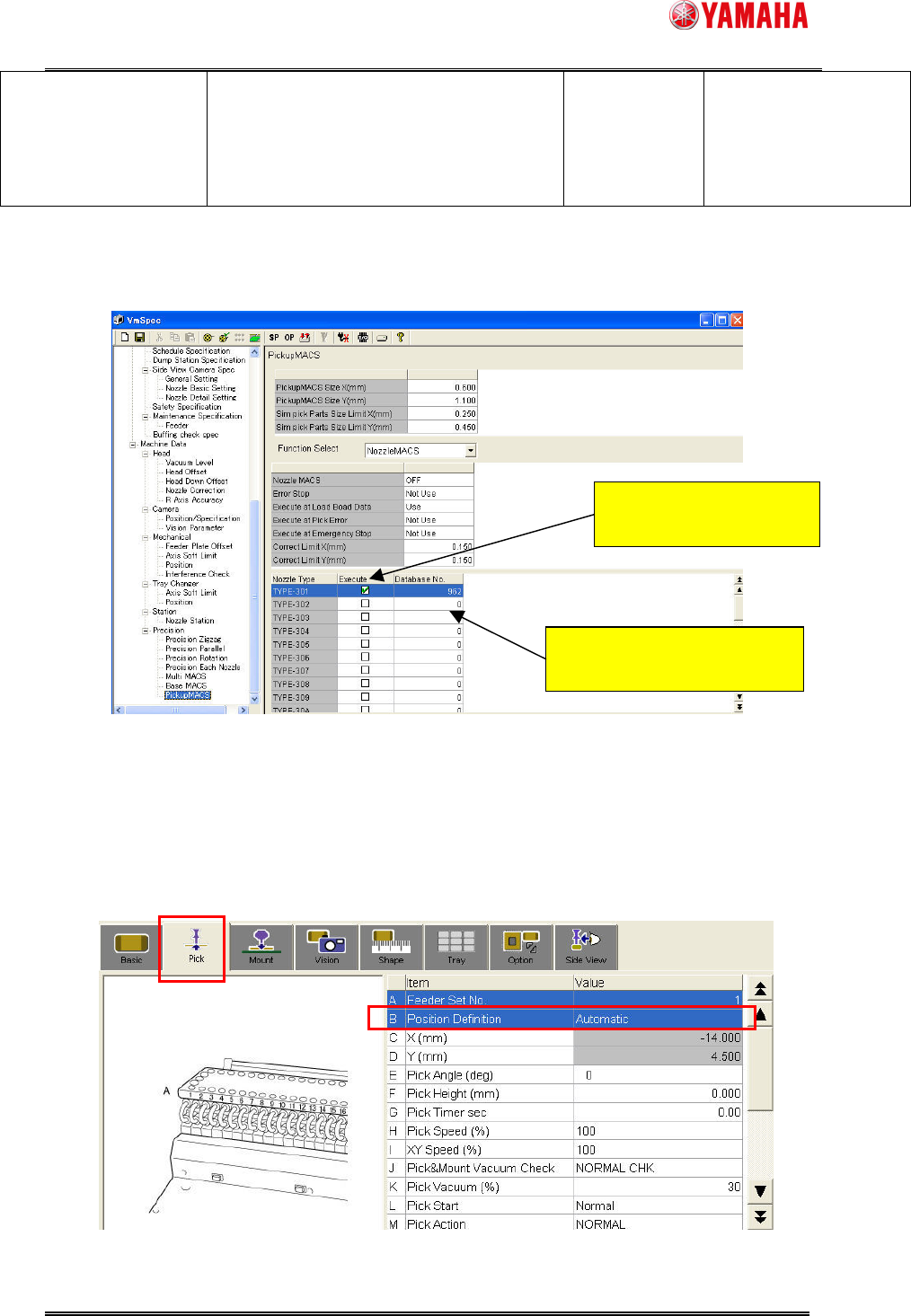
Nozzle Type and Database Number of the nozzle you want to use Nozzle MACS for are set on
the following dialog.
Fig.3.2 Select the nozzle type and setting the database number
3.2. Board data
To use Feeder MACS, Select “Automatic” on [Parts] - [Pick] - [Position Definition]. Feeder
MACS doesn’t work with “Teaching” or “Relative”.
Meanwhile, Nozzle MACS works with any of “Automatic”, “Teaching” and “Relative”.
Fig.3.3 [Parts] - [Pick]
Check the nozzle type to use
Nozzle MACS.
Input database number to use
Nozzle MACS.