manual-biron-nano-handle-b-soldering-tool-jbc-0036842_ID-262259_EN.pdf - 第10页
Main Screen - Wo r k Status Th e tool c an d isp lay d if fe re nt sta tus es: Status Caused by Effect Solution Wor k Lift an operative tool from the charging holder . The cartridge heats up to the selected temperature. …
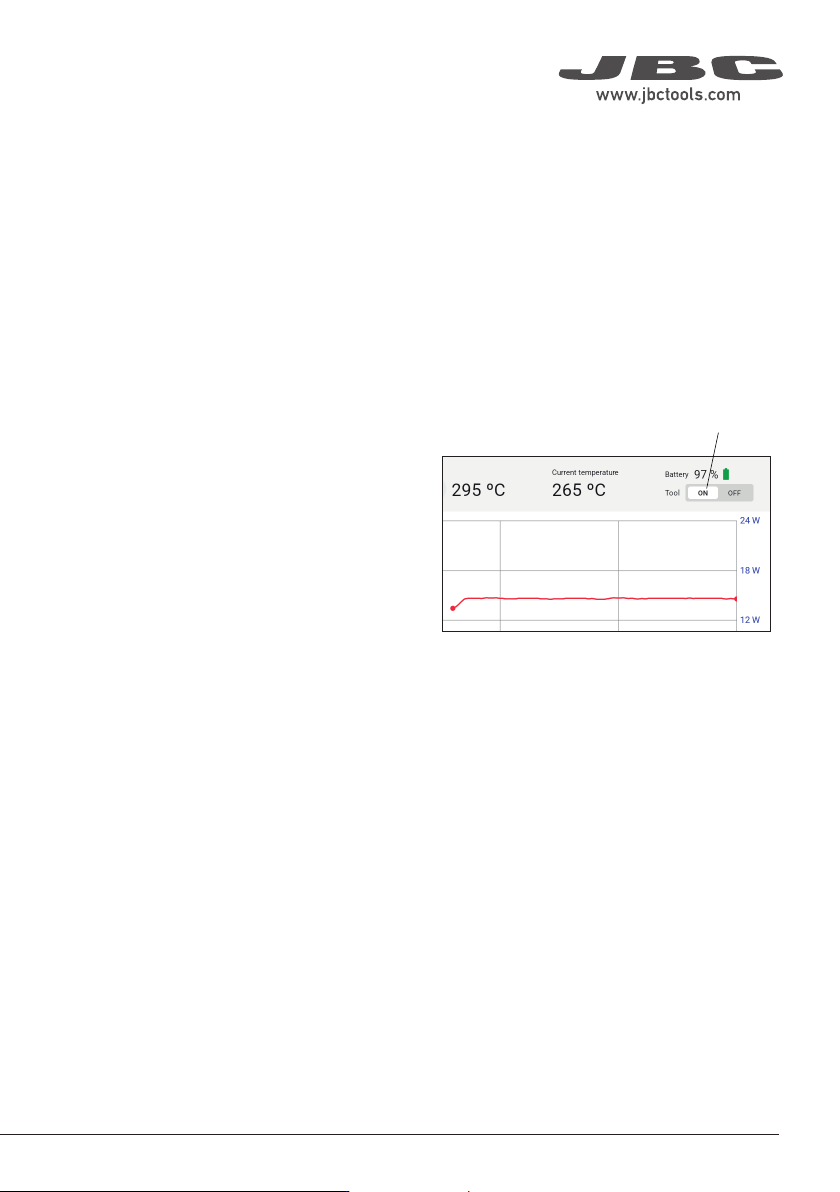
Auto Turn-Off
The tool turns off automatically in three different cases:
a) When the tool (without the tool cap) is laid down and remains completely still in Hibernation Mode
for 5 minutes.
b) When the tool (with the tool cap on) remains completely still in Hibernation Mode for 60 minutes.
c) When the tool is in the charger and the charging base is disconnected from the mains.
Tool Reactivation
After automatically shutting off, place the tool back in the charging holder to reactivate it.
Manual Turn Off/On
Besides the “automatic turn-off” feature, the
tool can also be manually turned off/on by
tapping the Tool On/Off button on the display.
Note: If the tool is turned off manually and
remains completely still for more than 5 minutes
or with its cap on for more than 60 minutes,
place it back in the charging holder to reactivate
it.
Tool On/Off Button
Main Screen - Work
9
40 mm
50 mm
60 mm
80 mm
100 mm
130 mm
130 mm
para manuales - negro plano
200 mm
300 mm

Main Screen - Work
Status
The tool can display different statuses:
Status Caused by Effect Solution
Work
Lift an operative tool from
the charging holder.
The cartridge heats up to
the selected temperature.
N/a
Charge
Place the tool in the
charging holder.
The cartridge cools down
to room temperature and
the battery charges.
N/a
Hibernation
Leave the tool completely
stationary out of the
charging holder for an
adjustable period of time (5
to 15 seconds).
The cartridge cools down
to room temperature.
N/a
Cover
Place the safety cap onto
the tool.
The cartridge cools down
to room temperature and
the status lightband turns
off. Communication with
the station is interrupted.
N/a
Connection lost
The connection between
the tool and the station has
been interrupted.
Possible reasons: the tool
has its safety cap on, the
tool has been inactive for 5
min., the tool is over 10 m
away from the station.
Tool-to-app information
exchange interrupted.
If the safety cap is on,
remove it. Place the
tool in the charging
holder if needed.
If the safety cap is not
on, place the tool in
the charging holder.
Off The tool is turned off.
Cartridge cools down to
room temperature.
Turn on the tool by
pressing the On/Off
button on the main
screen.
No cartridge
The tool does not have a
cartridge inserted or it is not
inserted correctly.
Inoperative tool.
Check that the
cartridge is inserted
correctly or insert a
cartridge.
Shortcircuit
Defective or unusable car-
tridge inserted.
Inoperative tool. Replace the cartridge.
Low batt
Battery of the tool nearly
depleted.
The tool will turn off
soon.
Charge the tool
by placing it in the
charging holder.
10
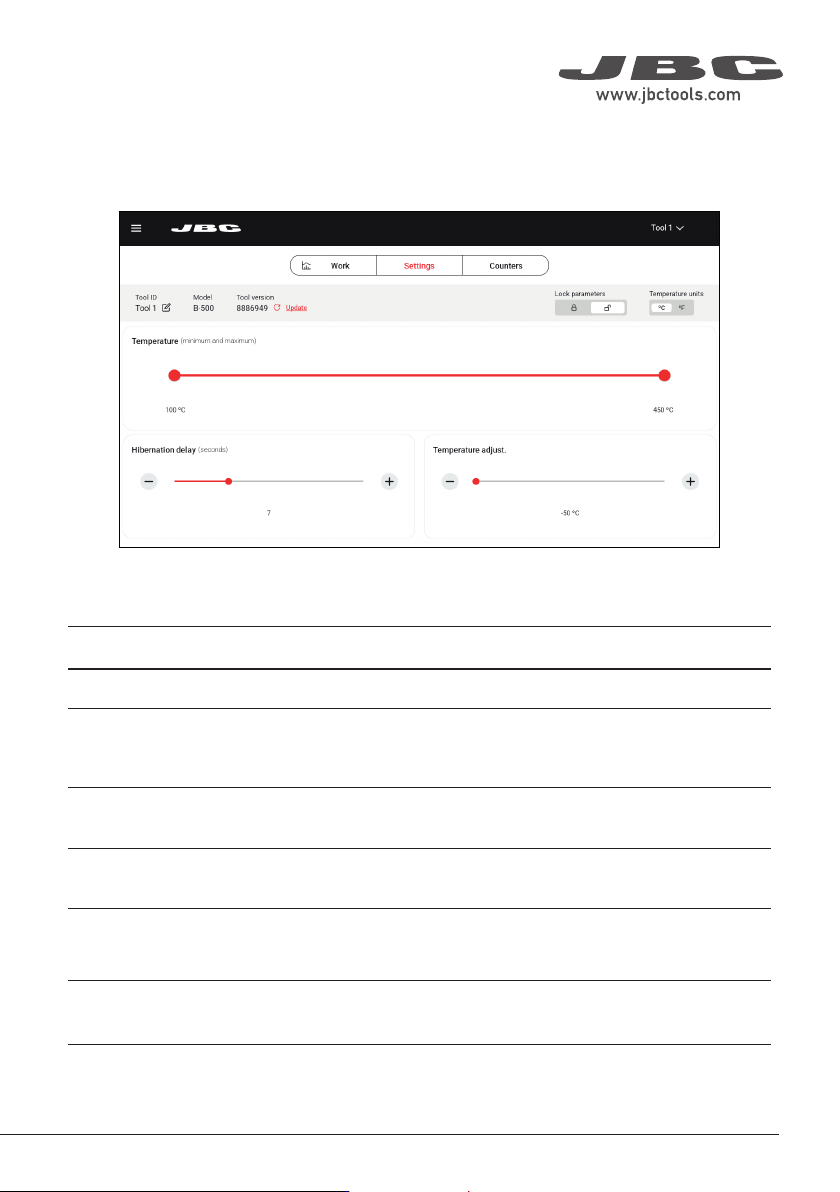
Main Screen - Settings
The B.IRON app offers an intuitive user interface, which provides quick access to several station
parameters:
Parameter
Tool ID
Lock parameters
Temperature units
Temperature
Hibernation delay
Temperature
adjustment
Description
Allows modifying the tool identifier.
Allows locking the parameters of the station using a four-digit code. The
default code is 0105, but a new code can be set by simply entering some
other four digits of choice when locking the parameters.
Allows changing the units of temperature measurement between degrees
Celsius and degrees Fahrenheit.
Define the minimum/maximum selectable working temperature.
Set the Hibernation delay from 5 to 15 sec. The countdown starts when
the tool remains completely stationary out of the charging holder or when
placed in the charging holder.
Sets an offset on the selected temperature value.
11
40 mm
50 mm
60 mm
80 mm
100 mm
130 mm
130 mm
para manuales - negro plano
200 mm
300 mm