manual-biron-nano-handle-b-soldering-tool-jbc-0036842_ID-262259_EN.pdf - 第3页
Y o ur ow n dev ic e or JB C’ s por tab le d isp lay PDS * , purchased a t ww w . jbct ools. com 3 40 mm 50 mm 60 mm 80 mm 100 mm 130 mm 130 mm par a manuales - neg r o plano 200 mm 300 mm B.NANO Na no T ool for B.I RO N…
2
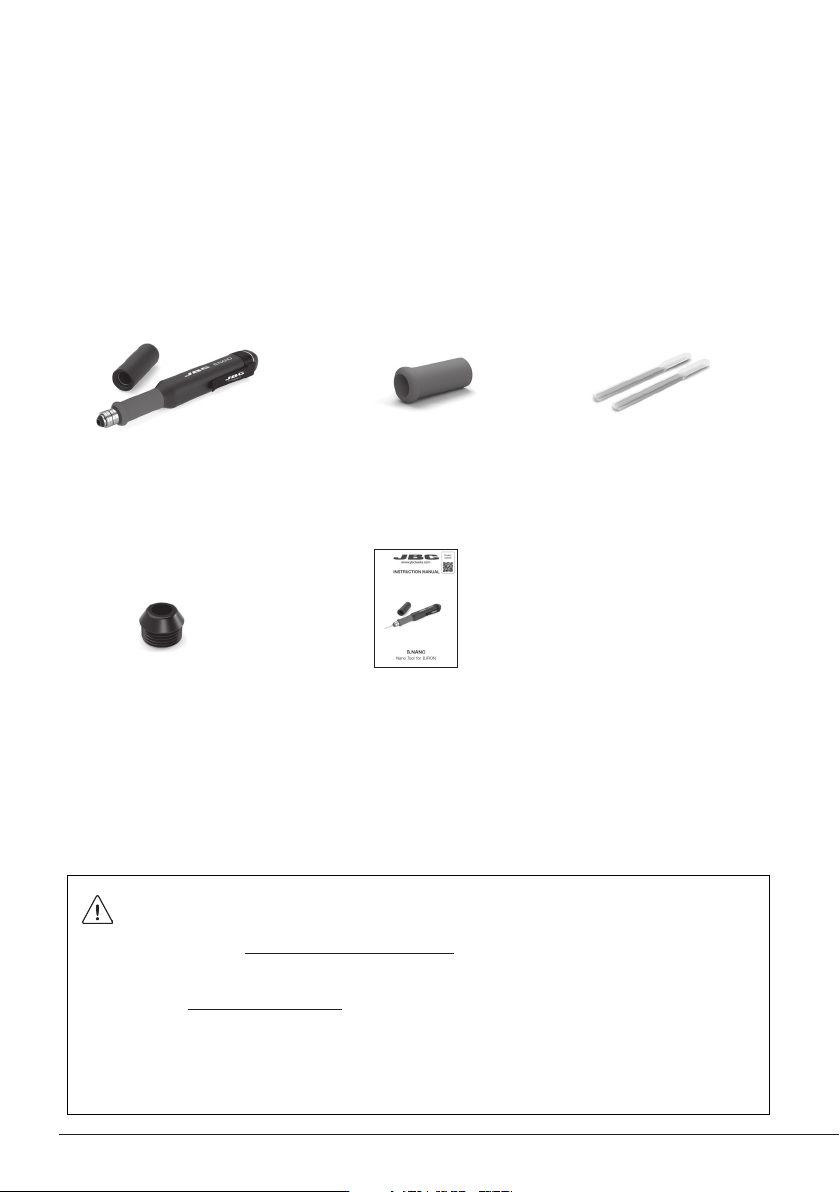
Packing List
The following items are included:
This manual corresponds to the following reference:
BN-B
Manual .............................. 1 unit
Ref. 0036842
Nano Tool for
B.IRON .......................... 1 unit
Sealing Plug for B.NANO
Tools ............ 1 unit
Available as ref. OB5000, which
includes 10 sealing plugs.
Grip for
B.IRON Tools ......... 1 unit
Available as B1510 (ref. 0031510),
which includes 4 grips.
Grip Fitters ................ 2 units
Important
Please read this manual and its safety guidelines thoroughly before using the product.
Note: Even if the display is turned off, the tool remains operational as long as the
batteries are charged, even when the cartridge is removed.
The tool can be manually switched off and on by tapping the tool power button on the
display (see page 9).
The tool turns off automatically under the following conditions:
- The tool is out of the charging holder (without safety cap on) and remains completely
still for 5 minutes.
- The tool has the safety cap on and remains completely still for 60 minutes.
- The tool is in the charging holder and the charging base is disconnected from the mains.
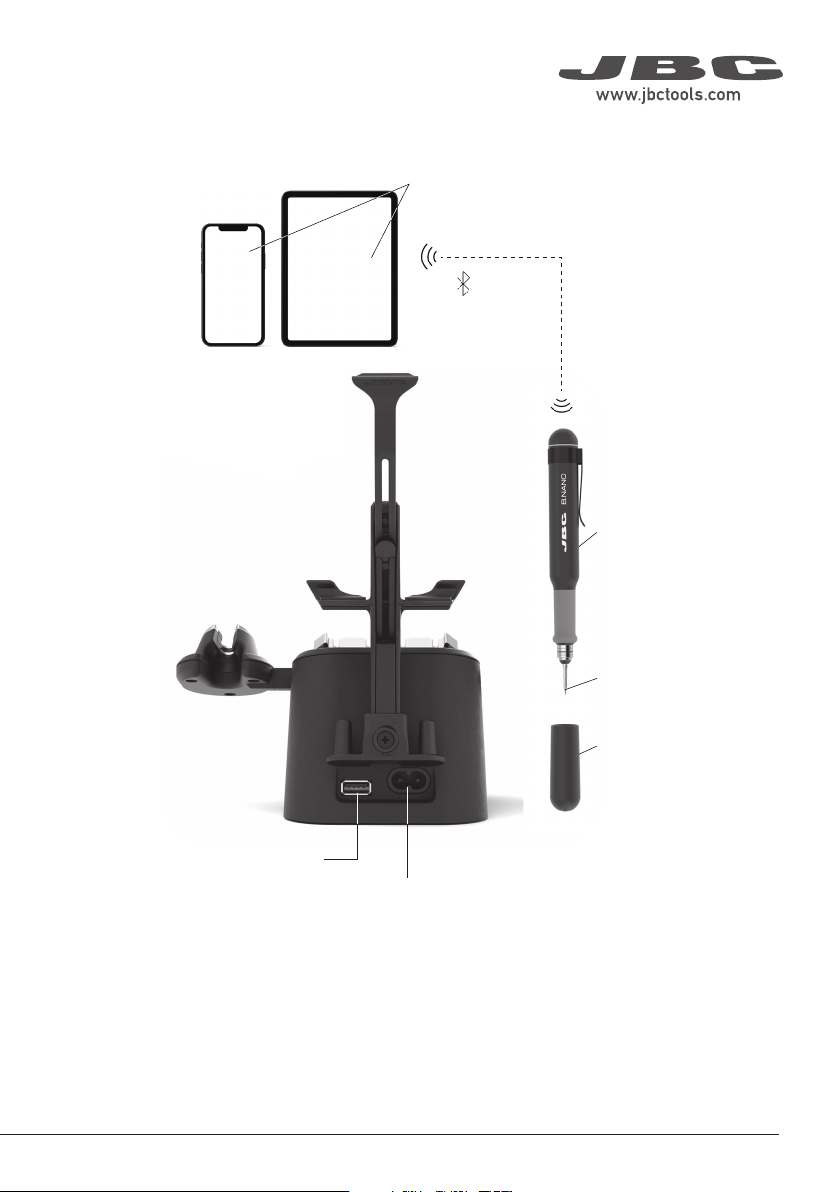
Your own device or JBC’s
portable display PDS*,
purchased at www.jbctools.com
3
40 mm
50 mm
60 mm
80 mm
100 mm
130 mm
130 mm
para manuales - negro plano
200 mm
300 mm
B.NANO
Nano Tool
for B.IRON
Power Socket
USB Connector
Bluetooth
Connection
B1596
Safety Cap
for B.IRON Tools
C115
Cartridge
Range
* Not included, sold separately.
Connection with B.IRON Station
ESD Safe Connection
Note: All B.IRON components comply with CE standards, but the tool by itself is not grounded. Therefore,
to comply with ESD regulations, the user of the B.IRON tool must be ESD-compliantly grounded.
JBC offers ESD tablemats, earthing cables, plugs and wristbands. More information at www.jbctools.com.
C115 Cartridge Adapters
(Ref. B0643 includes 4 adapters)
Since C115 cartridges have a smaller diameter
than C210 cartridges, adapters must be used to
store them in the cartridge holder.
These adapters must simply be inserted from
above into the slots of the cartridge holder.
Cartridge
Adapters
ø 1,5
ø 3,5
0,7
3,5
Ø2,5
Ø2,5
x
1
3
2
Retention
Clamps
The exchanger is suitable for
C115 and C210 cartridges.
C115 Cartridges
The holding area of C115
cartridges is delimited by the
two rings on the cartridge
shaft (x).
The cartridge exchanger allows
inserting / changing cartridges
safely without switching off
the tool. Cartridges are held in
place thanks to the retention
clamps (1).
Compatible Cartridges
B.XXX works with C115 cartridges. Find the
model that best suits your soldering needs at
www.jbctools.com.
Chisel Conical
Bent
Bevel
Cartridge
Exchanger
To insert a cartridge, carry out
the same steps in reverse order.
Note: Push the cartridges inside the tool until the reference ring is
aligned with the edge of the tool.
Gently press the tip against
the holes on the sides of the
cartridge exchanger (3) to
ensure that the cartridge is
appropriately inserted.
Place the tool with the cartridge
over the cartridge exchanger
slots and press down (1) until it
clicks. To remove the cartridge
pull out the tool (2).
Cartridge Replacement
Cartridge Extractor Cartridge Fixing
Reference Ring
Reference Ring
Cartridge Insertion and Replacement
Blade
C115
Cartridge
ø 1,5
ø 3,5
0,7
3,5
Ø2,5
Ø2,5
x
1
3
2
Retention
Clamps
The exchanger is suitable for
C115 and C210 cartridges.
C115 Cartridges
The holding area of C115
cartridges is delimited by the
two rings on the cartridge
shaft (x).
The cartridge exchanger allows
inserting / changing cartridges
safely without switching off
the tool. Cartridges are held in
place thanks to the retention
clamps (1).
Compatible Cartridges
B.XXX works with C115 cartridges. Find the
model that best suits your soldering needs at
www.jbctools.com.
Chisel Conical
Bent
Bevel
Cartridge
Exchanger
To insert a cartridge, carry out
the same steps in reverse order.
Note: Push the cartridges inside the tool until the reference ring is
aligned with the edge of the tool.
Gently press the tip against
the holes on the sides of the
cartridge exchanger (3) to
ensure that the cartridge is
appropriately inserted.
Place the tool with the cartridge
over the cartridge exchanger
slots and press down (1) until it
clicks. To remove the cartridge
pull out the tool (2).
Cartridge Replacement
Cartridge Extractor Cartridge Fixing
Reference Ring
Reference Ring
Cartridge Insertion and Replacement
Blade
C115
Cartridge
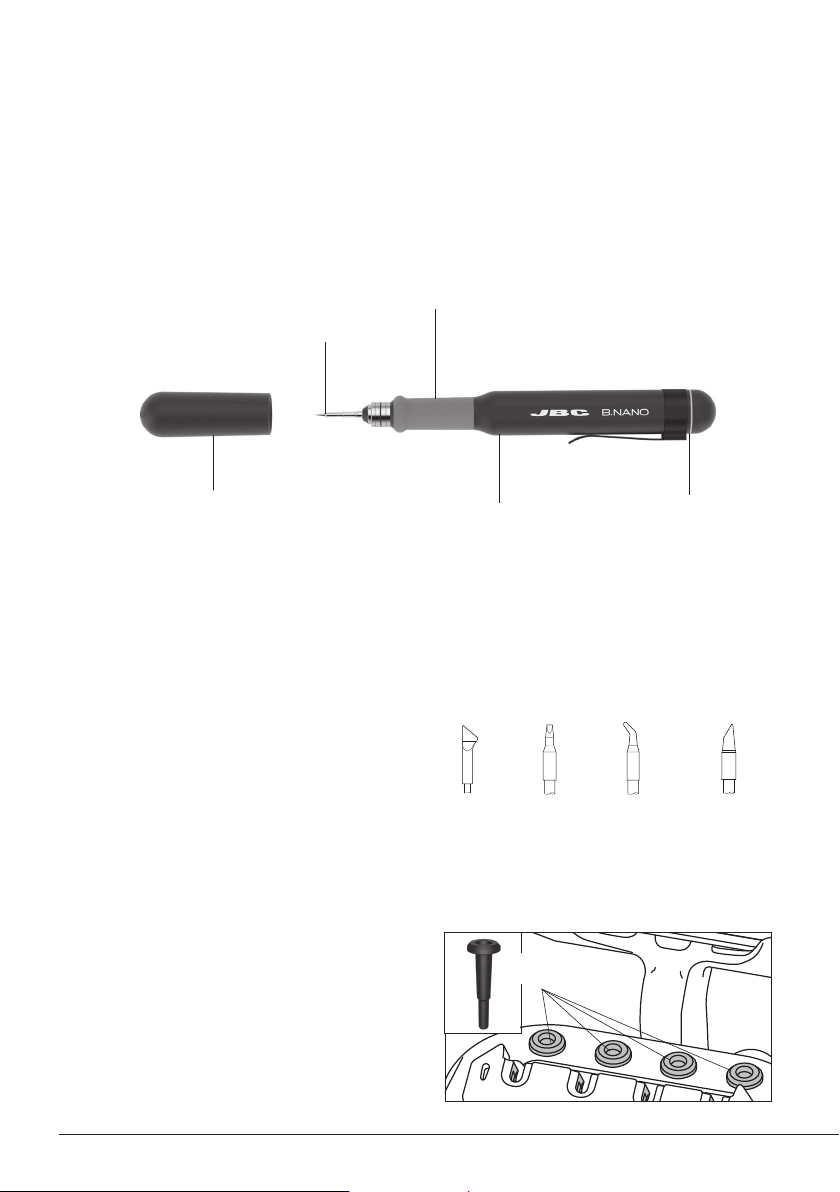
B.NANO works with C115 cartridges. Find the
model that best suits your soldering needs at
www.jbctools.com.
4
Features
C115*
Cartridge Range
Status Lightband
Tool
B1510
Grips for B.IRON
Tools
B1596
Safety Cap
for B.IRON Tools
* Not included, sold separately.
B.NANO performs up to 120 SMD soldering joints per charge and is the ideal tool for applications
in laboratories or performing individual soldering jobs that require the highest precision in hard-to
reach areas. Note: To charge the tool a B.IRON station is needed.