manual-biron-nano-handle-b-soldering-tool-jbc-0036842_ID-262259_EN.pdf - 第16页
Replacement Parts for B.NANO T ools B 15 10 Sof t Fo am G ri ps for B.I RON To o l s Reference includes 4 grips B 15 9 6 Safe ty C ap fo r B.IRO N T o ol s Reference includes 1 cap OB5 000 Se ali ng Pl ugs fo r B.NA NO T…
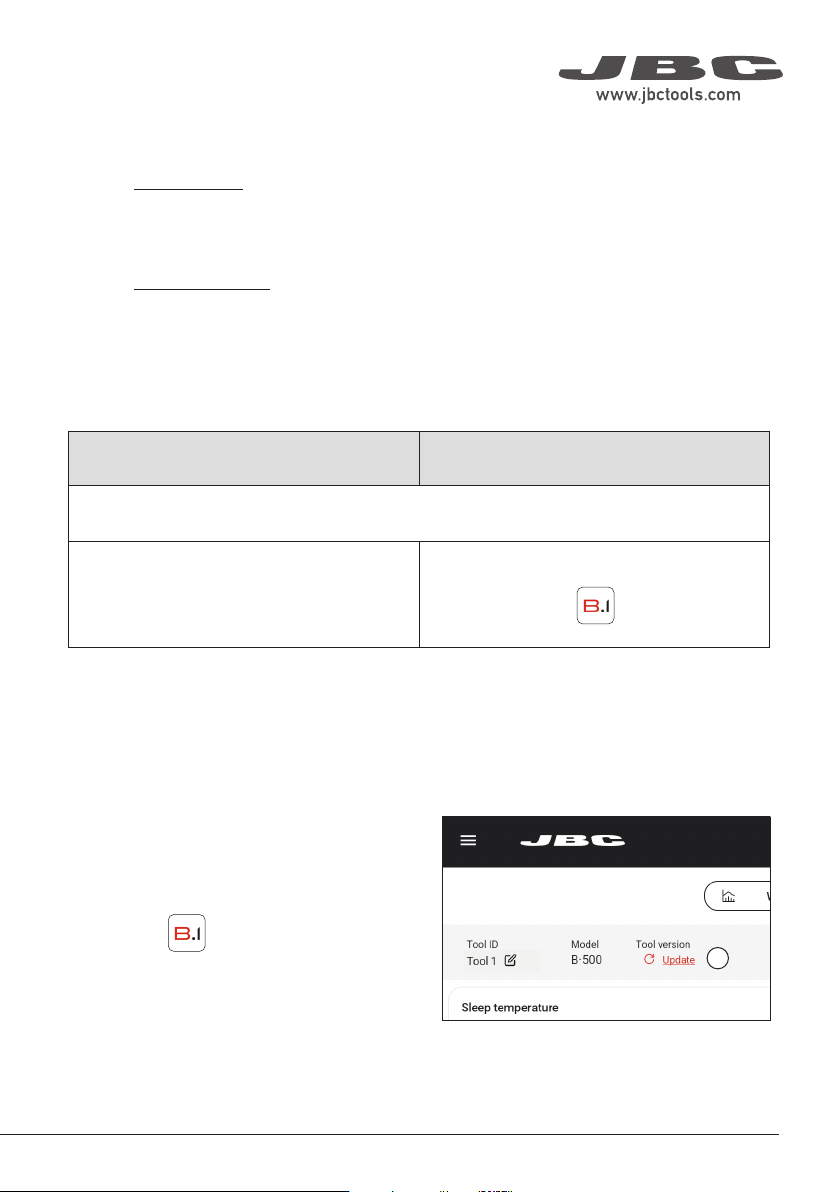
1
Tool firmware updates are not executed
automatically; they must be carried out by the
user.
On the display you are using with B.IRON, and
with the latest app version installed, access the
B.IRON app:
Connect the tool you want to update. Then,
on the Settings tab of the main screen, tap
“Update” (1).
Executing the Tool Firmware Update File
Android devices iOS devices
Transfer the unzipped files from the internet-connected device to the device used with B.IRON
and place them in the following path/folder:
\Internal shared storage\Android\data\com.
jbctools.jbcbiron\files
Files > On my iPad > JBC B.iron
Display without Internet connection:
Download the firmware update file to another device with an Internet connection from JBC’s website:
https://www.jbctools.com/jbcsoftware.html and unzip the downloaded file.
Then do as described in the table.
Downloading the Tool Firmware Update File
Display with Internet connection:
Download the firmware update file to the display used with B.IRON from https://www.jbctools.com/
jbcsoftware.html. Go to the internal folder and unzip the downloaded file.
15
40 mm
50 mm
60 mm
80 mm
100 mm
130 mm
130 mm
para manuales - negro plano
200 mm
300 mm
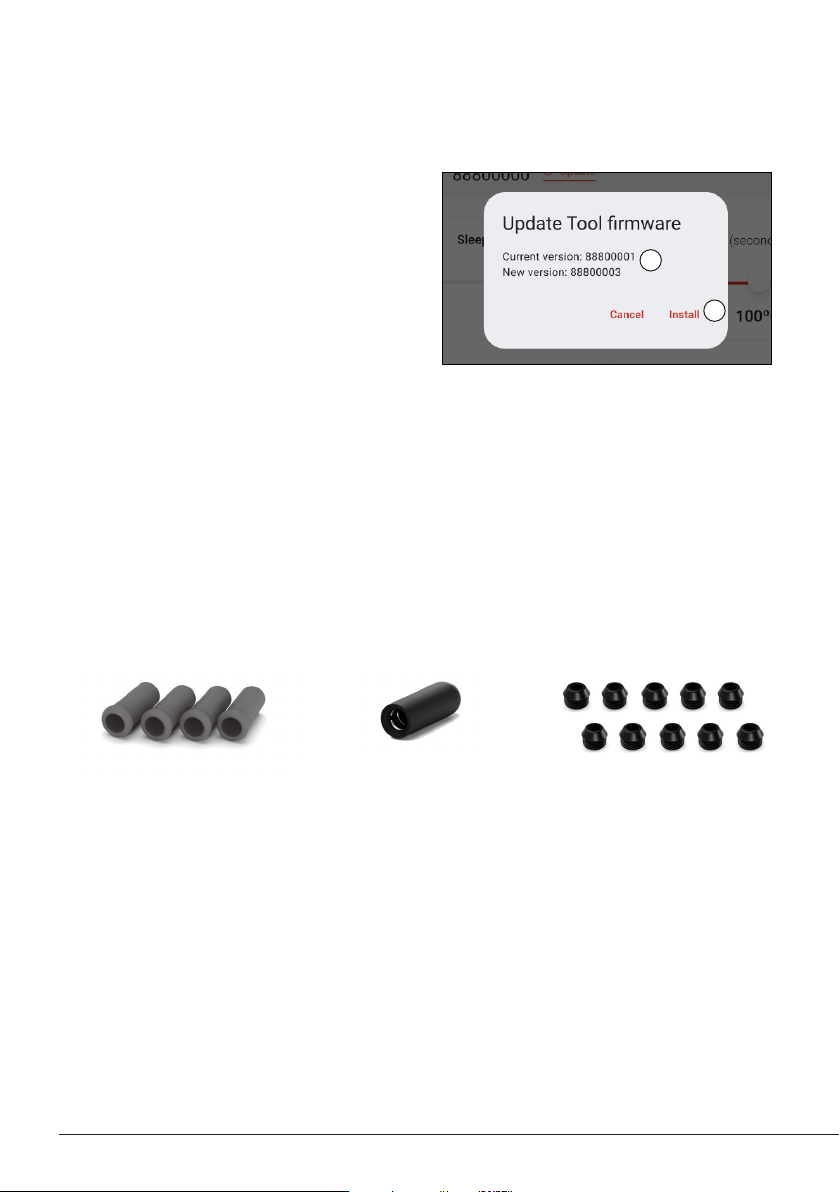
Replacement Parts for B.NANO Tools
B1510
Soft Foam Grips for B.IRON
Tools
Reference includes 4 grips
B1596
Safety Cap for B.IRON Tools
Reference includes 1 cap
OB5000
Sealing Plugs for B.NANO
Tools
Reference includes
10 sealing plugs
2
3
If the downloaded tool firmware update file
contains a more recent version than the one
already installed, the current and new version
are displayed (2). Tap “Install” to start the
update (3).
The update process takes about 10 minutes.
The B.IRON status lightband continuously
changes its color during the update process.
Once the update is complete, the pop-up
message “The tool version has been updated
correctly” appears on the screen.
If “No new version available” is displayed, no
update is possible or required.
Executing the Tool Firmware Update File (continuation)
16
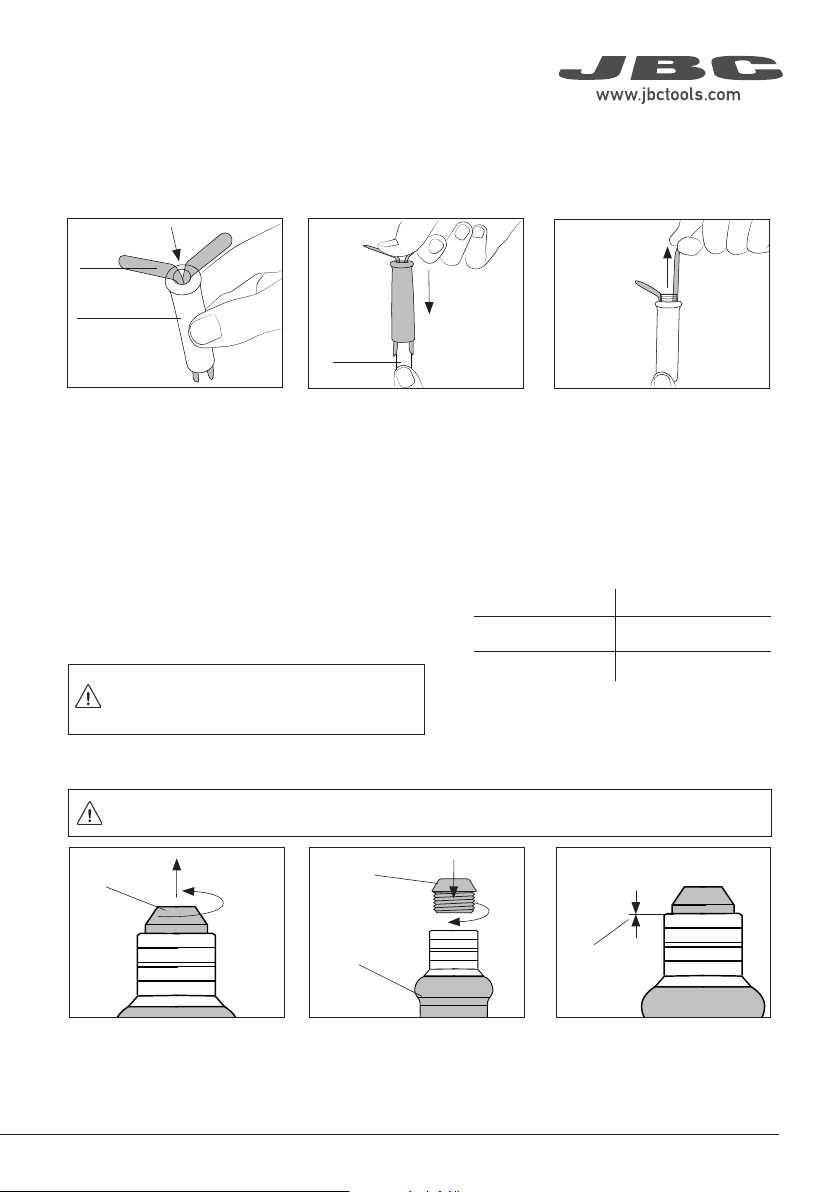
Sealing
plug
Before replacing the sealing plug,
disconnect the tool from the station and
make sure the device has cooled down.
The sealing plug prevents undesirable flux vapors or particles from entering the tool and its usage is
highly recommended. If the sealing plug is not used, this can lead to incorrect cartridge contact and
may render the tool unusable.
Push the sealing plug inside
the tool.
Note: The chamfered side
of the sealing plug has to be
positioned towards the tool.
Make sure the sealing plug is
placed correctly.
The edge of the sealing plug
must rest in the groove of the
tool bushing.
Introduce a small shaft or
screwdriver, not deeper than
8mm, lift and pull the sealing
plug. Never use a cartridge to
do this operation.
Tool
Chamfered
Side
* Each ref. comes with 10 sealing plugs
Replacing Sealing Plug for B.100 & B.500 Tools - OB4000 comes with 10 sealing plugs
Replacing Sealing Plug for B.NANO Tools - OB5000 comes with 10 sealing plugs
Edge inside
the groove
Tool
Chamfered
side
Sealing plug
in touch with
the bushing
Remove the worn sealing plug
by unscrewing it by hand.
Position the chamfered side
upwards and screw the new
sealing plug into the tool
bushing until it stops.
Make sure the sealing plug is
placed correctly.
The shoulder of the plug must
be in touch with the bushing.
View: inside
Sealing
Plug
Sealing Plugs
For B.NANO tools, the use of the sealing plug is mandatory. Without the use of the sealing
plug, the cartridges cannot be properly inserted.
Note: Check the condition of the plug periodically
and replace it as soon as wear or cracking is
detected.
Tool Sealing Plug Ref.
B.NANO OB5000*
B.100 and B.500 OB4000*
CD-Q:
OK
CD-Q:
OK
CD-Q:
OK
Make a lengthwise cut on the
worn grip. Be careful not to
damage the tool.
Remove the worn grip. Firmly slide the new grip onto
the tool until it locks into place.
Cutting Worn Grip Removing Worn Grip
Replacing Rubber Grips - B5051 includes 4 grips
Cutter
Assembling New Grips
Worn Grip
New Grip
Apply vaseline inside the
grip for easier fitting
Maintenance - B.IRON Tools
Replacing Soft Foam Grips - B1510 (B.100, B.NANO, B.500-A) / B5050 (B.500-B)
Insert the fitters into the new
grip.
Push the grip with the fitters
onto the tool.
To remove the fitters, hold the
grip and pull the fitters out. Use
pliers if necessary.
Fitter
New Grip
Hold this way
so the fi tters
can slide
Tool
Inserting Fitters Assembling Grips Removing Fitters
Sealing
plug
Before replacing the sealing plug,
disconnect the tool from the station and
make sure the device has cooled down.
The sealing plug prevents undesirable flux vapors or particles from entering the tool and its usage is
highly recommended. If the sealing plug is not used, this can lead to incorrect cartridge contact and
may render the tool unusable.
Push the sealing plug inside
the tool.
Note: The chamfered side
of the sealing plug has to be
positioned towards the tool.
Make sure the sealing plug is
placed correctly.
The edge of the sealing plug
must rest in the groove of the
tool bushing.
Introduce a small shaft or
screwdriver, not deeper than
8mm, lift and pull the sealing
plug. Never use a cartridge to
do this operation.
Tool
Chamfered
Side
* Each ref. comes with 10 sealing plugs
Replacing Sealing Plug for B.100 & B.500 Tools - OB4000 comes with 10 sealing plugs
Replacing Sealing Plug for B.NANO Tools - OB5000 comes with 10 sealing plugs
Edge inside
the groove
Tool
Chamfered
side
Sealing plug
in touch with
the bushing
Remove the worn sealing plug
by unscrewing it by hand.
Position the chamfered side
upwards and screw the new
sealing plug into the tool
bushing until it stops.
Make sure the sealing plug is
placed correctly.
The shoulder of the plug must
be in touch with the bushing.
View: inside
Sealing
Plug
Sealing Plugs
For B.NANO tools, the use of the sealing plug is mandatory. Without the use of the sealing
plug, the cartridges cannot be properly inserted.
Note: Check the condition of the plug periodically
and replace it as soon as wear or cracking is
detected.
Tool Sealing Plug Ref.
B.NANO OB5000*
B.100 and B.500 OB4000*
17
40 mm
50 mm
60 mm
80 mm
100 mm
130 mm
130 mm
para manuales - negro plano
200 mm
300 mm