00193702-01.pdf - 第47页
SIPLACE SR.504.xx szoftver útmutató 4 SIPLACE gépsor be- és kikapcsolása Kiadás 01/2003 4.1 A SIPLACE-gépsor bekapcsolása 47 4 SIPLACE gépsor be- és kikapcsolása E fejezetben Ön a súgótól segíts éget kap a SIPLACE- gépso…
3 Grafikus kezelőfelület SIPLACE SR.504.xx szoftver útmutató
3.4 Folyamatábra az alapnézethez Kiadás 01/2003
46
3.4 Folyamatábra az alapnézethez
3
3
3
3
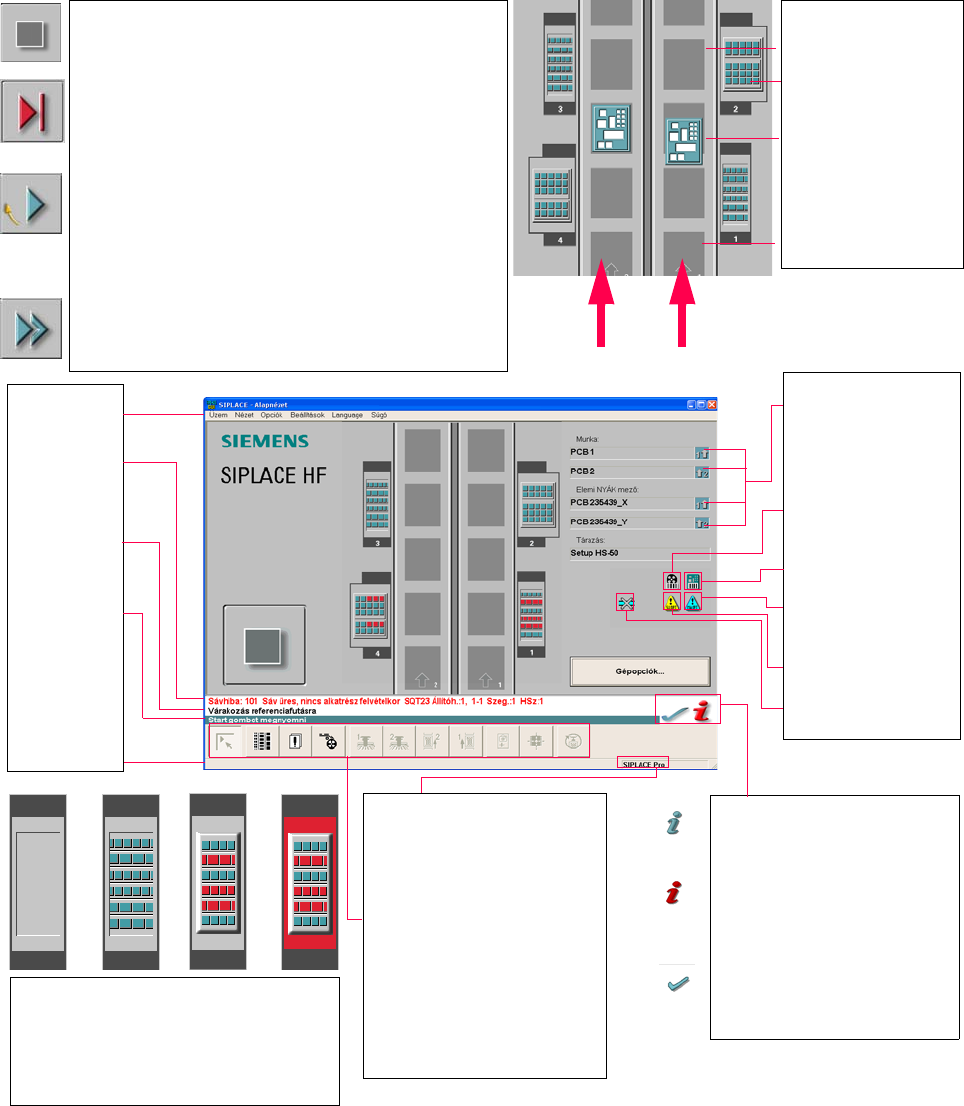
Pull-down menus
3
Error information
bar
3
Status indication
and process status
3
Notification about a
specific action to
carry out
3
Information bar
3
Control modes:
Stand alone
SIPLACE Pro
3
Submenu icons with info box:
Main view
Setup
Error
Feeders
Gantry 1, 2
PCB conveyor 2, 1
Teach fiducial
Test component
SITEST
GEM
3
Output conveyor
The output conveyor is empty.
MTC on location 2
Central conveyor
The PCB is supplied.
Input conveyor
The input conveyor is empty.
3
Context-sensitive help system
This also provides a short description of all
displayed operating elements.
3
Help system for errors
Starts a help system displaying possible
causes of the current error along with correc-
tive actions.
3
Error deletion
After the error has been successfully cor-
rected, the currently active error is deleted.
Conveyor 2
Conveyor 1
3
Identifies the job or panel of the
right conveyor lane, or of the
single conveyor, and of the left
conveyor lane (dual conveyors
only).
3
Barcode-supported component
refilling
3
PCB barcode is activated.
3
Machine options have been
changed
3
Software options configured
3
Compressed air switch-off
mechanism configured
1 234
1 No setup available on the corresponding location
2 Setup available
3 Setup available - at least one empty track error
4 Machine standstill due to track error
3
This display appears during the start-up process of the machine. Only when the
reference run has been completed successfully will the display appear in the form
of a button.
3
Status
The machine is running, or is in its 'ready' state.
Pressing the button:
The machine stops.
3
Status
The machine is placing components; 'stop' is activated. The assembly of the
PCBs located in processing conveyors 1 and 2 or in the central conveyor will be
terminated and the PCBs will be transported to the intermediate or output
conveyor. Subsequently, the machine will stop.
Pressing the button:
The machine continues to run without interruption.
3
Status
Machine is in the stopped state.
Pressing the button:
The machine resumes the placement operation.

SIPLACE SR.504.xx szoftver útmutató 4 SIPLACE gépsor be- és kikapcsolása
Kiadás 01/2003 4.1 A SIPLACE-gépsor bekapcsolása
47
4 SIPLACE gépsor be- és kikapcsolása
E fejezetben Ön a súgótól segítséget kap a SIPLACE- gépsor be- és kikapcsolásához. 4
4.1 A SIPLACE-gépsor bekapcsolása
4.1.1 A SIPLACE Pro programozó rendszer elindítása
Æ Kapcsolja be a sorvezérlő számítógépet. Ha a gép már felállt, megjelenik a Windows NT
bejelentkező ablaka.
Æ Jelentkezzen be Ön saját doménjénél a felhasználói nevével és jelszavával.
Æ Indítsa el a SIPLACE Pro programot a Windows NT Start --> Programok --> Siemens
SIPLACE startmenüről,
vagy
Æ Indítsa el a SIPLACE Pro programot a munkaasztalon levő ikonról.
A rendszer összekapcsolódik a SIPLACE Pro Szerver-el és megnyitja a SIPLACE Pro
kezelőfelületét. 4
Amíg tart a rendszer SIPLACE Pro-val való kapcsolatának felépítése a szerverrel, addig a
képernyőn a következő kijelzés látható. 4
4 SIPLACE gépsor be- és kikapcsolása SIPLACE SR.504.xx szoftver útmutató
4.1 A SIPLACE-gépsor bekapcsolása Kiadás 01/2003
48
4
Ábr. 4.1 - 1 A SIPLACE Pro elindul
4.1.2 Mire legyen gondja gépének bekapcsolása előtt
FIGYELEM
Mielőtt bekapcsolja az állomásokat, hajtsa végre a következőkben leírt lépéseket. 4
Æ Ellenőrizze az állomások áram- és sűrített levegő-ellátásának csatlakoztatását.
Æ Szemrevételezéssel ellenőrizze az állomások normális állapotát. Különösen arra legyen
gondja, hogy a portálok mozgásterében semmiféle akadály ne legyen.
Æ Győződjék meg arról, hogy mindegyik fej z-tengelye a felső véghelyzetben áll.
Æ Zárja be az adagolók fedeleit és a védőburkolatokat.
Æ Győződjék meg rőla, hogy nincs lemez az állomásvezérlő számítógép CD-meghajtójában.