i3070-Software-Installation.pdf.pdf - 第13页
i3070 Software Installation 13 Installing Software Licenses – Installing node-locked licenses – Setting up client machines to use floating licenses Installing node-locked licenses Run Keysight License Manager 6 to add th…

12 i3070 Software Installation
6 Complete the license installation: • To install the node-locked licenses on a testhead controller or test
development workstation, see Installing node-locked licenses on page 13.
• To allow access to optional feature licenses (which are floating licenses), see
Setting up client machines to use floating licenses on page 16.
7 To run the i3070 software when
Windows Firewall is enabled
(optional):
To allow the i3070 software to run when Windows Firewall is enabled, go to the
C:\I3070_ICT\util folder, right-click CreateFirewallRule.bat and select Run as
administrator.
The script creates inbound rules for the required ports and TCP/IP addresses.
• Default ports enabled: 1337, 3071, 9090, 5672, 31883, 40100, 40102,
50100, 50102, 7030.
• Default IP addresses enabled: 10.3.112.1 to 10.3.112.255, 0.0.0.0,
192.168.1.1, 255.255.255.255.
Completing the software installation (continued)
Task Steps
i3070 Software Installation 13
Installing Software Licenses
– Installing node-locked licenses
– Setting up client machines to use floating licenses
Installing node-locked licenses
Run Keysight License Manager 6 to add the node-locked licenses on:
• a testhead controller, or
• a test development workstation.
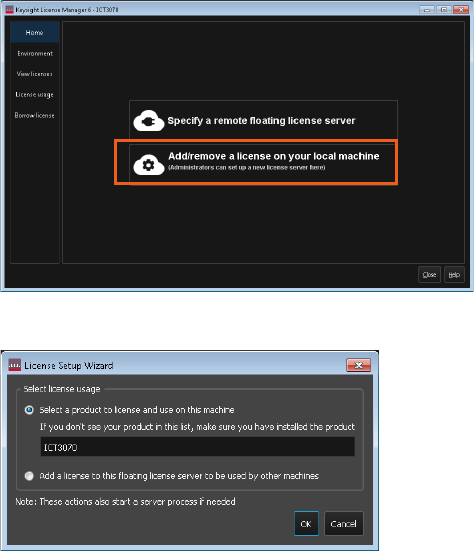
1 Launch Keysight License Manager 6 (Start > Keysight License Manager 6 >
Keysight License Manager 6).
2 Click Add/remove a license on your local machine.
3 Select the product to license (ICT3070) and click OK.
14 i3070 Software Installation
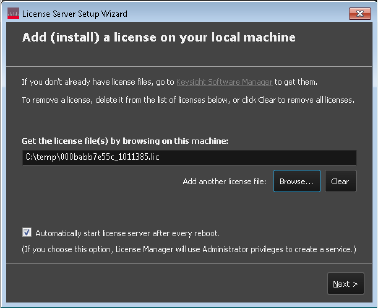
4 Click Browse to locate and select the license file(s) that you saved earlier.
5 Click Next to complete the license setup.
6 Go to the C:\I3070_ICT\util folder. Right-click licenseSearchPathReg.bat and
select Run as administrator. This will ensure that the license search path setup
is consistent for all ICT3070 user accounts.
You can now run the i3070 software on:
• Testhead controller
• Test development workstation issued with node-locked licenses.
Proceed with the license server setup if you have floating licenses to install for
optional test features and test development workstations. For instructions, see the
“Single/Triple-Redundant Network License Server Setup Guide”.