i3070-Software-Installation.pdf.pdf - 第18页
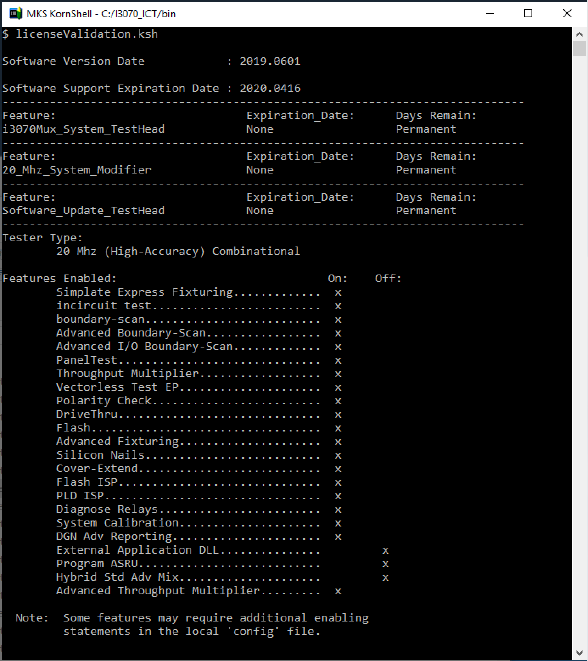
18 i3070 Software Installation Verify license installation 1 Open a Korn Shell window and type licenseValidation.ksh . The te ster t ype and enabled featur es will be displayed. This al so shows the support subscription …
i3070 Software Installation 17
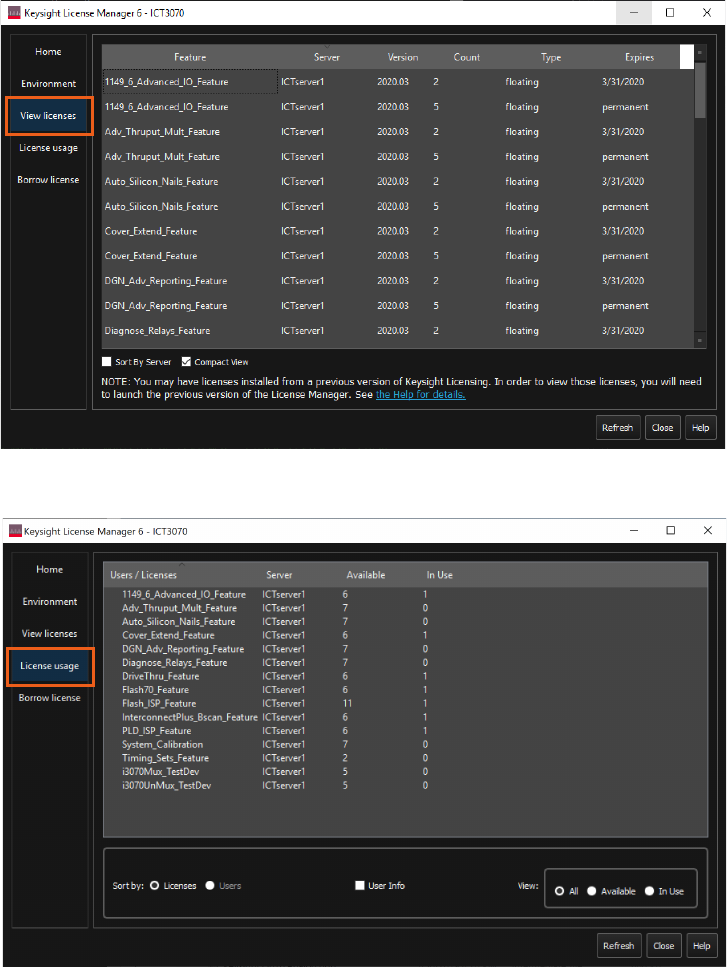
View licenses
Once the licenses are successfully set up, you can view them from the View licenses
tab. This also shows their expiry dates.
For the number of floating licenses that are available or in use, see License usage.
18 i3070 Software Installation
Verify license installation
1 Open a Korn Shell window and type licenseValidation.ksh. The tester type
and enabled features will be displayed. This also shows the support
subscription dates.
2 Check that the registry value for ICT3070_LICENSE_FILE is the same in:
•
HKEY_CURRENT_USER\Software\Keysight\EEsof License Configuration, and
•
HKEY_LOCAL_MACHINE\Software\Wow6432Node\Keysight\EEsof License Configuration
3 Check that the registry value for ICT3070_LICENSE_FILE contains the default license path
C:\ProgramData\Keysight\Licensing\Licenses\Other;
C:\ProgramData\Keysight\Licensing\Licenses\Server;
and any added floating license server path, if applicable
i3070 Software Installation 19
Other Tasks
– Copying user data
– Installing the online help
– System backup and recovery
Copying user data
If you are upgrading a test development station, you can copy your user data from
the old workstation. Do not copy the license files.
• From release 10.00p, the default installation folder for the i3070 In-Circuit Test
Software is C:\I3070_ICT.
• Copy your data from the old workstation (C:\I3070_ICT or C:\Agilent_ICT) to
corresponding subfolders in C:\I3070_ICT on the new workstation.
If your board data is not in the default
boards folder (C:\I3070_ICT\boards), follow
the procedure below to change ownership of the board directory.
Changing ownership of the boards directory
If you change the location of the default boards directory, follow the instructions
below to change the ownership of your custom directory. Otherwise, error
messages may appear.
To change the ownership of the boards directory:
1 In Windows Explorer, right-click the boards directory and select Properties.
2 In the boards Properties dialog box, click the Security tab.
3 In the Security tab, click Edit.
4 In the Permissions dialog box, click Add.
5 Under Enter the object names to select, type
Everyone and click OK.
The group Everyone is added to the Group or user names list in the Permissions
dialog box.
6 Under Group or user names, select Everyone.
7 In the Allow column, select the Full Control check box.
8 Click OK to save the changes.