00197623-03_VD_708.1_SP2_DE_EN.pdf - 第18页
Station Software 7 08.1 SP2 / Version Description Ausgabe 10/2015 E dition 18 5.13 E nhancements in SIPLACE Visio n The SIPLACE Vision s ys tem has been enhanc ed as foll ows : – D isplaying a virt ual keyboard C ompatib…
Station Software 708.1 SP2 / Version Description Ausgabe 10/2015 Edition
17
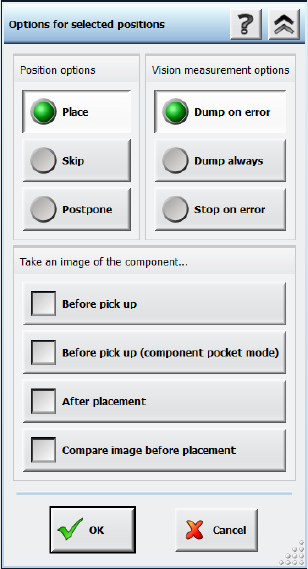
Figure 5-9: Placement error analysis options
After this option has been selected for one or several placement positions, the placement process
is interrupted before the z-axis starts to place the component and a new measurement with
reduced acceleration is started. The reduced acceleration shall prevent further slippage of the
components. After the additional measurement, the component is brought to the placement
position with reduced acceleration and will be placed with the z-axis acceleration that is defined in
SIPLACE Pro.
The two measurements (standard and before placement) can be compared and evaluated via the
inspection function for Vision measurements on the GUI. A possible slippage of the component can
thus be clearly recognized. Additionally, the results of the additional measurement are entered in
the board history files. This allows a statistical analysis over a longer period.
5.12 Robust Dual Gantry Measurement
Compatible mode: Complete
The dual gantry measurement procedure has been improved.
In a dual gantry configuration, the station software performs a dual gantry measurement every 5
minutes in order to correlate the gantries' positions and correct the positions, if necessary. Until
now, if a fiducial was manually taught or the wrong fiducial was detected by one of the gantries, the
resulting error was applied to all boards produced within the next 5 minutes.
To prevent such process errors, the dual gantry correction will now not be transferred to the next
board(s) if any of the fiducial positions were taught by the operator. This includes all cases in which
the first fiducial measurement failed and the operator intervened via a detailed error. Instead, a new
dual gantry measurement will be performed for the next board.
Station Software 708.1 SP2 / Version Description Ausgabe 10/2015 Edition
18
5.13 Enhancements in SIPLACE Vision
The SIPLACE Vision system has been enhanced as follows:
– Displaying a virtual keyboard
Compatible mode: Compatible
SIPLACE Vision automatically displays a virtual keyboard on the GUI of the station software
whenever a text entry field has been selected. This behavior has to be configured in the station
software beforehand.
The virtual keyboard is not displayed on the GUI of the Vision Teach Station because a
keyboard is always available in this case.
– Modifications to allow reading of individual barcode fiducials by the board camera.
Compatible mode: Complete
– Improved procedure to teach the pickup position if the camera is outside the travel range due to
a slight rotation.
Compatible mode: Compatible
– If connection problems occur in the communication with the GigE cameras, the errors are
narrowed down by specific queries and detailed error messages displayed.
Compatible mode: Complete
– Correction in the calculation of the scaling of MFU components.
Compatible mode: Complete
Station Software 708.1 SP2 / Version Description Ausgabe 10/2015 Edition
19
6 Hardware Specifications
6.1 Supported Feeder Types
The following feeders are supported by the 708.1 SP2 station software version:
– 4 mm – 104 mm X-feeder
– 2x8 mm X-feeder
– 16 mm XN-feeder
– Surftape AX (8 mm, 12 mm, 16 mm)
– LED feeder TE
LED feeder HS
– SIPLACE Glue Feeder
– TrayStack Feeder AX (X4i S on location 2 and 3 only)
– SIPLACE JTF-S (X-series S and SX1/SX2 V2 only)
– SIPLACE JTF-M (X-series S, X4i S micron and SX1/SX2 V2 only)
– Arbitrary Carrier X (X-series only)
– Conveyor Carrier X (X-series only)
– Carrier X (XTH) (X2, X3, X4 on location 2 and 4 only)
– Carrier SX (SX1/SX2 with Twin Head and CPP head only)
– FFI feeders:
HanSan LED feeder
Top Engineering LED feeder
Data IO RoadRunners
– IPTE Multi Stick Feeder:
IPTE multi stick 60 AX
IPTE multi stick XL80 AX
– Stick feeder with X-adapter
– Label feeder with X-adapter
– Reject conveyor with X-adapter
– Dip module for X-tables (LDU_X)
– MTC2 (X2, X3, X4 on location 2 and 4, X2 S, X3 S, X4 S on location 2)
– WPC5/WPC6 (SX1/SX2, X-series S on location 2)
– SIPLACE Wafer Systems (CA-series only)
– Splice sensor X-feeder
6.2 Camera Systems and Component Ranges
Detailed information about the used camera systems and component ranges for the placement
heads can be found in the respective machine specifications and/or User Manuals of the placement
machines.