00195642-01_IM-SetupCenter-3.0_EN.pdf - 第11页
Navigation Guide for Installation SIPLACE System Installation Manual SIPLACE Setup Center V3.0 11 3 Navigation Guide for Inst allation 3.1 SIPLACE System Please use the fo llowing documents to lead you throu g h the inst…
Scope of Delivery
Optional: Docking Station Hardware package
10 Installation Manual SIPLACE Setup Center V3.0
2.1.2 Hardware package
DATALOGIC Scanner
DATALOGIC PowerScan® M8300-D (former DRAGON™ M131 Barcode Scanner) with BC-8030
Radio Cradle
Serial Cable
Power Supply
Optional: DATALOGIC C-3000 Battery Charger
Motorola / Symbol Scanner
Motorola / Symbol MC70 PDA 1D/2D Barcode Scanner
Ergonomic grip
WLAN ACCESS POINT
WLAN Client Module
2.2 Optional: Docking Station
Hardware package:
CAN BUS – PCI card:
CAN BUS card for Setup Center PC Item No.: 00116931-xx
– 1 Power CAN PCI card for SC
– 1 CAN BUS cable for up to 4 docking stations
X docking station:
Docking station for SIPLACE X component trolley Item No.: 00116933-xx
– 1 docking station for X-series
– 1 power supply cable 230 V AC (EU)
– 1 power supply cable 125 V AC (US)
– 1 pneumatic connection coupling
Navigation Guide for Installation
SIPLACE System
Installation Manual SIPLACE Setup Center V3.0
11
3 Navigation Guide for Installation
3.1 SIPLACE System
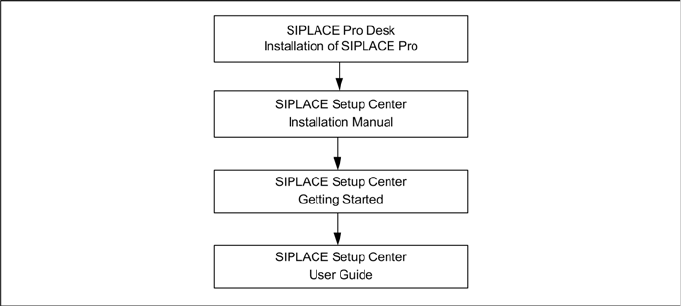
Please use the following documents to lead you through the installation procedure for SIPLACE System.
3.2 SIPLACE Setup Center
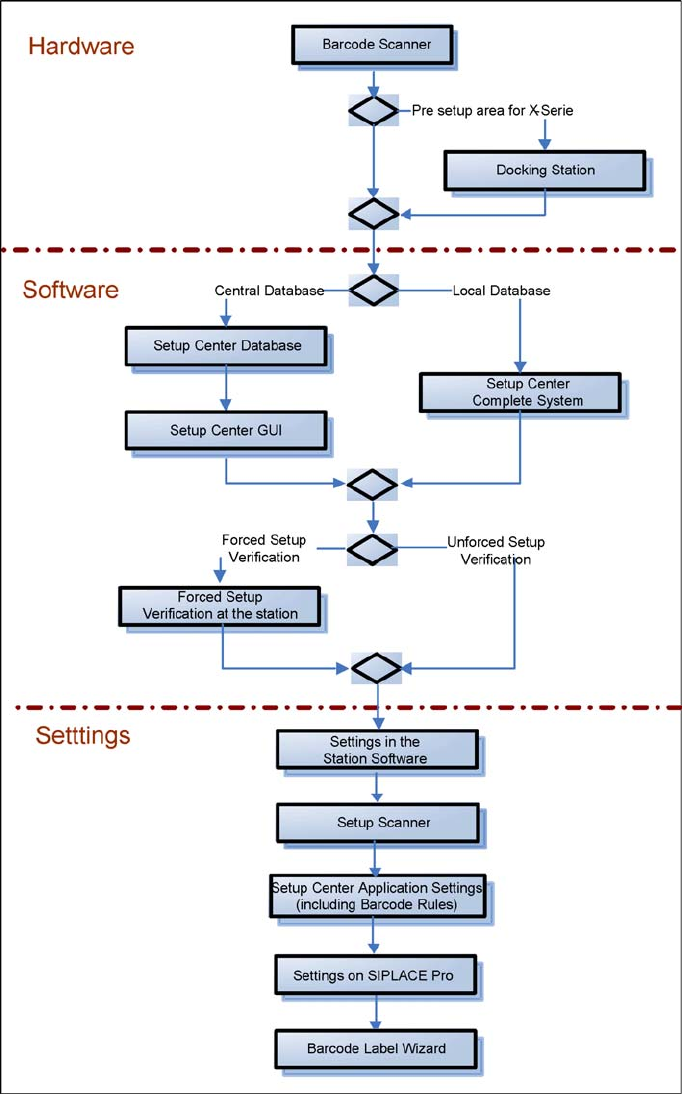
The installation procedure is divided into several parts (see the following Figure):
1. Installation of hardware
Barcode scanner
– Dragon Scanner's Cradle or Symbol MC70 2D barcode scanner
Optional: Docking Station
2. Installation of software
Setup Center, with setup type
–GUI
– Database
– Complete
Setup Center "Forced Setup Verification"
3. Settings
Station software, see SIPLACE Setup Center User Guide
Dragon Scanner or Symbol MC70 2D Barcode scanner (see the chapter "Scanner Configuration")
Setup Center, see SIPLACE Setup Center Getting Started
SIPLACE Pro, see SIPLACE Setup Center User Guide
Barcode Label Wizard, see SIPLACE Setup Center User Guide
Navigation Guide for Installation
SIPLACE Setup Center
12 Installation Manual SIPLACE Setup Center V3.0