00195642-01_IM-SetupCenter-3.0_EN.pdf - 第94页
All names identified by ® ar e registered trademarks of the Siemens AG . The remaining trademarks in this publication ma y be trad emarks whose use by third parties for their own pur poses could violate the rights of the…
Uninstalling
Optional: Uninstalling the C167API338W2K.exe of CAN Drivers Uninstalling SQL Server Express or MSDE installations
92 Installation Manual SIPLACE Setup Center V3.0
8.6 Optional: Uninstalling the C167API338W2K.exe of CAN
Drivers
X Click Start in the Windows start menu.
X Click Settings.
X Click Control Panel.
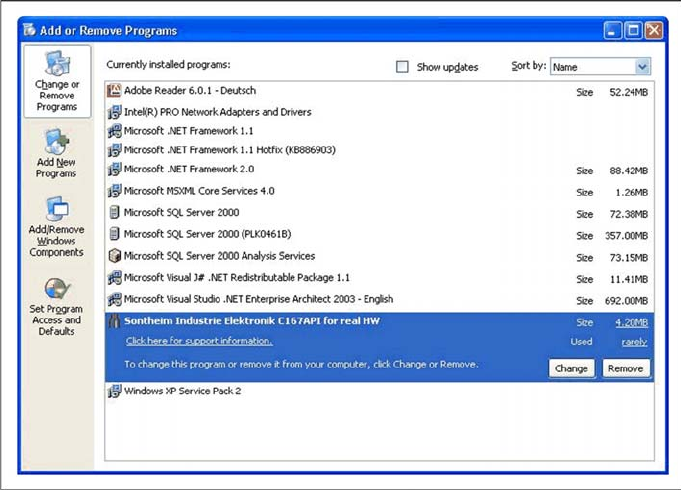
X Double-click Add / Remove Programs.
A list appears with the names of the software packages installed on the computer.
X Select Sontheim Industrie Elektronik C167API for real HW.
X Click the Remove button.
X Confirm the deletion of the application.

All names identified by ® are registered trademarks of the Siemens AG. The remaining trademarks in this publication may be trademarks
whose use by third parties for their own purposes could violate the rights of the owner.
We have reviewed t he contents of this publication to ensure consistency with the hardware and software described. Since variance cannot
be precluded entirely, we cannot guarantee full consistency. However, the information in this publication is reviewed regularly and any
necessary connections are included in subsequent editions.
Copyright © Siemens AG 2008 Technical data subject to change
Siemens AG Item no.: 00195642-01
Industry Sector
Electronics Assembly Systems
Rupert-Mayer-Strasse 44
81379 Muenchen
Germany
www.siplace.com