00197044-02_IM_706_1_DE_EN.pdf - 第49页
Station S oftware 706. 1 / Install ation Man ual Ausgabe 11/2012 E dit ion 49 7.5 SX4 P lace ment M achine ► W hen the SX4 pl acem ent m achine is boot ed for the fi rst tim e you hav e to selec t the S X4 Flexible entr …
Station Software 706.1 / Installation Manual Ausgabe 11/2012 Edition
48
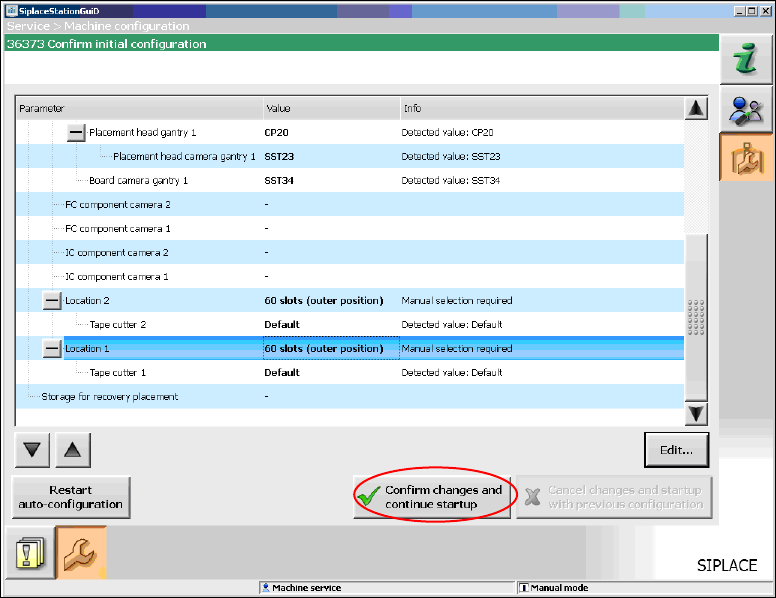
When you have selected all table configurations the following window is displayed, in which you
confirm the Auto-configuration.
Figure 7-9: Confirming Auto-configuration for SX1/SX2
► Click the Confirm changes and continue startup button to confirm the Auto-configuration.
► If the Coplan computer has been installed, you will additionally have to confirm or reject the 3-D
Coplan sensor.
7.4 SX+ Placement Machine
If the SX+ placement machine is to be used without gantries, this has to be configured in the Auto-
configuration after the machine has been booted.
► For this, select Ignore gantries at the processing area in the machine configuration dialog.
Station Software 706.1 / Installation Manual Ausgabe 11/2012 Edition
49
7.5 SX4 Placement Machine
► When the SX4 placement machine is booted for the first time you have to select the SX4
Flexible entry for Machine frame manually in the Auto-configuration, if there are tables in
outer position in processing area 2, as this is not detected automatically via sensors.
Tables in outer position are used when stationary cameras are in use.
► Otherwise you select the SX4 High Speed entry.
7.6 DX-Series Placement Machines
► When the DX placement machines are booted for the first time you have to select the following
options manually:
– For C&P12 placement head: height position (altitude)
– Lamp indicators (two-colored or three-colored)
– Table position:
inner 60 tracks
outer 60 tracks
outer with 30 tracks + free location for tray or WPC
– Confirm/reject 3-D Coplan sensor
7.7 Checking/Updating the Embedded Software
If the correct eSW versions are not available on the machine, the machine boot gets interrupted.
► In this case, perform an eSW download.
► Start an overall reference run for the machine.
7.8 Storage Location of the Machine Files (Calibration Data etc.)
The machine-specific configuration, measurement and parameter data is stored in XML files under
C:\Sirio\Work\Individual. These XML files contain all the calibration data.
Station Software 706.1 / Installation Manual Ausgabe 11/2012 Edition
50
7.9 Necessary Calibration Steps
After upgrading from station software 70x and first booting of the station software, some calibration
steps are required.
Requirements:
– The eSW versions have been updated.
– The reference run has been sucessfully performed.
– A calibration nozzle (1235) has to be available on every C&P20A placement head at segment
1.
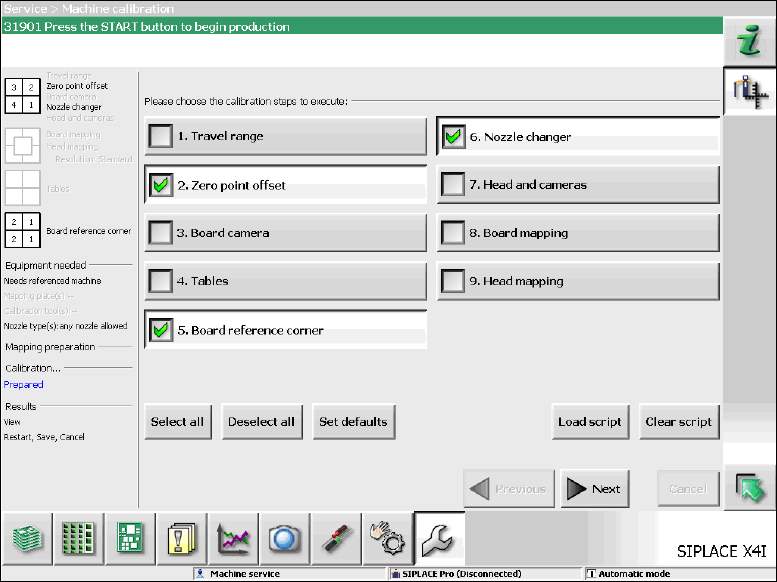
Figure 7-10: Required calibration steps
► Select the calibration steps that are highlighted in the figure and click on Next.
► Select all possible components in the following input masks (all conveyor lanes, all gantries, all
nozzle changers).