TS577R-UserGuide.pdf - 第16页
16 5.5 Stored Program in Memory cell The unit has 50 memory cells to store all dispense parameters . The controller can activate all memory cells in sequence mode. 5.5.1 To Store dispense parameters 1. To uch the forward…
15
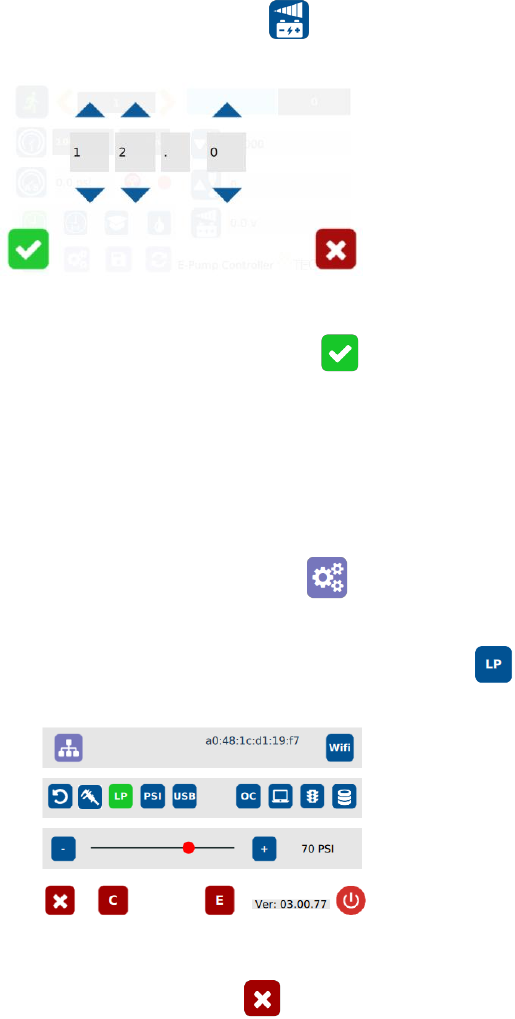
8. Touch the Voltage icon to set voltage
9. Touch the Up or Down arrows to set input voltage
10. Touch the Check Mark icon to save and exit
5.4 Low Pressure Alarm Setting
Note: This controller is equipped with an adjustable “Low Pressure” alarm
function. If the set pressure dropped below the “Low Pressure” setting, the
controller will not activate. The “Low Pressure” setting is pre-set at the factory
to 70 psi (4.8 bars). When the supplied pressure drops below 70 psi (4.8 bars)
the unit will not function. The “Low Pressure” setting can be adjusted. Follow
instruction below:
1. Touch the Setup icon to enter setup screen
2. Touch the Low Pressure (LP) icon to set the desired low pressure
3. Slide the pressure scale to set the desired low pressure threashold
4. Touch the X icon to save and exit
16
5.5 Stored Program in Memory cell
The unit has 50 memory cells to store all dispense parameters. The controller can
activate all memory cells in sequence mode.
5.5.1 To Store dispense parameters
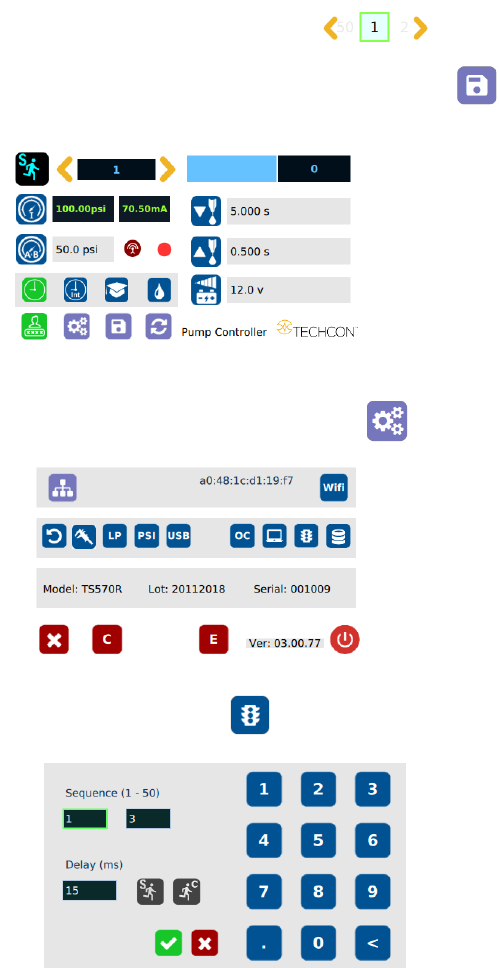
1. Touch the forward or backward arrow to
select desired memory cell.
2. Enter all desired dispense parameters then touch the “Save”
icon to save the data.
5.5.2 To run in Single Sequence Mode
1. Touch the Setup icon to enter the setup screen
2. Touch the Run Method icon
17
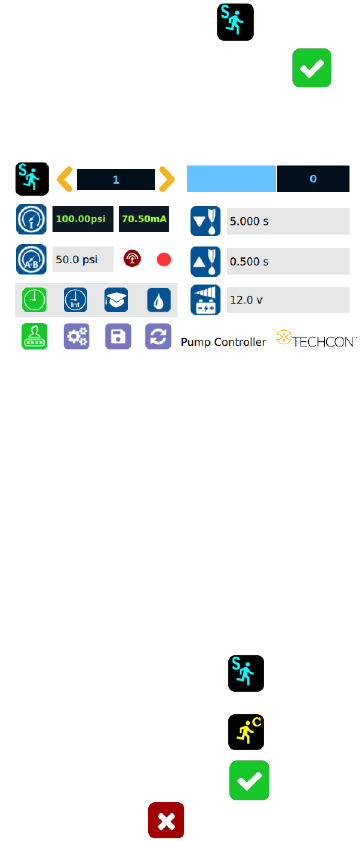
3. Enter number of memories to be run in sequence (ex. 1 to 3)
4. Touch the “Sequence Mode” icon
5. Touch the Check Mark icon to save and exit
The screen will look similarly to the screen below:
Notes:
A. If there is no delay time entered in the setting, the operator has
to press the foot switch or touch the Run icon after each
memory cell is completed to activate the next memory cell.
B. If delay time is entered in the setting, the controller will activate
the next memory cell in sequence automatically.
5.5.3 To run in Continuous Sequence Mode
1. Follow step 1 to 2 above then enter the waiting time “delay time” between
each activation.
2. Touch the “Sequence Mode” icon
3. Touch the “Continuous Mode” icon
4. Touch the Check Mark icon to save
5. Touch the X icon to exit
The screen will look similarly to the screen below: