TS577R-UserGuide.pdf - 第6页
6 5. T O CONTRO L AUGER V ALVE CAUTION: A 5-micron filter (TSD 800-6) must be installe d with the unit to ensu re proper air filtration. Figure 2.0 5.1 Connecting the Uni t: (Refer to Figure 1 .0 and 2.0) 1. Co nnect the…
5
3. SPECIFICATIONS
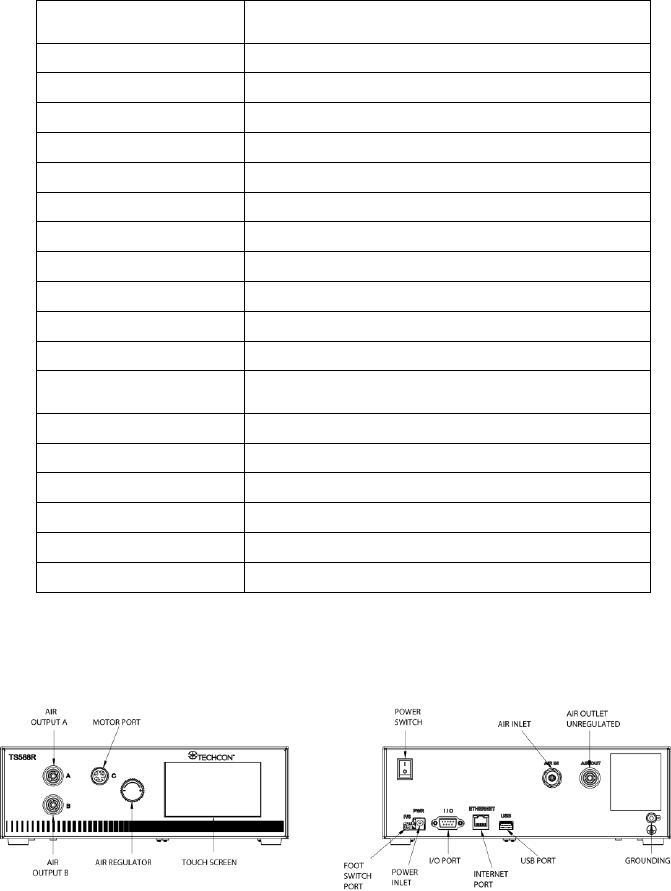
4. FEATURES
Figure 1.0
Size
290mm x 212mm x 98mm
(11.4” X 8.3” X 3.9”)
Weight
2.98 kg (6.6lbs)
Input Voltage
24VDC
Output Voltage Range
0-24 VDC
Rated Power
15W
Air Input
100 psi (6.9 bars) Max.
Air Output
0-99.9 Psi (6.9 bar)
Pollution Degree
II
Installation Category
I
Indoor Use
Altitude up to 2,000m (6,562ft)
Operating Temperature
0˚C to 50˚C (32˚F to 122˚F)
Storage Temperature
-10˚C to 60˚C (14˚F to 140˚F)
Max. Relative Humidity
80% for temperature up to 31˚C (87.8˚F) Decreasing
linearly to 50% relative humidity at 40˚C (104˚F)
Timer
0.008-99.99 seconds
Cycle Mode
Timed, Interrupt, Teach, Purge
Timing Repeat Tolerance
+/- 0.001%
Cycle Rate
900 cycles/min
Display
Touch Screen, Resitive
Meets or exceed
CE, TUV and NRTL
6
5. TO CONTROL AUGER VALVE
CAUTION: A 5-micron filter (TSD800-6) must be installed with the unit to ensure proper
air filtration.
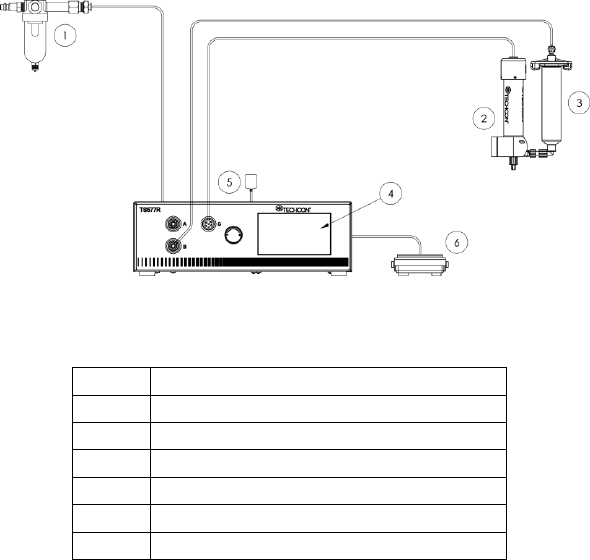
Figure 2.0
5.1 Connecting the Unit: (Refer to Figure 1.0 and 2.0)
1. Connect the power cord, foot switch to the back of the unit.
2. Connect Valve air hose to Port B
3. Touch the Power switch to turn on the unit.
Items
Description
1
Air Filter
2
Valve (not included)
3
Syringe of material (not included)
4
Display
5
Power Adapter
6
Foot Switch
7
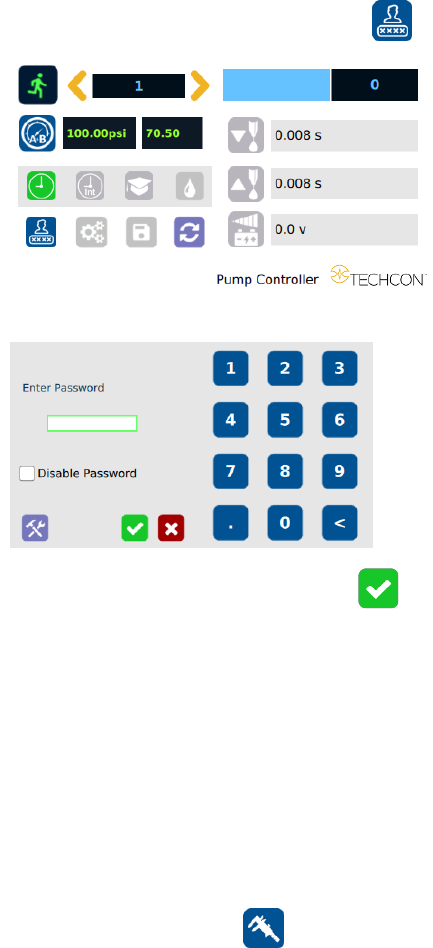
5.1.1 Login
1. Touch the Login icon to enter the login screen
2. Enter “0000” in Password window
3. Touch the Check Mark icon to save and exit
5.1.2 Pressure Calibration
Note: Pressure calibration must be performed when the unit is activated for
the first time.
1. Using a pressure gauge, verify that the input pressure line is delivering
approximately 100 psi
Note: If input pressure is not 100 psi, calibration will result in a
mismatch between the display pressure and the actual pressure on output
port A.B
2. Once you have verified input pressure, touch the Calibration icon
to enter calibration screen.