TS577R-UserGuide.pdf - 第3页
3 1. SAFETY 1.1 Intended Use: WARNING: Use of this equipment in ways other than those described in th is User Guide may result in injury to persons or damage to property. Use this equipment only as described in this User…
2
CONTENTS
Page Number
1. Safety ………………………………………………………………… 3
2. Symbol Definitions ……………………………………………….. 4
3. Specifications ……………………………………………….……….. 5
4. Features …………………………………………………………….. 5
5. To Control Auger Valve………………………………….................... 6
5.1 Connecting the unit……..……………………………………… 6
5.1.1 Login …………………………………………………… 7
5.1.2 Pressure Calibration.…………………………………… . 7
5.2 Setup for Non-Encoder Auger Valve …………………........ 9
5.2.1 Sellect Controlling Mode ……………………………… 9
5.2.2 Voltage Input Adjustment ……………………………... 10
5.2.3 Pressure Adjustment ………………………………….. 10
5.2.4 To Change Pressure Unit Display …………..………... 11
5.2.5 Manual/Purge Dispense Cycle ………………………….. 11
5.2.6 Automatic Dispense Cycle …………………………… 11
5.2.7 Teach Mode Setting …………………………………….. 12
5.2.8 To run in Continuous mode …………………………….. 12
5.3 Setup for Encoder Auger Valve ………………………………. 14
5.4 Low Pressure Alarm Setting ……………………………….. 15
5.5 Stored Program in Memory Cell …………………………….. 16
5.5.1 To store dispense parameters …………………………… 16
5.5.2 To run in Single Sequence mode ……………………….. 16
5.5.3 To run in Continous Sequence mode …………………… 17
5.6 Cycle Counter ……… ……………………………………….... 18
5.7 Over Current Protection ……...………………………………... 19
5.8 To Change Password …………….…………………………… 18
5.9 To connect to Wi-Fi network ………………………………….. 20
6. Internet of Thing ……………………………………………………… 22
7. Software Upgrade …………………………………………………….. 32
8. Troubleshooting …………………………………………………….. 35
9. Maintenance …………………………………………………………. 36
10. Warranty ……………………………………………………………... 36
11. I/O Configuration and End of Cycle Switch ………………………. 37
3
1. SAFETY
1.1 Intended Use:
WARNING: Use of this equipment in ways other than those described in this User
Guide may result in injury to persons or damage to property. Use this equipment
only as described in this User Guide.
OK International cannot be responsible for injuries or damages resulting from
unintended applications of its equipment. Unintended uses may result form taking
the following actions:
• Making changes to equipment that has not been recommended in the User
Guide
• Using incompatible or damaged replacement parts
• Using unapproved accessories or auxiliary equipment
1.2 Safety Precautions:
• Do not operate this unit in excess of maximum ratings/settings
• Always wear appropriate personal protective clothing or apparel
• The fluid being dispensed may be toxic and/or hazardous. Refer to Material
Safety Data Sheet for proper handling and safety precautions
• Do not smoke or use open flame when flammable materials are being dispensed
• This equipment is for indoor use only
4
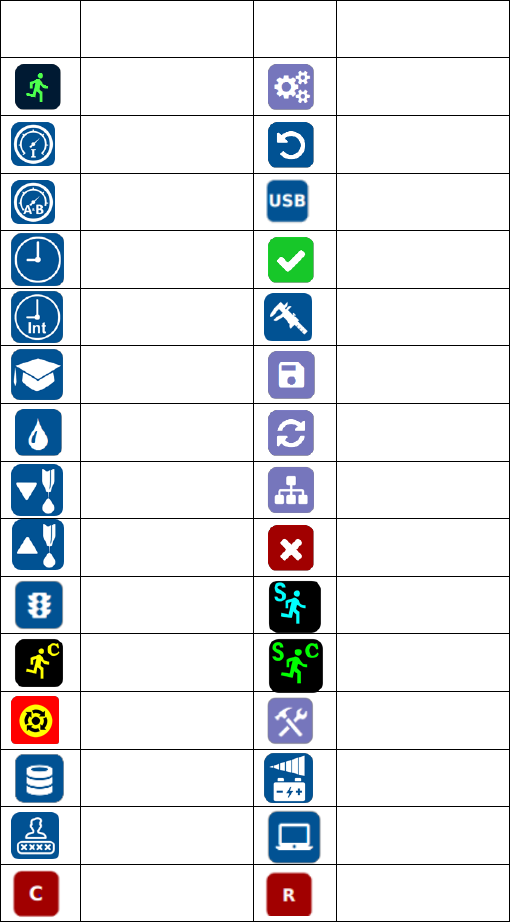
2. SYMBOL DEFINITIONS
Symbol
Description
Symbol
Description
Run (Activate)
Setup
Input Pressure
Counter reset
Pressure Port A&B
Firmware Upgrade
Timed mode
Accept change
Interrupt mode
Pressure calibration
Teach mode
Save
Purge mode
Reset time in Teach
mode
Dispense
IP address
Reverse (suck back)
Cancel/exit
Run Method
Sequence Mode
Continous Mode
Sequence Continous
Mode
E-Stop
Change Password
Remote Server
Input Voltage
Login/Logout
Controller type
Controller Mode
Robot Mode