M4serviceManual_e.pdf - 第43页
3 Mechanical Section 3-13 ■ Inspection of Suction Pad (Nozzle No. M017, M018, M 019, M020) Check that the rubber suction pad located at the nozzle t ip is free of scratches and cracks. If they are found on the pad, repla…
3 Mechanical Section
3-12
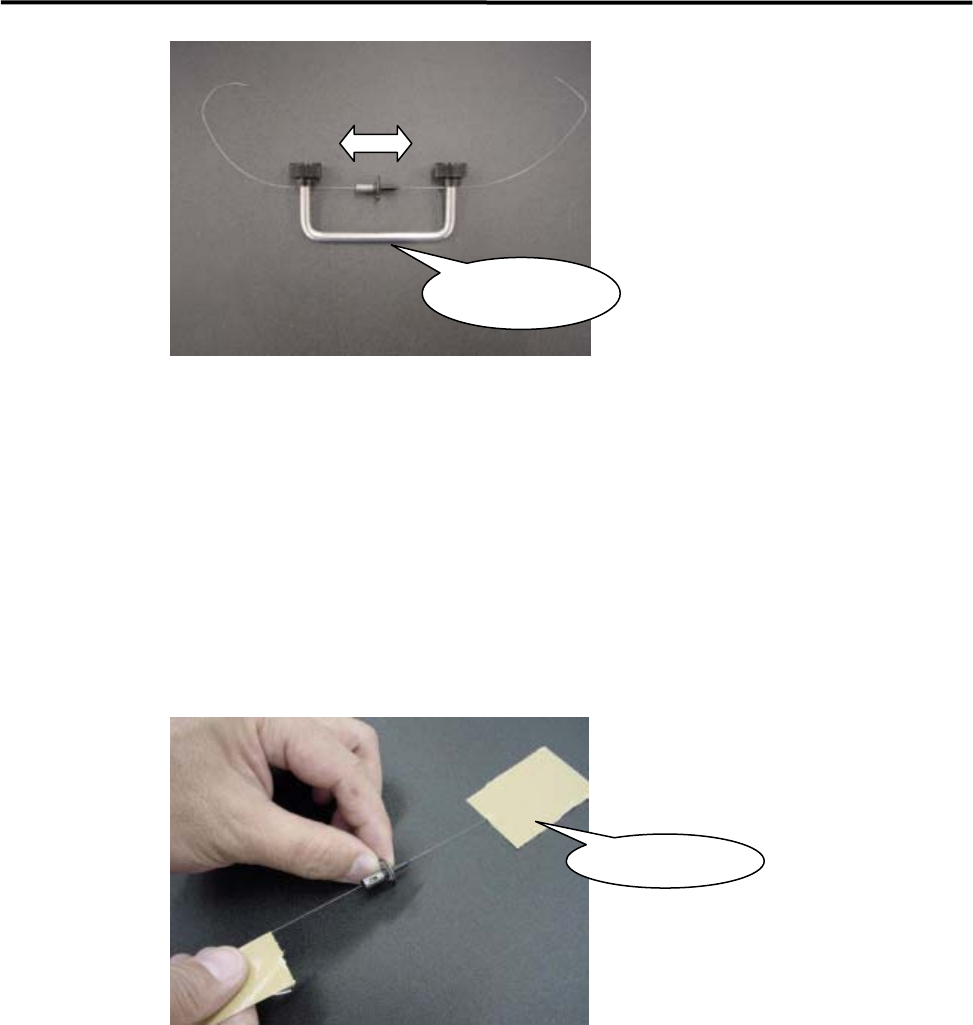
Nozzle Cleaner
Assy.
④ Move the nozzle back and forth to clean the nozzle hole.
⑤ Never forget to blow some air into the nozzle hole.
■ Nozzle Cleaning using Wire (2)
You can use the wire by fastening the wire ends with adhesive tape. In this case, adhesive may remain on
the wire. So be sure to clean the wire end before pulling out the wire form the nozzle.
Adhesive Tape
3 Mechanical Section
3-13
■ Inspection of Suction Pad (Nozzle No. M017, M018, M019, M020)
Check that the rubber suction pad located at the nozzle tip is free of scratches and cracks. If they are found
on the pad, replace the pad with a new one.
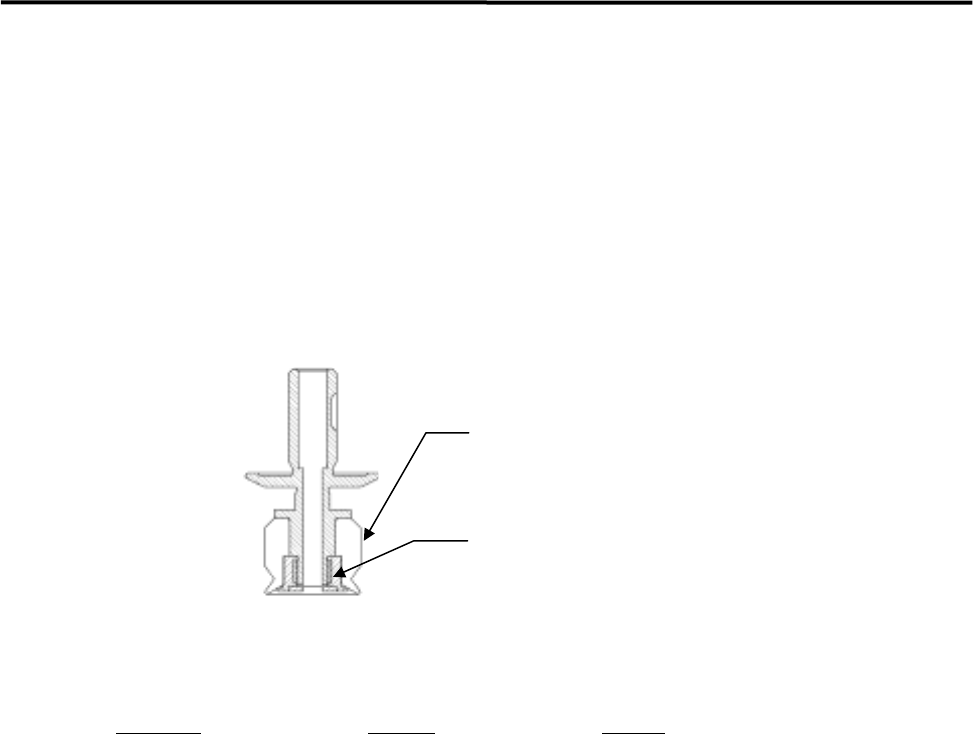
ACTION: Remove the old pad, apply silicon grease to the inner surface of a new pad, and then install it in the nozzle.
NOTE: M020 has a different nozzle structure from those of M017 to M019. Thus, in the case of M020, remove the
pad stopper from the nozzle tip first and then remove the suction pad. After a new pad is installed, make
sure that the pad stopper is re-installed properly.
Suction pad
Pad stopper
(Can be removed by turning it counter-clockwise using a
flat-blade driver screw)
Nozzle M020
Part Name
Part No. Remark
RUBB.PAD17 LG0-M77A0-00X Suction pad for M 017
RUBB.PAD18 LG0-M77A1-00X Suction pad for M 018
RUBB.PAD19 LG0-M77A2-00X Suction pad for M 019
RUBB.PAD20 LG0-M77A9-00X Suction pad for M 020
PAD STOPPER M020 LG0-M770U-000 Pad stopper for N 020/ M 020
GREASE SILICON LG0-M89AB-00X Silicone Grease
3 Mechanical Section
3-14
■ Applying Silicon Grease
After the nozzle is cleaned, it must be coated with silicon grease.
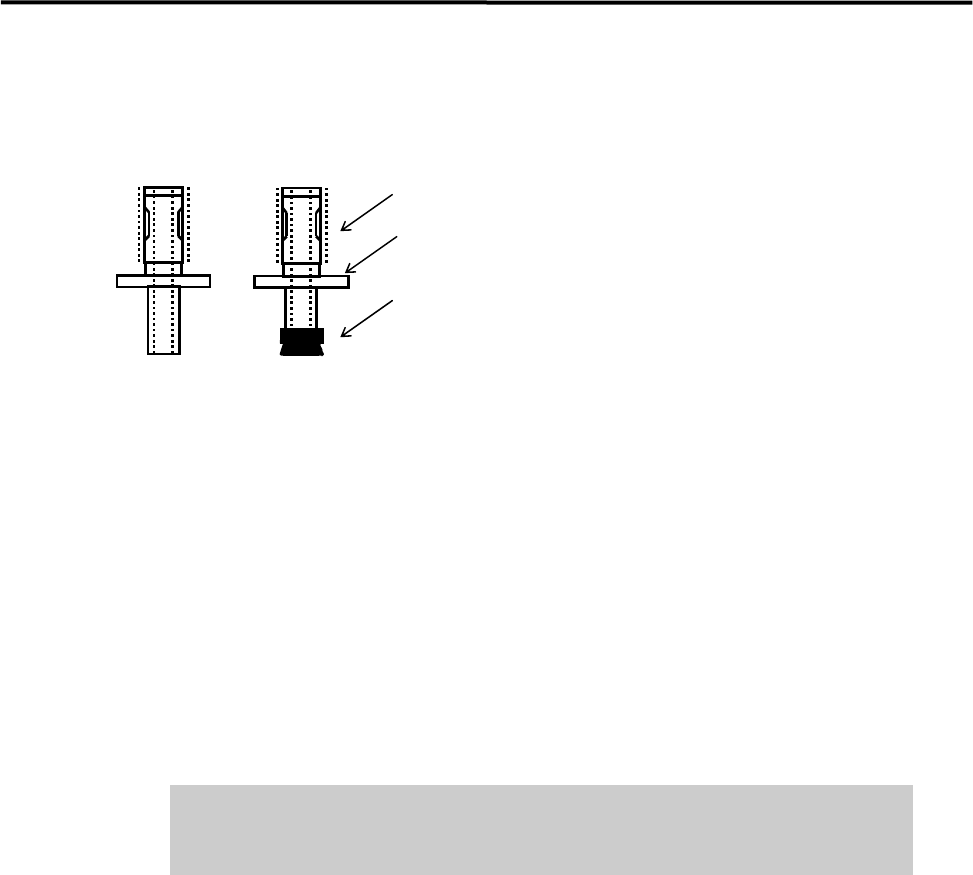
Apply silicon grease.
Nozzle ID sticker
Suction pad
● Nozzle outer surface
Apply a slight amount of grease to the outer surface (indicated by dotted lines in the above illustration), and
then wipe it off with a dry cloth.
NOTE: Silicon grease must be applied so that it forms a thin film on top of the surface.
● Suction pad
Application of oil content is needed to prevent deterioration of the rubber. Apply a slight amount of grease
to the outer surface of the suction pad, and then wipe it off with a dry cloth.
NOTE: Silicon grease must be applied so that it forms a thin film on top of the surface.
Do not apply excessive amounts of grease. This may cause collection of dirt
or dust in the air passage and on mounted components, resulting in
component mount failure.
● Checking the nozzle escape
After grease is applied to the nozzle’s outer surface, attach the nozzle to the head and check the condition of
the nozzle escape.
NOTE: When the nozzle is placed in the head (nozzle holder), it can slide a few millimeters vertically. This nozzle
sliding movement is called nozzle escape.
ACTION:
① Attach the nozzle to the head.
② Push the nozzle gently with fingers up to the top dead center of the nozzle escape.
③ Release fingers gently and check that the nozzle returns to the lower dead center smoothly.
NOTE: If the nozzle escape is not smooth, there may be problems with component suction and mounting. If the
nozzle gets caught or does not move smoothly, check the nozzle holder and nozzle’s inner/outer surfaces
for collection of foreign matter or scratches.