M4serviceManual_e.pdf - 第47页
3 Mechanical Section 3-17 Cleaning Nozzle Recognition Stickers Dirt on nozzle ID/presence stickers can be a cause of visi on recognition failure. Regularly clean the nozzle ID/presence stickers. ACTION: ① Clean the stick…
3 Mechanical Section
3-16
Nozzle Recognition Stickers
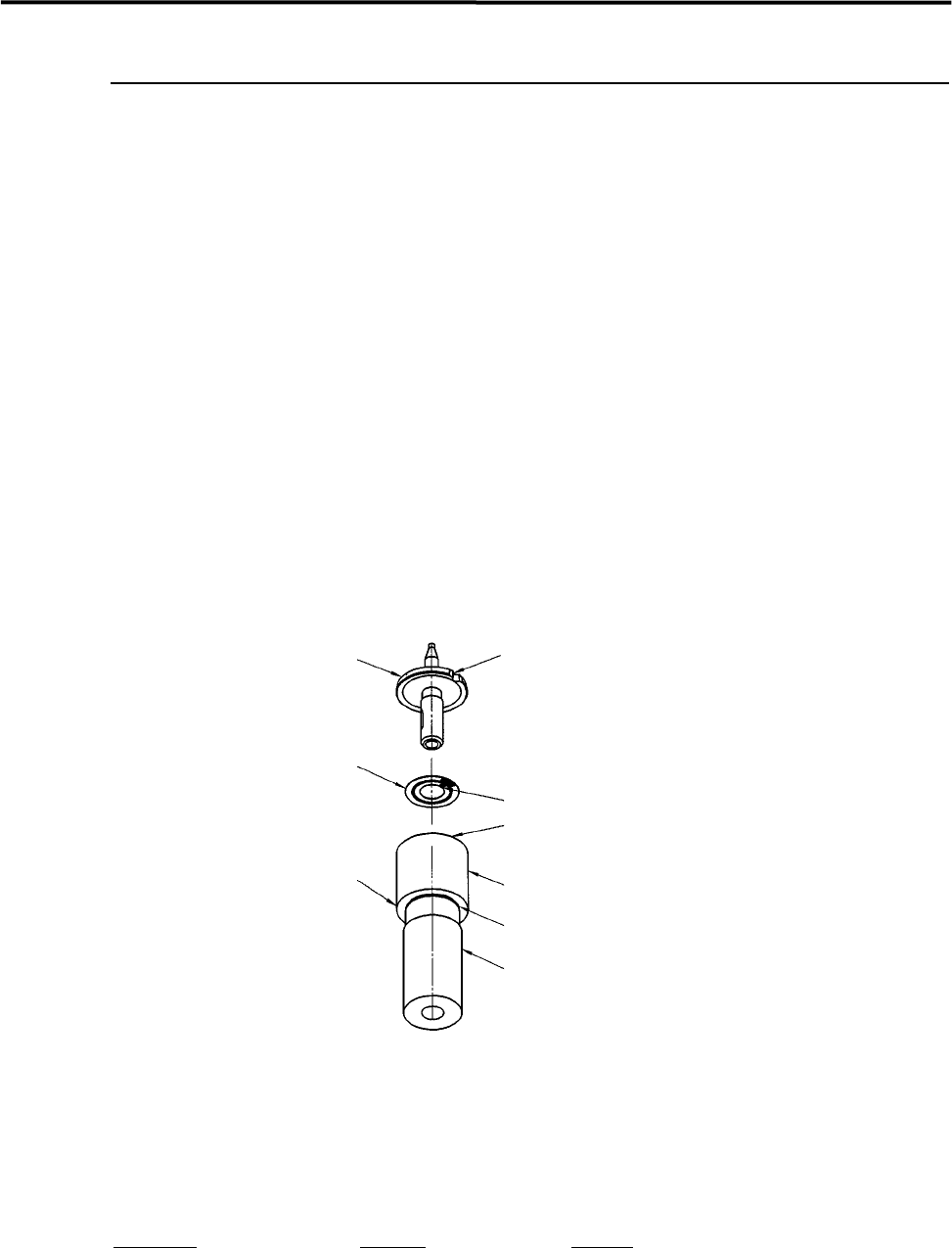
Labeling a Nozzle ID Sticker to a Nozzle
ACTION:
① Wipe off oil, dust, or water from the upper side of the nozzle flange with alcohol.
② Slide the ring of the labeler until the groove in the labeler shaft appears.
③ Peel off the sticker from its slip sheet using tweezers.
④ With the sticker’s adhesive side upward, align the sticker’s angle mark to the ring’s positioning mark.
Set the sticker into the ring, being careful not to touch the sticker’s adhesive side.
⑤ Make sure the sticker is properly placed in the ring.
⑥ Insert the nozzle upside down into the hollow of the labeler shaft, while aligning the nozzle cutoff to
the ring’s positioning mark.
⑦ Push up the labeler shaft so that the sticker sticks to the nozzle flange.
Nozzle
Cutoff
Nozzle ID sticker
Positioning mark
Ring
Groove
Shaft
Labeler for
nozzle ID sticker
Angle mark
NOTE: If the shaft is pulled out of the ring too much, it may come off. If it comes off, align the shaft’s slot with the
ring’s positioning pin and then insert the shaft into the ring slowly.
Part Name
Part No. Remark
ID SEAL TOOL, ASSY. LG0-M8903-00X ID sticker tool

3 Mechanical Section
3-17
Cleaning Nozzle Recognition Stickers
Dirt on nozzle ID/presence stickers can be a cause of vision recognition failure. Regularly clean the nozzle
ID/presence stickers.
ACTION:
① Clean the sticker with cotton swab soaked with alcohol.
② Wipe off the remaining alcohol on the sticker with dry cotton swab.
NOTE: Particularly the nozzle ID stickers are liable to get dirty. If a nozzle ID sticker becomes too dirty to be
cleaned, replace it with new one.
For the part No. for the nozzle ID sticker, refer to “5. Materials”.
NOTE: The nozzle ID/presence stickers are easily peeled off when they get wet. Be sure to dry them with cotton
swab whenever they get wet.
3 Mechanical Section
3-18
Flange Seal
The Flange Seal is affixed to cover and protect the mat black film, which covers the back of the nozzle
flange to avoid Vision Process error, may caused by reflecting. This seal may cause a Vision Process error
when it is damaged with scratches or when it turns reflective after long term use with nozzle changes.
Follow the procedure below when it needs to be replaced.
ACTION:
① Peel off the old Flange Seal thoroughly and clean off the dirt, such as oil, dust and moisture, from the
back of the nozzle flange using industrial alcohol. Do not use tools, such as an edged tool and
tweezers, to peel off the seal or damage the black film.
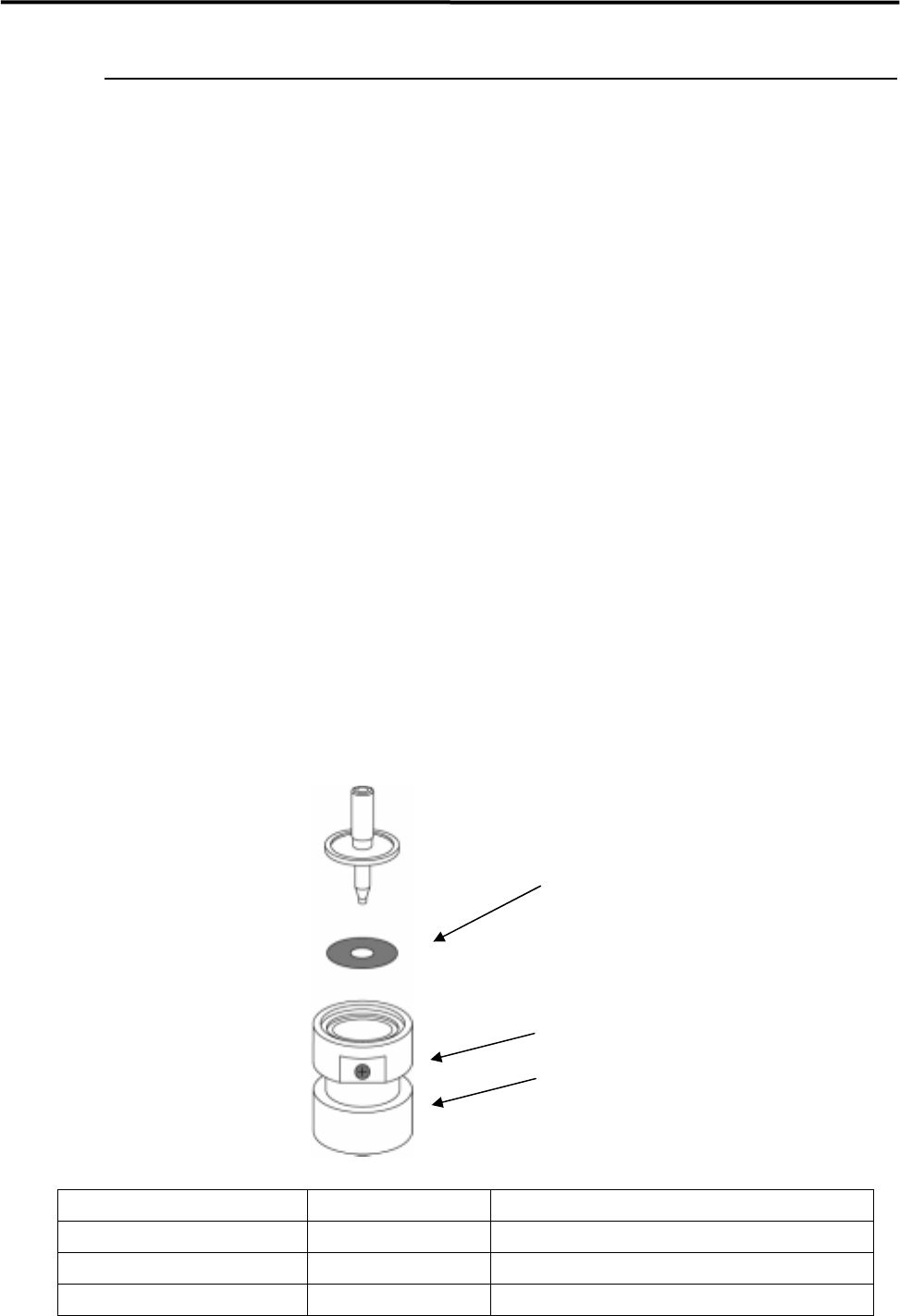
② Slide up the ring of the Flange Seal Set Tool (Optional) and turn it clockwise.
③ Remove the Flange Seal off the exfoliative paper using tweezers.
④ Set the Flange Seal, the adhesive side up, onto the Flange Seal Set Tool. Do not touch the seal with
hand.
⑤ Confirm that the seal is set evenly flat onto the inside bottom of the ring.
⑥ Insert the nozzle, nozzle tip down, into the tool.
⑦ Turn the ring counterclockwise with the nozzle pressed onto the tool, and slides it down to attach the
nozzle flange and the Flange Seal.
NOTE: The Flange Seal comes off easily when it touches liquid, such as oil and water. Wipe them off quickly and
well using something like dry cotton-swab.
NOTE: There are 3 types of Flange seal. Please refer to the list below.
Flange Seal
Ring
Flange Seal Set Tool
Flange Seal Parts Number Parts Name Supported nozzle types
LG0-M77A6-000 FLANGE SEAL 1 M001~M005,M012,M013,M021,M022
LG0-M77A7-000 FLANGE SEAL 2 M006,M017,M018,M019
LG0-M77A8-000 FLANGE SEAL 3 M020