SIPLACE D系列Servicemanual.pdf - 第68页
Service Wo rk Gantry D3 68 Servicemanual (internal ve rsion) SIPLACE D Series Installation X Clean the reading surface of the increme ntal encoder with a cloth and ethanol or with a cleansing tip. X Loosely fasten the in…
Service Work
D3 Gantry
Servicemanual (internal version) SIPLACE D Series
67
4.1.3.7 Replacing the X Axis Incremental Encoder [03020588S-xx]
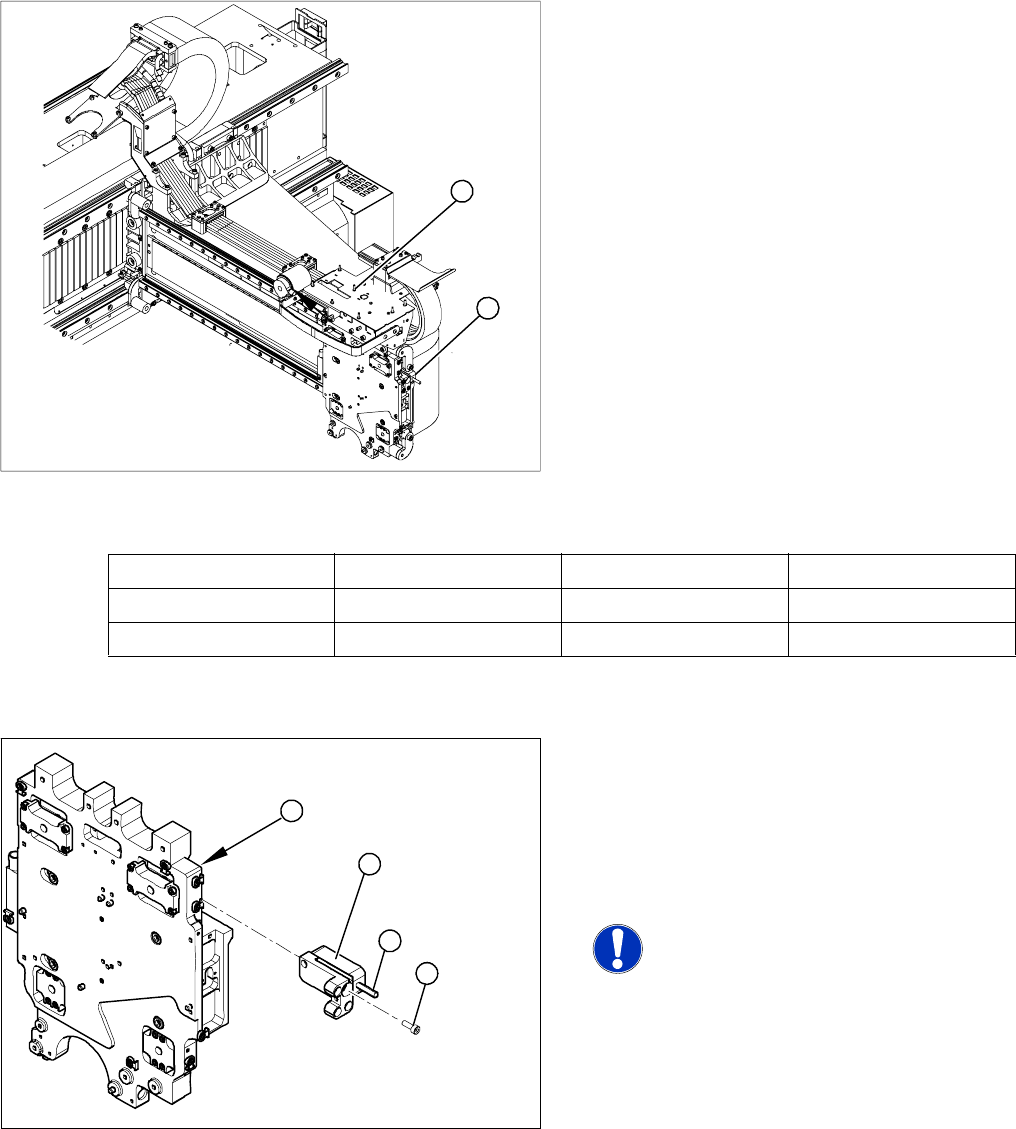
Overview
Press-fit connections
Removal
Legend
1. Installation point for head interface and Vision
board
2. Incremental encoder position
X Unplug the incremental encoder press-fit
connection (2) from the head interface (1).
1
2
Assembly Gantry Board Terminals
X axis incremental encoder Gantry 1 (C&P head ) Head interface 03000901 X15ac
X axis incremental encoder Gantry 2 (Twin Head) Head interface 03000901 X15bc
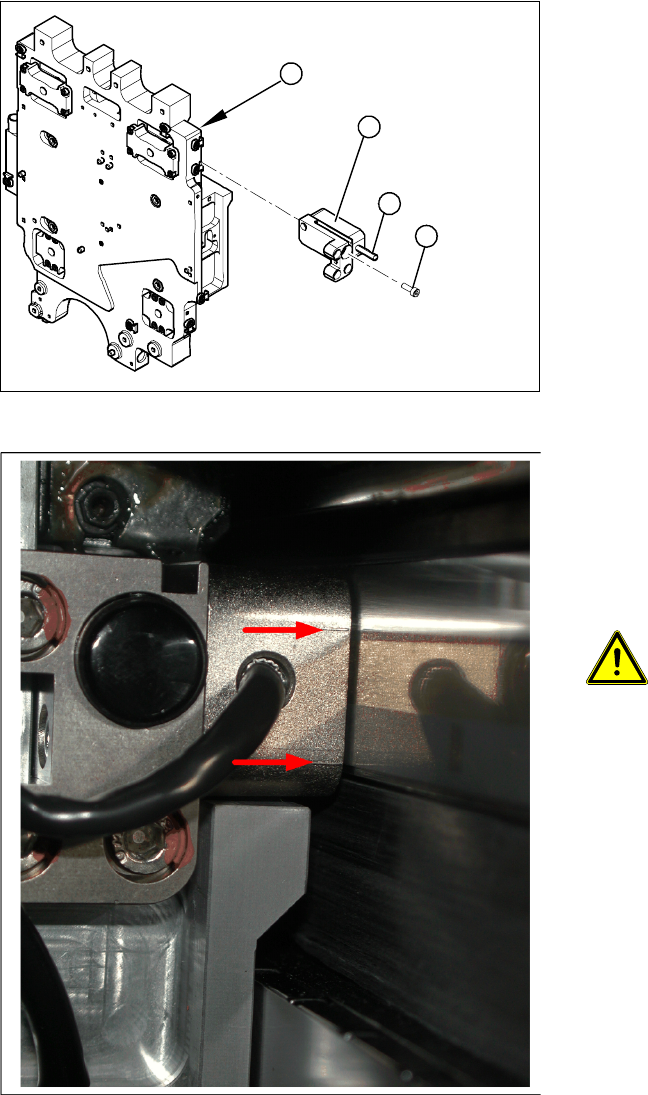
Legend
1. Head plate - front view
2. Incremental encoder
3. 3 x fastening screws
4. Grub screw (secured with Loctite No. 241)
NOTE: Grub screw on the
incremental encoder
If the incremental encoder is installed
on the head plate of a CFK 04 or 06
gantry, the grub screw is without
function. Do not loosen or tighten this
grub screw.
X Unthread the connection cable as far as the
incremental encoder (2).
X Loosen the three screws (3) fastening the
incremental encoder (2) of the X axis and
carefully lift off the incremental encoder.
3
4
1
2
Service Work
Gantry D3
68 Servicemanual (internal version) SIPLACE D Series
Installation
X Clean the reading surface of the incremental
encoder with a cloth and ethanol or with a
cleansing tip.
X Loosely fasten the incremental encoder (2)
with three fastening screws (3).
X The incremental encoder must be aligned with
a 0.4 mm gap to the scale. Use the
corresponding thickness gauge (plastic).
3
4
1
2
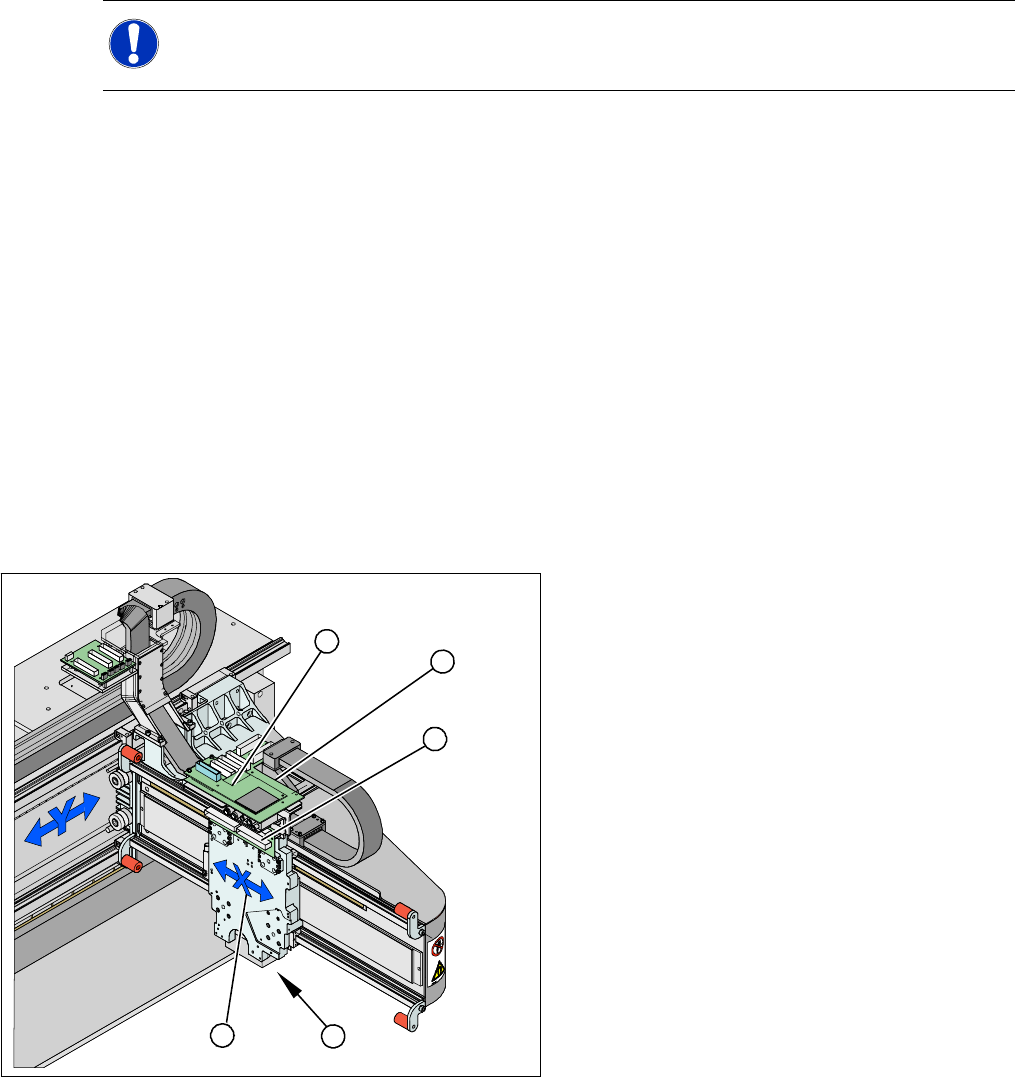
4-17: Casting marks on the incremental encoder
X You must set the exact height to the scale.
X Align the incremental encoder, using the two
casting marks (arrows), which mark the read
area.
X Tighten the fastening screws.
X Reconnect to the electricity supply.
ATTENTION: Check how the cables
are run!
Make sure that the axes can be moved
without damaging the cables.
X Fasten them with cable ties.
X Move the gantry into the end stopper and
check that the buffer does not come into
contact with the cable.
Service Work
D3 Gantry
Servicemanual (internal version) SIPLACE D Series
69
4.1.3.8 Replacing the X Drive (Primary) [03039726-xx]
Required equipment
Service Pack X drive (00377437-xx) for SIPLACE HF/X machines
–X drive
– 4 x dismantling screws
– 8 x lock screws (M4x60)
– Templates for Twin Head and DLM2
– 6 grub screws M4x6-ST
– Plastic thickness gauge 0.4 mm (approx. 50 cm long and 10 cm wide)
– Foam rest 500 mm x 50 mm x 20 mm
Xenon flashlight (non-magnetic)
Torque wrench with socket-head adapter
Loctite 241
Removal
NOTE:
The service pack for the X drive 00375245-01 only fits HF machines up to machine number
A219.
Legend
1. X drive (primary) with head mount
2. X mount with trailing cable
3. Head adapter board
4. Mount with PCB camera
5. Head Board
X Dismantle the placement head.
X Remove the head adapter board (3). The X
mount fixtures (2) are now accessible.
X Unplug the following cables from the head
board (5) and remove them from the X mount
(2):
X motor cable
X axis scanner head
Temperature sensor
5
5
1 4
3
2