TS500R-user-guide-Asia.pdf - 第10页
10 If constant air pressure is r e quired, connect syringe air hose to accessory air outlet port located in the rear of the unit, po rt #13 in figure 1.0 4. Press the Power button (1) to turn on th e unit. 5. Press the M…
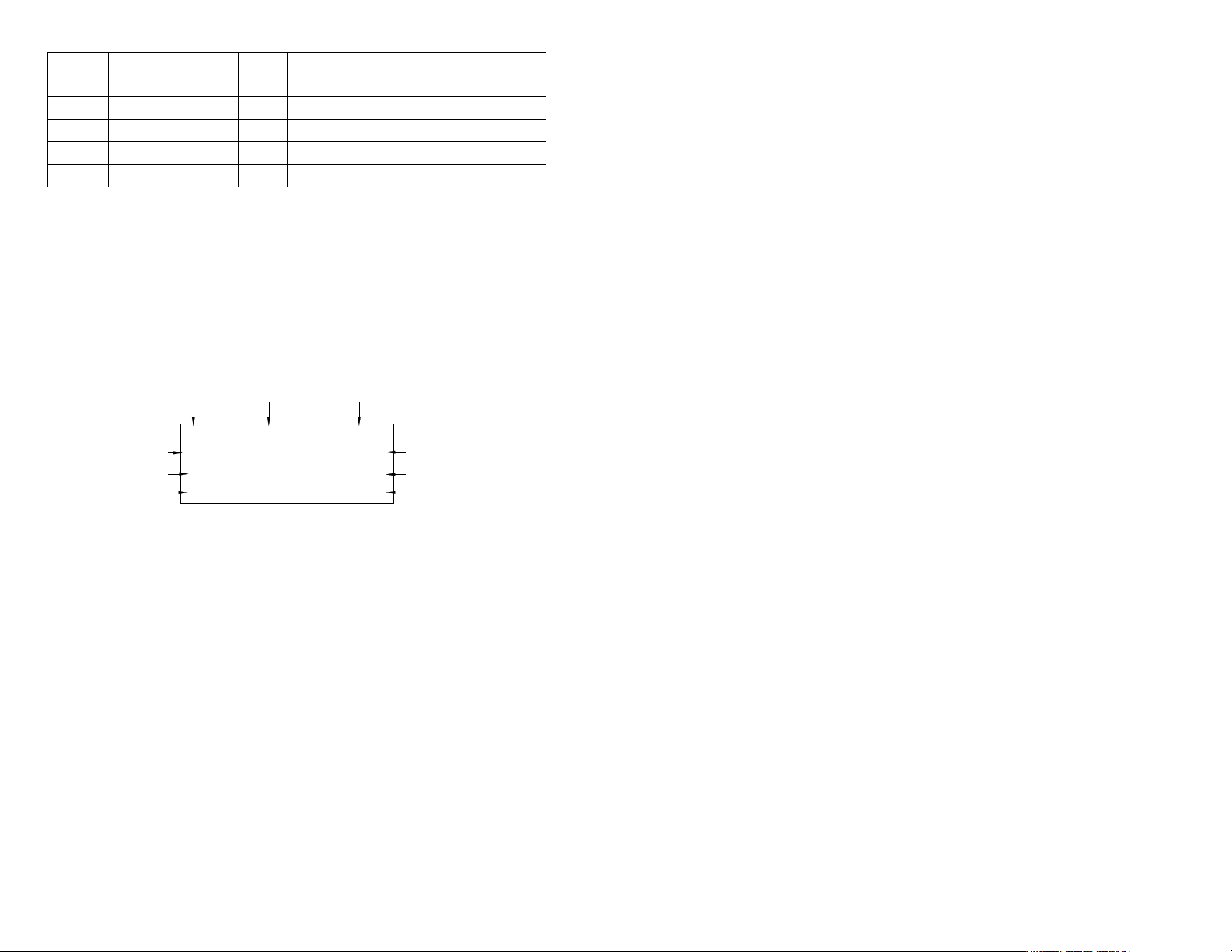
48
20.000V 1
P1 TIMED MODE PUMP
0.100S A: 15 PSI
0.050S B: 15 PSI
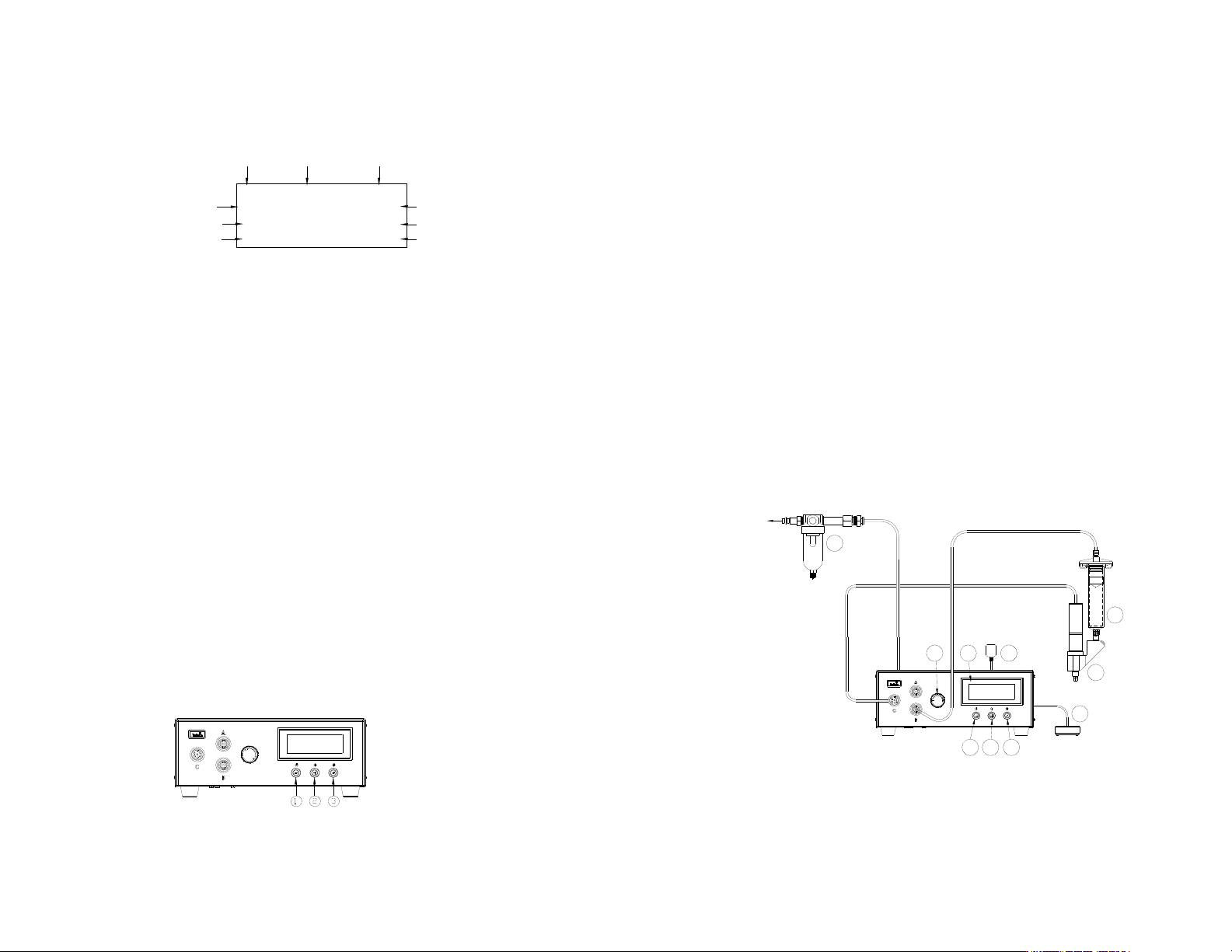
5.3.1 장치 연결 (세부 사항은 그림 6.0 참조)
1. 전원선과 페달 스위치 그리고 에어 호스를 본 장치의 후면에 연결합니다.
2. 모터 케이블을 포트 C 에 연결합니다.
3. 세척기 에어 호스를 포트 B 에 연결합니다 (조정됨, 펄스 공기 신호).
일정한 공기 압력이 필요하면, 세척기 에어 호스를 장치 후면에 위치한, 그림
1.0 의 13 번 포트, 부장품 공기 배출 포트에 연결하십시오.
4. 전원 버튼 (1)을 눌러 장치를 가동시킵니다.
5. 디스플레이의 상단 우측 코너에 “PUMP”가 나타날 때까지 모드 (2)와 설정
버튼 (3)을 동시에 누르십시오.
그림 7.0
5.3.2 프로그램 선택
5.1.2 절의 1 ~ 4 단계를 따르십시오
5.3.3 수동/정화 디스펜스 주기 설정:
1. 디스플레이에 원하는 압력이 표시될 때까지 공기 압력 조정기 손잡이 (6)을
돌려 공기 압력을 높여주십시오.
2. 디스플레이에 “PURGE(정화)”가 나타날 때까지 모드 버튼 (2)를 누릅니다.
3. 페달 스위치를 누른 채로 있으면 수동 주기가 활성화 됩니다.
모터 역전 시간과 출력 전압을 설정할 때는 아래의 지시를 따르십시오:
4. 설정 버튼 (3)을 2 초간 눌러 설정 화면으로 들어갑니다. 모터 역전 시간이
밝게 표시됩니다.
5. (+) 또는 (-) 버튼을 눌러 모터 역전 시간을 선택합니다.
6.
설정 버튼 (3)을 2 초 동안 누르고 있으면 커서가 출력 전압으로 이동합니다.
7. (+) 또는 (-) 버튼을 눌러 전압을 선택합니다.
8. 설정 버튼 (3)을 2 초간 눌러 데이터를 저장합니다.
9. 페달 스위치를 누른 채로 있으면 수동 주기가 활성화 됩니다.
항목 설명 항목 설명
1 전원 버튼 6 공기 압력 조정기 손잡이
2 모드 버튼 7 페달식 스위치
3 설정 버튼 8 TS5000 로터리 펌프 (포함되지 않음)
4 LCD 디스플레이 9 공기 필터
5 전원 어댑터 10 재료 저장조 (포함되지 않음)
입력 전압
디스펜스 시간
역전 시간
프로그램 번호 주기 모드 제어 형식
카운터
압력 포트 A (사용 안 함)
압력 포트 B 조정됨
9
5.3.2 Program selection:
Follow step 1 to 4 in Section 5.1.2
5.3.3 Manual/Purge Dispense Cycle Setting:
1. Turn up the air pressure by rotating the Air pressure regulator knob (6)
until the desired pressure is indicated on Display.
2. Press the Mode button (2) until “PURGE” appears on the Display.
3. Press and hold the Foot Switch to activate Manual cycle.
Follow instructions below to set motor reverse time and output voltage:
4. Press and hold the Set button (3) for two seconds to enter set up screen.
The motor reverse time will be highlighted.
5. Press the (+) or (-) button to set the motor reverse time.
6. Press and hold the Set button (3) for two seconds to move the cursor to the
output voltage.
7. Press the (+) or (-) button to change the voltage value.
8. Press and hold the Set button (3) for two seconds to save the data.
9. Press and hold the Foot Switch to activate Manual cycle.
5.3.4 Automatic Dispense Cycle Setting:
1. Push the Mode button (2) to select “TIMED MODE” or “INTERRUPT”
mode.
2. Press and hold the Set button (3) for two seconds to enter set up screen.
The dispense time (DISP) will be highlighted.
3. Press the (+) or (-) button to set the time.
4. Press and hold the Set button (3) for two seconds to move the cursor to the
reverse time.
5. Press the (+) or (-) button to set reverse time.
6. Press the Set button (3) to move the cursor to the next position.
7. Press and hold the Set button (3) for two seconds to move the cursor to the
output voltage.
8. Press the (+) or (-) button to change the voltage value.
9. Press and hold the Set button (3) for two seconds to save the data.
10. If the unit is in “TIMED MODE” mode, press and release the Foot Switch
to activate the timed dispense cycle.
11. If the unit is in “INTERRUPT” mode, press and hold the Foot Switch until
the dispense cycle is completed. The dispense cycle can be disrupted if
the Foot Switch is released and resumed when the Foot Switch is
depressed again.
5.4 TO CONTROL ROTARY PUMP WITH ENCODER MOTOR
Procedures to control the Rotary Pump with encoder motor are very similar to
procedures to control the standard Rotary Pump. The encoder count values is
ranging from 1 to 60,000 counts.
5.4.1 Connecting The Unit: Refer to Figure 6.0 for details
1. Connect the power cord, foot switch and air hose to the back of the unit.
2. Connect Encoder Motor Cable to Port C.
Note: Encoder motor cable, DX-ECABLE, must be purchased separately.
3. Connect syringe air hose to Port B (regulated, pulsed air signal).
10
If constant air pressure is re quired, connect syringe air hose to accessory
air outlet port located in the rear of the unit, port #13 in figure 1.0
4. Press the Power button (1) to turn on the unit.
5. Press the Mode (2) and Set up button (3) simultane ously until “PUMP-E”
appears on the top right hand corner of the Display.
Figure 8.0
5.4.2 Program Selection: Follow steps in Section 5.3.2
5.4.3 Manual/Purge Dispense Cycle: Follow steps in Section 5.3.3
5.4.4 Automatic Dispense Cycle Setting: Follow steps in Section 5.3.4
5.4.5 Iteration for Encoder Count Setting
The maximum default encoder count is 60,000P. However there is an
ITERATION “Itr” feature that can be used to increase the dispense
duration up to 4 times (240,000 counts) without interruption.
1. Press a n d hold the Setup button (#3) for 2 sec o nd s to ente r setup scre en
2. Press both Power button (#1) and Mode button (#2) simultaneously (3
times) until “Itr” appear.
3. Press both the Setup button (#3) and (+) button simultaneously to
increase iteration.
4. Press both the Setup button (#3) and (-) button simultaneously to
decrease iteratio n
5. Press the Setup button (#3) to save data and return to main screen.
5.5 CYCLE COUNTER ( Refer to Figure 9.0)
The cycle counter records the numbers of automatic dispense cycle being
activated. Up to 60,000 cycles can be recorded. To reset the counter, follow
steps below:
1. Press and hold Set button (3) for two seconds to enter setup screen.
2. Press and hold both Set button (3) and Mode button (2) simultaneously to
clear the counter.
3. Press and hold Set button (3) for two seconds to exit setup screen.
Figure 9.0
1P 15 PSI
P1 TIMED MODE PUMP-E
20.000V 1
Control Type
Encoder Count
Reverse
Encoder Count
Input Voltage
Program #
Cycle Mode
Pressure Port B
Regulated
Counter
10000P 15 PSI
Pressure Port A (not use)
47
전달됩니다. 반면, 포트 B 의 압력은 조정되기는 하지만 저압 설정과는
연계되지 않습니다.
9. 페달 스위치를 누른 채로 있으면 스프레이 주기가 활성화 됩니다.
5.2.4 자동 디스펜스 주기 설정:
1. 모드 버튼 (2)를 눌러 “TIMED MODE” 또는 “INTERRUPT” 모드를 선택합니다.
2. 설정 버튼 (3)을 2 초간 눌러 설정 화면으로 들어갑니다. 스프레이
시간/디스펜스 시간 (DISP)의 마지막 자릿수가 밝게 표시됩니다.
3. (+) 또는 (-) 버튼을 눌러 시간을 선택합니다.
4. 설정 버튼 (3)을 2 초 동안 누르고 있으면 커서가 스프레이 전 시간
(PRE)으로 이동하고 이 동작을 되풀이하면 스프레이 후 시간 (POST)으로
이동합니다.
5. 설정 버튼 (3)을 눌러 커서를 다음 위치로 이동합니다.
6. (+) 또는 (-) 버튼을 눌러 시간을 선택합니다.
7. 설정 버튼 (3)을 2 초간 눌러 데이터를 저장합니다.
8. 장치가 “TIMED MODE” 모드에 있을 경우, 페달 스위치를 눌렀다가 놓으면
시간 스프레이 주기가 활성화됩니다.
9. 장치가 “INTERRUPT” 모드에 있을 경우, 디스펜스 주기가 완료될 때까지
페달 스위치를 누른 채로 있으십시오. 페달 스위치를 놓으면 디스펜스 주기가
중단되며 다시 페달 스위치를 누르면 재개됩니다.
5.3
표준 TS5000 로터리 펌프 제어 방법
주의: 공기 여과가 적절히 되도록 하기 위해서는 반드시 5-마이크론 필터 (TSD800-
6)가 장치에 설치되어야 합니다.
그림 6.0
5
8
10
7
321
64
9
TO AIR SOURCE
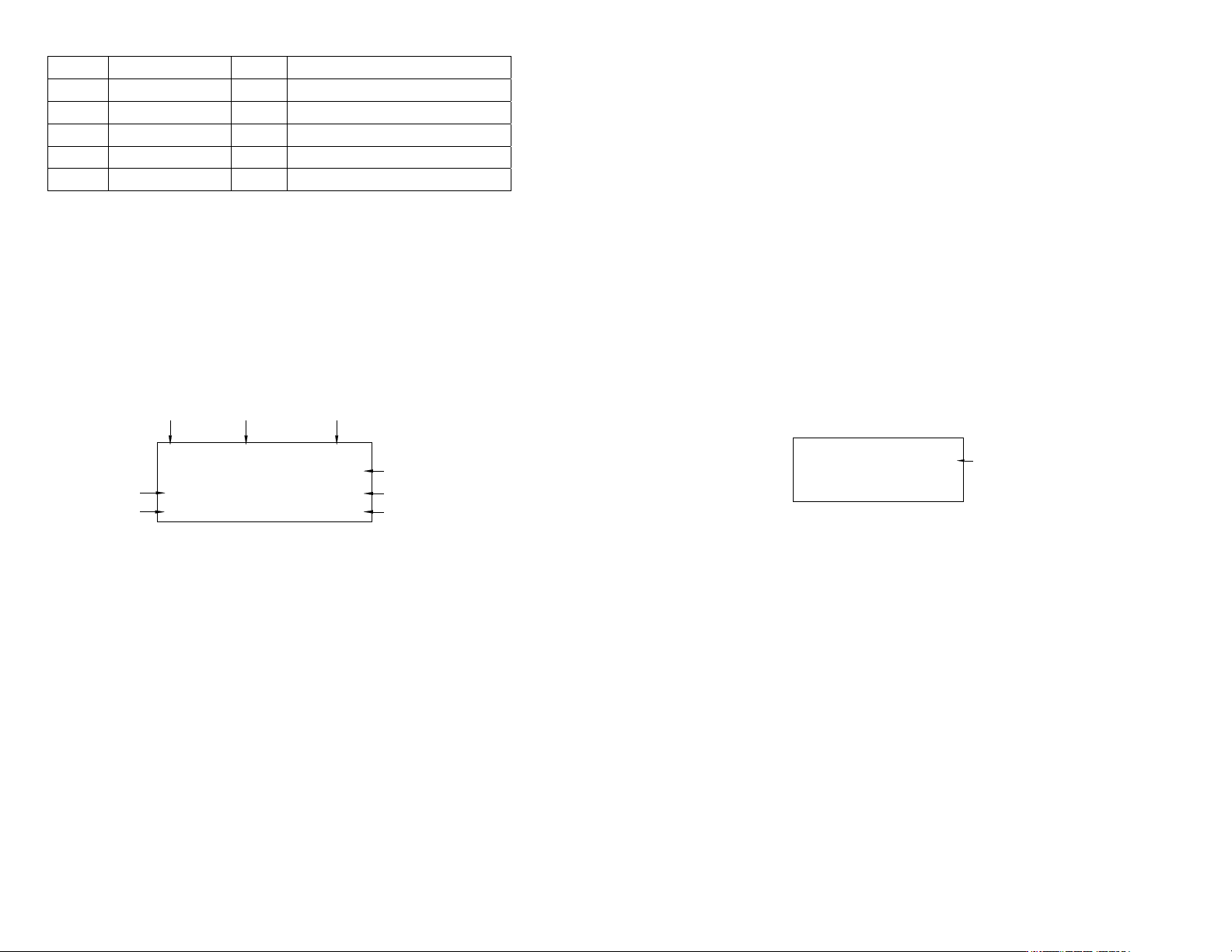
46
0.050S B: 40 PSI
P1 TIMED MODE SPRAY
1
0.100S A: 70 PSI
5.2.1 장치 연결 (그림 4.0 참조)
1. 전원선과 페달 스위치 그리고 에어 호스를 본 장치의 후면에 연결합니다. 공기
주입구 압력이 70 psi (4.8 bar) 이상이 되도록 하십시오.
2. 전원 버튼 (1)을 눌러 장치를 가동시킵니다.
3. 밸브 에어 호스는 포트 A 에 연결하고 원자화(Atomize) 에어 호스는 포트 B 에
연결합니다.
4. 디스플레이의 상단 우측 코너에 “SPRAY”가 나타날 때까지 모드 (2)와 설정
버튼 (3)을 동시에 누르십시오.
그림 5.0
5.2.2 프로그램 선택
5.1.2 절의 1 ~ 4 단계를 따르십시오
5.2.3 수동/정화 디스펜스 주기 설정:
참고: 완전한 스프레이 주기의 구성 요소: 스프레이 전, 스프레이, 스프레이 후
1. 디스플레이에 “PURGE(정화)”가 나타날 때까지 모드 버튼 (2)를 누릅니다.
2. 설정 버튼 (3)을 2 초간 눌러 설정 화면으로 들어갑니다. 스프레이 전 시간
(PRE)의 마지막 자릿수가 밝게 표시됩니다.
3. (+) 또는 (-) 버튼을 눌러 시간을 선택합니다.
4. 설정 버튼 (3)을 2 초 동안 누르고 있으면 커서가 스프레이 후 시간
(POST)으로 이동합니다.
5. 설정 버튼 (3)을 눌러 커서를 다음 위치로 이동합니다.
6. (+) 또는 (-) 버튼을 눌러 시간을 선택합니다.
7. 설정 버튼 (3)을 2 초간 눌러 데이터를 저장합니다.
8. 디스플레이에 원하는 압력이 표시될 때까지 공기 압력 조정기 손잡이 (6)를
돌려 원자화된(Atomized) 공기 압력을 높여주십시오.
참고: 포트 A 의 압력은 저압 설정에 의해 모니터링 될 수는 있지만 장치의
공기 조정기에 의해서는 조정되지 않습니다. 주입구 압력과 같은 압력이
항목 설명 항목 설명
1 전원 버튼 6 공기 압력 조정기 손잡이
2 모드 버튼 7 페달식 스위치
3 설정 버튼 8 공기 밸브 (포함되지 않음)
4 LCD 디스플레이 9 유체 저장조 (포함되지 않음)
5 전원 어댑터 10 공기 필터
스프레이 시간
스프
레이
전
시간
카운터
밸브 압력 포트 A
원자화된 압력 포트 B 조정됨
프로그램 번호 주기 모드 제어 형식
11
5.6 TO CHANGE PRESSURE UNIT DISPLAY (Refer to Figure 9.0)
The default pressure unit display is “psi”. To change pressure unit display to
“bar” follow steps below:
1. Press and hold Set button (3) for two seconds to enter setup screen.
2. Press both (+) and (-) button simultaneously two times. The unit “psi” will be
flashing.
3. Press both Set button (3) and (+) button simultaneously to change unit display
to “bar”. Repeat this step to change unit display back to “psi”
4. Press and hold Set button (3) for two seconds to exit setup screen.
5.7 LOW PRESSURE SETTING (Refer to Figure 9.0)
The low-pressure setting is pre-set at the factory to 70 Psi (4.8 bars). When the
supplied pressure drops below 70 Psi (4.8 bars) the unit will not function. To
change the low pressure set point, follow steps below:
1. Set the dispense cycle in “TIMED MODE” mode.
2. Press and hold the Set button (3) for two seconds to enter the setup screen.
3. Press (+) and (-) button simultaneously, the low pressure set point will
appear on display as shown on figure 6.0.
4. Press the Set button (3) and (+ ) button simultaneously to increase the set
point.
5. Press the Set button (3) and (-) button simultaneously to decrease the set
point.
6. Press and hold the Set button (3) for two seconds to save the data.
Figure 10.0
5.8 MULTIPLE SHOTS SETTING
Up to ten individual or sequential shots can be stored in the TS500R.
Sequential mode is activated in numerical order.
1. Follow steps in sections “5.1.2 Program Selection” & “5.1.4 Automatic
Dispense Cycle Setting” to set dispense time in desired programs
2. Press and hold the Mode button (#2) for 2 seconds to turn on sequential
mode
3. Press and release the Set button (#3) to enter the sequential program setup
mode
4. Press the (+) or (-) button to set the number of programs to be dispensed
5. Press and release the Set button (#3) to save selected sequential shot
program
6. Depress Foot switch to activate sequential dispensed cycle
7. Press the Mode button (#2) for 2 seconds to exit sequential mode
DISP: 0.100 70 psi
Low pressure
set point
P1 TIMED MODE VALVE