TS500R-user-guide-Asia.pdf - 第13页
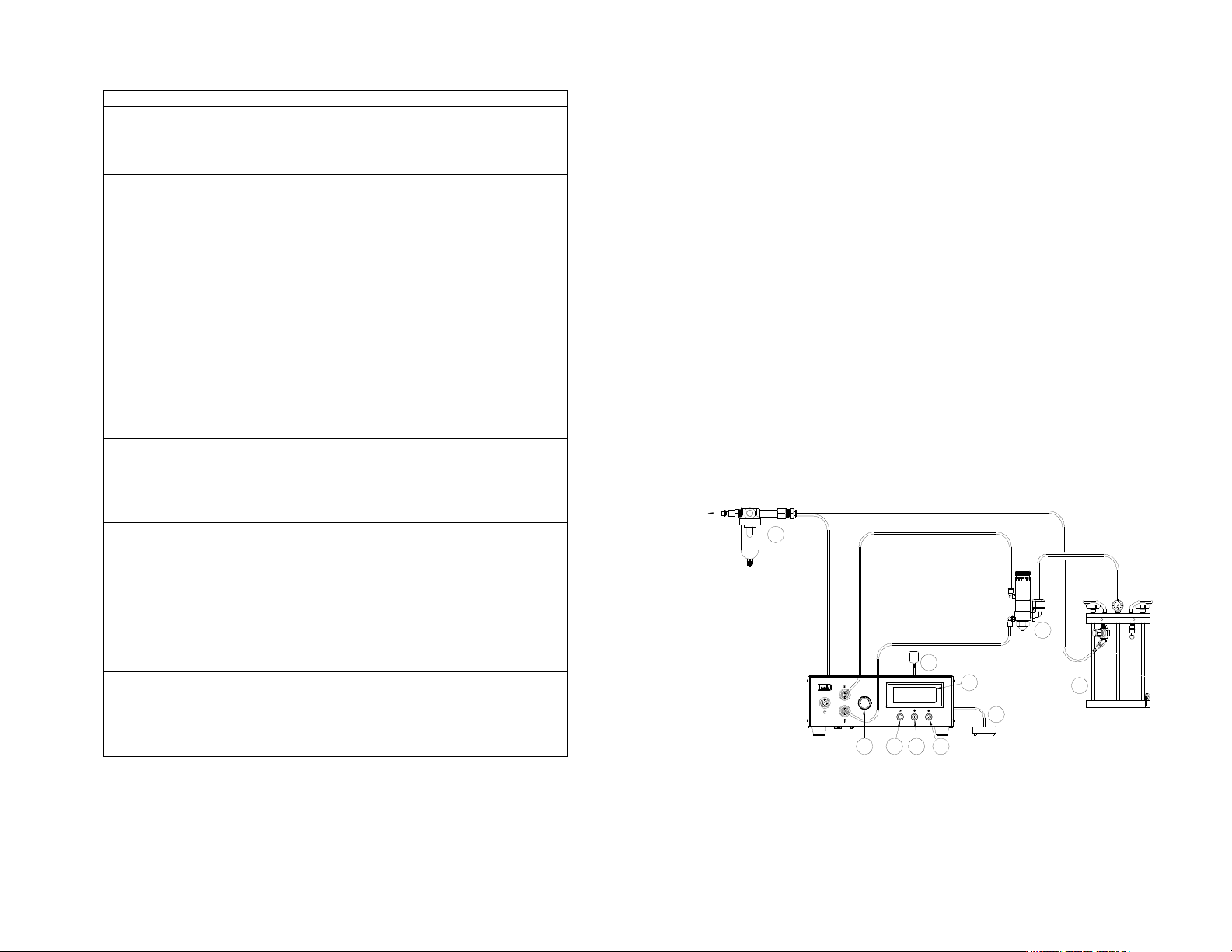
44 5.1.1 장치 연결 (그림 2.0 참조) 1. 전원선과 페달 스위치 그리고 에어 호스를 본 장치 의 후면에 연결합니다. 공기 주입구 압력이 70 psi (4.8 bar) 이상이 되도록 하십시오. 2. 전원 버튼 (1)을 눌러 장치를 가동시킵니다. 3. 밸브 에어 호스를 포트 A 에 연결합니다. 참고: 포트 A 의 압력은 저압 설정에 의해 모니터링 될 수는 있지 만 장치의 공기 조정기에…
12
6. TROUBLESHOOTING
PROBLEM POSSIBLE CAUSE CORRECTION
LCD does not
light
• No power input
•
Check power cord
connections
• Turn on power
System will not
actuate
• Supplied pressure
dropped below set
pressure
• Foot switch not plugged
in or improperly
plugged in
• Defective foot switch
• Broken wire or loose
connection inside unit
• Defective solenoid
• Defective PC board
•
Increase supplied
pressure
• Check foot switch
connection
• Foot switch needs to be
repaired or replaced
• Unplug power cord and
disconnect air supply.
Remove cover and check
for broken wires or loose
connections
• Replace solenoid
• Replace PC board
System will not
pressurize
• Insufficient air pressure
• Air hoses not plugged
in
• Regulator defective
•
Increase air supply
pressure
• Check connection
• Replace regulator
No Motor
Response
• Foot switch connection
is loose
• Motor cable connection
is loose
• Input Voltage is too
low
• Dispense time is too
low
•
Check Foot switch
connection
• Check Motor cable
connection
• Increase input voltage
• Increase dispense time
Inconsistent
dispensing
• Air bubbles in adhesive
• Dispense time is too
low
• Dispense needle started
to clog
•
De-air material
• Increase dispensing time
• Replace needle
45
3. 설정 버튼 (3)을 눌러 커서를 다음 위치로 이동합니다.
4. (+) 또는 (-) 버튼을 눌러 시간을 선택합니다.
5. 설정 버튼 (3)을 2 초간 눌러 데이터를 저장합니다.
6. 장치가 “TIMED MODE” 모드에 있을 경우, 페달 스위치를 눌렀다가 놓으면
시간설정 디스펜스 주기가 활성화됩니다.
7. 장치가 “INTERRUPT”에 있을 경우, 디스펜스 주기가 완료될 때까지 페달
스위치를 누른 채로 있으십시오. 페달 스위치를 놓으면 디스펜스 주기가
중단되며 다시 페달 스위치를 누르면 재개됩니다.
5.1.5 교시 모드 설정
교시 모드에서는 페달 스위치를 밟고 있는 동안 디스펜스 시간이 누적됩니다.
이것은 디스펜스 배출을 모를 때 필요한 디스펜스 시간을 결정하는 데
유용합니다.
1. 모드 버튼 (2)를 눌러 “INTERRUPT”를 선택합니다.
2. 설정 버튼(3)을 누른 채로 있으면 교시 모드로 들어갑니다. LCD 에 시간이
“0.000”으로 나타납니다.
3. 페달 스위치를 누른 채로 있어주십시오. 디스펜스 시간이 누적됩니다.
4. 원하는 양의 액체가 디스펜스되면 페달 스위치를 놓아주십시오.
5. 설정 버튼 (3)을 2 초간 눌러 데이터를 저장합니다.
6. 모드 버튼 (2)를 눌러서 “TIMED MODE” 모드로 전환합니다.
7. 이제 디스펜서는 이 시간 주기를 반복하기 시작합니다.
5.2
스프레이 밸브 제어 방법
주의: 공기 여과가 적절히 되도록 하기 위해서는 반드시 5-마이크론 필터 (TSD800-
6)가 장치에 설치되어야 합니다.
그림 4.0
5
8
9
7
4
3
21
6
TO AIR SOURCE
10
44
5.1.1
장치 연결 (그림 2.0 참조)
1. 전원선과 페달 스위치 그리고 에어 호스를 본 장치의 후면에 연결합니다.
공기 주입구 압력이 70 psi (4.8 bar) 이상이 되도록 하십시오.
2. 전원 버튼 (1)을 눌러 장치를 가동시킵니다.
3. 밸브 에어 호스를 포트 A 에 연결합니다.
참고: 포트 A 의 압력은 저압 설정에 의해 모니터링 될 수는 있지만 장치의
공기 조정기에 의해서는 조정되지 않습니다. 주입구 압력과 동일한 압력이
전달됩니다. 반면, 포트 B 의 압력은 조정되기는 하지만 저압 설정과는
연계되지 않습니다.
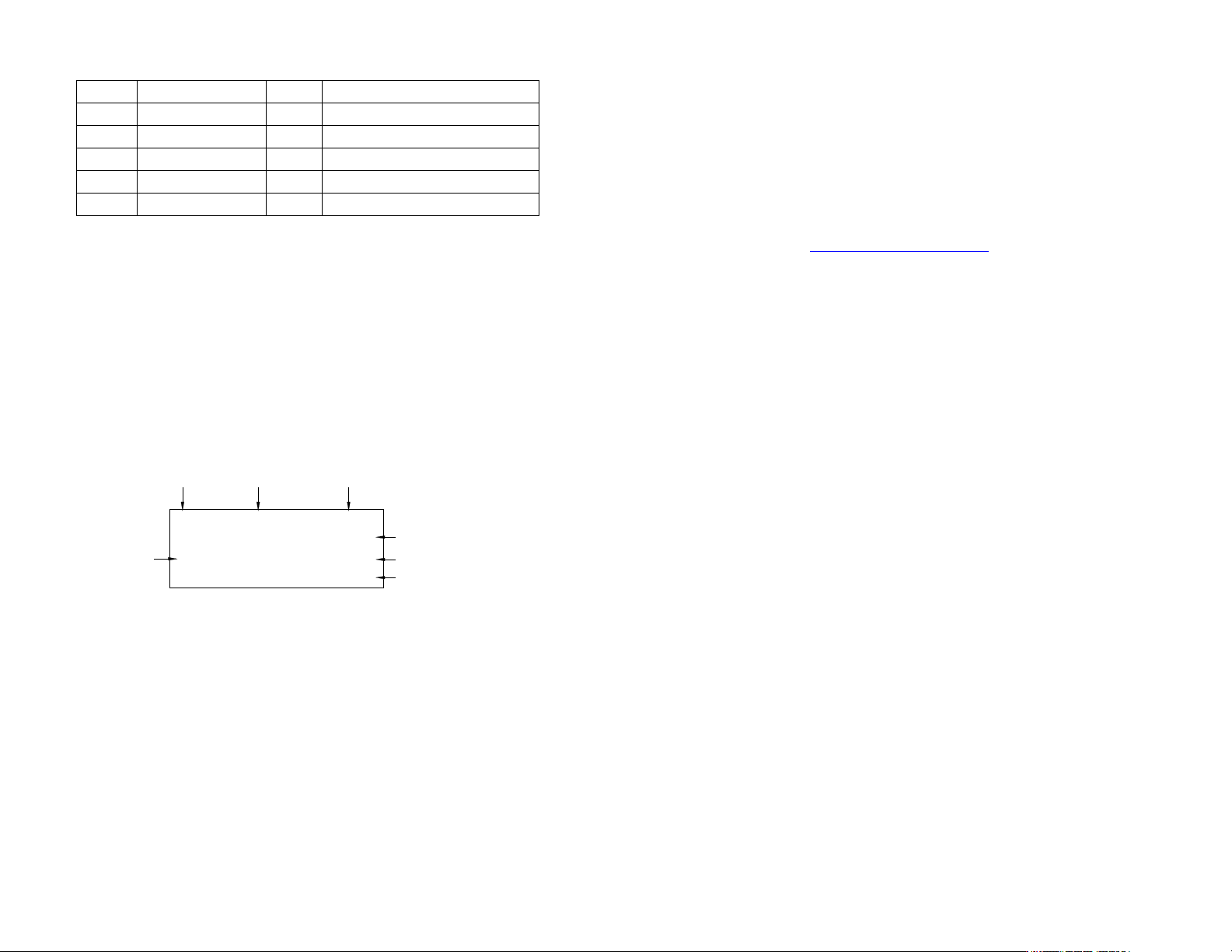
4. 그림 3.0 에서 보인 바와 같이 디스플레이의 상단 우측 코너에
“VALVE(밸브)”가 나타날 때까지 모드 (2)와 설정 버튼 (3)을 동시에
누르십시오.
그림 3.0
5.1.2 프로그램 선택
4. 설정 버튼 (3)을 눌러서 프로그램 번호 선택을 밝게 표시합니다.
5. (+) 또는 (-) 버튼을 눌러 원하는 프로그램을 선택합니다.
6. 설정 버튼 (3)을 누르면 설정이 완료됩니다.
5.1.3 수동/정화 디스펜스 주기 설정:
3. 디스플레이에 “PURGE(정화)”가 나타날 때까지 모드 버튼 (2)를 누릅니다.
4. 페달 스위치를 누른 채로 있으면 디스펜스 주기가 활성화 됩니다.
5.1.4 자동 디스펜스 주기 설정:
1. 모드 버튼 (2)를 눌러 “TIMED MODE(시간설정 모드)” 또는
“INTERRUPT(중지)”를 선택합니다.
2. 설정 버튼 (3)을 2 초간 눌러 설정 화면으로 들어갑니다. 디스펜스 시간의
마지막 자릿수가 밝게 표시됩니다.
항목 설명 항목 설명
1 전원 버튼 6 공기 압력 조정기 손잡이
2 모드 버튼 7 페달 스위치
3 설정 버튼 8 공기 밸브 (포함되지 않음)
4 LCD 디스플레이 9 유체 저장조 (포함되지 않음)
5 전원 어댑터 10 공기 필터
카운터
밸브 압력 포트
압력 포트 B
조정됨
디스펜스 시간
프로그램 번호 주기 모드 제어 형식
0.100S A: 70 PSI
B: 70 PSI
P1 TIMED MODE VALVE
1
13
7. MAINTENANCE
The dispenser is designed and built to be relati vely ma intenance free. To assure
trouble free operation, please follow below steps:
1. Make certain air supply is clean and dry.
2. Avoid connecting the unit to excessive moisture or solvent saturation.
3. Avoid connecting air supply exceeding 100 psi (6.9 bars).
4. Use only Amyl Alcohol to clean outside surface of the main housing.
5. Use only soft cloth to clean the LCD.
8. SPARE PARTS AND ACCESSOR I ES
For TS500R spare parts and accessories information, please visit the TS500R User
Guide webpage at http://www.techconsystems.com
9. LIMITED WARRANTY
OK International warrants this product to the original purchaser for a period of 2
years from date of purchase to be free from material and workmanship defects but
not normal wear-and-tear, abuse and faulty installation. Defective product or
subassembly and components under warranty will be repaired or replaced (at OK
International's option) free of charge. Customer with defective product under
warranty must contact the nearest OK International office or distributor to secure a
return authorization prior to shipping the product to the assigned OK International
authorized service center. For nearest OK International office or distributor contact
information, please visit www.techconsystems.com. OK International reserves the
right to make engineering product changes without notice.
14
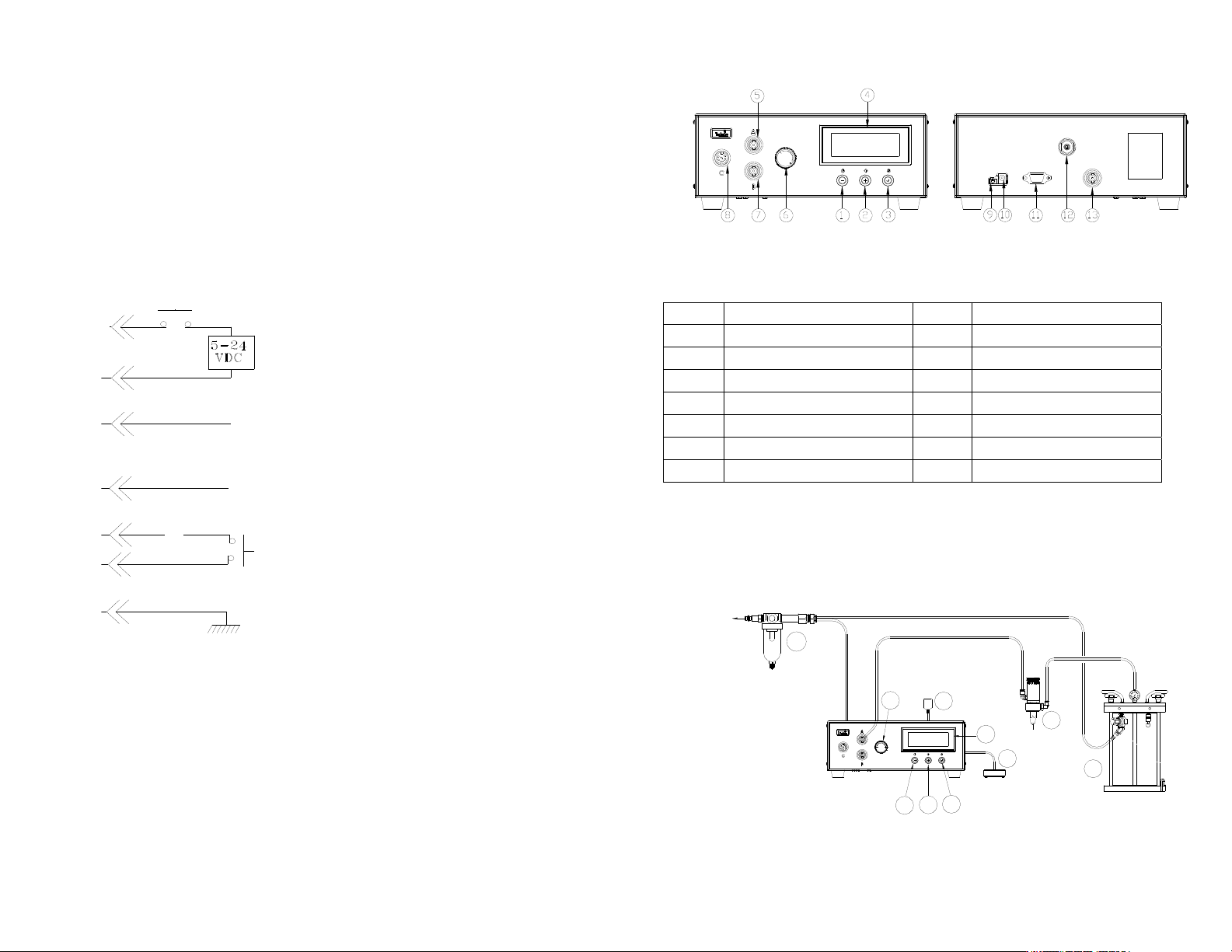
10. I/O CONFIGURATION AND END OF CYCLE FEEDBACK
During a dispense cycle, an open collector circuit closes and remains closed while
the valve is dispensing. Pin 3 and 4 can be as feedback signal to synchronize with
other devices. Power from an external source is allowed to pass through the circuit
to operate a 5 to 24 VDC load. Power consumption must not exceed 250 mA. The
load could be a relay, solenoid, counter, LED, or any device that will operate within
a 5 to 24 VDC range and a maximum of 250 mA.
Note:
During the dispense cyc le, pin 3 wi ll be grounded. Please make sure the
external device (your machine that controls the dispenser/controller) has the
same ground as the TS500R controller.
Pin 7, 8, and 9 = Available
Chasis Ground
To initiate a dispense cycle with
contact closure
When low pressure alarm is triggered, Pin 4 is grounded (-)
When low pressure alarm is turned off,
Pin 4 is not connected (opened)
End of Cycle Feedback
During dispensing cycle, Pin 3 is grounded (-)
End of dispensing cycle,
Pin 3 is not connected (opened)
To initiate a dispense cycle with voltage
Pin 1 (+)
Pin 2 (-)
Pin 3
Pin 4
Pin 5
Pin 6
Pin 5
43
4. 기능
그림 1.0
5. 설정 지침
5.1
공기 밸브 제어 방법
주의: 공기 여과가 적절히 되도록 하기 위해서는 반드시 5-마이크론 필터 (TSD800-
6)가 장치에 설치되어야 합니다.
그림 2.0
항목 설명 항목 설명
1 전원 버튼 8 모터 드라이브 콘센트
2 모드 버튼 9 페달식 스위치 콘센트
3 설정/저장 버튼 10 전원 콘센트
4 디스플레이 11 I/O 연결
5 공기 배출구 (비조정) 12 공기 주입구
6 공기 압력 조정기 13 부장품 공기 배출구
7 공기 배출구 (조정)
8
9
10
TO AIR SOURCE
6
5
2
1
3
4
7