TS500R-user-guide-Asia.pdf - 第6页
6 5.1.5 Teac h M ode Setting In the teach mode, the d ispense time will b e accumulated as long as the foot switch is depressed. This is he lpful in determining required dispense time when dispense output is unknown. 1. …
52
6. 문제 해결
문제 가능한 원인 해결책
LCD 에 불이
들어오지 음
• 전원이 들어오지 않음 • 전원 코드 연결 점검
• 전원을 켬
시스템이
가동되지 않음
• 공급된 압력이 설정 압력
아래로 떨어졌음
• 페달 스위치가 연결되어 있지
않았거나 올바르게 연결되지
않음
• 페달 스위치 결함
• 배선 파손 또는 장치 내부 연결
이완
• 관형 코일 결함
• PC 보드 결함
• 공급된 압력을 높임
• 페달 스위치 연결 확인
• 페달 스위치를 수리 또는
교체해야 함
• 전원 코드를 빼고 공기
공급을 차단함. 덮개를
열고 배선 파손이나
연결이 헐거워지지
않았는지 확인함
• 관형 코일 교체
• PC 보드 교체
시스템에
압력이
가해지지 않음
• 공기 압력 부족
• 공기 호스가 꽂혀있지 않음
• 조정기 결함
• 공기 공급 압력 증대
• 연결 확인
• 조정기 교체
모터가
반응하지 않음
• 페달 스위치 연결이 헐거움
• 모터 케이블 연결이 헐거움
• 입력 전압이 너무 낮음
• 지나치게 낮은 디스펜스 시간
• 페달 스위치 연결 확인
• 모터 케이블 연결 확인
• 입력 전압 증대
• 디스펜스 시간 연장
디스펜스가
일정하지 않음
• 점착 재료 내의 기포
• 지나치게 낮은 디스펜스 시간
• 디스펜스 needle 막힘
• 재료의 공기 빼기
• 디스펜스 시간 연장
• needle 교체
5
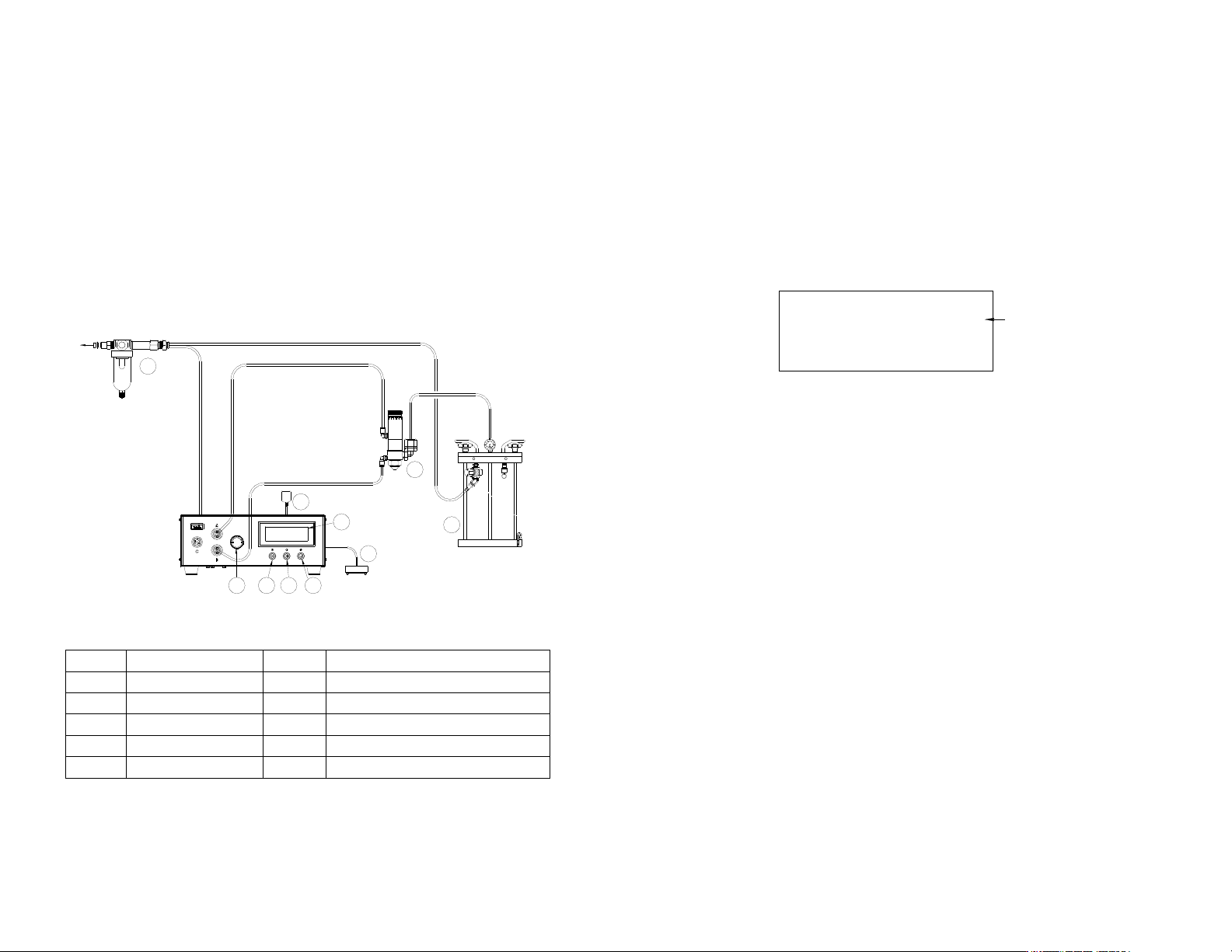
5.1.1 Connecting The Unit: (Refer to Figure 2.0)
1. Connect the power cord, foot switch and air hose to the back of the unit.
Make sure the air inlet pressure is 70 psi (4.8 bar) or higher.
2. Press the Power button (1) to turn on the unit.
3. Connect Valve air hose to Port A.
NOTE: Pressure in Port A can be monitored by the low pressure setting
but is not regulated by the air regulator in the unit. It delivers the same
pressure as the inlet pressure. On the other hand, pre ssure in Port B is
regulated but it is not linked to the low pressure setting.
4. Press the Mode (2) and Set button (3) simultaneously until “VALVE”
appears on the top right hand corner of the Display as shown in Figure 3.0
Figure 3.0
5.1.2 Program selection
1. Press the Set button (3) to highlight the program number selection.
2. Press the (+) or (-) buttons to select desired program.
3. Press the Set button (3) to exit.
5.1.3 Manual/Purge Dispense Cycle Setting:
1. Press the Mode button (2) until “PURGE” appears on the Display.
2. Press and hold the Foot Switch to activate dispense cycle.
5.1.4 Automatic Dispense Cycle Setting:
1. Push the Mode button (2) to select “TIMED MODE” or “INTERRUPT”.
2. Press and hold the Set button (3) for two seconds to enter set up screen.
The last digit of the dispense time will be highlighted.
3. Press the Set button (3) to move the cursor to the next position.
4. Press the (+) or (-) button to set the time
5. Press and hold the Set button (3) for two seconds to save the data.
6. If the unit is in “TIMED MODE” mode, press and release the Foot Switch
to activate the timed dispense cycle.
7. If the unit is in “INTERRUPT”, press and hold the Foot Switch until the
dispense cycle is completed. The dispense cycle can be disrupted if the
Foot Switch is released and resumed when the Foot Switch is depressed
again.
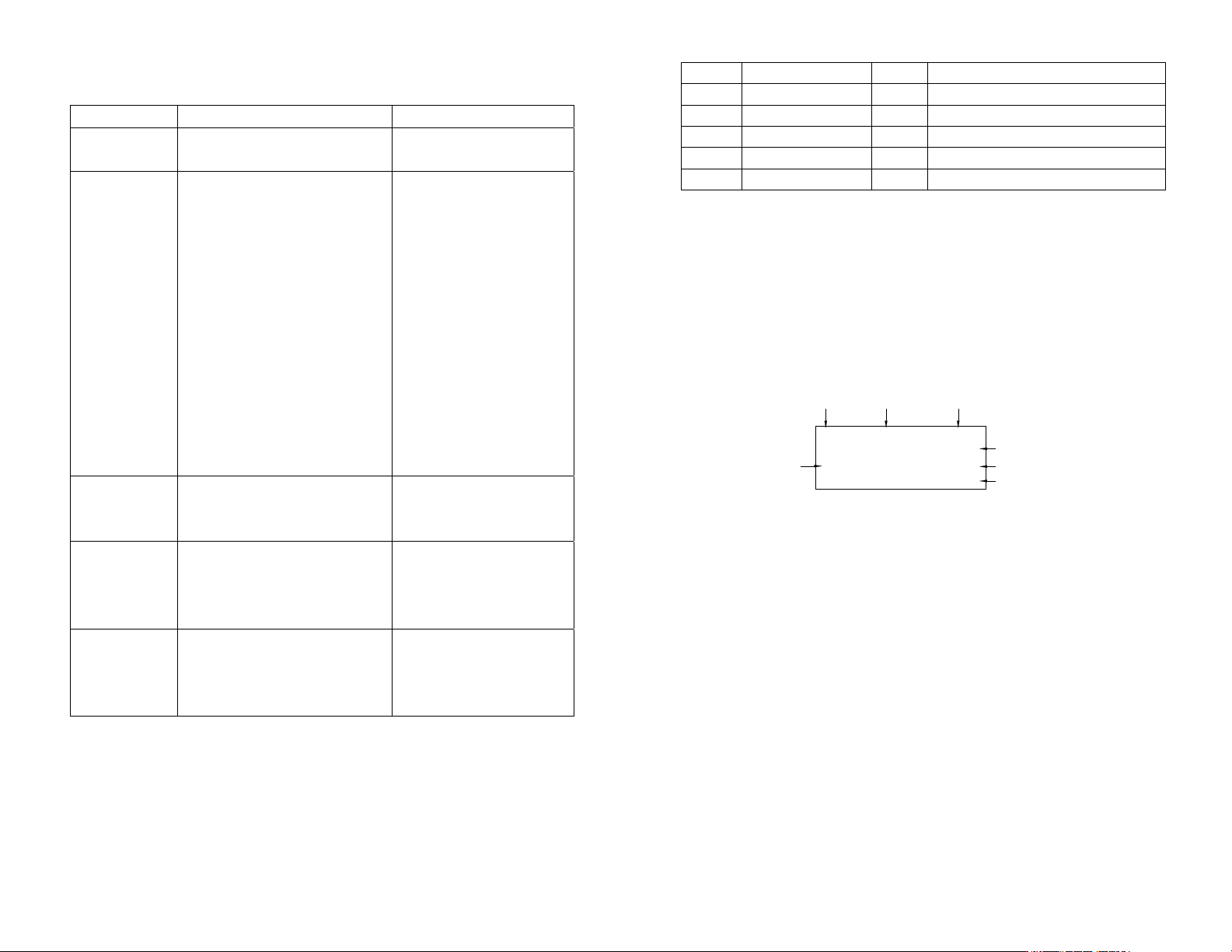
Items Description Items Description
1 Power Button 6 Air pressure regulator knob
2 Mode Button 7 Footswitch
3 Set Button 8 Pneumatic Valve (not included)
4 LCD Display 9 Fluid Reservoir (not included)
5 Power Adapter 10 Air Filter
Cycle Mode
Dispense
Time
Program #
Valve Pressure Port
Pressure Port B
Regulated
Counter
Control Type
1
0.100S A: 70 PSI
B: 70 PSI
P1 TIMED MODE VALVE
6
5.1.5 Teac h M ode Setting
In the teach mode, the dispense time will be accumulated as long as the
foot switch is depressed. This is helpful in determining required dispense
time when dispense output is unknown.
1. Push the Mode button (2) to select “INTERRUPT”.
2. Press and hold the Set button (3) to enter the teach mode. The time will
show “0.000” in the LCD.
3. Press and hold down Foot switch. Dispense time will be accumulated.
4. Release Foot Switch when desired amount of fluid is dispensed.
5. Press and hold the Set button (3) for two seconds to save the data.
6. Press the Mode button (2) to switch the “TIMED MODE” mode.
7. The dispenser is now set to repeat this timed cycle.
5.2 TO CONTROL SPRAY VALVE
CAUTION: A 5-micron filter (TSD800-6) must be installed with the unit to ensure
proper air filtration.
Figure 4.0
5.2.1 Connecting The Unit: (Refer to Figure 4.0)
1. Connect the power cord, foot switch and air hose to the back of the unit.
Make sure the air inlet pressure is 70 psi (4.8 bars) or higher.
2. Press the Power button (1) to turn on the unit.
3. Connect Valve air hose to Port A and Atomize air hose to Port B.
Items Description Items Description
1 Power Button 6 Air pressure regulator knob
2 Mode Button 7 Foot Switch
3 Set Button 8 Pneumatic Valve (not included)
4 LCD Display 9 Fluid Reservoir (not included)
5 Power Adapter 10 Air Filter
TO AIR SOURCE
10
5
8
9
7
4
3
21
6
51
DISP: 0.100 70 psi
P1 TIMED MODE VALVE
5.7 저압 설정 (그림 9.0 참조)
저압 설정은 공장에서 70 Psi (4.8 bars)로 미리 설정됩니다. 공급된 압력이 70 Psi
(4.8 bars) 아래로 떨어지면 장치가 작동하지 않게 됩니다. 저압 설정 포인트를
변경하려면, 아래 단계들을 따르십시오.
1. 디스펜스 주기를 “TIMED MODE” 모드로 설정합니다.
2. 설정 버튼 (3)을 2 초간 눌러 설정 화면으로 들어갑니다.
3. (+)와 (-) 버튼을 동시에 누르면 그림 6.0 에서 보인 바와 같이 디스플레이에
저압 설정 포인트가 나타날 것입니다.
4. 설정 버튼 (3)과 (+) 버튼을 동시에 누르면 설정 포인트가 증가합니다.
5. 설정 버튼 (3)과 (-) 버튼을 동시에 누르면 설정 포인트가 감소합니다.
6. 설정 버튼 (3)을 2 초간 눌러 데이터를 저장합니다.
그림 10.0
5.8 복복수 발사 설정:
TS500R 에는 최대 10 회의 개별 또는 순차 발사가 저장될 수 있습니다. 순차 모드는
수의 순서대로 활성화 됩니다.
1. "5.1.2 프로그램 선택" 절과 "5.1.4 자동 디스펜스 주기 설정" 절의 단계들에
따라 원하는 프로그램의 디스펜스 시간을 설정하십시오.
2. 모드 버튼 (2)를 2 초 동안 눌러 순차 모드를 켭니다.
3. 설정 버튼 (3)을 눌렀다가 놓아 순차 프로그램 설정 모드에 들어갑니다.
4. (+)나 (-) 버튼을 눌러 디스펜스 될 프로그램의 수를 설정하십시오.
5. 설정 버튼 (3)을 눌렀다가 놓아 선택된 순차 발사 프로그램을 저장합니다.
6. 페달 스위치를 밟아 순차 디스펜스 주기를 활성화시킵니다.
7. 모드 버튼 (2)를 2 초 동안 눌러 순차 모드를 빠져 나갑니다.
저압 설정 포인트
50
5.4.2 프로그램 선택: 5.3.2 절의 단계들을 따르십시오.
5.4.3 수동/정화 디스펜스 주기: 5.3.3 절의 단계들을 따르십시오.
5.4.4 자동 디스펜스 주기 설정: 5.3.4 절의 단계들을 따르십시오.
5.4.5 인코더 카운트의 반복 설정:
인코더 카운트의 기본설정 최대값은 60,000P 입니다. 하지만 ITERATION(반복)
“Itr” 기능이 있어서 디스펜스 지속시간을 최대 4 배 (240,000 카운트)까지
늘여서 사용할 수 있습니다.
1. 설정 버튼 (3)을 2 초 동안 눌러 설정 화면으로 들어갑니다.
2. “Itr”이 나타날 때까지 전원 버튼 (1)과 모드 버튼 (2)를 동시에 (3 회)
누릅니다.
3. 설정 버튼 (3)과 (+) 버튼을 동시에 누르면 반복 회수를 늘립니다.
4. 설정 버튼 (3)과 (-) 버튼을 동시에 누르면 반복 회수를 줄입니다.
5. 설정 버튼 (3)을 눌러 데이터를 저장하고 메인 화면으로 돌아갑니다.
인
5.5 주기 카운터 (그림 9.0 참조)
주기 카운터는 활성화되는 자동 디스펜스 주기의 횟수를 기록합니다. 최대 60,000
주기까지 기록할 수 있습니다. 카운터를 재설정하려면, 아래의
단계들을 따르십시오:
1. 설정 버튼 (3)을 2 초간 눌러 설정 화면으로 들어갑니다.
2. 설정 버튼 (3)과 모드 버튼 (2)를 동시에 눌러 카운터를 소거합니다.
3. 설정 버튼 (3)을 2 초간 눌러 설정 화면에서 빠져나옵니다.
그림 9.0
5.6 압력 단위 디스플레이를 변경하려면 (그림 9.0 참조)
기본으로 설정된 압력 단위 디스플레이는 “psi”입니다. 압력 단위 디스플레이를
““bar”로 변경하려면 아래의 단계들을 따르십시오.
1. 설정 버튼 (3)을 2 초간 눌러 설정 화면으로 들어갑니다.
2. (+)와 (-) 버튼을 동시에 두 번 누릅니다. 단위 “psi”가 깜박이게 됩니다.
3. 설정 버튼 (3)과 (+) 버튼을 동시에 누르면 단위 디스플레이가 “bar”로
변경됩니다. 단위 디스플레이를 다시 “psi”로 변경할 때도 이 과정을
반복합니다.
4. 설정 버튼 (3)을 2 초간 눌러 설정 화면에서 빠져나옵니다.
7
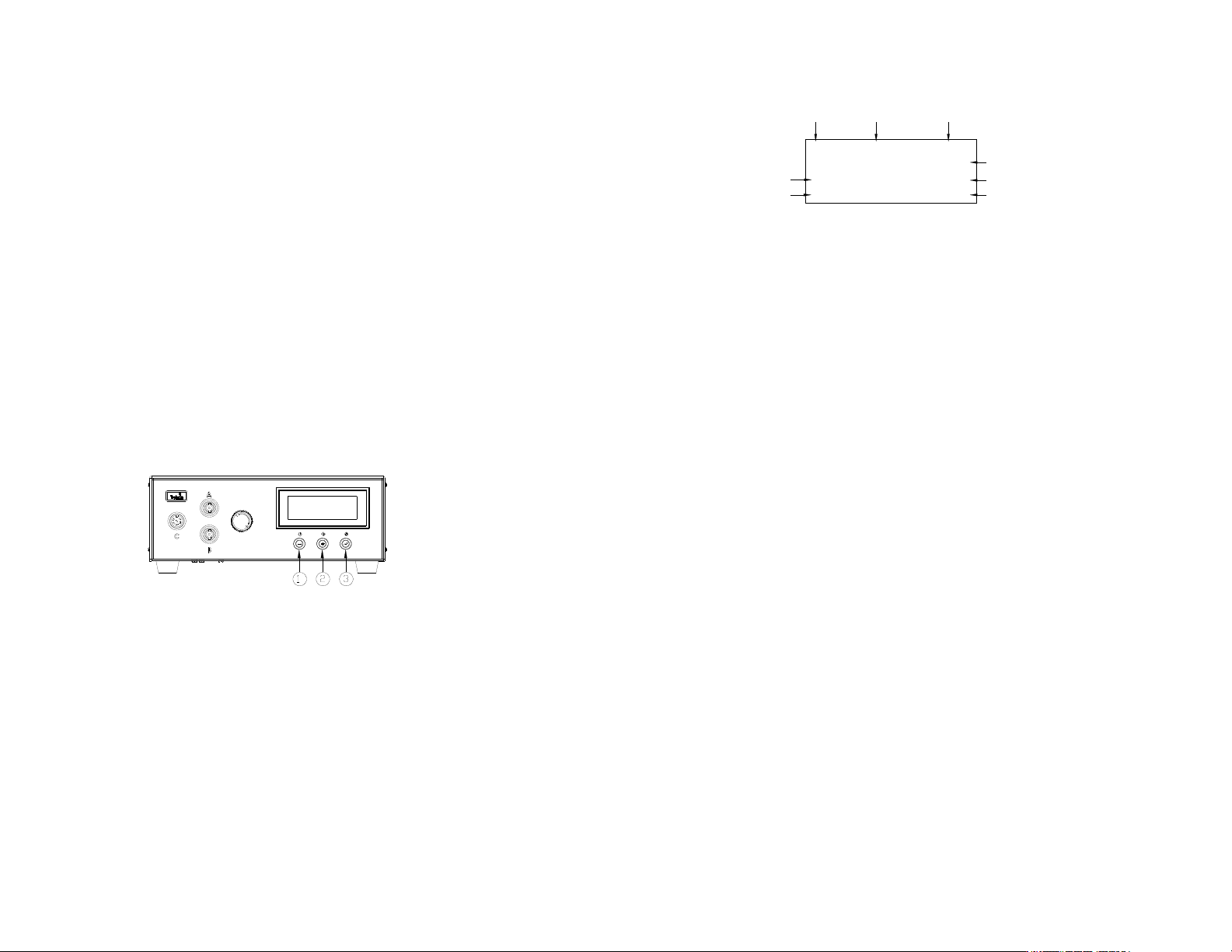
4. Press the Mode (2) and Set up button (3) simultane ously until “SPRAY”
appears on the top right hand corner of the Display.
Figure 5.0
5.2.2 Program selection
Follow step 1 to 4 in Section 5.1.2
5.2.3 Manual/Purge Dispense Cycle Setting:
Note: A complete spray cycle consists of: Pre-Spray, Spray and Post-Spray
1. Press the Mode button (2) until “PURGE” appears on the Display.
2. Press and hold the Set button (3) for two seconds to enter set up screen.
The last digit of the Pre-Spray time (PRE) will be highlighted.
3. Press the (+) or (-) button to set the time.
4. Press and hold the Set button (3) for two seconds to move the cursor to the
Post-Spray time (POST) .
5. Press the Set button (3) to move the cursor to the next position.
6. Press the (+) or (-) button to set the time.
7. Press and hold the Set button (3) for two seconds to save the data.
8. Turn up the Atomized air pressure by rotating the Air pressure regulator
knob (6) until the desired pressure is indicated on the Display.
Note: Pressure in Port A can be monitored by the low pressure setting
but is not regulated by the air regulator in the unit. It delivers the same
pressure as the inlet pressure. On the other hand, pre ssure in Port B is
regulated but it is not linked to the low pressure setting.
9. Press and hold the Foot Switch to activate spray cycle.
5.2.4 Automatic Dispense Cycle Setting:
1. Push the Mode button (2) to select “TIMED MODE” or “INTERRUPT”
mode.
2. Press and hold the Set button (3) for two seconds to enter set up screen.
The last digit of the Spray time/Dispense time (DISP) will be highlighted.
3. Press the (+) or (-) button to set the time
4. Press and hold the Set button (3) for two seconds to move the cursor to the
Pre-Spray time (PRE) and re peat this step to go to Post-Spray time (POST).
5. Press the Set button (3) to move the cursor to the next position.
6. Press the (+) or (-) button to set the time
7. Press and hold the Set button (3) for two seconds to save the data.
8. If the unit is in “TIMED MODE” mode, press and release the Foot Switch
to activate the timed spray cycle.
9. If the unit is in “INTERRUPT” mode, press and hold the Foot Switch until
the dispense cycle is completed. The dispense cycle can be disrupted if the
Foot Switch is released and resumed when the Foot Switch is depressed
again.
Cycle Mode
Pre-Spray
Time
Spray Time
Program #
Atomized Pressure Port B
Regulated
Valve Pressure Port A
Counter
Control Type
1
0.100S A: 70 PSI
0.050S B: 40 PSI
P1 TIMED MODE SPRAY