00196785-02_IM_Taceability_3.3_EN.pdf - 第36页
Uninstalling Trace Service and Trace Monitor 36 Installation Manual SIPLACE Traceability 3.3 ► The Install Shield Wizard will start and uninstalling Trace Monitor will be p repared. Trace Monitor will be uninstalled. ► T…
Uninstalling Trace Service and Trace Monitor
Installation Manual SIPLACE Traceability 3.3 35
6 Uninstalling Trace Service and Trace Monitor
NOTICE
Requirement
You need administrator privilege for your operation system in order to perform this installation.
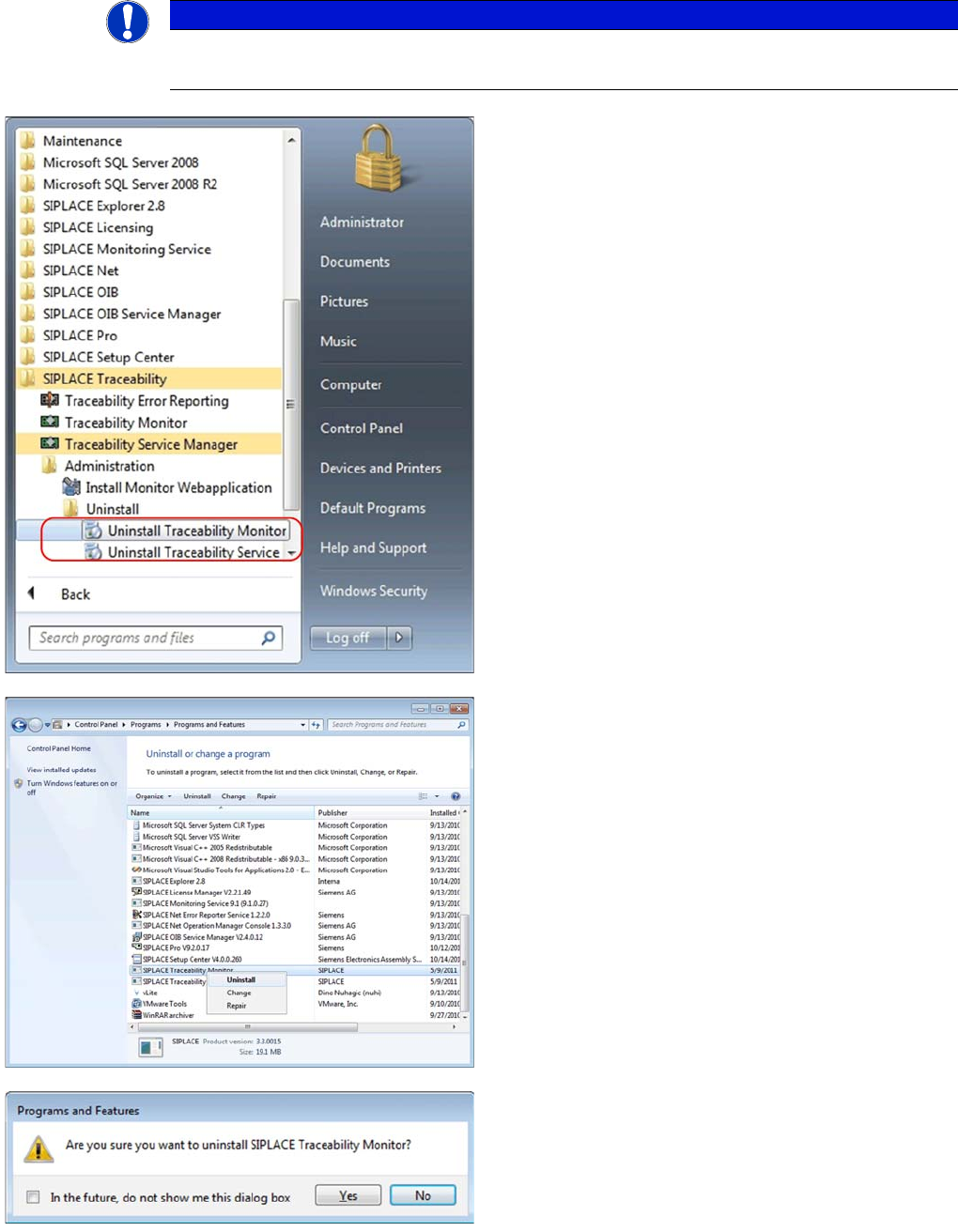
►In the Start Menu select the SIPLACE Traceability
program group -> Uninstall Traceability Service or
Uninstall Traceability Monitor.
⇨The Application Setup is started where you can choose
to repair or remove the installation.
►In the Control Panel -> Programs -> Programs and
Features dialog select the application to be unin-
stalled, e.g. SIPLACE Traceability Monitor, right-click
and select Uninstall in the context menu.
You are prompted to confirm uninstalling Trace Monitor.
►Confirm with Yes.
Uninstalling Trace Service and Trace Monitor
36 Installation Manual SIPLACE Traceability 3.3
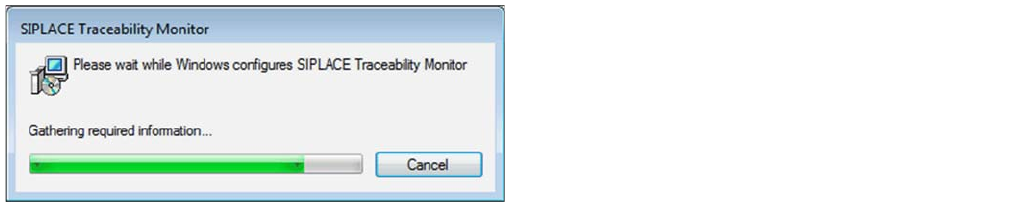
►The Install Shield Wizard will start and uninstalling
Trace Monitor will be prepared. Trace Monitor will be
uninstalled.
►Trace Monitor is no longer available.
Upgrade to the new Traceability concept
New concept for the former Trace Host database
Installation Manual SIPLACE Traceability 3.3 37
7 Upgrade to the new Traceability concept
7.1 New concept for the former Trace Host database
Traceability 3.3 comes with a new database concept which has significant impacts on the deployment
and the DBView interface.
The following has changed:
▪ The "Trace Host" Service was removed. Trace Service replaces the functionality and data will direct-
ly be exported to the database without detouring through the file system.
▪ The database schema was completely redesigned (see advantages).
This new concept has the following advantages for the customer:
▪ one service less needed for the traceability solution (less configuration options, less administrative
overhead)
▪ XML file export / file shares are not longer needed to store the traceability data to the database (al-
though XML file export is still an available export option in Trace Service for archiving purposes)
▪ less complexity, higher performance and improved reliability in the new database model compared
to the old solution
▪ the new DBView Interface is easier to comprehend than the old one
▪ The "Trace Monitor" tool supports old and new database (only one tool needed to query in databas-
es)
But there are still some disadvantages:
▪ The old DBView Interface will not longer be supported. Customers have to adapt their own SQL
statements
▪ A database migration from old DB to the new schema exists. But due to the design of the old data-
base schema, the migration process is rather slow. We always recommend to create a new data-
base. The DB migration script is not part of the Traceability Product CD but part of a customer
project.
Please see the User Guide for further information about configuring the new traceability database.
7.2 General steps for all Traceability versions 1.x /2.x
►This chapter is only relevant in case of an upgrade of Traceability 1.x, 2.x to 3.x.
In Traceability 3.x it is no longer possible to forward Traceability XML files directly from the stations to
the Trace Host because Trace Host is no longer supported.
In previous Traceability versions the XML file import path was configured on the stations and in Trace
Service. However in Traceability 3.x, XML files are processed by Trace Service and then forwarded to
3rd Party Applications or stored to database. Therefore you have to configure XML file directories (net-
work shares) on the stations in Trace Service.
NOTICE
Parallel operation
Databases with old and databases with new database schema can be used with Trace Monitor
3.3.
NOTICE
Configuration of Traceability XML file directories
In case of an upgrade of Traceability 1.x or 2.x installations to Traceability 3.x without modifi-
cation of the XML file directory configuration, all XML files from stations will no longer be proc-
essed!