00196622-03_OM_WPC5_6_EN.pdf - 第34页
Setting up and Commissioning Setting Up the Module 4.2.3 Switch on the WPC5/WPC6 34 Operating Manual SIPLACE WPC5/WPC6 Setting the exact height of the WPC5/WPC6 ► Use a measuring scale to adjust th e WPC5/WPC6 to the cor…
Setting up and Commissioning
4.2.2 Docking the WPC5/WPC6 Setting Up the Module
Operating Manual SIPLACE WPC5/WPC6 33
Aligning the WPC5/WPC6
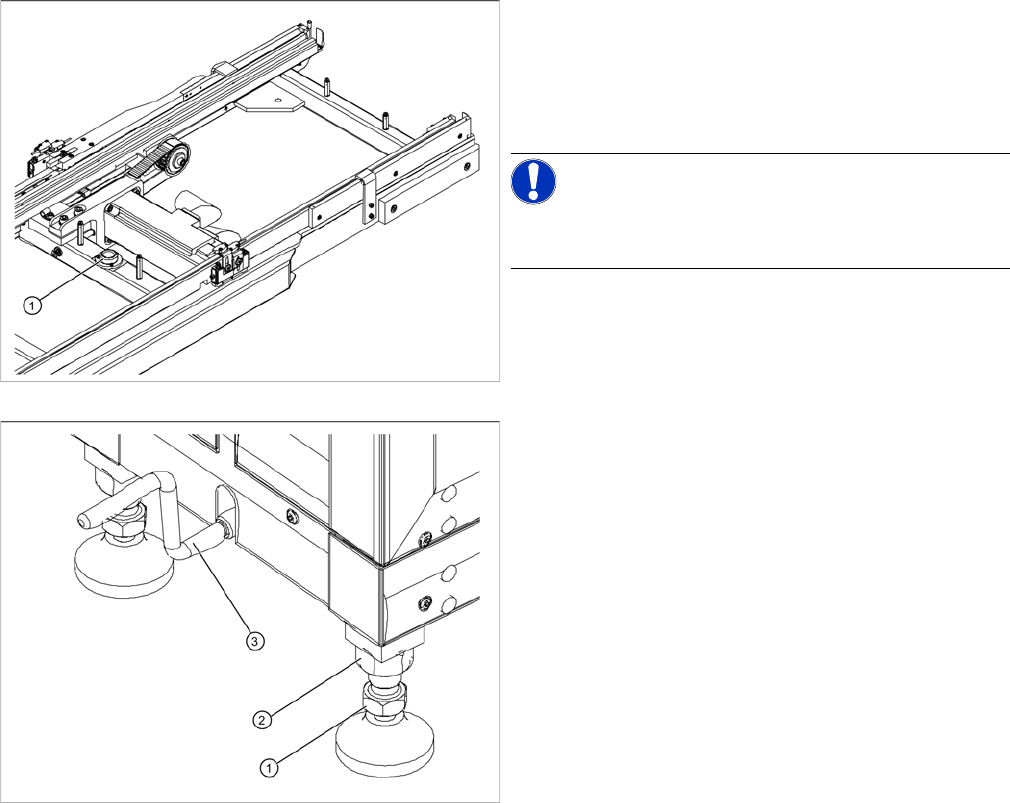
1. Circular spirit level
► Check the position of the WPC5/WPC6 with the help
of the integrated spirit level (1), which is between the
two rails of the feeder axis.
NOTICE!
The cover on the feed axis arms is not shown in the dia-
gram.
1. Foot with 30 mm nut
2. 36 mm locknut
3. Hexagonal shaft (crank handle)
► If the WPC5/WPC6 is not level, use a 30 mm and 36
mm open-ended wrench to adjust the feet in turn, un-
til more than half of the bubble is in the circle of the
spirit level.
Setting up and Commissioning
Setting Up the Module 4.2.3 Switch on the WPC5/WPC6
34 Operating Manual SIPLACE WPC5/WPC6
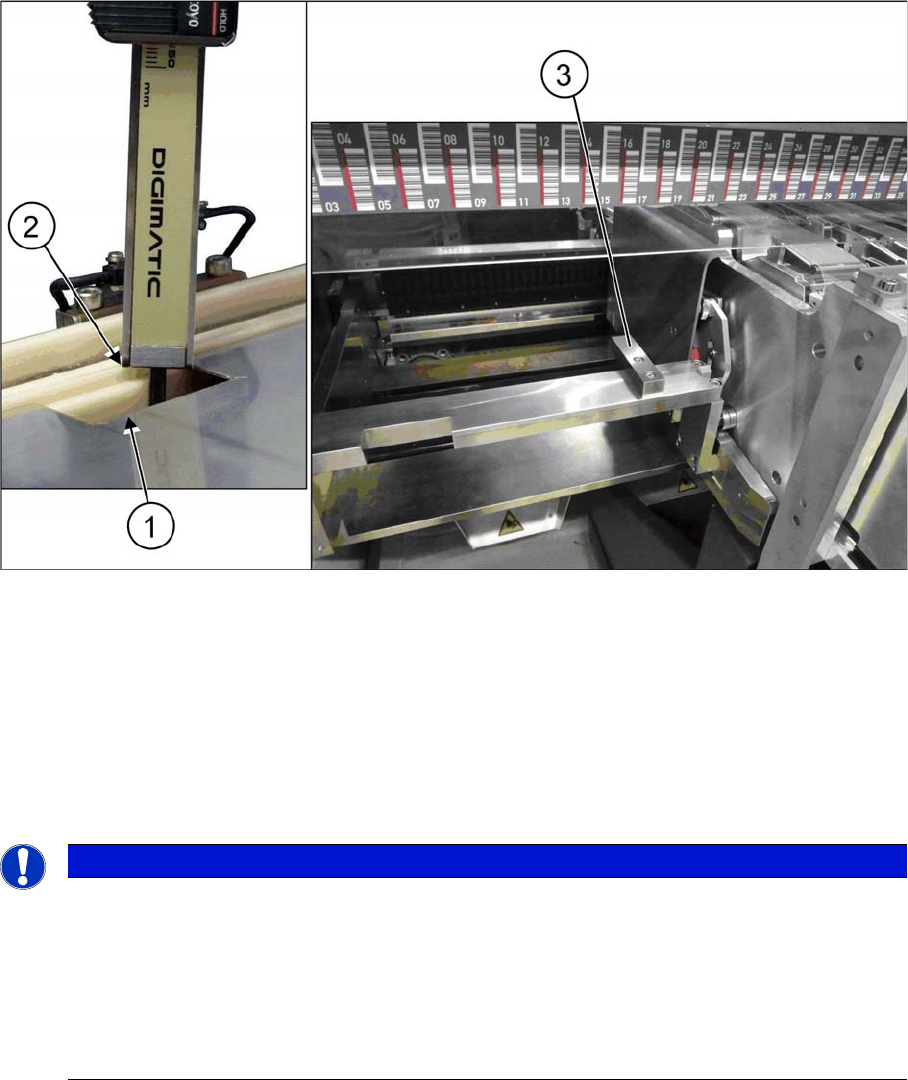
Setting the exact height of the WPC5/WPC6
► Use a measuring scale to adjust the WPC5/WPC6 to the correct height through the opening (1) on
the cover plate of the feed axis.
► Use the gauge to measure the height of the WPC5/WPC6 from the white sliding surface of the waffle
pack tray carrier (2) to the aluminum block on the changeover table insert (3). The correct height
should be 87 ± 0.5 mm.
► If the height is outside the specified value, adjust each foot accordingly to lower or raise the WPC5/
WPC6 to the correct height.
4.2.3
4.2.3 Switch on the WPC5/WPC6
Switch on the WPC5/WPC6
Start up sequence with two WPCs
4.2.4
4.2.4 Undocking the WPC5/WPC6
Undocking the WPC5/WPC6
Preparatory Steps
► Go to Manual operations => Entire machine functions and perform a Overall reference run.
► Perform a WPC reference run. To do this, select Manual operations => Subsystems => WPC and
click on Reference run.
► Use the software to move the lifting axis of the WPC5/WPC6 into the transport position. To do this,
select the Move into transport position button. The WPC5/WPC6 will be moved to a defined position,
from which it can be safely transported.
► Disconnect the WPC5/WPC6 from the power supply and the data supply.
NOTICE
Start up sequence with two WPCs
In case of two WPCs on one machine the start up sequence has to be observed. Otherwise
some errors (CAN switch errors) may occur.
► Always switch on the WPCs first and then the machine.
► On machines of type SX1/SX2 as well as DX1/DX2 with two WPCs, both WPCs must be
switched on simultaneously with the machine (within 12 sec.).
If not, the CAN switch switches into the "error" state.
Setting up and Commissioning
4.2.4 Undocking the WPC5/WPC6 Adjusting the WPC Height from 900mm to 930mm
Operating Manual SIPLACE WPC5/WPC6 35
Removing the WPC5/WPC6
► Open the machine covers on the relevant changeover table.
► Move the changeover table out of the machine.
► Fasten the hexagonal shaft (crank handle) to the lifting mechanism of the WPC and turn in a clock-
wise direction, to lift the WPC5/WPC6.
► Stop turning as soon as you have enough room to undock the WPC5/WPC6 from the machine. Make
sure that the feeder mechanism does not get caught anywhere!
► Remove the WPC5/WPC6.
Transportation of the WPC5
► When the lifting axis is in its lowermost position (transport position), the WPC5/WPC6 can be moved
on a level floor.
► To transport on the hand lift, ALWAYS turn the carriage COMPLETELY up. If you do not, the weight
of the WPC will burden the lifting spindle of the carriage and the spindle could be bent.
4.3
4.3 Adjusting the WPC Height from 900mm to 930mm
Adjusting the WPC Height from 900 mm to 930 mm
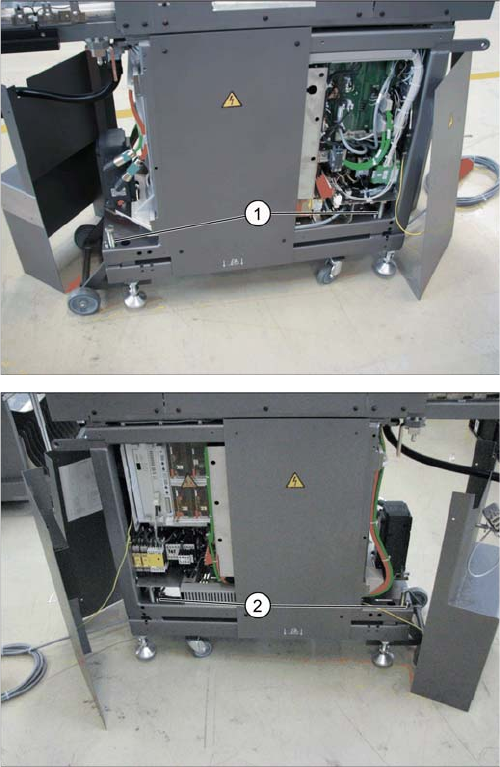
► Remove the cover to get access to the four settings
screws (1) and the four counter screws (2).
▪ Adjust the counter screws with an SW 17.
▪ Adjust the setting screws with an SW 24.